Deep Link
Android Deep Link 配置
- 通过 URI 将用户重定向到应用内特定内容
- Android 6.0+(API 级别 23)支持 Android App Links(带自动校验的 web link),通过
autoVerify属性,系统将自动校验应用是否符合intent-filter中指定的 host 网域 - 玩家可通过手动修改系统设置来选择该链接类型的默认处理应用
步骤 1:配置 SDK
在 AndroidManifest.xml 中添加 intent-filter:
scheme:协议类型(如lipass、http、https)host:网域(如app、www.levelinfinite.com)pathPrefix(可选):页面路径前缀,用于区分多渠道包
自定义协议:
<intent-filter>
    <action android:name="android.intent.action.VIEW" />
    <category android:name="android.intent.category.DEFAULT" />
    <category android:name="android.intent.category.BROWSABLE" />
    <data
    android:scheme="http"
    android:host="sdk-deeplink-confs.intlgame.com"
    android:pathPrefix="/channelA" />
</intent-filter>
HTTP/HTTPS Web Link:
<intent-filter>
    <action android:name="android.intent.action.VIEW" />
    <category android:name="android.intent.category.DEFAULT" />
    <category android:name="android.intent.category.BROWSABLE" />
    <data android:scheme="https"
          android:host="www.levelinfinite.com"
          android:pathPrefix="/app" />
</intent-filter>
Android App Link(Android 6.0+,带自动校验):
<intent-filter android:autoVerify="true">
    <action android:name="android.intent.action.VIEW" />
    <category android:name="android.intent.category.DEFAULT" />
    <category android:name="android.intent.category.BROWSABLE" />
    <data android:scheme="https"
          android:host="www.levelinfinite.com"
          android:pathPrefix="/app" />
</intent-filter>
处理 Intent 数据:
- Unity
- Unreal Engine
在 MainActivity 的 onCreate 和 onNewIntent 中获取 deep link 数据。
@Override
public void onCreate(Bundle savedInstanceState) {
    super.onCreate(savedInstanceState);
    setContentView(R.layout.main);

    Intent intent = getIntent();
    Uri data = intent.getData();

    if (data != null) {
        INTLSDK.Deeplink.receive(data.toString());
    }
}

public void onNewIntent(Intent intent) {
    super.onNewIntent(intent);
    INTLSDK.onNewIntent(intent);

    Uri appLinkData = intent.getData();
    if (appLinkData != null) {
        INTLSDK.Deeplink.receive(appLinkData.toString());
    }
}
在游戏的 XML 文件中对应的 onCreate 和 onNewIntent 里获取 deep link 数据。
{/*GameActivity.java onCreate code */}
<gameActivityOnCreateAdditions>
    <insert>
      setFullScreen();
      RequestDynamicPermissions();
      INTLSDK.initialize(this);

      Intent appLinkIntent = getIntent();
      Uri appLinkData = appLinkIntent.getData();
      if (appLinkData != null) {
          INTLSDK.Deeplink.receive(appLinkData.toString());
      }
    </insert>
</gameActivityOnCreateAdditions>

{/*GameActivity.java OnNewIntent code*/}
<gameActivityOnNewIntentAdditions>
    <insert>
      INTLSDK.onNewIntent(newIntent);
      Uri appLinkData = newIntent.getData();
      if (appLinkData != null) {
          INTLSDK.Deeplink.receive(appLinkData.toString());
      }
    </insert>
</gameActivityOnNewIntentAdditions>
步骤 2:配置网站(仅 App Links)
部署 assetlinks.json 文件至:
https://domain.name/.well-known/assetlinks.json
文件格式:
[{
  "relation": ["delegate_permission/common.handle_all_urls"],
  "target": {
    "namespace": "android_app",
    "package_name": "com.example",
    "sha256_cert_fingerprints": ["您的_SHA256_指纹"]
  }
}]
生成 SHA-256 指纹:
keytool -list -v -keystore my-release-key.keystore
多商店渠道包配置(可选)
- 渠道包:同一应用的不同 APK,包名不同,用于不同分发渠道
- pathPrefix:用于区分渠道,保证点击深度链接时打开正确 APK
配置示例:
[{
  "relation": ["delegate_permission/common.handle_all_urls"],
  "target": {
    "namespace": "android_app",
    "package_name": "com.example.puppies.app",
    "sha256_cert_fingerprints": ["14:6D:E9:83:C5:73:06:50:D8:EE:B9:95:2F:34:FC:64:16:A0:83:42:E6:1D:BE:A8:8A:04:96:B2:3F:CF:44:E5"]
  }
},
{
  "relation": ["delegate_permission/common.handle_all_urls"],
  "target": {
    "namespace": "android_app",
    "package_name": "com.example.monkeys.app",
    "sha256_cert_fingerprints": ["14:6D:E9:83:C5:73:06:50:D8:EE:B9:95:2F:34:FC:64:16:A0:83:42:E6:1D:BE:A8:8A:04:96:B2:3F:CF:44:E5"]
  }
}]
步骤 3:测试
- 在 Android 文本编辑器(如便签)中点击链接
- 检查日志中是否包含:
[ (intl_deeplink_manager.cpp:37) Receive]

- 使用 adb 测试链接跳转:
adb shell am start -W -a android.intent.action.VIEW -d "lipass://app/xxxxxx" com.example.android_app
调用网页 URI 时,Android 系统会依序尝试执行下列操作,直到请求成功为止:
- 如果已指定该链接类型的默认处理应用,则打开此应用
- 打开唯一可以处理该链接类型的应用
- 允许玩家从对话框中选择应用打开
微信限制:微信内置浏览器中的链接不会跳转应用
iOS Universal Link 配置
步骤 1:配置 Web 服务器
在 Web 服务器根目录部署 apple-app-site-association 文件,路径:
https://domain.name/.well-known/apple-app-site-association
{
    "applinks": {
        "apps": [],
        "details": [{
            "appID": "TEAMID.com.your.bundleid",
            "paths": ["/app/*"]
        }]
    }
}
关键要点:
apps必须是空数组appID= Team ID + Bundle IDpaths支持通配符(* 和 ?)- 使用 "NOT " 前缀排除路径(如:
"NOT /videos/wwdc/2010/*") - 路径字符串必须区分大小写
- 系统按指定顺序评估路径,找到匹配项后停止
- 重签名应用:必须将重签名证书的
appID和paths也添加到配置中
路径配置示例:
- 整个网站:
"*" - 特定链接:
"/wwdc/news/" - 网站某部分:
"/videos/wwdc/2015/*" - 组合通配符:
"/foo/*/bar/201?/mypage"
步骤 2:启用 Associated Domains
在 Apple 开发者账号中:
- 启用 Associated Domains 能力
- 重新生成描述文件

在 Xcode 中:
- 添加 Associated Domains 能力
- 添加域名:
applinks:your_link(无需 https://)

或通过代码配置:
- Unity
- Unreal Engine
在 PostProcess 中添加以下代码:
#if UNITY_2019_3_OR_NEWER
    var capManager = new UnityEditor.iOS.Xcode.ProjectCapabilityManager(projPath, entitlementsFilePath, targetGuid: targetProjectName);
#else
    var capManager = new UnityEditor.iOS.Xcode.ProjectCapabilityManager(projPath, entitlementsFilePath, targetProjectName);
#endif

capManager.AddAssociatedDomains(new string[] { "applinks:your_link" });
- 修改 Unreal Engine 路径下的文件:
/Your_UE_Installation_Path/Engine/Source/Programs/UnrealBuildTool/Platform/IOS/IOSExports.cs
添加以下代码:
   // for AssociatedDomains with Apple
   bool bEnableAssociatedDomains = false;
   string domainsListString = null;
   PlatformGameConfig.GetString("/Script/IOSRuntimeSettings.IOSRuntimeSettings", "AssociatedDomains", out domainsListString);
   PlatformGameConfig.GetBool("/Script/IOSRuntimeSettings.IOSRuntimeSettings", "bEnableAssociatedDomains", out bEnableAssociatedDomains);
   if(bEnableAssociatedDomains && domainsListString.Length > 0){
       Text.AppendLine("\t<key>com.apple.developer.associated-domains</key>");
       Text.AppendLine("\t<array>");
       string[] domainList = domainsListString.Split(',');
       for(int i = 0;i<domainList.Count();i++)
       {
           Text.AppendLine(string.Format("<string>{0}</string>", domainList[i]));
       }
       Text.AppendLine("\t</array>");
   }
修改完毕后需要重新运行 UnrealBuildTool.sln 并重新生成解决方案。
- 在
DefaultEngine.ini中找到/Script/IOSRuntimeSettings.IOSRuntimeSettings并添加:
   bEnableAssociatedDomains=True
   AssociatedDomains=applinks:your_link
步骤 3:配置 SDK
- Unity
- Unreal Engine
由于当前 INTLCore 对该入口方法 hook 不生效,所以在 Unity 的 UnityAppController.mm 文件的 UnityAppController 类中添加 iOS 的生命周期入口函数。
目前 XCodePostProcess.cs 代码已经自动在编译后的处理流程中添加了 application:continueUserActivity:restorationHandler 方法(函数中不需要额外添加代码)。
不要在 UnityAppController 的子类中添加生命周期入口函数。确保入口函数是在跟 application:openURL:options: 等系统生命周期函数在同一个类中。
- (BOOL)application:(UIApplication *)application
continueUserActivity:(NSUserActivity *)userActivity
restorationHandler:(void(^)(NSArray<id<UIUserActivityRestoring>> * __nullable restorableObjects))restorationHandler {
    return YES;
}
在 iOS 中创建一个 iOSAppDelegate Category,放入 INTLSDK/Source/INTLCore/Private/iOS。
该方式使用 Category,可能被其他 SDK 覆盖,需确认 URL 是否正常。
新建 IOSAppDelegate+INTL.mm,内容如下:
# define WITH_INTLSDK 1

# if WITH_INTLSDK
# ifdef __APPLE__

# import <Foundation>
# import "IOSAppDelegate.h"//UE4

# include "CoreDelegates.h"//UE4
# include "INTLApplicationDelegate.h"

@interface IOSAppDelegate(INTLSDK)

@end

@implementation IOSAppDelegate(INTLSDK)
- (BOOL)application:(UIApplication *)application continueUserActivity:(NSUserActivity *)userActivity restorationHandler:(void (^)(NSArray * _Nullable))restorationHandler
{
    NSLog(@"IOSAppDelegate(INTLSDK) continueUserActivity ");
    return [[INTLApplicationDelegate sharedInstance] application:application continueUserActivity:userActivity restorationHandler:restorationHandler];
}
@end

# endif
# endif
步骤 4:测试
- 在 iOS 备忘录中点击链接
- 应打开应用并记录日志:
INTLApplicationDelegate:continueUserActivity
若配置正确但链接不生效:尝试重启设备或重新安装应用
安装或更新后首次打开应用时:
- App 向配置的域名发起 GET 请求拉取
apple-app-site-association文件 - App 将文件注册到系统
- WebView 打开 URL 时根据注册的配置检查 URL
- 命中注册的 universal link 则打开应用触发 delegate
- 未命中则 WebView 继续跳转 URL
微信限制:微信内置浏览器中的链接不会跳转应用

AppsFlyer OneLink 配置
跨平台归因链接,支持深度链接和延迟深度链接
功能说明:
- 深度链接(Deep linking):应用已安装,直接打开应用内特定位置
- 延迟深度链接(Deferred deep linking):应用未安装,先跳转应用商店下载,安装后打开时跳转到特定位置
步骤 1:在 AppsFlyer 控制台创建应用
根据 AppsFlyer 文档 添加应用程序 来创建您的应用程序。
步骤 2:配置 OneLink 模板
- 在 AppsFlyer OneLink 管理创建模板,记录模板 ID 和子域名


- Android:在 "Use App Links" 添加 SHA-256 指纹, 并保存生成的
intent-filter代码

步骤 3:配置 SDK
Android:
- 在
INTLConfig.ini中添加:
APPSFLYER_APP_INVITE_ONELINK_ID_ANDROID = {模板_ID}
- 在
[Android LifeCycle]中添加 AppsFlyer(如缺失):
LIFECYCLE = WeChat,QQ,Twitter,Adjust,Facebook,Google,Line,VK,Garena,Discord,Dmm,Update,Firebase,WhatsApp,Permission,GooglePGS,AppsFlyer
- 在
AndroidManifest.xml的游戏 MainActivity 中添加 intent-filter 用于打开游戏,并替换{Subdomain}和{OneLink_Template_ID}。
    <activity
            android:name="com.intlgame.unity.MainActivity"
            android:configChanges="fontScale|keyboard|keyboardHidden|locale|mcc|mnc|navigation|orientation|screenLayout|screenSize|smallestScreenSize|touchscreen|uiMode"
            android:exported="true"
            android:label="@string/app_name"
            android:launchMode="singleTask">
            <intent-filter android:autoVerify="true">
                <action android:name="android.intent.action.VIEW" />
                <category android:name="android.intent.category.DEFAULT" />
                <category android:name="android.intent.category.BROWSABLE" />
                <data
                    android:host="{Subdomain}.onelink.me"
                    android:pathPrefix="/{OneLink_Template_ID}"
                    android:scheme="https" />
            </intent-filter>
    </activity>
iOS:
- 在
INTLConfig.ini中添加:
APPSFLYER_APP_INVITE_ONELINK_ID_IOS = {模板_ID}
- 添加子域名到 Associated Domains:
- Unity:修改
XCodePostProcess.cs,添加
capManager.AddAssociatedDomains(new string[] { "appslinks:subdomain.onelink.me"});- UE:在
DefaultEngine.ini的AssociatedDomains中添加子域名:
AssociatedDomains=appslinks:subdomain.onelink.me - Unity:修改
步骤 4:调用 OneLink 接口
设置 OneLink 回调:
- Unity
- Unreal Engine
INTLAPI.AddExtendResultObserver(OnExtendEvent); // 设置回调

public void OnExtendEvent(INTLExtendResult extendResult)
{
    if ("OnOneLinkResult".Equals(extendResult.ExtendMethodName)) // OneLink 点击回调
    {
        if (extendResult.RetCode == 0) // OneLink 点击回调成功
        {
            string jsonParameter = extendResult.ExtraJson; // 点击 OneLink 后 AF 返回的参数
            // TODO: Handle OneLink Parameter
        }
        else // OneLink 点击回调失败
        {
            // TODO: handle OneLink Failed result
        }
    }
}
- 回调类继承
IINTLPluginObserver类 - 回调类根据需要实现
IINTLPluginObserver类的方法
FINTLExtendEvent extendEvent;
extendEvent.AddUObject(this, &UFriendWindow::OnExtendResult_Implementation);

void UFriendWindow::OnExtendResult_Implementation(FINTLExtendResult ret) {
    if (ret.ExtendMethodName.Equals(TEXT("OnOneLinkResult"))) // OneLink 点击回调
    {
        if (ret.RetCode == 0) // OneLink 点击回调成功
        {
            FString jsonParameter = ret.ExtraJson; // 点击 OneLink 后 AF 返回的参数
            // TODO: Handle OneLink Parameter
        }
        else // OneLink 点击回调失败
        {
            // TODO: handle OneLink Failed result
        }
    }
}
设置被分享链接的用户点击生成的 OneLink 后的结果回调:
- Unity
- Unreal Engine
生成 OneLink 和点击 OneLink 共用一个回调,通过回调中的 INTLExtendResult 的参数区分。
    INTLAPI.AddExtendResultObserver(OnExtendEvent);//设置回调
    public void OnExtendEvent(INTLExtendResult extendResult)
    {
        if ("OnOneLinkResult".Equals(extendResult.ExtendMethodName))//OneLink 点击回调
        {
            if (extendResult.RetCode == 0)//OneLink 点击回调成功
            {
                string jsonParameter = extendResult.ExtraJson;//点击 OneLink 后 AF 返回的参数
                //TODO:Handle OneLink Parameter
            }
            else//OneLink 点击回调失败
            {
                //TODO: handle OneLink Failed result
            }
        }
    }
FINTLExtendEvent extendEvent;
extendEvent.AddUObject(this, &UFriendWindow::OnExtendResult_Implementation);

void UFriendWindow::OnExtendResult_Implementation(FINTLExtendResult ret) {
  if (ret.ExtendMethodName.Equals(TEXT("OnOneLinkResult")))//OneLink点击回调
  {
    if (ret.RetCode == 0)// OneLink 点击回调成功
    {
      FString jsonParameter = ret.ExtraJson;// 点击 OneLink 后AF返回的参数
      //TODO:Handle OneLink Parameter
    }
    else// OneLink 点击回调失败
    {
      //TODO: handle OneLink Failed result
    }
  }

}
参考示例代码生成 OneLink,并按实际情况修改参数。:
- Unity
- Unreal Engine
StringBuilder sb = new StringBuilder();
        sb.Append("{");
        sb.Append("\"deep_link_value\":\"abc\"").Append(","); //<TARGET_VIEW>

        sb.Append("\"deep_link_sub1\":\"1234\"").Append(",");//<PROMO_CODE>
        sb.Append("\"deep_link_sub2\":\"1234\"").Append(",");//<REFERRER_ID(openid)>
        sb.Append("\"channel\":\"mobile_share\"").Append(",");//Channel
        sb.Append("\"campaign\":\"summer_sale\"");//Campaign
        //其他参数,可选
        sb.Append("\"deep_link_sub3\":\"1234\"").Append(",");
        sb.Append("\"deep_link_sub4\":\"1234\"").Append(",");
        sb.Append("\"deep_link_sub5\":\"1234\"").Append(",");
        sb.Append("\"deep_link_sub6\":\"1234\"").Append(",");
        sb.Append("\"deep_link_sub7\":\"1234\"").Append(",");
        sb.Append("\"deep_link_sub8\":\"1234\"").Append(",");

        sb.Append("\"af_sub4\":\"12324\"").Append(",");
        sb.Append("\"af_sub5\":\"dfasdf\"").Append(",");

        sb.Append("}");
        String paramsJsonString = sb.ToString();
        INTLExtend.Invoke("AppsFlyer", "generateInviteLinkUrl", paramsJsonString);
        FString ParamsJsonString = TEXT("");
        const TSharedRef<TJsonWriter<>> JsonWriter = TJsonWriterFactory<>::Create(&ParamsJsonString);
        JsonWriter->WriteObjectStart();
        JsonWriter->WriteValue(TEXT("deep_link_value"),TEXT("abc"));

        JsonWriter->WriteValue(TEXT("deep_link_sub1"),TEXT("1234"));
        JsonWriter->WriteValue(TEXT("deep_link_sub2"),TEXT("1234"));

        JsonWriter->WriteValue(TEXT(""),TEXT("1234"));
        JsonWriter->WriteValue(TEXT(""),TEXT("1234"));

        JsonWriter->WriteValue(TEXT("deep_link_sub3"),TEXT("1234"));
        JsonWriter->WriteValue(TEXT("deep_link_sub4"),TEXT("1234"));
        JsonWriter->WriteValue(TEXT("deep_link_sub5"),TEXT("1234"));
        JsonWriter->WriteValue(TEXT("deep_link_sub6"),TEXT("1234"));
        JsonWriter->WriteValue(TEXT("deep_link_sub7"),TEXT("1234"));
        JsonWriter->WriteValue(TEXT("deep_link_sub8"),TEXT("1234"));

        JsonWriter->WriteValue(TEXT("af_sub4"),TEXT("1234"));
        JsonWriter->WriteValue(TEXT("af_sub5"),TEXT("dfasdf"));

        JsonWriter->WriteObjectEnd();
        JsonWriter->Close();

        UINTLSDKAPI::ExtendInvoke(EINTLLoginChannel::kChannelAppsFlyer,TEXT("generateInviteLinkUrl"),
步骤 5:测试集成
- 进入 AppsFlyer 控制台。
- 在左侧边栏中,单击 SDK Integration Tests。
- 选择要测试的应用程序,点击 Run test。

- 在 Run non-organic install test 页面,选择测试设备并选择 Other。
- 扫描二维码并安装应用。
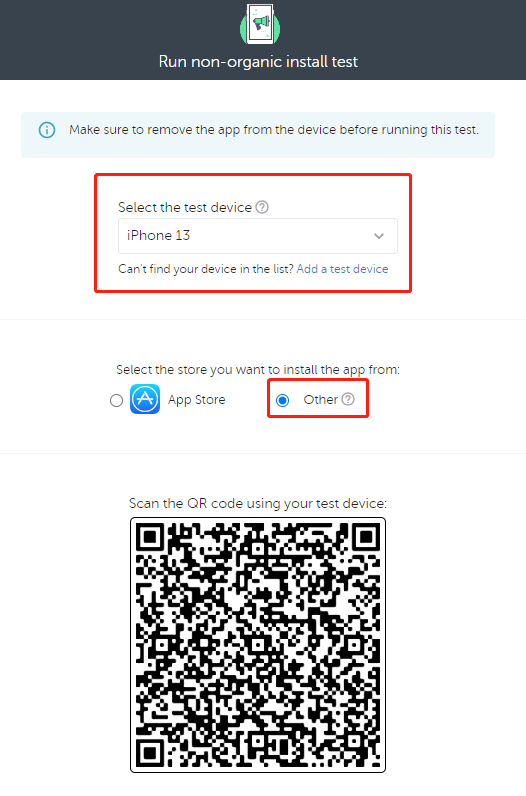
若要再次测试激活,请删除该应用程序并重新启动测试。
客户端接口
Deep Link Observer
- Unity
- Unreal Engine
| API | 函数定义 |
|---|---|
| SetDeepLinkObserver | 设置 deep link 回调,通知游戏引擎层是否有数据到达,收到回调后,需要手动调 Fetch 函数获取数据。 |
| RemoveDeepLinkObserver | 移除 deep link 的回调 |
| API | 函数定义 |
|---|---|
| SetDeepLinkObserver | 设置 INTL deep link 模块 BaseResult 的回调,通知游戏引擎层是否有数据到达,收到回调后,需要手动调 Fetch 函数获取数据。 |
| GetDeepLinkObserver | 获取 BaseResult 的回调。 |
| OnDeepLinkResult_Implementation | 实现 INTL deep link BaseResult 的回调 |
Fetch
Fetch 接口获取 SDK 缓存的 deep link 数据。更多信息,请参见:

