移动端打包指引
移动端接入较多 第三方渠道,各个渠道在 Android、iOS 平台上的配置不一样,在 Unity 和 Unreal 的打包中需要特别注意。不过不用担心,本文将会带你一步步完成打包过程。
前置条件
请确保 PlayerNetwork SDK 接入 正常
- Unity
- Unreal Engine
详情请参考 Player Network SDK 接入
详情请参考 Player Network SDK 接入
Android
- Unity
- Unreal Engine
1. Firebase 配置
Firebase 配置文件的路径是:
Android:Assets/Plugins/Android/google-services.json
确保对应平台的 Firebase 配置文件未被删除,并且所有配置项都正确。
2. 指定版本 Android 适配文档
更多的指定版本 Android 适配文档,请参考以下
iOS
- Unity
- Unreal Engine
1. 合并隐私清单
版本要求:Player Network SDK V1.22 及更高版本
从 2024 年春季开始,对于需更新或上传至 Apple App Store Connect 的应用,开发者需明确 注明使用原因,以展示该应用如何使用 required reason API(需提交使用原因的 API)。更多信息,请参见 即将发布的第三方 SDK 要求。
对于受影响的 Player Network SDK 插件,需要手动合并的包括 INTLFoundation、INTLCore、INTLGarena,其中 INTLGarena 只在项目确认接入 Garena 时需配置。
另外,INTLLine 已在 Player Network SDK 自动整合而无需额外操作。
由于其他第三方 SDK 的隐私清单尚未公布,目前 Player Network SDK 隐私清单中不包含对应的内容。要查看尚未发布插件的列表,请参见 iOS 17 隐私清单。
步骤
-
在 Player Network SDK 产物目录内找到所需插件的隐私清单
PrivacyInfo.xcprivacy。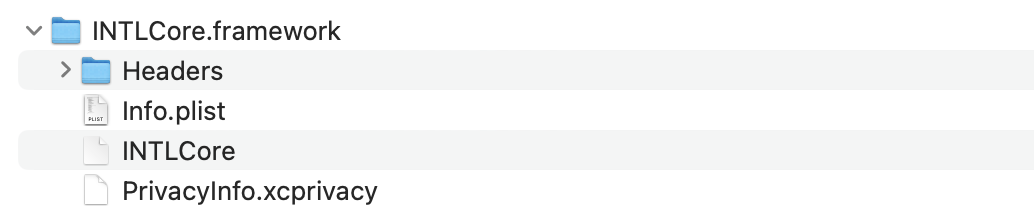
- Unity
- Unreal Engine
插件 路径 INTLFoundation /Plugins/iOS/INTLSDK/INTLFoundation/INTLFoundation.framework/PrivacyInfo.xcprivacy INTLCore /Plugins/iOS/INTLSDK/INTLCore/INTLCore.framework/PrivacyInfo.xcprivacy INTLGarena /Plugins/iOS/INTLSDK/INTLGarena/INTLGarena.framework/PrivacyInfo.xcprivacy 插件 路径 INTLFoundation /INTLSDK/Source/INTLFoundation/Libs/iOS/INTLFoundation/INTLFoundation.embeddedframework/INTLFoundation.framework/PrivacyInfo.xcprivacy INTLCore /INTLSDK/Source/INTLCore/Libs/iOS/INTLCore/INTLCore.embeddedframework/INTLCore.framework/PrivacyInfo.xcprivacy INTLGarena /INTLSDK/Source/INTLGarena/Libs/iOS/INTLGarena/INTLGarena.embeddedframework/INTLGarena.framework/PrivacyInfo.xcprivacy -
将 Player Network SDK 内的
PrivacyInfo.xcprivacy中的4个节点,用于与游戏项目内PrivacyInfo.xcprivacy中对应的内容进行比较,并根据以下条件合并。

-
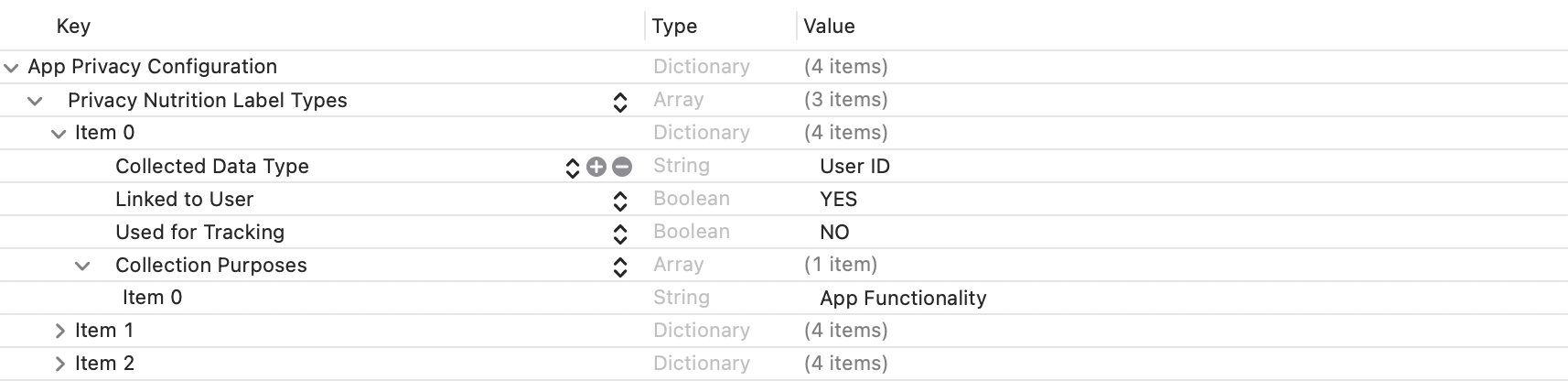
Privacy Nutrition Label Types (NSPrivacyCollectedDataTypes)为使用数据的类型描述节点:
比较各个item的Collected Data Type (NSPrivacyCollectedDataType),有不同值则添加至游戏项目文件。
若存在相同值则比较Collection Purposes (NSPrivacyCollectedDataTypePurposes),有不同值则添加至游戏项目文件。
-
Privacy Tracking Domains (NSPrivacyTrackingDomains)为域名追踪列表节点:
比较对应节点,有不同值则添加至游戏项目文件。 -
Privacy Tracking Enabled (NSPrivacyTracking)描述是否开启 App Tracking Transparency 功能:
比较对应节点,Player Network SDK 隐私清单的值为YES时修改游戏项目文件。 -
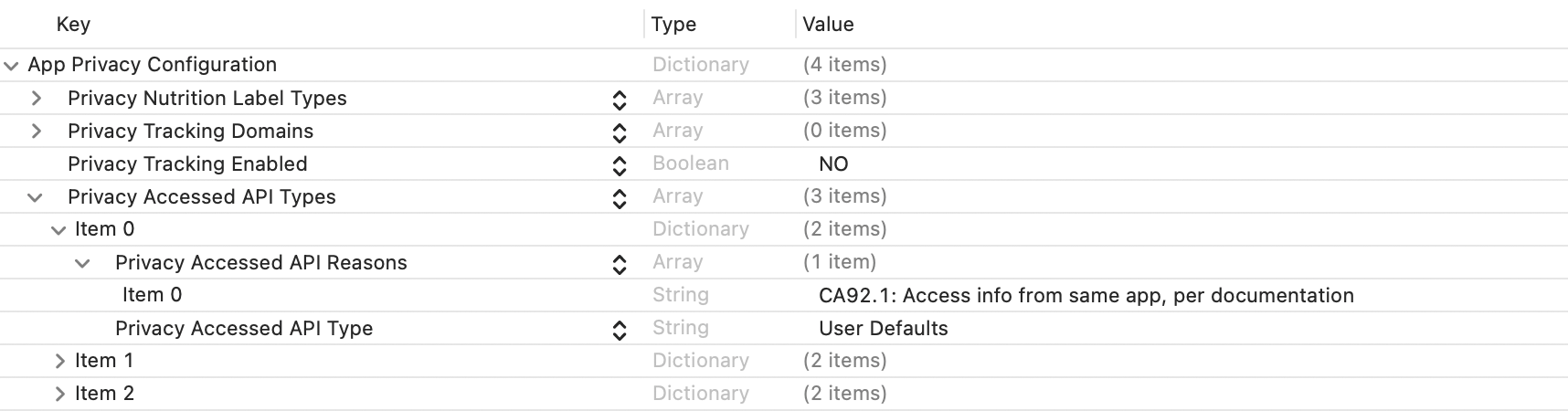
Privacy Accessed API Types (NSPrivacyAccessedAPITypes)为使用接口的类型描述节点:
比较各个item的Privacy Accessed API Type (NSPrivacyAccessedAPIType),有不同值则添加至游戏项目文件。
若存在相同值则比较Privacy Accessed API Reasons (NSPrivacyAccessedAPITypeReasons),有不同值则添加至游戏项目文件。
-
-
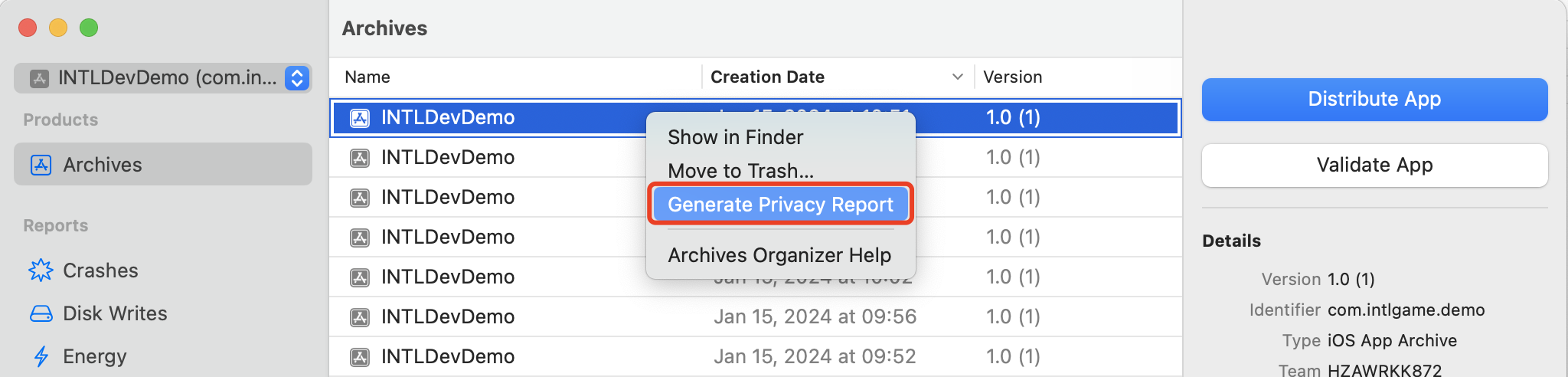
通过 Xcode 15 生成隐私报告来验证是否符合预期。
2. INTLConfig.ini 配置
手动修改 INTLConfig.ini 配置时,请联系 Player Network 助手确认内容变更是否符合预期,详见 SDK Config 须知。
请按照 INTLConfig.ini 的说明进行相应配置。
3. Firebase 配置
Firebase 配置文件的路径是:
iOS:Assets/Plugins/iOS/INTLSDK/INTLFirebase/ThirdSDK/GoogleService-Info.plist
确保对应平台的 Firebase 配置文件未被删除,并且所有配置项都正确。
4. 指定版本 iOS 适配文档
更多的指定版本 iOS 适配文档,请参考以下
1. Swift SDK 兼容设置
Unreal Engine 5.2 及以上版本已内置 Swift 模块,下列步骤仅适用于 Unreal Engine 5.2 以下版本。
iOS Swift 模块不能直接添加到 Unreal Engine 中,必须先修改引擎配置。
-
修改本地 Unreal Engine 源代码。
在 /Your_UE_Installation_Path/Engine/Source/Programs/UnrealBuildTool/ProjectFiles/Xcode/XcodeProject.cs 的
private void AppendProjectBuildConfiguration(StringBuilder Content, string ConfigName, string ConfigGuid)函数中添加以下代码。// Enable Swift
Content.Append("\t\t\t\tCLANG_ENABLE_MODULES = YES;" + ProjectFileGenerator.NewLine);
Content.Append("\t\t\t\tSWIFT_VERSION = 5.0;" + ProjectFileGenerator.NewLine);
Content.Append("\t\t\t\tLIBRARY_SEARCH_PATHS = \"$(TOOLCHAIN_DIR)/usr/lib/swift/$(PLATFORM_NAME)\";" + ProjectFileGenerator.NewLine);
if (ConfigName == "Debug")
{
Content.Append("\t\t\t\tSWIFT_OPTIMIZATION_LEVEL = \"-Onone\";" + ProjectFileGenerator.NewLine);
}
Content.Append("\t\t\t\tALWAYS_EMBED_SWIFT_STANDARD_LIBRARIES = YES;" + ProjectFileGenerator.NewLine);
Content.Append("\t\t\t\tEMBEDDED_CONTENT_CONTAINS_SWIFT = YES;" + ProjectFileGenerator.NewLine);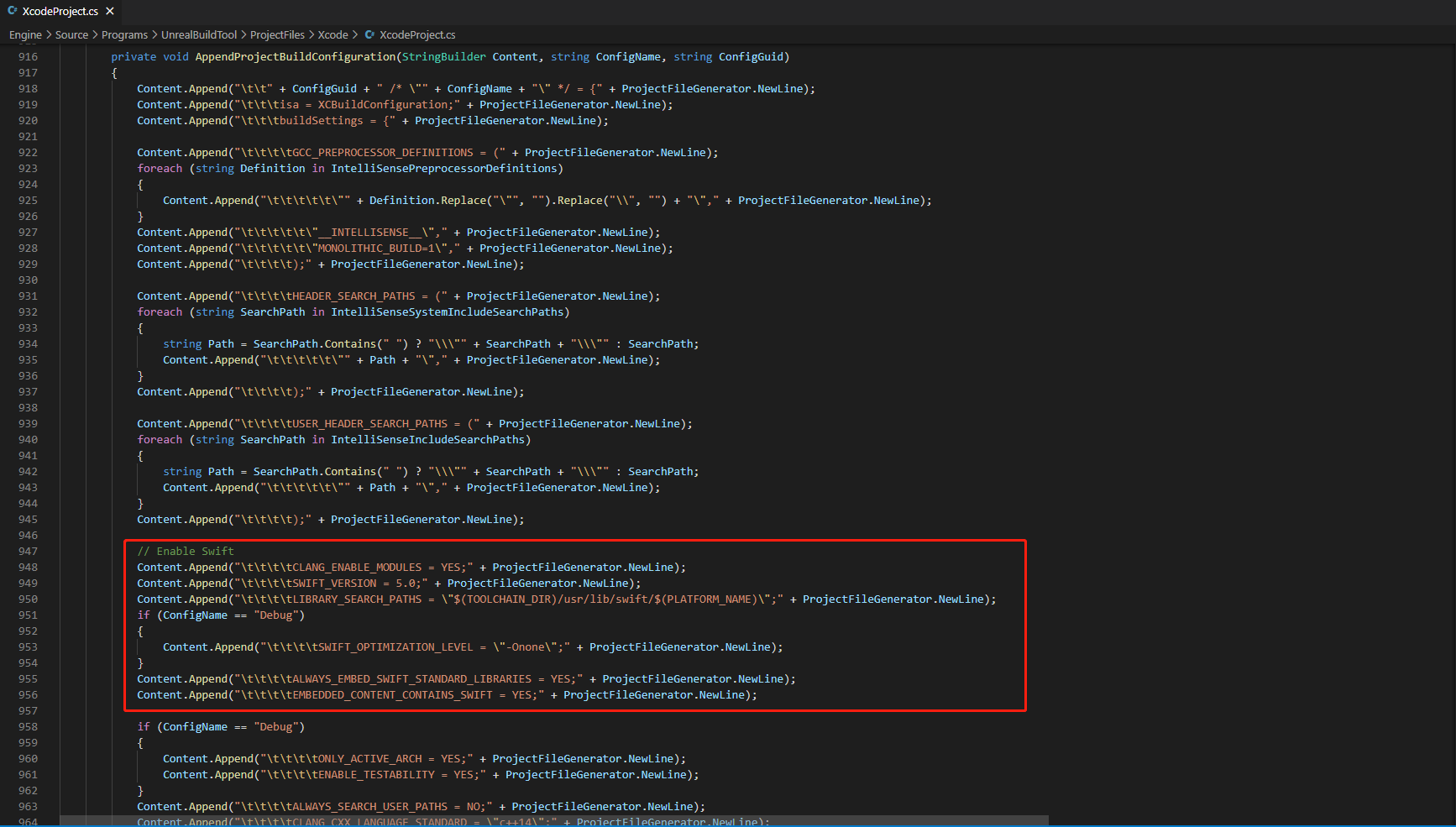
-
在 /Your_UE_Installation_Path/Engine/Source/Programs/UnrealBuildTool/Platform/IOS/IOSToolChain.cs 的
string GetLinkArguments_Global(LinkEnvironment LinkEnvironment)函数中添加以下代码。- Before XCode 12
- XCode 12 and later
// enable swift support
Result += " -rpath \"/usr/lib/swift\"";
Result += " -rpath \"@executable_path/Frameworks\"";
// /Applications/Xcode.app/Contents/Developer/Platforms/iPhoneOS.platform/Developer/SDKs/iPhoneOS.sdk/usr/lib/swift/
String swiftLibPath = String.Format(" -L {0}Platforms/{1}.platform/Developer/SDKs/{1}{2}.sdk/usr/lib/swift",
    Settings.Value.XcodeDeveloperDir,
    bIsDevice? Settings.Value.DevicePlatformName : Settings.Value.SimulatorPlatformName,
    Settings.Value.IOSSDKVersion);
Result += swiftLibPath;
Log.TraceInformation("Add swift lib path : {0}", swiftLibPath);
///Applications/Xcode.app/Contents/Developer/Toolchains/XcodeDefault.xctoolchain/usr/lib/swift/iphoneos
swiftLibPath = String.Format(" -L {0}Toolchains/XcodeDefault.xctoolchain/usr/lib/swift/{1}",
    Settings.Value.XcodeDeveloperDir,
    bIsDevice? Settings.Value.DevicePlatformName.ToLower() : Settings.Value.SimulatorPlatformName.ToLower());
Result += swiftLibPath;
Log.TraceInformation("Add swift lib path : {0}", swiftLibPath);
///Applications/Xcode.app/Contents/Developer/Toolchains/XcodeDefault.xctoolchain/usr/lib/swift-5.0/iphoneos
swiftLibPath = String.Format(" -L {0}Toolchains/XcodeDefault.xctoolchain/usr/lib/swift-5.0/{1}",
    Settings.Value.XcodeDeveloperDir,
    bIsDevice? Settings.Value.DevicePlatformName.ToLower() : Settings.Value.SimulatorPlatformName.ToLower());
Result += swiftLibPath;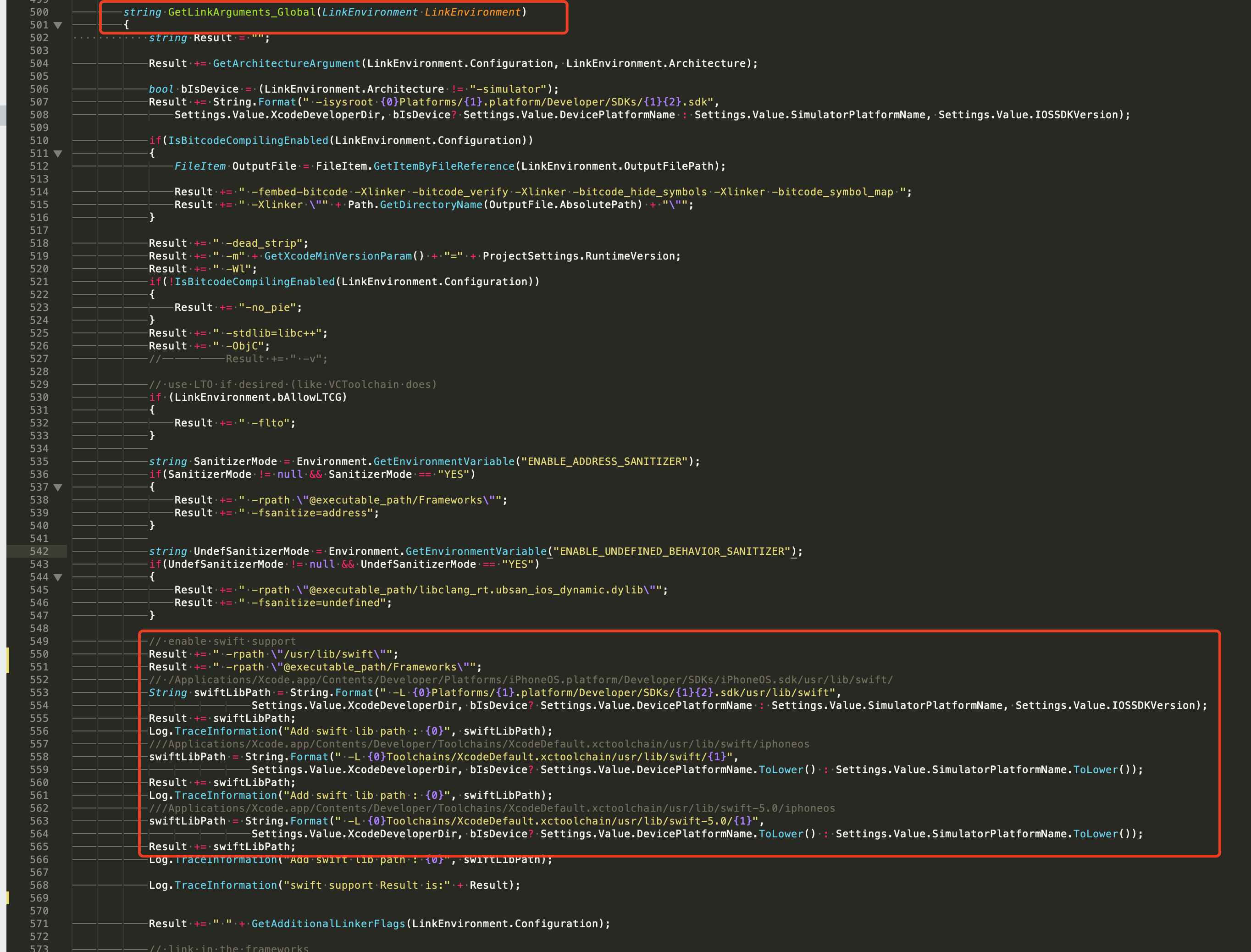
// This line of code must be prepended (see the sample image below for the position of the prepended code)
// enable swift support, make sure '/usr/lib/swift' goes before '@executable_path/Frameworks'
Result += " -rpath \"/usr/lib/swift\"";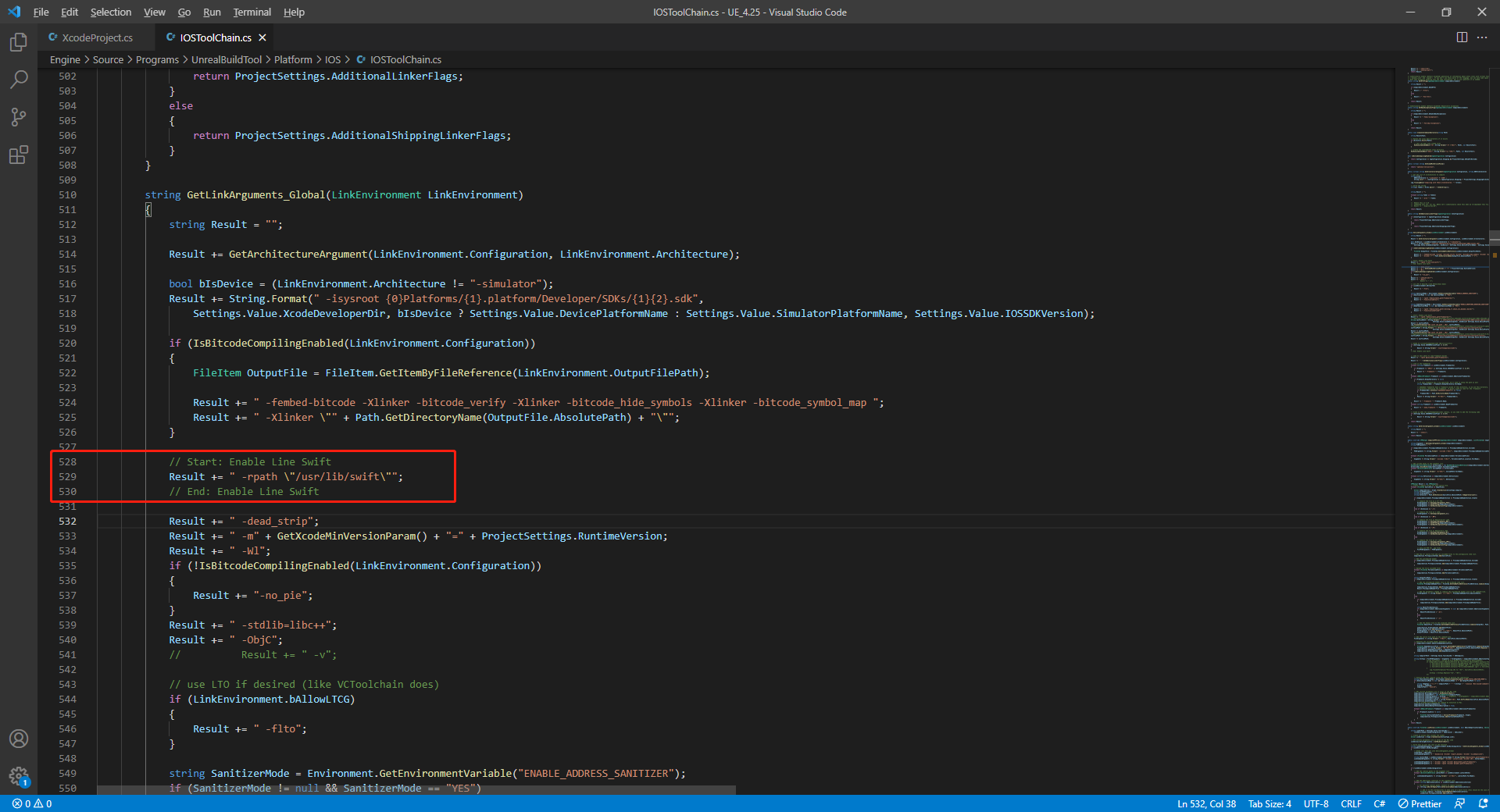
// enable swift support
Result += " -rpath \"@executable_path/Frameworks\"";
// /Applications/Xcode.app/Contents/Developer/Platforms/iPhoneOS.platform/Developer/SDKs/iPhoneOS.sdk/usr/lib/swift/
String swiftLibPath = String.Format(" -L {0}Platforms/{1}.platform/Developer/SDKs/{1}{2}.sdk/usr/lib/swift",
    Settings.Value.XcodeDeveloperDir,
    bIsDevice? Settings.Value.DevicePlatformName : Settings.Value.SimulatorPlatformName, Settings.Value.IOSSDKVersion);
Result += swiftLibPath;
Log.TraceInformation("Add swift lib path : {0}", swiftLibPath);
///Applications/Xcode.app/Contents/Developer/Toolchains/XcodeDefault.xctoolchain/usr/lib/swift/iphoneos
swiftLibPath = String.Format(" -L {0}Toolchains/XcodeDefault.xctoolchain/usr/lib/swift/{1}",
    Settings.Value.XcodeDeveloperDir,
    bIsDevice? Settings.Value.DevicePlatformName.ToLower() : Settings.Value.SimulatorPlatformName.ToLower());
Result += swiftLibPath;
Log.TraceInformation("Add swift lib path : {0}", swiftLibPath);
///Applications/Xcode.app/Contents/Developer/Toolchains/XcodeDefault.xctoolchain/usr/lib/swift-5.0/iphoneos
swiftLibPath = String.Format(" -L {0}Toolchains/XcodeDefault.xctoolchain/usr/lib/swift-5.0/{1}",
    Settings.Value.XcodeDeveloperDir,
    bIsDevice? Settings.Value.DevicePlatformName.ToLower() : Settings.Value.SimulatorPlatformName.ToLower());
Result += swiftLibPath;

// Xcode 12 adds the swiftCompatibility51 library, so you need to add the following code
if (Settings.Value.IOSSDKVersionFloat >= 14.0f)
{
        Result += String.Format(" -lswiftCompatibility51");
}
-
打开解决方案并重新编译
/Users/intl/UE4/UE_4.25/Engine/Source/Programs/UnrealBuildTool/UnrealBuildTool.sln。
2. 合并隐私清单
版本要求:Player Network SDK V1.22 及更高版本
从 2024 年春季开始,对于需更新或上传至 Apple App Store Connect 的应用,开发者需明确 注明使用原因,以展示该应用如何使用 required reason API(需提交使用原因的 API)。更多信息,请参见 即将发布的第三方 SDK 要求。
对于受影响的 Player Network SDK 插件,需要手动合并的包括 INTLFoundation、INTLCore、INTLGarena,其中 INTLGarena 只在项目确认接入 Garena 时需配置。
另外,INTLLine 已在 Player Network SDK 自动整合而无需额外操作。
由于其他第三方 SDK 的隐私清单尚未公布,目前 Player Network SDK 隐私清单中不包含对应的内容。要查看尚未发布插件的列表,请参见 iOS 17 隐私清单。
步骤
-
在 Player Network SDK 产物目录内找到所需插件的隐私清单
PrivacyInfo.xcprivacy。- Unity
- Unreal Engine
插件 路径 INTLFoundation /Plugins/iOS/INTLSDK/INTLFoundation/INTLFoundation.framework/PrivacyInfo.xcprivacy INTLCore /Plugins/iOS/INTLSDK/INTLCore/INTLCore.framework/PrivacyInfo.xcprivacy INTLGarena /Plugins/iOS/INTLSDK/INTLGarena/INTLGarena.framework/PrivacyInfo.xcprivacy 插件 路径 INTLFoundation /INTLSDK/Source/INTLFoundation/Libs/iOS/INTLFoundation/INTLFoundation.embeddedframework/INTLFoundation.framework/PrivacyInfo.xcprivacy INTLCore /INTLSDK/Source/INTLCore/Libs/iOS/INTLCore/INTLCore.embeddedframework/INTLCore.framework/PrivacyInfo.xcprivacy INTLGarena /INTLSDK/Source/INTLGarena/Libs/iOS/INTLGarena/INTLGarena.embeddedframework/INTLGarena.framework/PrivacyInfo.xcprivacy -
将 Player Network SDK 内的
PrivacyInfo.xcprivacy中的4个节点,用于与游戏项目内PrivacyInfo.xcprivacy中对应的内容进行比较,并根据以下条件合并。
-
Privacy Nutrition Label Types (NSPrivacyCollectedDataTypes)为使用数据的类型描述节点:
比较各个item的Collected Data Type (NSPrivacyCollectedDataType),有不同值则添加至游戏项目文件。
若存在相同值则比较Collection Purposes (NSPrivacyCollectedDataTypePurposes),有不同值则添加至游戏项目文件。
-
Privacy Tracking Domains (NSPrivacyTrackingDomains)为域名追踪列表节点:
比较对应节点,有不同值则添加至游戏项目文件。 -
Privacy Tracking Enabled (NSPrivacyTracking)描述是否开启 App Tracking Transparency 功能:
比较对应节点,Player Network SDK 隐私清单的值为YES时修改游戏项目文件。 -
Privacy Accessed API Types (NSPrivacyAccessedAPITypes)为使用接口的类型描述节点:
比较各个item的Privacy Accessed API Type (NSPrivacyAccessedAPIType),有不同值则添加至游戏项目文件。
若存在相同值则比较Privacy Accessed API Reasons (NSPrivacyAccessedAPITypeReasons),有不同值则添加至游戏项目文件。
-
-
通过 Xcode 15 生成隐私报告来验证是否符合预期。
3. INTLConfig.ini 配置
手动修改 INTLConfig.ini 配置时,请联系 Player Network 助手确认内容变更是否符合预期,详见 SDK Config 须知。
请按照 INTLConfig.ini 的说明进行相应配置。
4. Firebase 配置
Firebase 配置文件的路径是:
iOS:Assets/Plugins/iOS/INTLSDK/INTLFirebase/ThirdSDK/GoogleService-Info.plist
确保对应平台的 Firebase 配置文件未被删除,并且所有配置项都正确。
5. 指定版本 iOS 适配文档
更多的指定版本 iOS 适配文档,请参考以下

