Mobile Packaging Guide
Mobile integration covers many third-party channels, and platform configurations vary between Android and iOS. Pay special attention during packaging in Unity and Unreal.However, don't worry. This article will guide you step-by-step through the packaging process.
Prerequisites
Please ensure PlayerNetwork SDK is integrated and functioning normally.
- Unity
- Unreal Engine
For details, please refer to Player Network SDK Integration
For details, please refer to Player Network SDK Integration
Android
- Unity
- Unreal Engine
1. Firebase Configuration
The path for the Firebase configuration file is:
Android: Assets/Plugins/Android/google-services.json
Ensure that the Firebase configuration file for the corresponding platform has not been deleted and that all configuration items are correct.
2. Version-specific Android adaptation documentation
For more version-specific Android adaptation documentation, please refer to:
1. Firebase Configuration
The path for the Firebase configuration file is:
Android: Assets/Plugins/Android/google-services.json
Ensure that the Firebase configuration file for the corresponding platform has not been deleted and that all configuration items are correct.
2. Version-specific Android adaptation documentation
For more version-specific Android adaptation documentation, please refer to:
iOS
- Unity
- Unreal Engine
1. Merge Privacy Manifest
Version requirements: Player Network SDK V1.22 and above
Starting in spring 2024, for apps that need to be updated or uploaded to Apple App Store Connect, developers must clearly declare the reasons for use to show how the app uses required reason API (APIs that require a reason for use to be submitted). For more information, see Upcoming third-party SDK requirements.
For affected Player Network SDK plug-ins, manual merging is required for INTLFoundation, INTLCore, and INTLGarena. INTLGarena only needs to be configured if Garena integration is confirmed for the project.
Additionally, INTLLine is automatically integrated by Player Network SDK without extra action.
Since privacy manifests from other third-party SDKs have not been released yet, the Player Network SDK privacy manifest does not currently include the corresponding content.To view the list of plugins yet to be released, see iOS 17 Privacy Manifest.
Steps
- Find the privacy manifest
PrivacyInfo.xcprivacyfor the required plugin in the Player Network SDK output directory.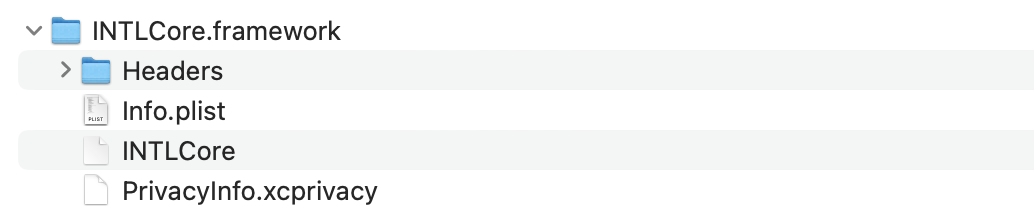
- Unity
- Unreal Engine
| Plugin | Path |
|---|---|
| INTLFoundation | /Plugins/iOS/INTLSDK/INTLFoundation/INTLFoundation.framework/PrivacyInfo.xcprivacy |
| INTLCore | /Plugins/iOS/INTLSDK/INTLCore/INTLCore.framework/PrivacyInfo.xcprivacy |
| INTLGarena | /Plugins/iOS/INTLSDK/INTLGarena/INTLGarena.framework/PrivacyInfo.xcprivacy |
| Plugin | Path |
|---|---|
| INTLFoundation | /INTLSDK/Source/INTLFoundation/Libs/iOS/INTLFoundation/INTLFoundation.embeddedframework/INTLFoundation.framework/PrivacyInfo.xcprivacy |
| INTLCore | /INTLSDK/Source/INTLCore/Libs/iOS/INTLCore/INTLCore.embeddedframework/INTLCore.framework/PrivacyInfo.xcprivacy |
| INTLGarena | /INTLSDK/Source/INTLGarena/Libs/iOS/INTLGarena/INTLGarena.embeddedframework/INTLGarena.framework/PrivacyInfo.xcprivacy |
-
Compare the four nodes in the
PrivacyInfo.xcprivacyfrom Player Network SDK with the corresponding contents in the project'sPrivacyInfo.xcprivacy, and merge based on the following conditions.

-
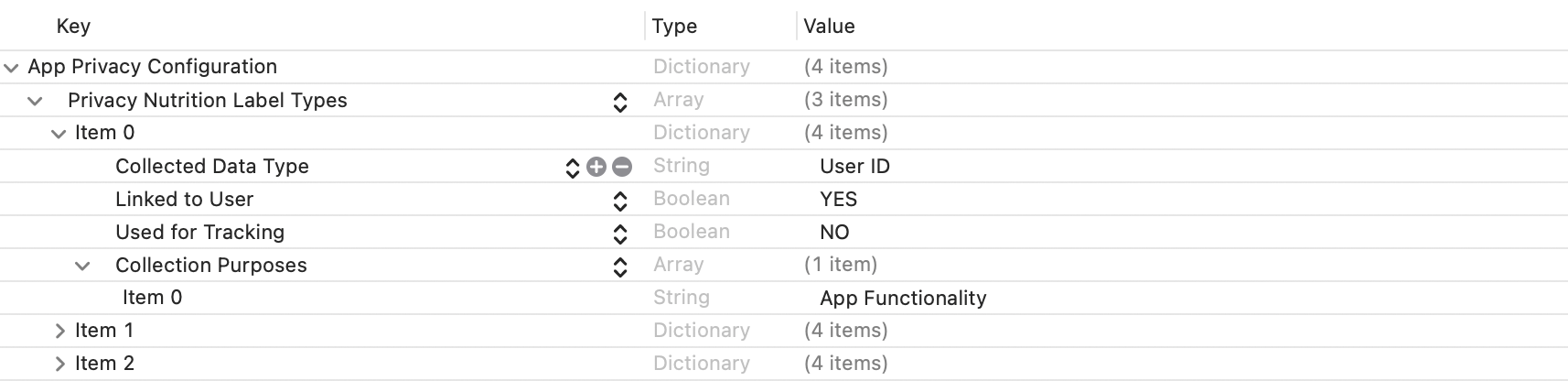
Privacy Nutrition Label Types (NSPrivacyCollectedDataTypes)is the node describing types of data usage:
Compare theitemvalues forCollected Data Type (NSPrivacyCollectedDataType)in each; if there are differences, add them to the project file.
If any values are the same, compareCollection Purposes (NSPrivacyCollectedDataTypePurposes); if there are differences, add them to the project file.
-
Privacy Tracking Domains (NSPrivacyTrackingDomains)is the node for the domain tracking list:
Compare the corresponding nodes; if there are differences, add them to the project file. -
Privacy Tracking Enabled (NSPrivacyTracking)describes whether the App Tracking Transparency feature is enabled:
Compare the corresponding nodes. If the value in the Player Network SDK privacy manifest isYES, modify the project file. -
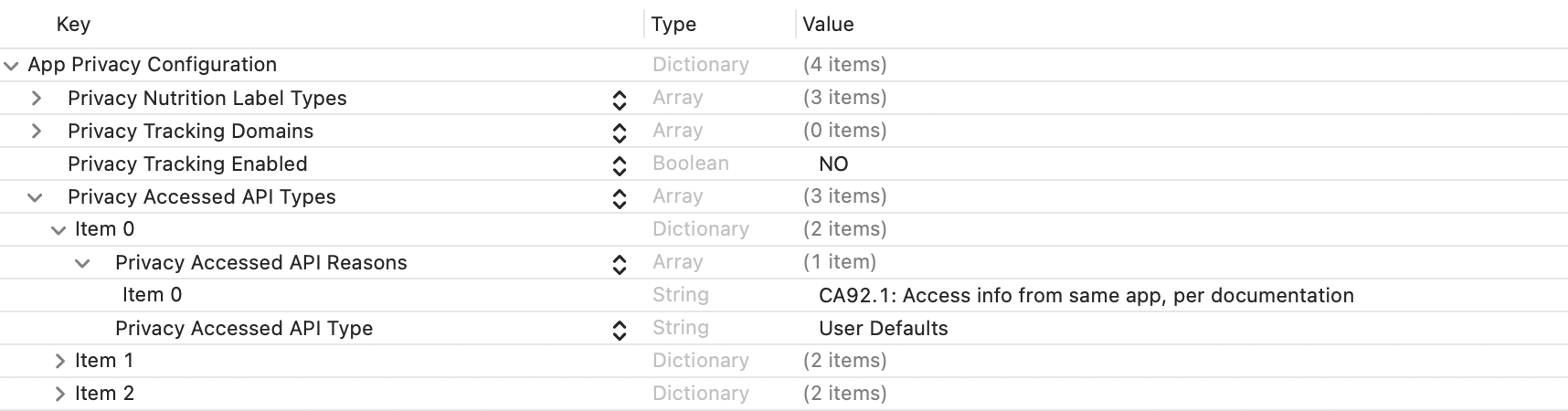
Privacy Accessed API Types (NSPrivacyAccessedAPITypes)is the node describing the types of APIs used:
Compare theitemvalues forPrivacy Accessed API Type (NSPrivacyAccessedAPIType)in each. If there are differences, add them to the project file.
If any values are the same, comparePrivacy Accessed API Reasons (NSPrivacyAccessedAPITypeReasons); if there are differences, add them to the project file.
-
-
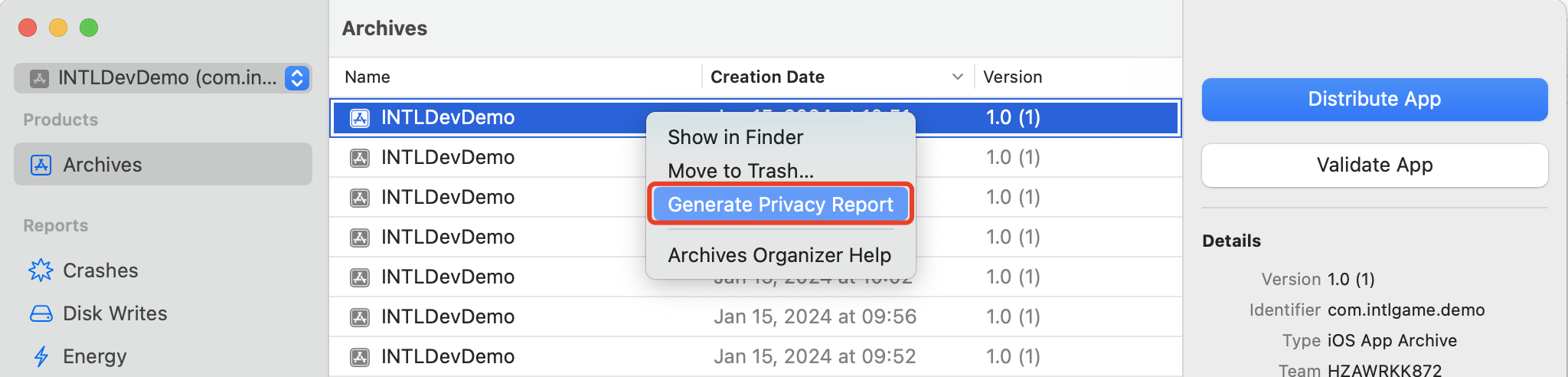
Generate a privacy report via Xcode 15 to verify it meets expectations.
2) INTLConfig.ini Configuration
When manually modifying the INTLConfig.ini configuration, please contact the Player Network Assistant to confirm whether your changes meet the expected requirements. For details, see SDK Config Notes.
Please configure according to the instructions in INTLConfig.ini.
3. Firebase Configuration
The path for the Firebase configuration file is:
iOS: Assets/Plugins/iOS/INTLSDK/INTLFirebase/ThirdSDK/GoogleService-Info.plist
Ensure that the Firebase configuration file for the corresponding platform has not been deleted and that all configuration items are correct.
4. Version-specific iOS adaptation documentation
For more version-specific iOS adaptation documentation, please refer to:
1. Swift SDK Compatibility Settings
Unreal Engine 5.2 and later already has built-in Swift modules. The following steps apply only to Unreal Engine versions below 5.2.
iOS Swift modules cannot be directly added to Unreal Engine and require modifying the engine configuration first.
-
Modify your local Unreal Engine source code.
In the function
private void AppendProjectBuildConfiguration(StringBuilder Content, string ConfigName, string ConfigGuid)of /Your_UE_Installation_Path/Engine/Source/Programs/UnrealBuildTool/ProjectFiles/Xcode/XcodeProject.cs, add the following code.// Enable Swift
Content.Append("\t\t\t\tCLANG_ENABLE_MODULES = YES;" + ProjectFileGenerator.NewLine);
Content.Append("\t\t\t\tSWIFT_VERSION = 5.0;" + ProjectFileGenerator.NewLine);
Content.Append("\t\t\t\tLIBRARY_SEARCH_PATHS = \"$(TOOLCHAIN_DIR)/usr/lib/swift/$(PLATFORM_NAME)\";" + ProjectFileGenerator.NewLine);
if (ConfigName == "Debug")
{
Content.Append("\t\t\t\tSWIFT_OPTIMIZATION_LEVEL = \"-Onone\";" + ProjectFileGenerator.NewLine);
}
Content.Append("\t\t\t\tALWAYS_EMBED_SWIFT_STANDARD_LIBRARIES = YES;" + ProjectFileGenerator.NewLine);
Content.Append("\t\t\t\tEMBEDDED_CONTENT_CONTAINS_SWIFT = YES;" + ProjectFileGenerator.NewLine);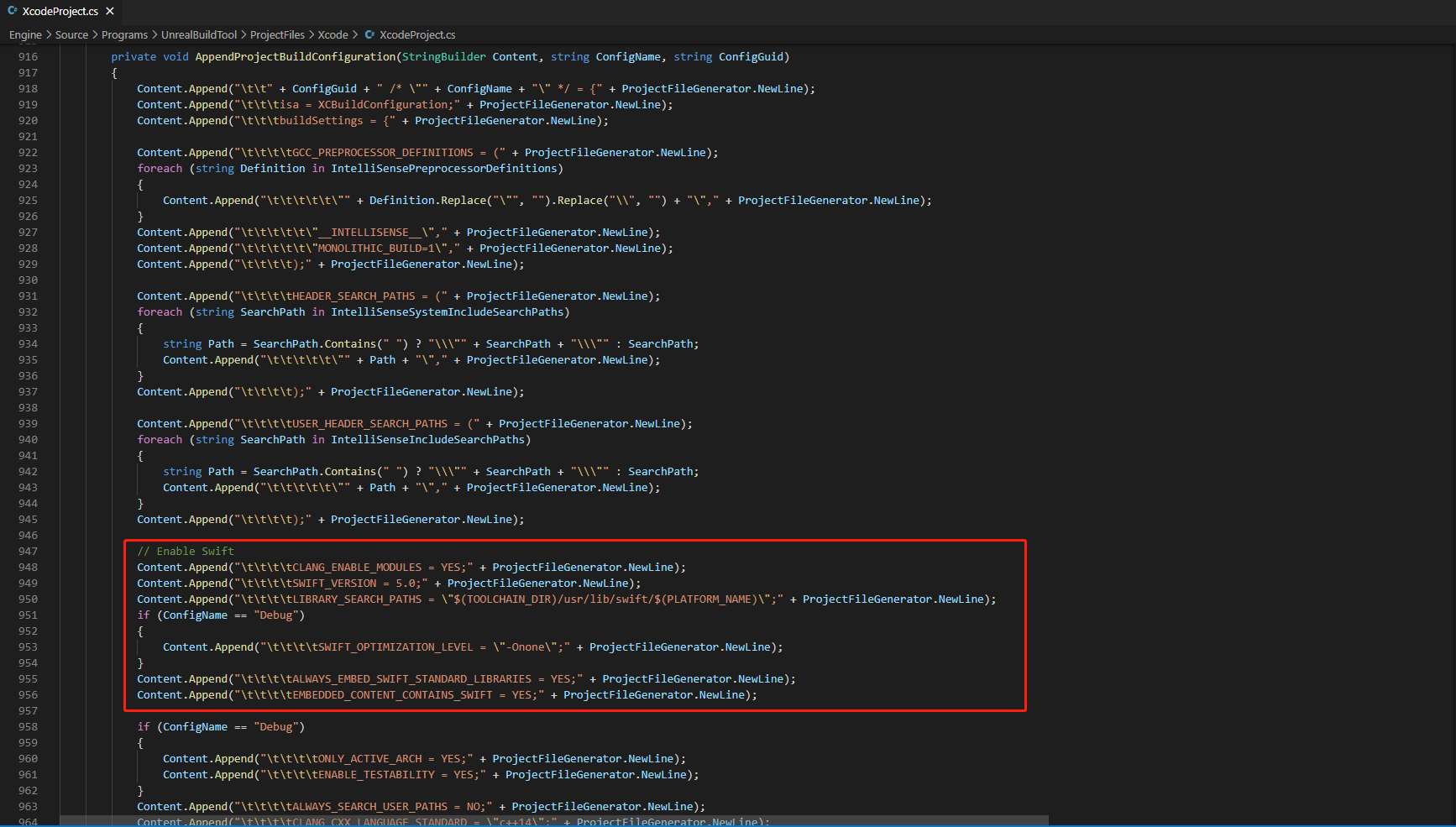
-
In the function
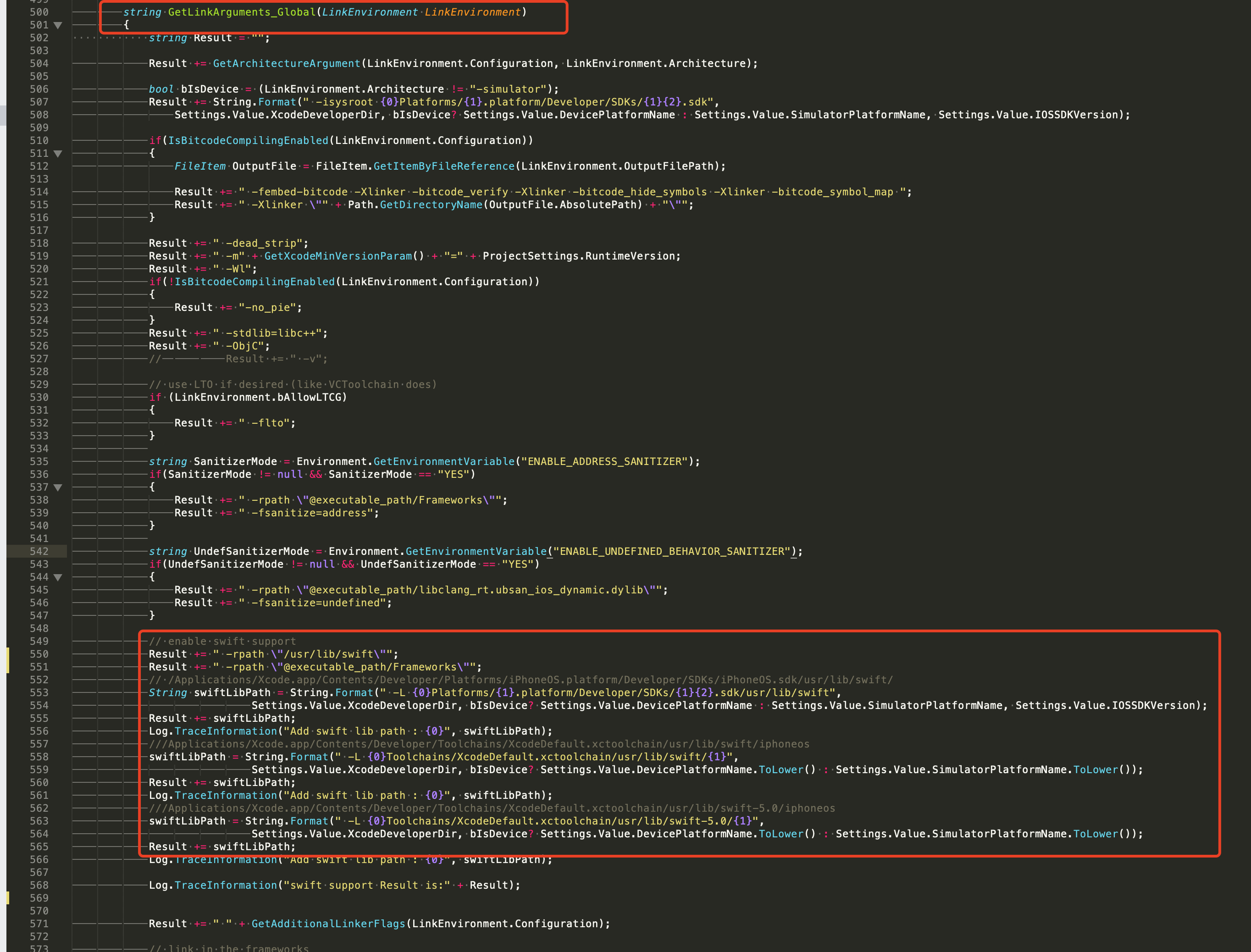
string GetLinkArguments_Global(LinkEnvironment LinkEnvironment)of /Your_UE_Installation_Path/Engine/Source/Programs/UnrealBuildTool/Platform/IOS/IOSToolChain.cs, add the following code.
- Before XCode 12
- XCode 12 and later
// enable swift support
Result += " -rpath \"/usr/lib/swift\"";
Result += " -rpath \"@executable_path/Frameworks\"";
// /Applications/Xcode.app/Contents/Developer/Platforms/iPhoneOS.platform/Developer/SDKs/iPhoneOS.sdk/usr/lib/swift/
String swiftLibPath = String.Format(" -L {0}Platforms/{1}.platform/Developer/SDKs/{1}{2}.sdk/usr/lib/swift",
    Settings.Value.XcodeDeveloperDir,
    bIsDevice? Settings.Value.DevicePlatformName : Settings.Value.SimulatorPlatformName,
    Settings.Value.IOSSDKVersion);
Result += swiftLibPath;
Log.TraceInformation("Add swift lib path : {0}", swiftLibPath);
///Applications/Xcode.app/Contents/Developer/Toolchains/XcodeDefault.xctoolchain/usr/lib/swift/iphoneos
swiftLibPath = String.Format(" -L {0}Toolchains/XcodeDefault.xctoolchain/usr/lib/swift/{1}",
    Settings.Value.XcodeDeveloperDir,
    bIsDevice? Settings.Value.DevicePlatformName.ToLower() : Settings.Value.SimulatorPlatformName.ToLower());
Result += swiftLibPath;
Log.TraceInformation("Add swift lib path : {0}", swiftLibPath);
///Applications/Xcode.app/Contents/Developer/Toolchains/XcodeDefault.xctoolchain/usr/lib/swift-5.0/iphoneos
swiftLibPath = String.Format(" -L {0}Toolchains/XcodeDefault.xctoolchain/usr/lib/swift-5.0/{1}",
    Settings.Value.XcodeDeveloperDir,
    bIsDevice? Settings.Value.DevicePlatformName.ToLower() : Settings.Value.SimulatorPlatformName.ToLower());
Result += swiftLibPath;
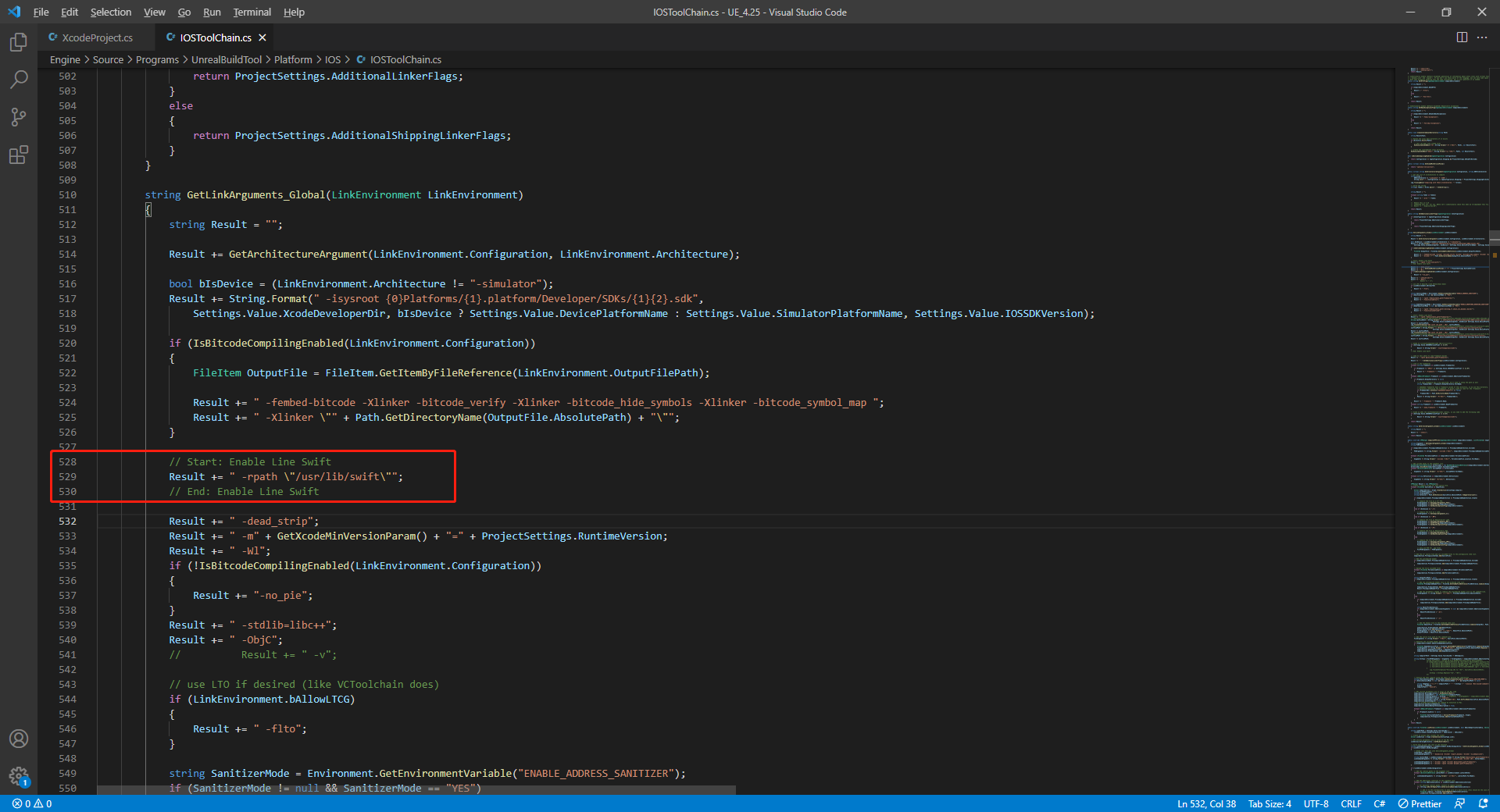
// This line of code must be prepended (see the sample image below for the position of the prepended code)
// enable swift support, make sure '/usr/lib/swift' goes before '@executable_path/Frameworks'
Result += " -rpath \"/usr/lib/swift\"";
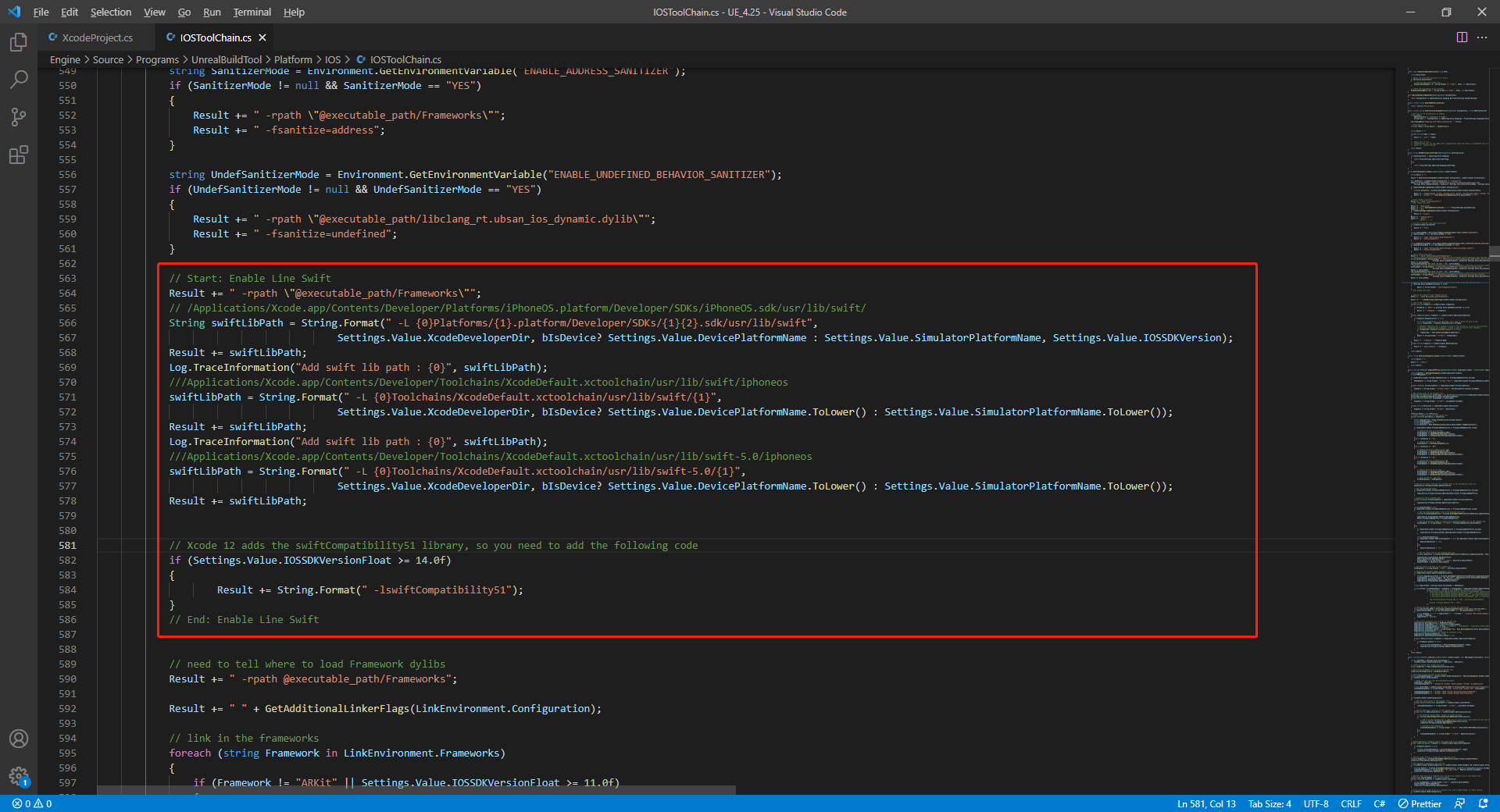
// enable swift support
Result += " -rpath \"@executable_path/Frameworks\"";
// /Applications/Xcode.app/Contents/Developer/Platforms/iPhoneOS.platform/Developer/SDKs/iPhoneOS.sdk/usr/lib/swift/
String swiftLibPath = String.Format(" -L {0}Platforms/{1}.platform/Developer/SDKs/{1}{2}.sdk/usr/lib/swift",
    Settings.Value.XcodeDeveloperDir,
    bIsDevice? Settings.Value.DevicePlatformName : Settings.Value.SimulatorPlatformName, Settings.Value.IOSSDKVersion);
Result += swiftLibPath;
Log.TraceInformation("Add swift lib path : {0}", swiftLibPath);
///Applications/Xcode.app/Contents/Developer/Toolchains/XcodeDefault.xctoolchain/usr/lib/swift/iphoneos
swiftLibPath = String.Format(" -L {0}Toolchains/XcodeDefault.xctoolchain/usr/lib/swift/{1}",
    Settings.Value.XcodeDeveloperDir,
    bIsDevice? Settings.Value.DevicePlatformName.ToLower() : Settings.Value.SimulatorPlatformName.ToLower());
Result += swiftLibPath;
Log.TraceInformation("Add swift lib path : {0}", swiftLibPath);
///Applications/Xcode.app/Contents/Developer/Toolchains/XcodeDefault.xctoolchain/usr/lib/swift-5.0/iphoneos
swiftLibPath = String.Format(" -L {0}Toolchains/XcodeDefault.xctoolchain/usr/lib/swift-5.0/{1}",
    Settings.Value.XcodeDeveloperDir,
    bIsDevice? Settings.Value.DevicePlatformName.ToLower() : Settings.Value.SimulatorPlatformName.ToLower());
Result += swiftLibPath;

// Xcode 12 adds the swiftCompatibility51 library, so you need to add the following code
if (Settings.Value.IOSSDKVersionFloat >= 14.0f)
{
        Result += String.Format(" -lswiftCompatibility51");
}
- Open the solution and recompile
/Users/intl/UE4/UE_4.25/Engine/Source/Programs/UnrealBuildTool/UnrealBuildTool.sln.
2) Merge Privacy Manifest
Version requirements: Player Network SDK V1.22 and above
Starting in spring 2024, for apps that need to be updated or uploaded to Apple App Store Connect, developers must clearly declare the reasons for use to show how the app uses required reason API (APIs that require a reason for use to be submitted). For more information, see Upcoming third-party SDK requirements.
For affected Player Network SDK plug-ins, manual merging is required for INTLFoundation, INTLCore, and INTLGarena. INTLGarena only needs to be configured if Garena integration is confirmed for the project.
Additionally, INTLLine is automatically integrated by Player Network SDK without extra action.
Since privacy manifests from other third-party SDKs have not been released yet, the Player Network SDK privacy manifest does not currently include the corresponding content.To view the list of plugins yet to be released, see iOS 17 Privacy Manifest.
Steps
- Find the privacy manifest
PrivacyInfo.xcprivacyfor the required plugin in the Player Network SDK output directory.
- Unity
- Unreal Engine
| Plugin | Path |
|---|---|
| INTLFoundation | /Plugins/iOS/INTLSDK/INTLFoundation/INTLFoundation.framework/PrivacyInfo.xcprivacy |
| INTLCore | /Plugins/iOS/INTLSDK/INTLCore/INTLCore.framework/PrivacyInfo.xcprivacy |
| INTLGarena | /Plugins/iOS/INTLSDK/INTLGarena/INTLGarena.framework/PrivacyInfo.xcprivacy |
| Plugin | Path |
|---|---|
| INTLFoundation | /INTLSDK/Source/INTLFoundation/Libs/iOS/INTLFoundation/INTLFoundation.embeddedframework/INTLFoundation.framework/PrivacyInfo.xcprivacy |
| INTLCore | /INTLSDK/Source/INTLCore/Libs/iOS/INTLCore/INTLCore.embeddedframework/INTLCore.framework/PrivacyInfo.xcprivacy |
| INTLGarena | /INTLSDK/Source/INTLGarena/Libs/iOS/INTLGarena/INTLGarena.embeddedframework/INTLGarena.framework/PrivacyInfo.xcprivacy |
-
Compare the four nodes in the
PrivacyInfo.xcprivacyfrom Player Network SDK with the corresponding contents in the project'sPrivacyInfo.xcprivacy, and merge based on the following conditions.
-
Privacy Nutrition Label Types (NSPrivacyCollectedDataTypes)is the node describing types of data usage:
Compare theitemvalues forCollected Data Type (NSPrivacyCollectedDataType)in each; if there are differences, add them to the project file.
If any values are the same, compareCollection Purposes (NSPrivacyCollectedDataTypePurposes); if there are differences, add them to the project file.
-
Privacy Tracking Domains (NSPrivacyTrackingDomains)is the node for the domain tracking list:
Compare the corresponding nodes; if there are differences, add them to the project file. -
Privacy Tracking Enabled (NSPrivacyTracking)describes whether the App Tracking Transparency feature is enabled:
Compare the corresponding nodes. If the value in the Player Network SDK privacy manifest isYES, modify the project file. -
Privacy Accessed API Types (NSPrivacyAccessedAPITypes)is the node describing the types of APIs used:
Compare theitemvalues forPrivacy Accessed API Type (NSPrivacyAccessedAPIType)in each. If there are differences, add them to the project file.
If any values are the same, comparePrivacy Accessed API Reasons (NSPrivacyAccessedAPITypeReasons); if there are differences, add them to the project file.
-
-
Generate a privacy report via Xcode 15 to verify it meets expectations.
3) INTLConfig.ini Configuration
When manually modifying the INTLConfig.ini configuration, please contact the Player Network Assistant to confirm whether your changes meet the expected requirements. For details, see SDK Config Notes.
Please configure according to the instructions in INTLConfig.ini.
4. Firebase Configuration
The path for the Firebase configuration file is:
iOS: Assets/Plugins/iOS/INTLSDK/INTLFirebase/ThirdSDK/GoogleService-Info.plist
Ensure that the Firebase configuration file for the corresponding platform has not been deleted and that all configuration items are correct.
5. Version-specific iOS adaptation documentation
For more version-specific iOS adaptation documentation, please refer to:

