LI PASS Changelog
- When upgrading to the latest version, please consult the upgrade guide for all versions.
- The versions of all plugins used in the game must match, including the version of the SDK used by the launcher.If your business requires integrating different versions of the Player Network SDK at the same time, or upgrading only one plugin, you need to contact Player Network Assistant.
2026
2026
V1.32.01
New Features
- Console: Added console platform adaptation based on the features of version V1.32.00
- All: Added support for Canada’s new compliance policy
Feature Optimizations
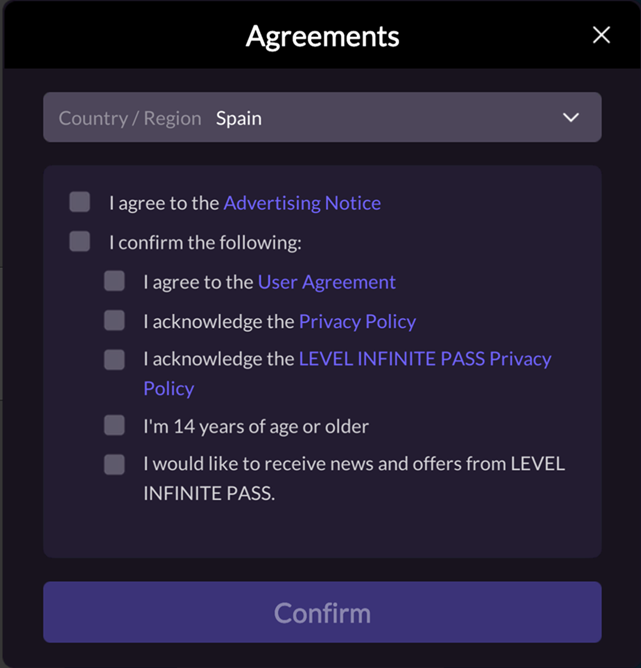
- Console: Optimized the interaction on the compliance agreement page. When no options are selected, the confirm button displays "Agree and Continue", and clicking it will automatically agree to all agreements; if the user selects options manually, the required-item validation logic remains unchanged.
Bug Fixes
- Mobile: Fixed an issue where the credit card verification webpage in the Android production environment could be closed directly using the Back button
- Fixed several UI display issues
Upgrade Guide
- This version supports Android, iOS, Windows, and Console platforms.
- Download the LI PASS plugin and V1.32.01 resources from Player Network Console, and completely replace the corresponding folders in the game project
V1.32.00
New Features
-
- Mobile, PC: Added support for blocking Gmail alias email registration to raise the threshold for fake accounts.
-
- Mobile, PC: Added a re-selection mechanism for compliant parental verification (excluding the UK and US), allowing players to go back to the previous step to re-select country / agreement / age before completing verification.
- Mobile, PC: Added event listeners for minor chat authorization (SOCIAL_FEATURE_VERIFY_WEBVIEW_CLOSE, SOCIAL_FEATURE_APPROVE_STATUS), supporting in-game minor social feature management.
Feature Optimizations
- Mobile, PC: Optimized LI PASS quick binding, unified LI PASS binding interface (RequestBindLIPass), optimized social media quick binding flow, supports automatic binding after third-party channel login.
- Mobile, PC: Optimized Passkey support for PC, and set the smart onboarding login and Passkey configuration toggle to enabled by default.
- Mobile, PC: Optimized LI PASS multilingual support, improved error prompts after entering undefined multilingual codes.
- Mobile, PC: Optimized
OpenAccountCenterinterface, introduced unified APIOpenAccountCenterWithParams, parameter renamed toGNAccountCenterParams/FINTLAccountCenterParams. RemovedAllowDeletion, the delete button visibility is now controlled by the server. The oldOpenAccountCenter()interface has been deprecated.
Bug Fixes
- Mobile, PC: Fixed several UI display issues.
- PC: Fixed the issue where two processes were displayed in the mouse tooltip taskbar after closing Webview.
Upgrade Guide
- This version supports Mobile and PC platforms.
- Download the LI PASS plug-in and V1.32.00 resources from the Player Network Console, and completely replace the corresponding folders in the game project.
V1.31.01
New Features
- All: Added support for user age verification methods required by Brazil's new ECA law regulations.
- Mobile: Added compliant process capability for event tracking, supporting data reporting for adult verification and parental adult verification flows.
Feature Optimizations
- Mobile, PC: Optimized the security interception mechanism of smart onboarding login, improved error code 66000 handling logic, optimized error code copy display.
- Mobile, PC: Optimized the password screen of smart onboarding login, lifted restrictions on countdown disablement, improved user operation experience.
- Mobile, PC: Optimized the UI display of the account center interface, adjusted headline font styles, link text font, content font, and transparency.
- Mobile, PC: Optimized UI display in Passkey-related interfaces, unified font display for Create Passkey and Create Passkey Successfully pages.
Bug Fixes
- Fixed and optimized several UI interface display issues.
Upgrade Guide
- This version supports Android, iOS, Windows, and Console platforms.
- Download the LI PASS plug-in and V1.31.01 resources from the Player Network Console, and completely replace the corresponding folders in the game project.
- For games integrated with Unreal Engine 5.7, please update the corresponding blueprint configuration.
V1.31.00
Feature Optimizations
- Mobile, PC: Optimized font display issues for some minor languages.
- PC: Optimized PC controller operation experience. When opening Webview, in-game controller operations will be disabled to prevent incorrect actions.
- Mobile: Optimized Webview to support auto-rotation. Display orientation is no longer bound to the game orientation.
Bug Fixes
- Mobile, PC: Fixed several known issues.
- Mobile: Fixed the issue of Liu Hai screen blocking on the compliance credit card verification interface.
Upgrade Guide
- This version supports Android, iOS, and Windows platforms.
- Download LI PASS plugin and V1.31.00 resources from Player Network Console, and completely replace the corresponding folders in the game project.
2025
2025
V1.30.01
Upgrade Guide
- In this version, based on V1.30.00, added console platform adaptation, supporting Mobile, PC, and Console platforms
- Download LI PASS plugin and V1.30.01 resources from Player Network Console, and completely replace the corresponding folders in the game project.
v1.30.00
New Features
- Mobile, PC: Added LI PASS platform-level minor chat authorization function. Supports setting cross-game chat authorization and optimized the cumbersome flow requiring minors to obtain authorizations one by one in different games.
- Mobile, PC: Newly added support for LI PASS account security level features. The aim is to guide players to actively improve their security level. Players can view their account security level and recommended security measures in the LI PASS Account Center. For detailed instructions, please refer to Security Level.
- Mobile, PC: Added support for Discord channel login. After logging in via Discord channel and opening the account center, the channel email will be automatically obtained and LI PASS binding reminder displayed.
Feature Optimizations
- Mobile, PC: Optimized compliance flow logic to accommodate scenarios where game compliance configuration and LI PASS platform compliance configuration are inconsistent.
- Mobile, PC: Optimized UI layout and effects on some interfaces.
Bug Fixes
- Mobile: iOS Fixed the issue that, due to Unreal Engine's SetIsFocusable method possibly being called by business logic and causing changes in return values, the compliance country list could not be displayed.
- Mobile, PC: Fixed the issue where, when INTL_WEBVIEW_COMMON_URL is not configured, account center delete requests incorrectly pull test environment domain.
Upgrade Guide
- This version supports Mobile and PC platforms.
- Download LI PASS plugin and V1.30.00 resources from Player Network Console, and completely replace the corresponding folders in the game project.
V1.29.01
Bug Fixes
- Mobile, PC, Console: Fixed the issue where, when the business is not published by Proxima Beta and does not access IEGG compliance solutions, LI PASS new account login requires re-ticking service agreement.
- Mobile, PC: Fixed UI display issues on some interfaces.
- Console: Fixed occasional crashes after completing credit card verification during LI PASS QR code login and returning to the console.
- Console: Fixed the occasional focus issue where the compliance agreement selection interface cannot select agreement clauses.
Upgrade Guide
- This version adds console platform adaptation based on V1.29.00 and supports Mobile, PC, and Console platforms.
- Download the LI PASS plugin and V1.29.01 resources from the Player Network Console, and fully replace the corresponding folders in the game project.
V1.29.00
New Features
- Mobile, PC: Added support for LI PASS binding in-game WebView via Web SDK, allowing the player client login state to trigger switching simultaneously.
- Mobile: Added a Passkey creation guidance workflow for user login and account center, and supports configuration options to show/hide the guidance popup.
Feature Optimizations
- Mobile, PC: Optimized bot verification capabilities, supports different types of bot verification providers, and supports configuring specified providers and parameter types of bot verification as needed.
- Mobile, PC: Optimized LI PASS email subscription selection copy.
- Mobile, PC: Optimized supplemental reporting for account center data.
Bug Fixes
- Mobile, PC: Fixed the issue where repeated clicking the button in the account center to jump to LI PASS official site would trigger multiple jumps.
- Fixed several known issues.
Upgrade Guide
- This version supports Mobile and PC platforms.
- Download the LI PASS plugin and V1.29.00 resources from the Player Network Console, and fully replace the corresponding folders in the game project.
V1.28.01
New Features
- Mobile, PC: Added account interception functionality. When a security risk is detected in the account environment, supports intercepting player operations and popping up risk prompts in LI PASS password login, third-party channel login, and binding scenarios.
- Console: Newly supports the Console platform.
Feature Optimizations
- Console: Supports customizing the authentication method for compliance age by country/region. For details, please refer to Custom Authentication Method
- Console: Supports configuring a default compliance country/region. When the user's IP location is not in the country/region list, the default configuration will be used. The configuration item is LI_DEFAULT_COMPLIANCE_REGION
- Console: Optimized compliance agreement selection interface interaction by merging the "Privacy Policy" and "User Agreement" checkboxes into one to streamline user operations.
- Console: Optimized compliance credit card verification email templates.
Bug Fixes
- Console: Fixed the issue where the focus disappears after triggering a red prompt in the South Korea real-name verification interface email input box.
- Console: Fixed the abnormal jump issue to the agreement selection button when moving focus to the bottom from the compliance age drop-down and birthday selection boxes.
- Console: Fixed the compliance region error update issue caused by not clearing cache when switching users.
Upgrade Guide
- This version supports Mobile, PC, and Console platforms.
- Download the LI PASS plugin and V1.28.01 resources from Player Network Console, and fully replace the corresponding folders in the game project.
V1.28.00
New Features
- Mobile, PC: Newly added support for smart guided login, which can automatically determine the player's account status and guide the player into the most suitable flow, simplifying operations and optimizing the user experience. For details, please refer to Smart Guided Login Flow
- Mobile, PC: Newly added support for customizing the authentication method for compliance age by country/region. For details, please refer to Flexible Configuration for Region-Specific Age Verification Methods
- Mobile, PC: Newly added support for configuring a default compliance country/region. When the user's IP location is not in the country/region list, the default configuration will be used. The configuration item is LI_DEFAULT_COMPLIANCE_REGION
Feature Optimizations
- Mobile, PC: Optimized the interaction for compliance interface agreement checkboxes, merging 'Privacy Agreement' and 'User Agreement' checkbox options into one, simplifying user operation.
- Mobile, PC: Optimized the display method of the 'Account does not exist' and 'Account already registered' error prompts, changing from Toast to a pop-up guide.
- Mobile, PC: Optimized the parameters of the LI PASS initialization API
InitLIPby making theappVersionparameter optional and defaulting to the device'sappVersion, making the parameter format more consistent. For detailed instructions, please refer to Initialization (InitLIP) - Mobile, PC: Optimized and modified the definition of LuaDelegation in hot-update files
INTLLuaCodeGenandObjectCachetoINTLLuaDelegationto avoid conflicts with other components. - Mobile, PC: Optimized and expanded scenarios triggering human-machine verification.
- Mobile, PC: Optimized documentation and multilingual translation for some interfaces.
Bug Fixes
- Mobile, PC: Fixed issue of duplicate username error when selecting the same avatar in Account Center.
- Mobile, PC: Fixed issue where compliance region would incorrectly change when switching users without clearing cache.
Upgrade Guide
- This version supports Mobile and PC platforms.
- Download the LI PASS plugin and V1.28.00 resources from Player Network Console, and fully replace the corresponding folders in the game project.
V1.27.00
New Features
- Mobile: Newly added support for Passkey login:
- Passkey allows players to use fingerprint, Face ID, or device PIN for identity verification, without entering passwords, enabling quick LI PASS login.
- Passkey is shared across all games under the LI PASS umbrella. After a player creates a Passkey in any game supporting LI PASS, it can directly be used for identity verification in other games without needing to reset, achieving seamless login across games.
- Mobile, PC: Added support for one-click copy username function in Account Center.
Feature Optimizations
- Mobile, PC, Console: Optimized Arabic UI adaptation.
- Mobile, PC, Console: Optimized compliant age input interaction for regions such as the US, Colombia, UK, and India, unified as dropdown age selection.
- Mobile, PC, Console: Optimized unified multi-terminal compliant process logic for several flows.
Upgrade Guide
- This version supports Mobile, PC, and Console platforms (only Unreal engine).
- Download LI PASS plugin and V1.27.00 resources from the Player Network Console(https://console.playernetwork.intlgame.com/intlsdk/sdkdownload), and completely replace the corresponding folders in the game project.
V1.26.00
New Features
- Mobile, PC: Completely revamped Account Center:
- Added a new Marketing Center module, providing LI PASS email subscription, LI PASS official website coin management and redemption, official website and social media access, and marketing campaign display and access features. Each module supports configuration. For detailed feature introductions and configuration instructions, please refer to Marketing Center
- Newly added support for players to change their avatar in the Account Center. Businesses can also obtain avatar information through the GetLICombineAccountInfo API and get the list of all avatars through GetLIAvatarInfo
Feature Optimizations
- Mobile, PC, Console: Optimized the compliance API call logic for LI PASS login, auto-login, and binding flows, merged the compliance information return APIs for LI PASS UID and game OpenID, reduced redundant API calls, and lowered response time. Applicable to businesses under the Proxima Beta publishing entity, or businesses under non-Proxima Beta publishing entities that do not integrate the IEGG compliance solution. For detailed API parameter adjustments, please refer to ComplianceInitWithParams and AuthResult
- Mobile, PC, Console: Adjusted LI PASS Terms of Service to be a mandatory option on compliance agreement interfaces. Based on legal requirements, business published by Proxima Beta must also check LI PASS Terms of Service.
- Mobile, PC, Console: Optimized LI PASS startup cloud control configuration timing. If the first startup cloud fetch fails, multiple retries will be attempted to further ensure update capability.
- Mobile, PC: Optimized the Account Center password change function, supports automatic display of the bound mailbox, players do not need to re-enter it.
Bug Fixes
- Mobile, PC, Console: Fixed the issue where protocol versions between multiple channel packages were not isolated. After the fix, independent management of protocol versions for each channel package is supported.
- Mobile, PC: Fixed the issue where URL parameters were concatenated incorrectly in Webview redirects. Now, game ID parameters are only concatenated when jumping to the LI PASS official website carrying login status within the client.
- Fixed several known issues.
Upgrade Guide
- This version supports Mobile, PC, and Console platforms (only Unreal engine).
- Download LI PASS plugin and V1.26.00 resources from the Player Network Console(https://console.playernetwork.intlgame.com/intlsdk/sdkdownload), and completely replace the corresponding folders in the game project.
2024
2024
V1.25.00
New Features
- Mobile, PC, Console: For businesses under non-Proxima Beta publishing entities that do not integrate the IEG Global compliance solution, newly added the corresponding integrated compliance flow, which can be configured through COMPLIANCE_SWITCH_ALL_PLATFORM; for such businesses, the IEG Global compliance verification flow is triggered only during LI PASS login or binding, while game compliance flows (such as checking the game agreement) need to be developed by the game itself. For the APIs to call, please refer to ComplianceInitWithParams and AuthResult
- Mobile, PC, Console: Added search function on the compliance country/region selection page, allowing players to quickly locate the desired country.
- Mobile: Newly added support for redirecting to the LI PASS official website with the client's login state:
For players who have already bound LI PASS and whose login state is still valid, they can be securely redirected to the LI PASS official website through an external browser without logging in again, optimizing the user experience of redirection. This feature is used for the More Service redirection in the Account Center, or businesses can apply it to other redirection scenarios by integrating the API OpenLIPASSMoreService themselves. For feature toggle configuration, please contact Player Network Assistant - Mobile: Newly added support for automatically obtaining the channel email and displaying the LI PASS binding prompt when opening the Account Center after logging in via a third-party channel. Currently supported channels are Facebook, Twitter, and Google. For details, please refer to Quick Binding
- PC: Newly added support for integrating the Account Center into login solutions for the Steam and Epic platforms. For integration instructions, please refer to OpenAccountCenter
Feature Optimizations
- Mobile, PC, Console: Optimized UI layout, buttons, and operation hot zones on some LI PASS interfaces to unify multi-terminal visual effects and make operation touchpoints more user-friendly.
- Mobile, PC, Console: Optimized the code logic for new and old card authentication flow in IEG Global compliance solutions.
- Mobile, PC, Console: Updated the configurable country/region list according to the latest compliance requirements. For the detailed list, please refer to Country or Region Configuration
- Mobile, PC: Optimized default avatar icons for LI PASS account center, as well as binding/unbinding icons.
- Mobile, PC: Optimized third-party channel display on the login interface, added a scrolling bar.
- Mobile: Optimized error prompts for input boxes on the login and compliance flow interfaces, changed from toast prompts to red text prompts in the input boxes.
- Mobile: Optimized verification code entry, supports automatic removal of spaces before and after, prioritizes bringing up the numeric keyboard, improving player experience when filling in verification codes.
Bug Fixes
- Mobile, PC, Console: Fixed the problem where players from unknown compliance regions (999) were blocked in compliance verification flow and could not log in.
- Mobile, PC, Console: Fixed issues with AccountFlowSwitch initialization logic causing ReportTag problems and resolved issues with reporting point positioning.
Upgrade Guide
- Starting from this version, LI PASS version number will be unified with Player Network SDK as V1.25.00.
- This version supports Mobile, PC, and Console platforms (only Unreal engine).
- Download LI PASS plugin and V1.25.00 resources in Player Network Console, and completely replace relevant folders in the game project.
V1.17.01
New Features
- Console: Added support for Nintendo Switch platform, and QR code login function.
- Mobile, PC: Added support for console in cross-game LI PASS linking functions, and supports third-party channel login scenarios for mobile and PC platforms.
- Mobile, PC: Newly added support for a flat layout on the LI PASS login page. In this layout, LI PASS channel login will be fixed in the first-screen position. For configuration instructions, please refer to ACCOUNT_FLOW_SWITCH
- PC: Newly added support for gamepad operations in Unity engine PC games, supported via SetGamepadStatus
Version upgrade
-
- Mobile, PC, Console: Added support for Unreal Engine 5.4 adaptation
Feature Optimizations
- PC: Optimized keyboard shortcut input for PC login and compliance interfaces, optimized Tab and Enter key actions, improving keyboard operation experience on PC.
Bug Fixes
- Mobile, PC, Console: Fixed build issues with PAK files after enabling IOStore with Unreal Engine hot updates.
- Mobile, PC, Console: Fixed issues with some interface text prompts and reporting data.
- PC: Fixed platform source identification inconsistency after login via Web JSSDK. After the fix, it will be unified as
source = 32.
Upgrade Guide
- This version supports Mobile, PC, and Console platforms (only Unreal engine).
- For integrating or upgrading to this LI PASS version, please ensure the Player Network SDK is updated to 1.24.01.
- Download LI PASS plugin and V1.17.01 resources in Player Network Console, and completely replace relevant folders in the game project.
V1.17.00
New Features
- PC: Added support for cross-game synchronization of LI PASS with some third-party channels, providing automatic cross-game linkage capability for newly integrated services.
- PC: Newly added support for gamepad operations in Unreal engine PC games, supported via SetGamepadStatus
Feature Optimizations
- Mobile, PC, Console: Optimized and standardized the callback events for opening and closing panels,
LIP_PANEL_OPENandLIP_PANEL_CLOSE. For details, please refer to LIBaseEvent - Mobile, PC, Console: Optimized the language switch for the game service terms and privacy agreement screens for compliant country/region selection. Supports automatic language switching based on client language.
- Mobile, PC: Optimized the UI display for businesses that have not integrated the gift pack feature. Use the new configuration item LIP_REWARD_ENABLE to set the gift pack integration status, and deprecate the original configuration
SHOW_LOGIN_REWARD_ICON - Mobile, PC: Optimized popup prompts for binding LI PASS in the account center.
- Mobile: Optimized the interactive flow for DMA advertisement privacy agreement consent. All users will confirm the clause via a DMA agreement notification popup.
- Console: Improved the error prompt display methods for the console login screen and the compliant process screen.
Bug Fixes
- Mobile, PC: Fixed the issue where the account center username was displayed as guest when logging in via third-party channels.
- Mobile, PC: Fixed the issue where PC device names were displayed beyond the frame in the account center device history screen.
- PC: Fixed the issue where an error occurred after opening the Korea region game privacy agreement when the player was not logged in.
- Console: Fixed the issue where clicking the delete button in the account deletion popup causes the login page focus to become ineffective.
Upgrade Guide
- This version supports Mobile, PC, and Console platforms (only Unreal engine).
- Integrate or upgrade to this version of LI PASS, requiring Player Network SDK to be updated to 1.24.00.
- Download LI PASS plugin and V1.17.00 resources from the Player Network Console, and completely replace the corresponding folders in the game project.
V1.16.01
New Features
- Console: Added QR code login feature for console platforms. Players can log in to LI PASS conveniently by scanning a QR code with their phone. Through the
QueryBindInfointerface, the LI PASS binding screen can be triggered from within the game, enabling rapid binding in console games.
Bug Fixes
- PC, Console: Fixed the issue of abnormal consent popups caused by missing DMA agreement platform check logic.
- Mobile, PC: Fixed the issue with clicking the close button in device history records.
Upgrade Guide
- This version supports Mobile, PC, and Console platforms (only Unreal engine).
- Integrate or upgrade to this version of LI PASS, supporting Player Network SDK version 1.23.01.
- Download LI PASS plugin and V1.16.01 resources from the Player Network Console, and completely replace the corresponding folders in the game project.
V1.16.00
New Features
- Added support for UI customization features in parts of the interface.
- Added support for A/B testing base capabilities, allowing A/B test experiments on the client via hot updates.
Feature Optimizations
- Reduce the external exposure of the LEVEL INFINITE PASS logo in non-main screens inside the game client.
- Optimized the display of the countdown limit for new device login binding, adding highlighting effects for numbers and time units.
- Optimized the overlapping display method for multiple toast prompts appearing simultaneously.
- Optimized the reminder method for abnormal account region attribution when logging in, providing users with more accurate guidance.
- Optimized the multi-language abbreviation standard, supporting regional Traditional Chinese (Taiwan and Hong Kong).
- Optimized the text formatting on some pop-up interfaces.
- Optimized font configuration for Unity and Unreal engines, unified font size, color, and transparency settings under different engines.
Bug Fixes
- Fixed the issue where usernames were not displayed in compliant parental verification email subjects in some scenarios.
Upgrade Guide
- This version supports Mobile and PC platforms.
- Integrated or upgraded to this version of LI PASS, supported Player Network SDK versions are 1.22.01 to 1.23.00.
- Download LI PASS plugin and V1.16.00 resources from the Player Network Console, and fully replace the corresponding folders in the game project.
V1.15.00
New Features
- Added support for Korean independent game privacy agreement jumping, to comply with Korea’s latest data privacy supervision requirements;
supports modifying Korean game privacy agreement configuration in the Player Network Console.
Feature Optimizations
- Optimized the notification copy for the minor restriction feature.
- Optimized the display method of error prompts in the PC input box, improving the user experience on PC.
- Optimized the More Services link jump in Account Center; after update, it will lead to the relevant game page on the LI PASS official website.
Bug Fixes
- Fixed the multilingual issue with security reminder emails; login and auto-login now support sending security reminder emails according to specified language.
- Fixed the issue where DMA advertising privacy agreement configuration item
EU_DMA_URLdid not support '-' and '?' conversions.
Upgrade Guide
- This version supports Mobile and PC platforms.
- Integrated or upgraded to this version of LI PASS, requires matching and updating Player Network SDK version to 1.22.01.
- Download LI PASS plugin and V1.15.00 resources from the Player Network Console, and fully replace the corresponding folders in the game project.
V1.14.00
New Features
- Added registration guidance for unregistered users when login fails.
Version upgrade
-
- Support for Unreal Engine 5.3
Feature Optimizations
- Optimized the countdown display format; when the countdown is less than one day, use hours as units for display switching.
- Optimized the prompt copy when automatic registration feature is activated on the login interface.
Bug Fixes
- Fixed the issue where the device history in the Account Center could not be scrolled down to view the list.
-
- Fixed several LQA issues, improved multilingual copy and presentation
Upgrade Guide
- This version supports Mobile and PC platforms.
- Integrate or upgrade to this version of LI PASS, which requires the Player Network SDK version updated to 1.22.00.
- Download LI PASS plugin and V1.14.00 resources from the Player Network Console(https://console.playernetwork.intlgame.com/intlsdk/sdkdownload), and completely replace the corresponding folders in the game project.
V1.13.01
New Features
- Mobile: Added an interactive flow for checking DMA advertising privacy agreement terms for users in the EEA/UK regions, supporting agreement selection flows for both new and existing users. For detailed configuration, please refer to ANALYTICS_CONSENT_ENABLE and EU_DMA_URL
- For newly registered game users in applicable regions (EEA/UK), added a separate advertising notification checkbox above the "One-click check" on the agreement page
 .
. - For already registered game users in applicable regions (EEA/UK), when entering the game for the first time after upgrading the version, an advertising notification popup will appear. Please confirm whether you agree to it
 .
. - PC: When logging in on PC, DMA advertising privacy agreement checkbox interaction flow will be skipped; the advertising notification checkbox will not be displayed and no advertising popup will appear. Meanwhile, the code will not set Consent Mode, maintaining the user’s unset status.
- For newly registered game users in applicable regions (EEA/UK), added a separate advertising notification checkbox above the "One-click check" on the agreement page
Upgrade Guide
-
- This version only supports Mobile platform, the PC version of the resource is for testing purposes only
- To integrate or upgrade to this LI PASS version, you must update the Player Network SDK version to 1.21.03
- Download the LI PASS plugin and V1.13.01 resources from the Player Network Console, and completely replace the corresponding folders in the game project
2023
2023
V1.13.00
New Features
- Added support for account deletion, allowing an entry point for game account deletion to be added in the Account Center. For detailed configuration items, see
SHOW_DELETE_ACCOUNT_BUTTON
Feature Optimizations
-
- Optimize the sorting of countries/regions in the Compliance screen, keep the order of A-Z
-
- Optimize the rules for displaying device names in the device history in the security settings, and unify the display of mobile and PC
-
- Optimize the prompts and contents of some scenarios, and change the prompts of user triggered re-login, account has been bound and banned by the game to pop-up windows
-
- Optimize the keyboard input method of the login interface of Unity Engine games, and improve the experience of the keyboard blocking problem
Bug Fixes
-
- Fixed several LQA issues, improved multilingual copy and presentation
Upgrade Guide
- This version only supports Mobile and PC platforms
- To integrate or upgrade to this LI PASS version, you must update the Player Network SDK version to 1.21.02
- Download the LI PASS plugin and V1.13.00 resources from the Player Network Console, and completely replace the corresponding folders in the game project
V1.12.00
New Features
- Added support for the PlayStation 5 and Xbox Series X|S platforms for the Unity engine, providing standardized LI PASS integration and supporting hot update capabilities. For more information, see LI PASS Getting Started Guide
-
- Added support for independent checking of marketing email terms.In order to meet the compliance requirements of some countries/regions, support the configuration to remove the marketing agreement of some countries/regions from the one-click checkbox and replace it with a separate checkbox
-
- Added support for underage banning, which provides games with LI PASS access with the ability to block underage players from entering the game based on specific regions
Feature Optimizations
-
- Optimize the UI display details in vertical gamertag center when the introduction text of binding benefits exceeds one line in some languages
-
- Optimize the device verification mechanism to only perform device verification when users log in through third-party channels and bind LI PASS in the game
-
- Optimize the display of the close button on each page of the compliance user process to ensure that the compliance process is carried out in one direction
-
- Optimized unified email and password validation rules across platforms
-
- Optimized several UI display issues
Bug Fixes
-
- Fixed several LQA issues, improved multilingual copy and presentation
-
- Fix resource loading exception when system area is Turkey
Upgrade Guide
- To integrate or upgrade to this LI PASS version, you must update the Player Network SDK version to 1.21.01
- Download the LI PASS plugin and V1.12.00 resources from the Player Network Console, and completely replace the corresponding folders in the game project
V1.11.00
New Features
- The UI has been fully revamped, covering login solutions across platforms (iOS, Android, PC, Console) and multiple scenarios (Social Media, Platform).
- Added a restriction feature that can limit player login when the region of the LI PASS account does not match the game's compliance region, with support for a game-controlled toggle. For the configuration item, see
REGION_RESTRICTION_CHECK_ENABLE -
- Added verification of parents' e-mail addresses during parent authentication to avoid duplicating the registered e-mail address of LI PASS
-
- Add new language, support Chinese Taiwan Traditional zh-TW
Version upgrade
-
- Support for Unreal Engine 5.2
Feature Optimizations
-
- Optimize the birthday entry checking mechanism, the user must select a year that is less than or equal to the current year
-
- Optimize the user prompts when an account that has been bound to LI PASS is repeatedly bound, providing clearer prompts
Bug Fixes
-
- Fix invalid setting when business-initiated call to
UpdateCountryListinterface
- Fix invalid setting when business-initiated call to
Upgrade Guide
- To integrate or upgrade to this LI PASS version, you must update the Player Network SDK version to 1.20.01
- Download the LI PASS plugin and V1.11.00 resources from the Player Network Console, and completely replace the corresponding folders in the game project
V1.10.00
New Features
- PC: Supports LI PASS interaction and UI standardization for PC game platforms (Steam / Epic) using the Unreal engine.
- PC: For Unreal engine, when the LI PASS account region does not match the game's compliant publishing region, new restrictions for player login capabilities will be added, supporting toggling through the game’s control backend.
- Unreal engine parental verification, added validation of parent email address to avoid duplication with LI PASS registration email.
- Unreal parental verification, added email notification function after verification is completed.
- Supports hiding the close button on the login panel via configuration item. For detailed configuration, please refer to
SHOW_LOGIN_PANEL_CLOSE
Feature Optimizations
-
- Unreal has optimized the birthday entry validation mechanism; when users select a year, it must be less than or equal to the current year.
-
- Replace the slua_unreal file name in the Plugins/Levelinfinite directory with lipass_slua_unreal to resolve the UBT execution conflict error caused by the duplicate slua_unreal_model file name
- Updated the content of LI PASS's Privacy Policy in accordance with legal requirements
-
- Optimized the names of some countries and regions
Upgrade Guide
-
- V1.10.00 only supports Unreal Engine PC version.If you need to access other endpoints, we recommend downloading the most recent version of the history
- Starting from V1.10.00, LI PASS has optimized the product directory structure and no longer uses GameNative-related product directory names. For more information, see Integration Guide.
- To integrate or upgrade to this LI PASS version, you must update the Player Network SDK to V1.20.01.
- Download the LI PASS plugin and V1.10.00 resources from the Player Network Console, and completely replace the corresponding folders in the game project.
- When upgrading to this LI PASS version, you need to remove the following code when logging in with LoginChannelWithLIPass (LevelInfinite.AutoLogin + OpenLoginPanel).
V1.09.00
Feature Optimizations
- Optimized age selection interaction in Korea’s compliance flow; supports stepwise age segment selection.
- Optimized multilingual adaptation, with improved translation and layout for Arabic documents.
- Optimized the security verification mechanism for binding LI PASS and binding/unbinding third-party channels in the User Center. Switch control is supported; please refer to SAFETY_DEVICE_CHECK_ENABLE.
- Optimized Android physical back key adaptation; newly provided API for closing the panel OnBackPressed.
- Optimized Unreal archives, unified compilation into Luac files.
- Optimized several UI panels.
Upgrade Guide
- To integrate or upgrade to this LI PASS version, you must update the Player Network SDK to V1.19.03.
- Download the LI PASS plugin and V1.09.00 resources from the Player Network Console, and completely replace the corresponding folders in the game project.
V1.08.00
New Features
-
Added support for PlayStation 5 and Xbox Series X|S platforms, providing standardized integration for Unreal engine LI PASS login binding flow, and also supporting hot update capabilities.
-
Added support for 2FA authentication. Players can enable this function themselves in the Account Center. Once activated, when logging into the game without using the verification code method, players will be required to complete a second verification via email.
-
Added support for device management functionality in the Account Center, including:
- Supports displaying the player's login history and device records, as well as red-dot notifications when new devices are added.
- Support for players to manually log out all devices under the currently logged-in game.
-
Added support for the LI PASS binding verification mechanism in the Account Center. When a player's login from a new device is detected, binding a LI PASS account will be unavailable for a specified period to reduce the risk of abnormal binding after account loss. The game can configure the switch and the restriction duration.
-
Added support for CAPTCHA in the client registration and login flow, with per-game toggle control.
-
Added support for asmdef in the Unity engine. For more information, please refer to the official documentation.
Feature Optimizations
- Optimized the UI interaction of the bind/unbind buttons for third-party channels in the Account Center, providing players with more accurate status prompts. For more information, see Product Introduction.
-
- Optimize the email text color on the unbundle page and the multi-language copy of the get verification code button to improve readability
-
- Optimize to add the space removal processing of mailbox input box
-
- Optimized to support Unreal Engine auto-calculation of UI resolution scaling, providing more convenient adaptive display adaptation
Upgrade Guide
-
- Accessing or upgrading this LI PASS version depends on updating the Player Network SDK version to V1.19.02
- Download the LI PASS plugin and V1.08.00 resources from the Player Network Console, and completely replace the corresponding folders in the game project.
V1.07.00
New Features
- Added support for automatically filling in the most recently used email account during LI PASS login. This feature supports toggle control. For configuration items, see Configuration Items.
- Added support for displaying the third-party channel most recently used by the user at the top of the channel list by default. This feature supports toggle control. For configuration items, see Configuration Items.
-
- Newly check the registration status of the user's email address when obtaining the verification code to simplify the non-essential operation of the user
- Added an interface for setting the compliance region and country list. For detailed instructions, see UpdateCountryList.
Feature Optimizations
- Optimized Unity & UE performance, improved image loading performance, and fixed memory leaks
-
- Optimize the error alerts and guidelines for users with unregistered LI PASS and empty passwords to improve user experience
-
- Optimize the binding guidance for non-LI PASS users in the user center to improve user experience
-
- Optimize the user center binding reminder text, make the reminder more concise and clearer
-
- Optimize the display rules of third-party channels in the user center, so that users can directly see the list of third-party channels when LI PASS is not bound, which is more user-friendly
-
- Optimize the country and region where authentication is not required, and the user's underage authentication status is set to adult
Bug Fixes
-
- Fix an issue where, in certain Korea-specific scenarios, users were incorrectly assigned an adult compliance status when real-name authentication was turned off
- Fixed several known issues.
Upgrade Guide
-
- From version V1.07.00, LI PASS adjusted the Unity directory structure, dividing it into Runtime and Editor directories.To upgrade this version, it is recommended to delete the old LevelInfinite catalog before importing the new LevelInfinite catalog
-
- Upgrading this version depends on updating the Player Network SDK version to V1.19.01
- Download the LI PASS plugin and V1.07.00 resources from the Player Network Console, and completely replace the corresponding folders in the game project
V1.06.00
New Features
-
- Added India Regional Compliance Certification Support
-
- Add Unity side set font interface, support dynamic switching fonts at runtime
-
- Added INI editor extension to support editing LI PASS related INI configurations in Unity/UE editor visualization tools
-
- Added Unity 2021, 2022 support
-
- Added UE 5.0, 5.1 support
- Added Lua-layer Exception callback handling LILuaErrorObserver
Feature Optimizations
- Optimized the skin integration workflow; see Skin Integration
- Optimized the custom font workflow; see Replacing Fonts in Unreal Engine
- Optimized some UI copy
-
- Optimize UI display for different login methods
-
- Optimize the closing process of the pop-up window for deleting numbers, and support closing the pop-up window to return to the login interface automatically
-
- Optimize the process of parent authentication, and support modifying the parent's email address without completing the authentication
Bug Fixes
-
- Fixed the issue of unrecorded status of Korean nightly marketing email agreements
-
- Fix the issue that the countdown of the silent period did not show the real-time number of days
Upgrade Guide
-
- Download the LI PASS plugin and the 1.06 resources from the Player Network console and replace the corresponding folder in the game project with the complete one
- Replace the LevelInfinite init method call with the
InitLImethod -
- If you have customized UI skinning before, please contact [mingyiwang]/[flawang] for customization resources
- A callback will be triggered when a Lua-layer error occurs. It is recommended that the game add Crashsight/Bugly reporting in the LILuaErrorObserver function.

