Player Network SDK 接入 - Unreal
前提条件
游戏使用的每个 SDK 插件的版本(包括游戏启动器使用的版本)必须保持一致。如果游戏需要同时访问多个版本的 Player Network SDK,或者只有一个组件需要升级,请联系 Player Network 助手。
进入PlayerNetwork SDK 下载页面,按需选择对应的引擎和平台,下载PlayerNetwork SDK。详情可参考PlayerNetwork SDK 下载指引文档。
步骤1:安装 SDK
- Android
- iOS
- Windows
- Console
- SDK 1.26 及之后版本
- SDK 1.26 之前的版本
UE4.21 ~ UE4.27 & UE5 ~ UE5.5
androidx
minSdkVersion: 21
targetSdkVersion: 34
compileSdkVersion: 34
如果接入 LINE,minSdkVersion 需要升级到 24。
如果接入 Discord,minSdkVersion 需要升级到 23。
项目提审前需注意:从 SDK V1.24.00 开始,Google 新增了 foreground service permissions 权限声明。如果该声明未通过 Google 审核,重新提交审核可能需要一周左右的时间。更多信息,请参见前台服务必须定义类型。
UE4.21 ~ UE4.27 & UE5 ~ UE5.4
androidx
minSdkVersion: 16
targetSdkVersion: 34
compileSdkVersion: 34
如果接入 LINE,minSdkVersion 需要升级到 19。
如果接入 Firebase,minSdkVersion 需要升级到 19,Android Gradle 需要升级到 V6.7.1 或以上,Android Gradle Plugin 需要升级到 V4.2.0 或以上。
如果接入 VK,minSdkVersion 需要升级到 21。
如果接入 Discord,minSdkVersion 需要升级到 23。
如果接入 Adjust,minSdkVersion 需要升级到 18。
1. 将 Player Network SDK 添加到您的项目
-
解压 SDK 软件包。
-
将
INTLSDK文件夹复制到项目的Plugins文件夹中。
如果项目中没有Plugins文件夹,请创建一个。 -
打开项目的
{项目名称}.Build.cs文件,并按照示例将 Player Network SDK 添加到 Unreal Engine 中。public INTLSample(ReadOnlyTargetRules Target) : base(Target)
{
PrivateDependencyModuleNames.AddRange(new string[] {
"INTLCore",
"INTLFoundation",
"INTLConfig",
});
}
Player Network SDK package
├─INTLSDK
│  ├─INTLSDK.uplugin    // Player Network SDK plugins description files
│  ├─Resources          // Player Network SDK resources
│  └─Source             // Player Network SDK plugin modules. Each module contains its own Build.cs file, libraries, and interfaces.
│    ├─INTLApple
│    ├─INTLConfig       // Player Network SDK configurations
│    ├─INTLCore         // Player Network SDK Core module
│    ├─INTLDiscord
│    ├─INTLEpic
│    ├─INTLFacebook
│    ├─INTLFoundation
│    ├─INTLGoogle
│    ├─INTLKakao
│    ├─INTLLine
│    ├─INTLSteam
│    ├─INTLTwitter
│    └─INTLVK
├─LevelInfinite     // LI PASS APIs
└─Symbols           // Player Network SDK symbol table *.so files
INTLSDK/Source/INTLCore
└─INTLSDK
   ├─INTLSDK.uplugin
   ├─Resources
   └─Source
     ├─INTLConfig
     ├─INTLCore
     |  ├─INTLCore.Build.cs // INTLCore Build.cs file
     |  ├─Libs              // INTLCore libraries for different platforms which contain dll, lib, and other binary files.
     |  |  ├─Android
     |  |  ├─include
     |  |  ├─iOS
     |  |  ├─MacOS
     |  |  └─Win
     |  ├─Private           // Player Network SDK private folder
     |  └─Public            // Player Network SDK public interfaces
     |                      // INTLSDKAPI.h: Player Network SDK APIs
     |                      // INTLSDKPluginObserver.h: Player Network SDK observer classes
     |                      // INTLSDKPluginDefine.h: Player Network SDK data types
     |                      // INTLSDKOutputUtility.h: Player Network SDK utility to process callbacks
     |                      // INTLSDKBaseUserWidget.h: Player Network SDK base class for UserWidget which includes registration and deregistration APIs
     ├─INTLCustomer
     ├─INTLDiscord
     ├─INTLEpic
INTLSDK/Source/INTLConfig
└─INTLSDK
   ├─INTLSDK.uplugin
   ├─Resources
   └─Source
     ├─INTLConfig
     |  ├─Configs       // Player Network SDK configurations for different platform
     |  |  ├─Android
     |  |  |  └─INTLConfig_APL.xml  // Player Network SDK Android gradle configuration file
     |  |  ├─iOS
     |  |  |  └─INTLConfig_UPL.xml
     |  |  ├─Resources
     |  |  |  ├─APASConfig.ini      // APAS device level configuration file
     |  |  |  └─INTLConfig.ini      // Player Network SDK main configuration file
     |  ├─Encrypt
     |  ├─INTLConfig.Build.cs
     |  ├─INTLConfig.uplugin
     |  ├─Private
     |  ├─Public
     |  └─Resources
     ├─INTLCore
2. 加载所需的权限和插件
添加用于加载库和注册 Player Network SDK 生命周期的 Player Network SDK 代码至位于 INTLSDK/Source/INTLCore/Libs/Android 的INTLCore_APL.xml(Android 游戏的 Gradle 配置文件)。
载入动态权限
通过代码添加动态权限
在 INTLCore_APL.xml 中找到 RequestDynamicPermissions() 的函数定义,然后添加需要的动态权限:
private void RequestDynamicPermissions()
{
    List<String> permissions = new ArrayList<String>();

    permissions.add(Manifest.permission.INTERNET);
    //permissions.add(Manifest.permission.ACCESS_COARSE_LOCATION); // <--- Add permission here

    this.INTLRequestPermission(this, permissions, INTLPermissionRequestCode);
}
异型屏兼容设置
在 Android P 之后,Android 已为异型屏提供标准 API。但对于 Android O 设备,不同供应商存在不同的实现逻辑。Player Network SDK 提供了统一的 C++ API 和 Java API,以支持小米、华为、三星、VIVO 和 OPPO 等不同的 Android O 设备。
对于 Unreal Engine,游戏可使用 UPL 调用 Java API。更多信息,请参见 异步异形屏信息读取。
一般上,手机的全屏纵横比大于2.1。为避免黑边,用户必须将 android.max_aspect 修改为2.1以上。
对于使用 Android Oreo 操作系统的华为和小米手机,用户必须配置 AndroidManifest。
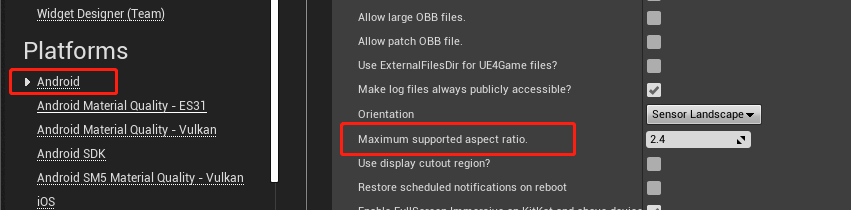
为了避免在 Unreal Engine 4 中合并 AndroidManifest 时发生冲突,进入 Project Settings > Android > Max Supported Aspect Ratio,将最大支持纵横比设置为2.4。
<androidManifestUpdates>
  <log text="INTL-Sample-UPL AndroidManifestUpdates finish" />
    <addElements tag="application">
        <meta-data android:name="notch.config" android:value="portrait|landscape"/>
        <meta-data android:name="android.notch_support" android:value="true"/>
    </addElements>
</androidManifestUpdates>
对于使用 Android API 获取异型屏安全区域信息的游戏,请添加以下配置:
在 INTLCore_APL.xml 中添加以下配置。
<gameActivityImportAdditions>
    <insert>

    // ... other code

    import com.intlgame.core.cutout.DisplayCutoutManager;
    import com.intlgame.foundation.Singleton;
    </insert>
</gameActivityImportAdditions>
<gameActivityClassAdditions>
    <insert>

    // ... other code

    // Use the cutout area
    private void setFullScreen()
    {
        Log.debug("INTL::setFullScreen");
        getWindow().setFlags(WindowManager.LayoutParams.FLAG_FULLSCREEN,
        WindowManager.LayoutParams.FLAG_FULLSCREEN);// Set full screen
        int systemUiVisibility = this.getWindow().getDecorView().getSystemUiVisibility();
        int flags = View.SYSTEM_UI_FLAG_LAYOUT_FULLSCREEN
            | View.SYSTEM_UI_FLAG_HIDE_NAVIGATION
            | View.SYSTEM_UI_FLAG_FULLSCREEN;
        systemUiVisibility |= flags;
        getWindow().getDecorView().setSystemUiVisibility(systemUiVisibility);
        // P version is allowed to use notch area
        if (Build.VERSION.SDK_INT >= Build.VERSION_CODES.P) {
            WindowManager.LayoutParams lp = this.getWindow().getAttributes();
            lp.layoutInDisplayCutoutMode = WindowManager.LayoutParams.LAYOUT_IN_DISPLAY_CUTOUT_MODE_SHORT_EDGES;
            this.getWindow().setAttributes(lp);
        }
    }
  </insert>
</gameActivityClassAdditions>
<gameActivityOnCreateAdditions>
    <insert>
    setFullScreen();
    INTLSDK.initialize(this);

    // ...Other game code

    // The following uses Android’s native call method
    if (Build.VERSION.SDK_INT >= Build.VERSION_CODES.KITKAT_WATCH) {
      getWindow().getDecorView().setOnApplyWindowInsetsListener(new View.OnApplyWindowInsetsListener() {
          @Override
          public WindowInsets onApplyWindowInsets(View v, WindowInsets insets)
          {
              Context mContext = getApplicationContext();
              DisplayCutoutManager displayCutoutManager = Singleton.getSingleton(DisplayCutoutManager.class);
              // Whether the device has a notched display
              if (displayCutoutManager.hasCutoutSupport(mContext, insets))
              {
                  // Get notched display safe areas
                  Rect safeRect = displayCutoutManager.getSafeDisplay(mContext, insets);
                  // Get notched display notch area
                  List<Rect> rects = displayCutoutManager.getCutoutSize(mContext, insets);
                  // Game business logic, can use native call to pass notched display information
              }
              return insets;
          }
      });
    }
    </insert>
</gameActivityOnCreateAdditions>
3. 生成 AAR 包
Player Network SDK 使用 Gradle 生成 AAR 包。Gradle 配置文件包括第三方 SDK 版本号以及 Player Network SDK 和第三方渠道所需的依赖项。游戏需要根据所需的插件添加必要的依赖项。
INTLConfig_APL.xml 文件是 Player Network SDK Gradle 配置文件。根据游戏需求更新 Gradle 配置。用 INTLConfig.ini 配置文件中的值替换 {placeholder} 文本。
<?xml version="1.0" encoding="utf-8"?>

<root xmlns:android="http://schemas.android.com/apk/res/android"
    xmlns:tools="http://schemas.android.com/tools">

    <init>
        <log text="INTLConfig-APL init"/>
    </init>

    <prebuildCopies>
        <log text="INTLConfig-APL Start prebuildCopies ...$S(PluginDir)" />
    </prebuildCopies>

    <resourceCopies>
        <log text="INTLConfig-APL Start resourceCopies...$S(PluginDir)" />
        <copyFile src="$S(PluginDir)/../Resources/APASConfig.ini" dst="$S(BuildDir)/assets/APASConfig.ini"/>
        <log text="INTLConfig-APL copy APASConfig.ini from $S(PluginDir) to $S(BuildDir) end" />

        <setBoolFromProperty result="bEncrypted" ini="Engine" section="/Script/INTLSDK.Settings" property="bEnableConfigIniEncryption" default="false"/>
        <if condition="bEncrypted">
            <true>
                <copyFile src="$S(PluginDir)/../Encrypted/Android/INTLConfig.ini.new" dst="$S(BuildDir)/assets/INTLConfig.ini.new"/>
            </true>
            <false>
                <copyFile src="$S(PluginDir)/../Resources/INTLConfig.ini" dst="$S(BuildDir)/assets/INTLConfig.ini"/>
            </false>
        </if>
        <log text="INTLConfig-APL copy INTLConfig.ini from $S(PluginDir) to $S(BuildDir) end" />
    </resourceCopies>


    <buildGradleAdditions>
        <insert>
<![CDATA[
android{

    defaultConfig {
        manifestPlaceholders += [
            "FACEBOOK_APPID"                : "{INTL_FACEBOOK_APP_ID}",
            "FACEBOOK_CLIENT_TOKEN"         : "{INTL_FACEBOOK_CLIENT_TOKEN}",
            "GOOGLE_APPID"                  : '{INTL_GOOGLE_APP_ID}',
            'GOOGLEPGS_APPID'               : '{INTL_GOOGLEPGS_APPID}',
            'VK_APPID'                      : '{INTL_VK_APP_ID}',
            'GARENA_APP_ID'                 : '{INTL_GARENA_APP_SDK_ASSIGN_ID}',
            'QQ_APPID'                      : '{INTL_QQ_APP_ID}',
            'GOOGLE_CLIENT_ID'              : '{INTL_GOOGLE_CLIENT_KEY_ANDROID}',
            'DISCORD_APP_ID'                : '{INTL_DISCORD_APP_ID}',
            'DISCORD_REDIRECT_SCHEME'       : '{INTL_DISCORD_REDIRECT_SCHEME}',
            'DISCORD_REDIRECT_HOST'         : '{INTL_DISCORD_REDIRECT_HOST}',
            'DISCORD_REDIRECT_PATH'         : '{INTL_DISCORD_REDIRECT_PATH}',
            'DMM_LOGIN_ACTIVITY_DATA_SCHEME': '{INTL_DMM_LOGIN_ACTIVITY_DATA_SCHEME}',
            'WEBVIEW_TASK_AFFINITY'         : '',
            'DEEPLINK_INTL_SCHEME'          : '{INTL_DEEPLINK_INTL_SCHEME}',
            'VNG_GG_APP_ID'                 : '{INTL_VNG_GG_APP_ID}',
            'VNG_GG_CLIENT_TOKEN'           : '{INTL_VNG_GG_CLIENT_TOKEN}',
        ]
    }

    compileOptions {
        sourceCompatibility JavaVersion.VERSION_1_8
        targetCompatibility JavaVersion.VERSION_1_8
    }
}
]]>
        </insert>
    </buildGradleAdditions>

</root>
4. Player Network SDK 配置
手动修改 INTLConfig.ini 配置时,请联系 Player Network 助手确认内容变更是否符合预期,详见 SDK Config 须知。
请按照 INTLConfig.ini 的说明进行相应配置。
5. 初始化 Player Network SDK
在集成第三方渠道之前,必须先初始化 Player Network SDK。更多详情,请参见 初始化 SDK。
#include "INTLSDKAPI.h" // Include the INTL header file

void UExample::Init()
{
    UINTLSDKAPI::Init();
}
- SDK 1.26 及之后版本
- SDK 1.26 之前的版本
UE4.21 ~ UE4.27 & UE5 ~ UE5.5
UE4.21 ~ UE4.27 & UE5 ~ UE5.4
1. 将 Player Network SDK 添加到您的项目
-
解压 SDK 软件包。
-
将
INTLSDK文件夹复制到项目的Plugins文件夹中。
如果项目中没有Plugins文件夹,请创建一个。 -
打开项目的
{项目名称}.Build.cs文件,并按照示例将 Player Network SDK 添加到 Unreal Engine 中。public INTLSample(ReadOnlyTargetRules Target) : base(Target)
{
PrivateDependencyModuleNames.AddRange(new string[] {
"INTLCore",
"INTLFoundation",
"INTLConfig",
});
}
Player Network SDK package
├─INTLSDK
│  ├─INTLSDK.uplugin    // Player Network SDK plugins description files
│  ├─Resources          // Player Network SDK resources
│  └─Source             // Player Network SDK plugin modules. Each module contains its own Build.cs file, libraries, and interfaces.
│    ├─INTLApple
│    ├─INTLConfig       // Player Network SDK configurations
│    ├─INTLCore         // Player Network SDK Core module
│    ├─INTLDiscord
│    ├─INTLEpic
│    ├─INTLFacebook
│    ├─INTLFoundation
│    ├─INTLGoogle
│    ├─INTLKakao
│    ├─INTLLine
│    ├─INTLSteam
│    ├─INTLTwitter
│    └─INTLVK
├─LevelInfinite     // LI PASS APIs
└─Symbols           // Player Network SDK symbol table *.so files
INTLSDK/Source/INTLCore
└─INTLSDK
   ├─INTLSDK.uplugin
   ├─Resources
   └─Source
     ├─INTLConfig
     ├─INTLCore
     |  ├─INTLCore.Build.cs // INTLCore Build.cs file
     |  ├─Libs              // INTLCore libraries for different platforms which contain dll, lib, and other binary files.
     |  |  ├─Android
     |  |  ├─include
     |  |  ├─iOS
     |  |  ├─MacOS
     |  |  └─Win
     |  ├─Private           // Player Network SDK private folder
     |  └─Public            // Player Network SDK public interfaces
     |                      // INTLSDKAPI.h: Player Network SDK APIs
     |                      // INTLSDKPluginObserver.h: Player Network SDK observer classes
     |                      // INTLSDKPluginDefine.h: Player Network SDK data types
     |                      // INTLSDKOutputUtility.h: Player Network SDK utility to process callbacks
     |                      // INTLSDKBaseUserWidget.h: Player Network SDK base class for UserWidget which includes registration and deregistration APIs
     ├─INTLCustomer
     ├─INTLDiscord
     ├─INTLEpic
INTLSDK/Source/INTLConfig
└─INTLSDK
   ├─INTLSDK.uplugin
   ├─Resources
   └─Source
     ├─INTLConfig
     |  ├─Configs       // Player Network SDK configurations for different platform
     |  |  ├─Android
     |  |  |  └─INTLConfig_APL.xml  // Player Network SDK Android gradle configuration file
     |  |  ├─iOS
     |  |  |  └─INTLConfig_UPL.xml
     |  |  ├─Resources
     |  |  |  ├─APASConfig.ini      // APAS device level configuration file
     |  |  |  └─INTLConfig.ini      // Player Network SDK main configuration file
     |  ├─Encrypt
     |  ├─INTLConfig.Build.cs
     |  ├─INTLConfig.uplugin
     |  ├─Private
     |  ├─Public
     |  └─Resources
     ├─INTLCore
2. 加载所需的权限和插件
打开 INTLSDK/Scripts/INTLConfig/Editor/Resources/INTLConfig.ini 文件,并添加 Player Network SDK 配置。将占位符替换为游戏配置的对应值。
    [INTL environment]
    # WARNING: You should change this URL to the production environment when you release your game.
    INTL_URL = https://test.intlgame.com
    GAME_ID = {INTL_GAME_ID}
    SDK_KEY = {INTL_SDK_KEY}
    [INTL Log]
    LOG_LEVEL = 1
    LOG_CONSOLE_OUTPUT_ENABLE = 1
    LOG_FILE_OUTPUT_ENABLE = 1
    LOG_ENCRYPT_ENABLE = 0
    LOG_COMPRESS_ENABLE = 0
    [Facebook channel configuration]
    FACEBOOK_APP_ID = {INTL_FACEBOOK_APP_ID}
    FACEBOOK_DISPLAYNAME = {INTL_APP_NAME}
iOS 使用说明
集成时,用户可根据自己的需要修改内容,并 与法律团队确认内容是否合规。如果没有修改,请用游戏名称替换 INTLSample。
根据 iOS 权限要求,在申请敏感权限时,当系统弹出提示用户填写信息时,填写 用途描述。
-
在
Plugins/INTLSDK/Source/INTLConfig/Configs/iOS/Plist/INTLCore.plist中,以下权限已升级:<key>NSPhotoLibraryUsageDescription</key>
<key>NSCameraUsageDescription</key>
<key>NSLocationWhenInUseUsageDescription</key>
<key>NSPhotoLibraryAddUsageDescription</key>
<key>NSMicrophoneUsageDescription</key> -
在
Plugins/INTLSDK/Source/INTLConfig/Configs/iOS/Plist/INTLADTracking.plist中,以下权限已升级:<key>NSUserTrackingUsageDescription</key>
3. Swift SDK 兼容设置
Unreal Engine 5.2 及以上版本已内置 Swift 模块,下列步骤仅适用于 Unreal Engine 5.2 以下版本。
iOS Swift 模块不能直接添加到 Unreal Engine 中,必须先修改引擎配置。
-
修改本地 Unreal Engine 源代码。
在 /Your_UE_Installation_Path/Engine/Source/Programs/UnrealBuildTool/ProjectFiles/Xcode/XcodeProject.cs 的
private void AppendProjectBuildConfiguration(StringBuilder Content, string ConfigName, string ConfigGuid)函数中添加以下代码。// Enable Swift
Content.Append("\t\t\t\tCLANG_ENABLE_MODULES = YES;" + ProjectFileGenerator.NewLine);
Content.Append("\t\t\t\tSWIFT_VERSION = 5.0;" + ProjectFileGenerator.NewLine);
Content.Append("\t\t\t\tLIBRARY_SEARCH_PATHS = \"$(TOOLCHAIN_DIR)/usr/lib/swift/$(PLATFORM_NAME)\";" + ProjectFileGenerator.NewLine);
if (ConfigName == "Debug")
{
Content.Append("\t\t\t\tSWIFT_OPTIMIZATION_LEVEL = \"-Onone\";" + ProjectFileGenerator.NewLine);
}
Content.Append("\t\t\t\tALWAYS_EMBED_SWIFT_STANDARD_LIBRARIES = YES;" + ProjectFileGenerator.NewLine);
Content.Append("\t\t\t\tEMBEDDED_CONTENT_CONTAINS_SWIFT = YES;" + ProjectFileGenerator.NewLine);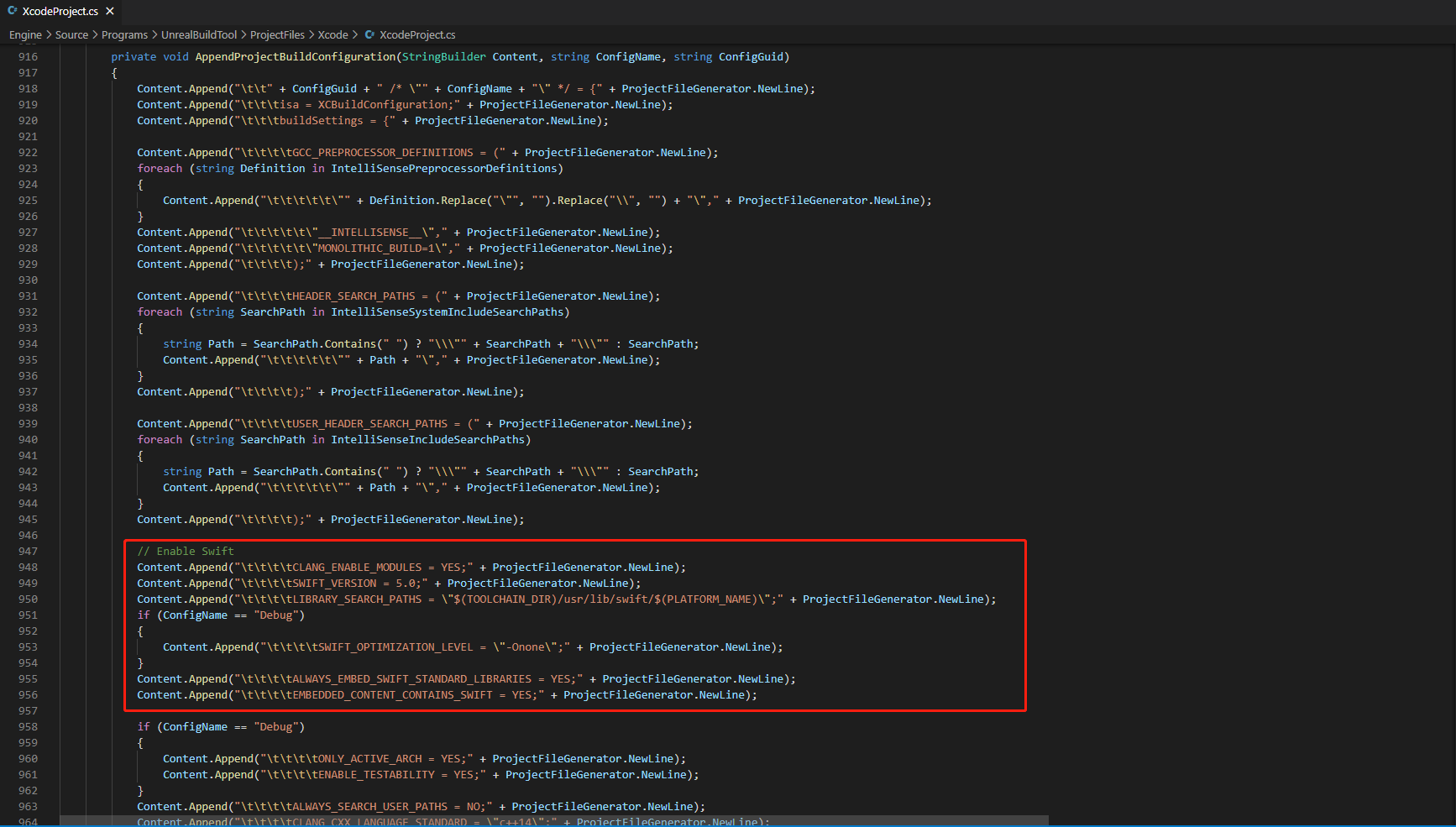
-
在 /Your_UE_Installation_Path/Engine/Source/Programs/UnrealBuildTool/Platform/IOS/IOSToolChain.cs 的
string GetLinkArguments_Global(LinkEnvironment LinkEnvironment)函数中添加以下代码。- Before XCode 12
- XCode 12 and later
// enable swift support
Result += " -rpath \"/usr/lib/swift\"";
Result += " -rpath \"@executable_path/Frameworks\"";
// /Applications/Xcode.app/Contents/Developer/Platforms/iPhoneOS.platform/Developer/SDKs/iPhoneOS.sdk/usr/lib/swift/
String swiftLibPath = String.Format(" -L {0}Platforms/{1}.platform/Developer/SDKs/{1}{2}.sdk/usr/lib/swift",
    Settings.Value.XcodeDeveloperDir,
    bIsDevice? Settings.Value.DevicePlatformName : Settings.Value.SimulatorPlatformName,
    Settings.Value.IOSSDKVersion);
Result += swiftLibPath;
Log.TraceInformation("Add swift lib path : {0}", swiftLibPath);
///Applications/Xcode.app/Contents/Developer/Toolchains/XcodeDefault.xctoolchain/usr/lib/swift/iphoneos
swiftLibPath = String.Format(" -L {0}Toolchains/XcodeDefault.xctoolchain/usr/lib/swift/{1}",
    Settings.Value.XcodeDeveloperDir,
    bIsDevice? Settings.Value.DevicePlatformName.ToLower() : Settings.Value.SimulatorPlatformName.ToLower());
Result += swiftLibPath;
Log.TraceInformation("Add swift lib path : {0}", swiftLibPath);
///Applications/Xcode.app/Contents/Developer/Toolchains/XcodeDefault.xctoolchain/usr/lib/swift-5.0/iphoneos
swiftLibPath = String.Format(" -L {0}Toolchains/XcodeDefault.xctoolchain/usr/lib/swift-5.0/{1}",
    Settings.Value.XcodeDeveloperDir,
    bIsDevice? Settings.Value.DevicePlatformName.ToLower() : Settings.Value.SimulatorPlatformName.ToLower());
Result += swiftLibPath;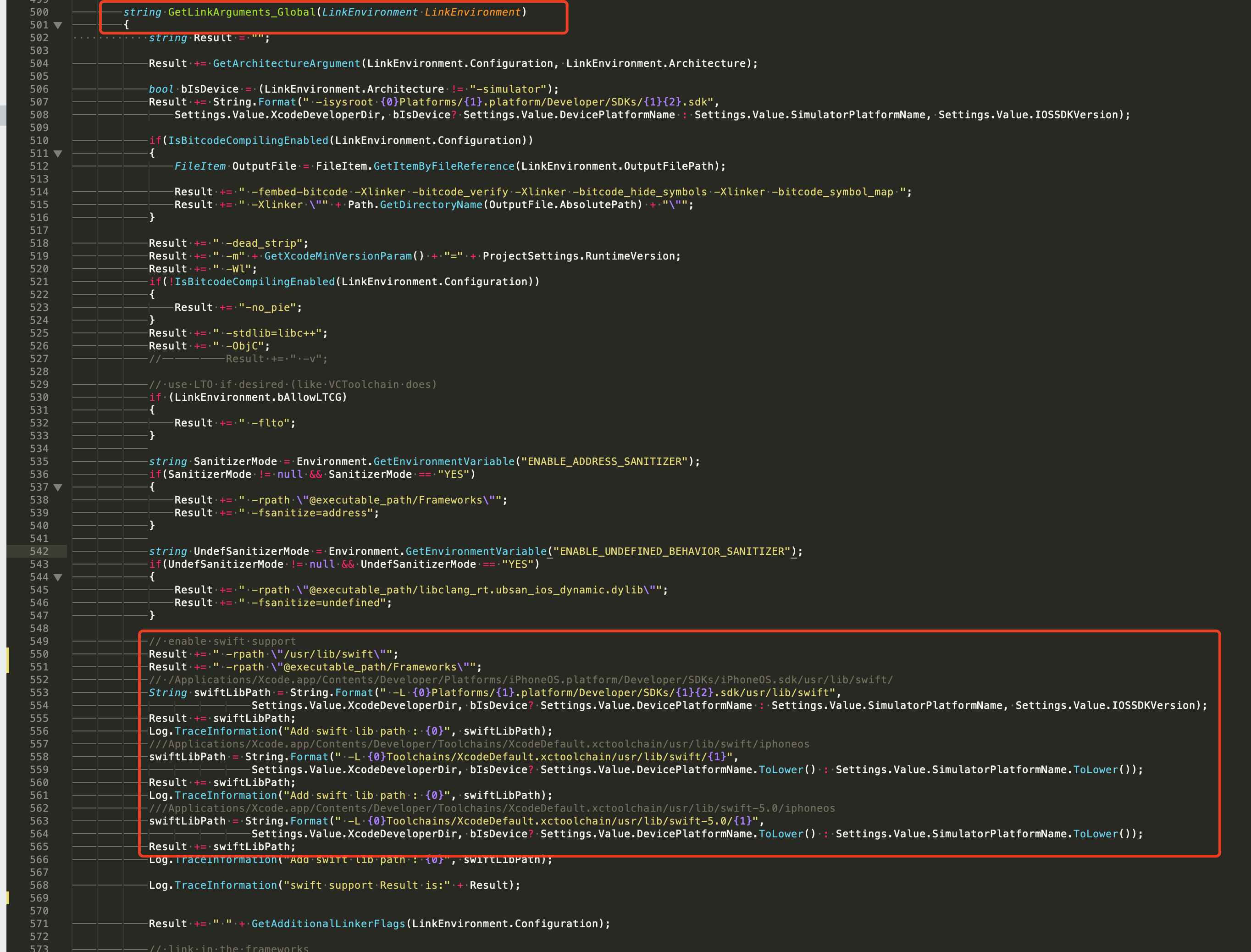
// This line of code must be prepended (see the sample image below for the position of the prepended code)
// enable swift support, make sure '/usr/lib/swift' goes before '@executable_path/Frameworks'
Result += " -rpath \"/usr/lib/swift\"";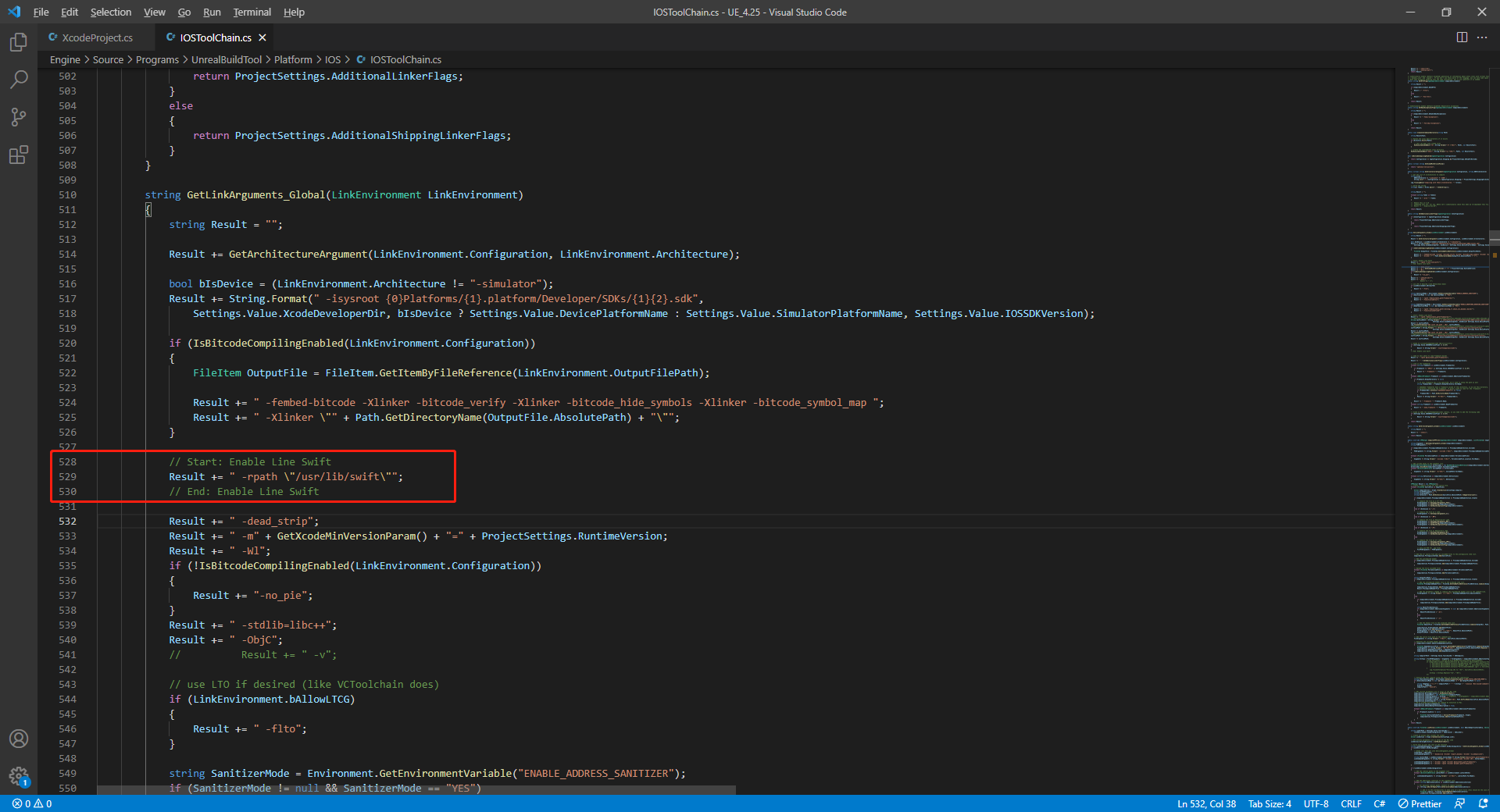
// enable swift support
Result += " -rpath \"@executable_path/Frameworks\"";
// /Applications/Xcode.app/Contents/Developer/Platforms/iPhoneOS.platform/Developer/SDKs/iPhoneOS.sdk/usr/lib/swift/
String swiftLibPath = String.Format(" -L {0}Platforms/{1}.platform/Developer/SDKs/{1}{2}.sdk/usr/lib/swift",
    Settings.Value.XcodeDeveloperDir,
    bIsDevice? Settings.Value.DevicePlatformName : Settings.Value.SimulatorPlatformName, Settings.Value.IOSSDKVersion);
Result += swiftLibPath;
Log.TraceInformation("Add swift lib path : {0}", swiftLibPath);
///Applications/Xcode.app/Contents/Developer/Toolchains/XcodeDefault.xctoolchain/usr/lib/swift/iphoneos
swiftLibPath = String.Format(" -L {0}Toolchains/XcodeDefault.xctoolchain/usr/lib/swift/{1}",
    Settings.Value.XcodeDeveloperDir,
    bIsDevice? Settings.Value.DevicePlatformName.ToLower() : Settings.Value.SimulatorPlatformName.ToLower());
Result += swiftLibPath;
Log.TraceInformation("Add swift lib path : {0}", swiftLibPath);
///Applications/Xcode.app/Contents/Developer/Toolchains/XcodeDefault.xctoolchain/usr/lib/swift-5.0/iphoneos
swiftLibPath = String.Format(" -L {0}Toolchains/XcodeDefault.xctoolchain/usr/lib/swift-5.0/{1}",
    Settings.Value.XcodeDeveloperDir,
    bIsDevice? Settings.Value.DevicePlatformName.ToLower() : Settings.Value.SimulatorPlatformName.ToLower());
Result += swiftLibPath;

// Xcode 12 adds the swiftCompatibility51 library, so you need to add the following code
if (Settings.Value.IOSSDKVersionFloat >= 14.0f)
{
        Result += String.Format(" -lswiftCompatibility51");
}
-
打开解决方案并重新编译
/Users/intl/UE4/UE_4.25/Engine/Source/Programs/UnrealBuildTool/UnrealBuildTool.sln。
4. 合并隐私清单
版本要求:Player Network SDK V1.22 及更高版本
从 2024 年春季开始,对于需更新或上传至 Apple App Store Connect 的应用,开发者需明确 注明使用原因,以展示该应用如何使用 required reason API(需提交使用原因的 API)。更多信息,请参见 即将发布的第三方 SDK 要求。
对于受影响的 Player Network SDK 插件,需要手动合并的包括 INTLFoundation、INTLCore、INTLGarena,其中 INTLGarena 只在项目确认接入 Garena 时需配置。
另外,INTLLine 已在 Player Network SDK 自动整合而无需额外操作。
由于其他第三方 SDK 的隐私清单尚未公布,目前 Player Network SDK 隐私清单中不包含对应的内容。要查看尚未发布插件的列表,请参见 iOS 17 隐私清单。
步骤
-
在 Player Network SDK 产物目录内找到所需插件的隐私清单
PrivacyInfo.xcprivacy。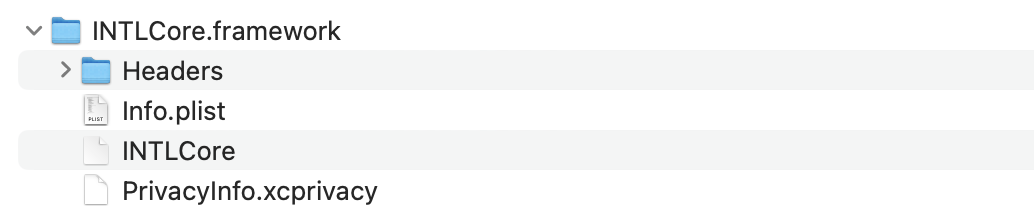
- Unity
- Unreal Engine
插件 路径 INTLFoundation /Plugins/iOS/INTLSDK/INTLFoundation/INTLFoundation.framework/PrivacyInfo.xcprivacy INTLCore /Plugins/iOS/INTLSDK/INTLCore/INTLCore.framework/PrivacyInfo.xcprivacy INTLGarena /Plugins/iOS/INTLSDK/INTLGarena/INTLGarena.framework/PrivacyInfo.xcprivacy 插件 路径 INTLFoundation /INTLSDK/Source/INTLFoundation/Libs/iOS/INTLFoundation/INTLFoundation.embeddedframework/INTLFoundation.framework/PrivacyInfo.xcprivacy INTLCore /INTLSDK/Source/INTLCore/Libs/iOS/INTLCore/INTLCore.embeddedframework/INTLCore.framework/PrivacyInfo.xcprivacy INTLGarena /INTLSDK/Source/INTLGarena/Libs/iOS/INTLGarena/INTLGarena.embeddedframework/INTLGarena.framework/PrivacyInfo.xcprivacy -
将 Player Network SDK 内的
PrivacyInfo.xcprivacy中的4个节点,用于与游戏项目内PrivacyInfo.xcprivacy中对应的内容进行比较,并根据以下条件合并。

-
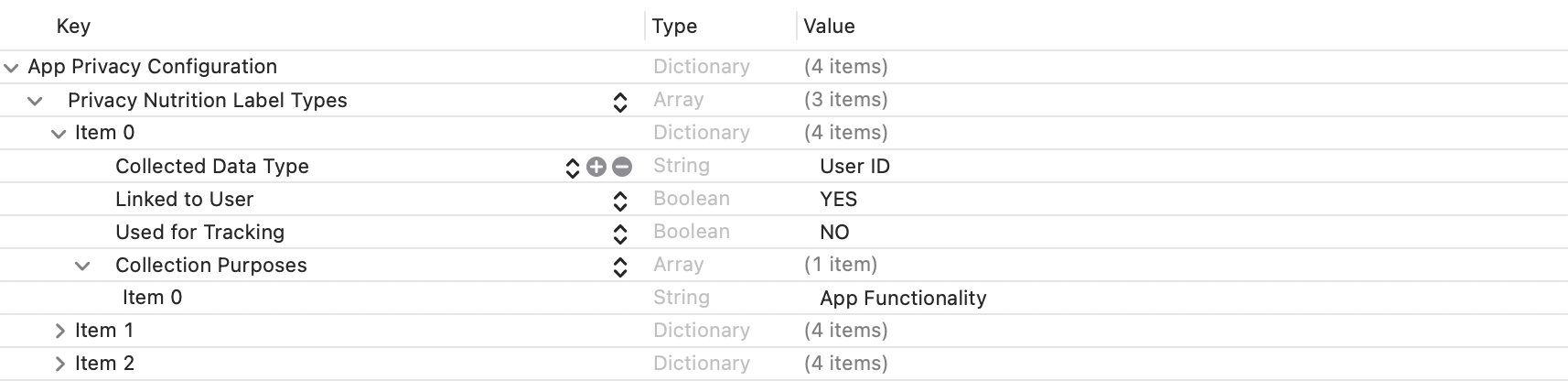
Privacy Nutrition Label Types (NSPrivacyCollectedDataTypes)为使用数据的类型描述节点:
比较各个item的Collected Data Type (NSPrivacyCollectedDataType),有不同值则添加至游戏项目文件。
若存在相同值则比较Collection Purposes (NSPrivacyCollectedDataTypePurposes),有不同值则添加至游戏项目文件。
-
Privacy Tracking Domains (NSPrivacyTrackingDomains)为域名追踪列表节点:
比较对应节点,有不同值则添加至游戏项目文件。 -
Privacy Tracking Enabled (NSPrivacyTracking)描述是否开启 App Tracking Transparency 功能:
比较对应节点,Player Network SDK 隐私清单的值为YES时修改游戏项目文件。 -
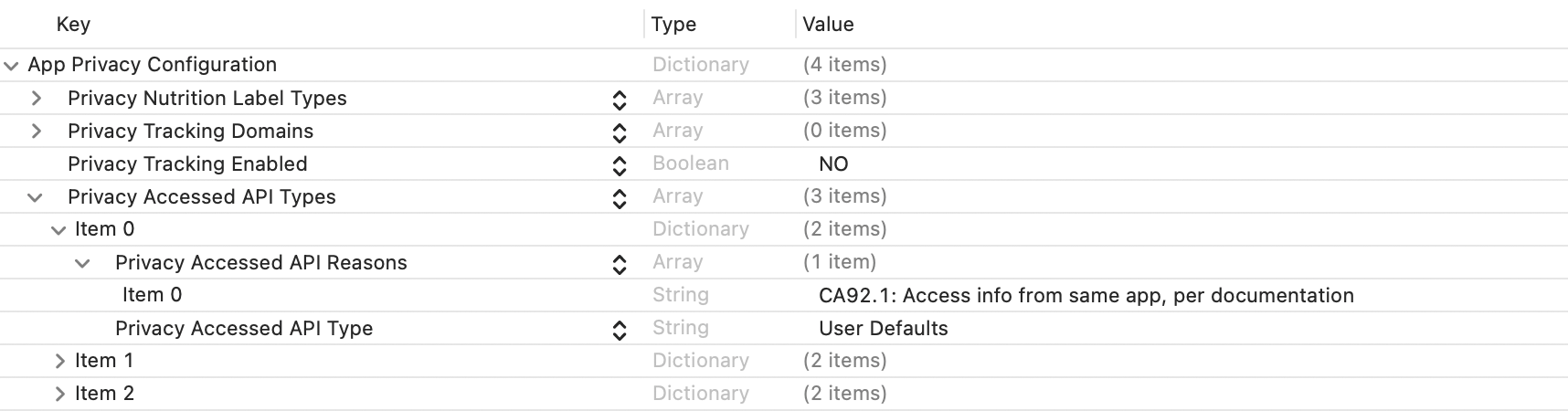
Privacy Accessed API Types (NSPrivacyAccessedAPITypes)为使用接口的类型描述节点:
比较各个item的Privacy Accessed API Type (NSPrivacyAccessedAPIType),有不同值则添加至游戏项目文件。
若存在相同值则比较Privacy Accessed API Reasons (NSPrivacyAccessedAPITypeReasons),有不同值则添加至游戏项目文件。
-
-
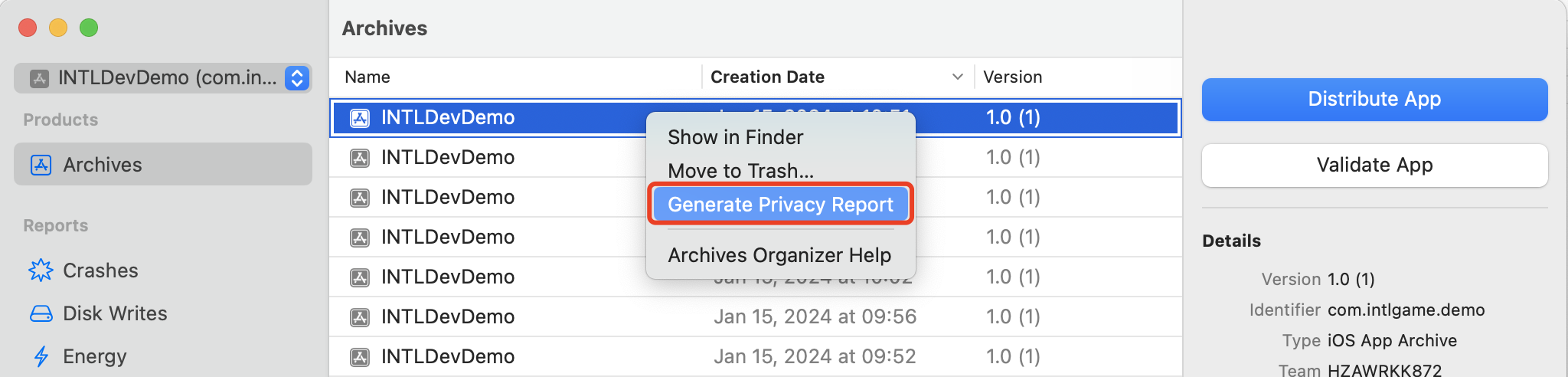
通过 Xcode 15 生成隐私报告来验证是否符合预期。
5. Player Network SDK 配置
手动修改 INTLConfig.ini 配置时,请联系 Player Network 助手确认内容变更是否符合预期,详见 SDK Config 须知。
请按照 INTLConfig.ini 的说明进行相应配置。
6. 初始化 Player Network SDK
在集成第三方渠道之前,必须先初始化 Player Network SDK。更多详情,请参见 初始化 SDK。
#include "INTLSDKAPI.h" // Include the INTL header file

void UExample::Init()
{
    UINTLSDKAPI::Init();
}
- SDK 1.26 及之后版本
- SDK 1.26 之前的版本
UE4.21 ~ UE4.27 & UE5 ~ UE5.5
UE4.21 ~ UE4.27 & UE5 ~ UE5.4
支持 64-bit 的 Windows 7、Windows 10、Windows 11 操作系统。
由于 Windows 平台的特性,游戏的安装目录不能含有英文字符分号(;),否则会导致游戏无法找到必要的 DLL,导致游戏运行失败。
如果 Windows 平台接入 Google、Facebook、LINE、Apple 等渠道,需要引入 WebView。
建议基于 Microsoft Visual C++ Redistributable 2015-2022 编译器运行。
-
Windows 7:
- 安装 Microsoft Visual C++ Redistributable packages 并添加
VC_redist.x64.exe /install /quiet /norestart命令到安装程序脚本。 - 安装 Windows 7 安全更新 (KB3063858)。
- 安装 Microsoft Visual C++ Redistributable packages 并添加
-
Windows 8 和 Windows 8.1:
安装 Microsoft Visual C++ Redistributable packages 并添加
VC_redist.x64.exe /install /quiet /norestart命令到安装程序脚本。
1. 将 Player Network SDK 添加到您的项目
-
解压 SDK 软件包。
-
将
INTLSDK文件夹复制到项目的Plugins文件夹中。
如果项目中没有Plugins文件夹,请创建一个。 -
打开项目的
{项目名称}.Build.cs文件,并按照示例将 Player Network SDK 添加到 Unreal Engine 中。public INTLSample(ReadOnlyTargetRules Target) : base(Target)
{
PrivateDependencyModuleNames.AddRange(new string[] {
"INTLCore",
"INTLFoundation",
"INTLConfig",
});
}
Player Network SDK package
├─INTLSDK
│  ├─INTLSDK.uplugin    // Player Network SDK plugins description files
│  ├─Resources          // Player Network SDK resources
│  └─Source             // Player Network SDK plugin modules. Each module contains its own Build.cs file, libraries, and interfaces.
│    ├─INTLApple
│    ├─INTLConfig       // Player Network SDK configurations
│    ├─INTLCore         // Player Network SDK Core module
│    ├─INTLDiscord
│    ├─INTLEpic
│    ├─INTLFacebook
│    ├─INTLFoundation
│    ├─INTLGoogle
│    ├─INTLKakao
│    ├─INTLLine
│    ├─INTLSteam
│    ├─INTLTwitter
│    └─INTLVK
├─LevelInfinite     // LI PASS APIs
└─Symbols           // Player Network SDK symbol table *.so files
INTLSDK/Source/INTLCore
└─INTLSDK
   ├─INTLSDK.uplugin
   ├─Resources
   └─Source
     ├─INTLConfig
     ├─INTLCore
     |  ├─INTLCore.Build.cs // INTLCore Build.cs file
     |  ├─Libs              // INTLCore libraries for different platforms which contain dll, lib, and other binary files.
     |  |  ├─Android
     |  |  ├─include
     |  |  ├─iOS
     |  |  ├─MacOS
     |  |  └─Win
     |  ├─Private           // Player Network SDK private folder
     |  └─Public            // Player Network SDK public interfaces
     |                      // INTLSDKAPI.h: Player Network SDK APIs
     |                      // INTLSDKPluginObserver.h: Player Network SDK observer classes
     |                      // INTLSDKPluginDefine.h: Player Network SDK data types
     |                      // INTLSDKOutputUtility.h: Player Network SDK utility to process callbacks
     |                      // INTLSDKBaseUserWidget.h: Player Network SDK base class for UserWidget which includes registration and deregistration APIs
     ├─INTLCustomer
     ├─INTLDiscord
     ├─INTLEpic
INTLSDK/Source/INTLConfig
└─INTLSDK
   ├─INTLSDK.uplugin
   ├─Resources
   └─Source
     ├─INTLConfig
     |  ├─Configs       // Player Network SDK configurations for different platform
     |  |  ├─Android
     |  |  |  └─INTLConfig_APL.xml  // Player Network SDK Android gradle configuration file
     |  |  ├─iOS
     |  |  |  └─INTLConfig_UPL.xml
     |  |  ├─Resources
     |  |  |  ├─APASConfig.ini      // APAS device level configuration file
     |  |  |  └─INTLConfig.ini      // Player Network SDK main configuration file
     |  ├─Encrypt
     |  ├─INTLConfig.Build.cs
     |  ├─INTLConfig.uplugin
     |  ├─Private
     |  ├─Public
     |  └─Resources
     ├─INTLCore
2. 更改缓存目录
默认情况下,Player Network SDK PC 用户和应用程序生成的缓存目录为:
C:/ProgramData/INTLC:/Users/{name}/AppData/Local/INTL/local/INTL。
在调用 InitSDK 之前,游戏开发者必须设置缓存目录。更多信息,请参见 更改用户数据文件夹目录 API。
// For example, game id is 11, and the game application name is INTLSDKDemo.
// Then the game invokes the interface like this:
UINTLSDKAPI::SetDefaultUserStorageDirectory("D:\\game_data\\")
// The data cache path for Player Network SDK will be D:\game_data\11\INTLSDKDemo\.
3. Player Network SDK 配置
手动修改 INTLConfig.ini 配置时,请联系 Player Network 助手确认内容变更是否符合预期,详见 SDK Config 须知。
请按照 INTLConfig.ini 的说明进行相应配置。
4. 初始化 Player Network SDK
在集成第三方渠道之前,必须先初始化 Player Network SDK。更多详情,请参见 初始化 SDK。
#include "INTLSDKAPI.h" // Include the INTL header file

void UExample::Init()
{
    UINTLSDKAPI::Init();
}
为了释放 Player Network SDK 的全局状态,建议在编辑器中的应用程序生命周期结束时重启或关闭 SDK。
有关上述 Windows 专用 API 的更多详情,请参见 Restart(重启) 和 ShutDown(关闭)。
由于主机游戏多半使用 Windows 来进行开发,游戏的安装目录不能含有英文字符分号(;),否则会导致游戏无法找到必要的 DLL,导致游戏运行失败。
对于 Nintendo Switch 平台,Switch Nintendo SDK >= 18.3.1 Unreal,Engine引擎版本 >= UE5.5
对于 PlayStation 5 平台,PS5 SDK >= 9.00.00,Unreal Engine引擎版本 >= UE5.5
对于 Xbox Series X|S 平台,GDK version >= 231003,Unreal Engine引擎版本 >= UE5.5
对于 WinGDK 平台,GDK version >= 202504,Unreal Engine引擎版本 >= UE5.6
1. 将 Player Network SDK 添加到您的项目
-
解压 SDK 软件包。
-
将
INTLSDK文件夹复制到项目的Plugins文件夹中。
如果项目中没有Plugins文件夹,请创建一个。 -
打开项目的
{项目名称}.Build.cs文件,并按照示例将 Player Network SDK 添加到 Unreal Engine 中。public INTLSample(ReadOnlyTargetRules Target) : base(Target)
{
PrivateDependencyModuleNames.AddRange(new string[] {
"INTLCore",
"INTLFoundation",
"INTLConfig",
});
}
Player Network SDK package
├─INTLSDK
│  ├─INTLSDK.uplugin    // Player Network SDK plugins description files
│  ├─Resources          // Player Network SDK resources
│  └─Source             // Player Network SDK plugin modules. Each module contains its own Build.cs file, libraries, and interfaces.
│    ├─INTLApple
│    ├─INTLConfig       // Player Network SDK configurations
│    ├─INTLCore         // Player Network SDK Core module
│    ├─INTLDiscord
│    ├─INTLEpic
│    ├─INTLFacebook
│    ├─INTLFoundation
│    ├─INTLGoogle
│    ├─INTLKakao
│    ├─INTLLine
│    ├─INTLSteam
│    ├─INTLTwitter
│    └─INTLVK
├─LevelInfinite     // LI PASS APIs
└─Symbols           // Player Network SDK symbol table *.so files
INTLSDK/Source/INTLCore
└─INTLSDK
   ├─INTLSDK.uplugin
   ├─Resources
   └─Source
     ├─INTLConfig
     ├─INTLCore
     |  ├─INTLCore.Build.cs // INTLCore Build.cs file
     |  ├─Libs              // INTLCore libraries for different platforms which contain dll, lib, and other binary files.
     |  |  ├─Android
     |  |  ├─include
     |  |  ├─iOS
     |  |  ├─MacOS
     |  |  └─Win
     |  ├─Private           // Player Network SDK private folder
     |  └─Public            // Player Network SDK public interfaces
     |                      // INTLSDKAPI.h: Player Network SDK APIs
     |                      // INTLSDKPluginObserver.h: Player Network SDK observer classes
     |                      // INTLSDKPluginDefine.h: Player Network SDK data types
     |                      // INTLSDKOutputUtility.h: Player Network SDK utility to process callbacks
     |                      // INTLSDKBaseUserWidget.h: Player Network SDK base class for UserWidget which includes registration and deregistration APIs
     ├─INTLCustomer
     ├─INTLDiscord
     ├─INTLEpic
INTLSDK/Source/INTLConfig
└─INTLSDK
   ├─INTLSDK.uplugin
   ├─Resources
   └─Source
     ├─INTLConfig
     |  ├─Configs       // Player Network SDK configurations for different platform
     |  |  ├─Android
     |  |  |  └─INTLConfig_APL.xml  // Player Network SDK Android gradle configuration file
     |  |  ├─iOS
     |  |  |  └─INTLConfig_UPL.xml
     |  |  ├─Resources
     |  |  |  ├─APASConfig.ini      // APAS device level configuration file
     |  |  |  └─INTLConfig.ini      // Player Network SDK main configuration file
     |  ├─Encrypt
     |  ├─INTLConfig.Build.cs
     |  ├─INTLConfig.uplugin
     |  ├─Private
     |  ├─Public
     |  └─Resources
     ├─INTLCore
2. Player Network SDK 配置
手动修改 INTLConfig.ini 配置时,请联系 Player Network 助手确认内容变更是否符合预期,详见 SDK Config 须知。
请按照 INTLConfig.ini 的说明进行相应配置。
3. 初始化 Player Network SDK
在集成第三方渠道之前,必须先初始化 Player Network SDK。更多详情,请参见 初始化 SDK。
#include "INTLSDKAPI.h" // Include the INTL header file

void UExample::Init()
{
    UINTLSDKAPI::Init();
}
步骤2:验证 Player Network SDK 接入成功
- 修改 INTLConfig.ini 文件中
INTL Log节点下的配置。
[INTL Log]
LOG_LEVEL = 1
LOG_ENCRYPT_ENABLE = 0
LOG_COMPRESS_ENABLE = 0
LOG_CONSOLE_OUTPUT_ENABLE = 1
LOG_FILE_OUTPUT_ENABLE = 1
- 运行程序,当日志中显示
Init INTL SDK success.时,表示接入成功。

