Deep Link
Android Deep Link Configuration
- Redirect users to specific in-app content via URI.
- Android 6.0+ (API level 23) supports Android App Links (web links with auto verification). With the
autoVerifyattribute, the system will automatically verify whether the app matches the host domain specified in theintent-filter. - Players can manually change system settings to select the default app to handle this type of link.
Step 1: Configure SDK
Add intent-filter in AndroidManifest.xml:
scheme: Protocol type (e.g.,lipass,http,https)host: Domain (e.g.,app,www.levelinfinite.com)pathPrefix(optional): Page path prefix, used to distinguish multi-store packages
Custom Protocol:
<intent-filter>
    <action android:name="android.intent.action.VIEW" />
    <category android:name="android.intent.category.DEFAULT" />
    <category android:name="android.intent.category.BROWSABLE" />
    <data
    android:scheme="http"
    android:host="sdk-deeplink-confs.intlgame.com"
    android:pathPrefix="/channelA" />
</intent-filter>
HTTP/HTTPS Web Link:
<intent-filter>
    <action android:name="android.intent.action.VIEW" />
    <category android:name="android.intent.category.DEFAULT" />
    <category android:name="android.intent.category.BROWSABLE" />
    <data android:scheme="https"
          android:host="www.levelinfinite.com"
          android:pathPrefix="/app" />
</intent-filter>
Android App Link (Android 6.0+, with auto verification):
<intent-filter android:autoVerify="true">
    <action android:name="android.intent.action.VIEW" />
    <category android:name="android.intent.category.DEFAULT" />
    <category android:name="android.intent.category.BROWSABLE" />
    <data android:scheme="https"
          android:host="www.levelinfinite.com"
          android:pathPrefix="/app" />
</intent-filter>
Handling Intent Data:
- Unity
- Unreal Engine
Obtain deep link data in onCreate and onNewIntent of MainActivity.
@Override
public void onCreate(Bundle savedInstanceState) {
    super.onCreate(savedInstanceState);
    setContentView(R.layout.main);

    Intent intent = getIntent();
    Uri data = intent.getData();

    if (data != null) {
        INTLSDK.Deeplink.receive(data.toString());
    }
}

public void onNewIntent(Intent intent) {
    super.onNewIntent(intent);
    INTLSDK.onNewIntent(intent);

    Uri appLinkData = intent.getData();
    if (appLinkData != null) {
        INTLSDK.Deeplink.receive(appLinkData.toString());
    }
}
Obtain deep link data in corresponding onCreate and onNewIntent within the game's XML file.
{/* GameActivity.java onCreate code */}
<gameActivityOnCreateAdditions>
    <insert>
      setFullScreen();
      RequestDynamicPermissions();
      INTLSDK.initialize(this);

      Intent appLinkIntent = getIntent();
      Uri appLinkData = appLinkIntent.getData();
      if (appLinkData != null) {
          INTLSDK.Deeplink.receive(appLinkData.toString());
      }
    </insert>
</gameActivityOnCreateAdditions>

{/* GameActivity.java OnNewIntent code */}
<gameActivityOnNewIntentAdditions>
    <insert>
      INTLSDK.onNewIntent(newIntent);
      Uri appLinkData = newIntent.getData();
      if (appLinkData != null) {
          INTLSDK.Deeplink.receive(appLinkData.toString());
      }
    </insert>
</gameActivityOnNewIntentAdditions>
Step 2: Configure Website (App Links only)
Deploy assetlinks.json file to:
https://domain.name/.well-known/assetlinks.json
File format:
[{
  "relation": ["delegate_permission/common.handle_all_urls"],
  "target": {
    "namespace": "android_app",
    "package_name": "com.example",
    "sha256_cert_fingerprints": ["Your_SHA256_fingerprint"]
  }
}]
Generate SHA-256 fingerprint:
keytool -list -v -keystore my-release-key.keystore
Multi-store channel package configuration (optional)
- Channel package: different APKs for the same app, with different package names for different distribution channels.
- pathPrefix: distinguishes channels to ensure the correct APK is opened when clicking a deep link.
Configuration example:
[{
  "relation": ["delegate_permission/common.handle_all_urls"],
  "target": {
    "namespace": "android_app",
    "package_name": "com.example.puppies.app",
    "sha256_cert_fingerprints": ["14:6D:E9:83:C5:73:06:50:D8:EE:B9:95:2F:34:FC:64:16:A0:83:42:E6:1D:BE:A8:8A:04:96:B2:3F:CF:44:E5"]
  }
},
{
  "relation": ["delegate_permission/common.handle_all_urls"],
  "target": {
    "namespace": "android_app",
    "package_name": "com.example.monkeys.app",
    "sha256_cert_fingerprints": ["14:6D:E9:83:C5:73:06:50:D8:EE:B9:95:2F:34:FC:64:16:A0:83:42:E6:1D:BE:A8:8A:04:96:B2:3F:CF:44:E5"]
  }
}]
Step 3: Testing
- Click the link in an Android text editor (such as Notes).
- Check if the logs contain:
[ (intl_deeplink_manager.cpp:37) Receive]

- Use adb to test link redirection:
adb shell am start -W -a android.intent.action.VIEW -d "lipass://app/xxxxxx" com.example.android_app
调用网页 URI 时,Android 系统会依序尝试执行下列操作,直到请求成功为止:
- If you have already specified the default app to handle this type of link, the app will open.
- Open the only app that can handle this type of link.
- Allow players to select an app to open from the dialog.
WeChat Limitation: Links in the WeChat built-in browser will not redirect to the app
iOS Universal Link Configuration
Step 1: Configure Web Server
Deploy the apple-app-site-association file to the root directory of the web server. Path:
https://domain.name/.well-known/apple-app-site-association
{
    "applinks": {
        "apps": [],
        "details": [{
            "appID": "TEAMID.com.your.bundleid",
            "paths": ["/app/*"]
        }]
    }
}
Key points:
appsmust be an empty array.appID= Team ID + Bundle IDpathssupports wildcards (* and ?)- Use "NOT " prefix to exclude paths (e.g.,
"NOT /videos/wwdc/2010/*") - Path strings must be case-sensitive.
- The system evaluates paths in the specified order and stops when a match is found.
- Re-signed App: Must also add the appID and paths of the re-signed certificate to the configuration.
Path configuration examples:
- Entire site:
"*" - Specific link:
"/wwdc/news/" - Specific part of site:
"/videos/wwdc/2015/*" - Combined wildcards:
"/foo/*/bar/201?/mypage"
Step 2: Enable Associated Domains
In your Apple Developer Account:
- Enable the Associated Domains capability.
- Regenerate the provisioning profile.
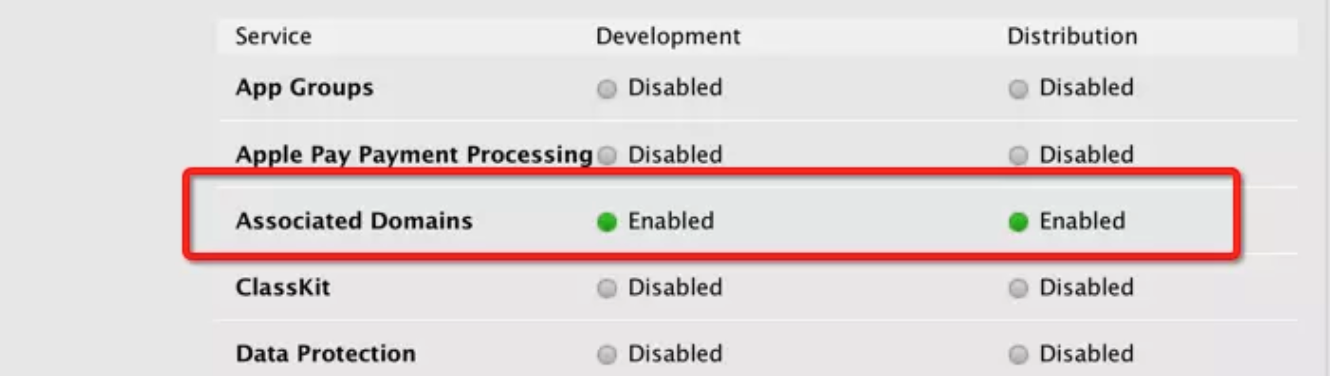
In Xcode:
- Add the Associated Domains capability.
- Add the domain:
applinks:your_link(no https:// required)
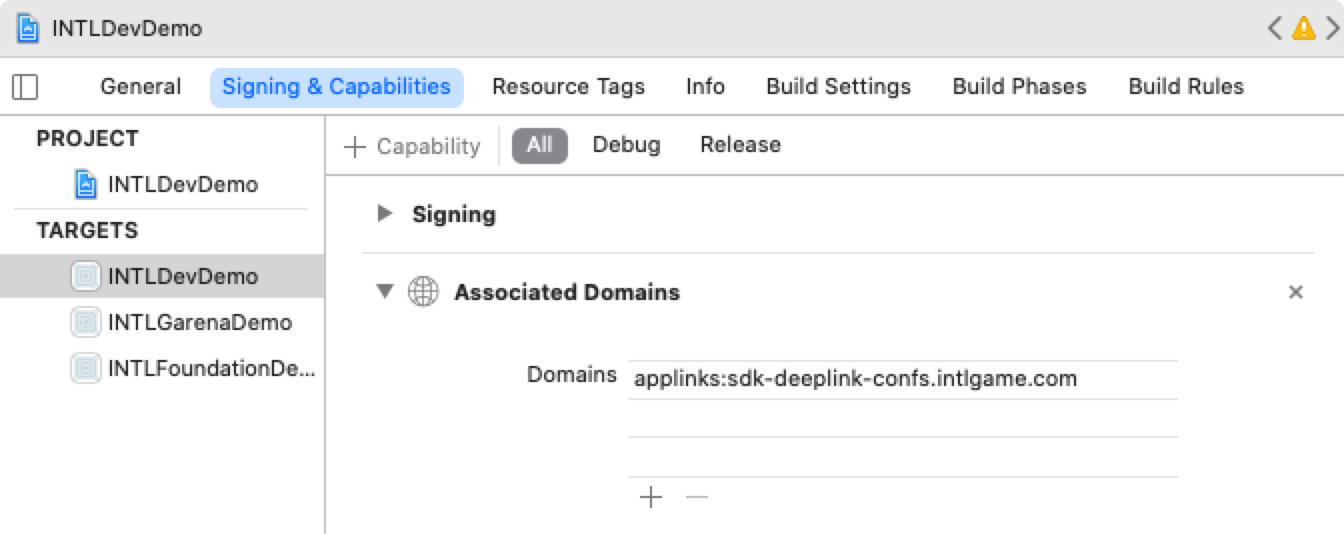
Or configure via code:
- Unity
- Unreal Engine
Add the following code in PostProcess:
#if UNITY_2019_3_OR_NEWER
    var capManager = new UnityEditor.iOS.Xcode.ProjectCapabilityManager(projPath, entitlementsFilePath, targetGuid: targetProjectName);
#else
    var capManager = new UnityEditor.iOS.Xcode.ProjectCapabilityManager(projPath, entitlementsFilePath, targetProjectName);
#endif

capManager.AddAssociatedDomains(new string[] { "applinks:your_link" });
- Modify the file under the Unreal Engine path:
/Your_UE_Installation_Path/Engine/Source/Programs/UnrealBuildTool/Platform/IOS/IOSExports.cs
Add the following code:
   // for AssociatedDomains with Apple
   bool bEnableAssociatedDomains = false;
   string domainsListString = null;
   PlatformGameConfig.GetString("/Script/IOSRuntimeSettings.IOSRuntimeSettings", "AssociatedDomains", out domainsListString);
   PlatformGameConfig.GetBool("/Script/IOSRuntimeSettings.IOSRuntimeSettings", "bEnableAssociatedDomains", out bEnableAssociatedDomains);
   if(bEnableAssociatedDomains && domainsListString.Length > 0){
       Text.AppendLine("\t<key>com.apple.developer.associated-domains</key>");
       Text.AppendLine("\t<array>");
       string[] domainList = domainsListString.Split(',');
       for(int i = 0;i<domainList.Count();i++)
       {
           Text.AppendLine(string.Format("<string>{0}</string>", domainList[i]));
       }
       Text.AppendLine("\t</array>");
   }
After modification, you need to rerun UnrealBuildTool.sln and regenerate the solution.
- Find
/Script/IOSRuntimeSettings.IOSRuntimeSettingsinDefaultEngine.iniand add:
   bEnableAssociatedDomains=True
   AssociatedDomains=applinks:your_link
Step 3: Configure SDK
- Unity
- Unreal Engine
Due to the current INTLCore, the hook does not work on this entry method, so you should add the iOS lifecycle entry function in the UnityAppController.mm file of the UnityAppController class.
Currently, the XCodePostProcess.cs code already automatically adds the application:continueUserActivity:restorationHandler method during compiled post-processing (no additional code needed in the function).
Do not add lifecycle entry functions in subclasses of UnityAppController.Ensure that the entry function is in the same class as system lifecycle functions such as application:openURL:options:.
- (BOOL)application:(UIApplication *)application
continueUserActivity:(NSUserActivity *)userActivity
restorationHandler:(void(^)(NSArray<id<UIUserActivityRestoring>> * __nullable restorableObjects))restorationHandler {
    return YES;
}
Create an iOSAppDelegate Category in iOS, placed in INTLSDK/Source/INTLCore/Private/iOS.
This method uses Category and may be overridden by other SDKs; make sure the URL works properly.
Create a new file IOSAppDelegate+INTL.mm, with the following content:
# define WITH_INTLSDK 1

# if WITH_INTLSDK
# ifdef __APPLE__

# import <Foundation>
# import "IOSAppDelegate.h"//UE4

# include "CoreDelegates.h"//UE4
# include "INTLApplicationDelegate.h"

@interface IOSAppDelegate(INTLSDK)

@end

@implementation IOSAppDelegate(INTLSDK)
- (BOOL)application:(UIApplication *)application continueUserActivity:(NSUserActivity *)userActivity restorationHandler:(void (^)(NSArray * _Nullable))restorationHandler
{
    NSLog(@"IOSAppDelegate(INTLSDK) continueUserActivity ");
    return [[INTLApplicationDelegate sharedInstance] application:application continueUserActivity:userActivity restorationHandler:restorationHandler];
}
@end

# endif
# endif
Step 4: Testing
- Click the link in iOS Notes.
- The app should open and log:
INTLApplicationDelegate:continueUserActivity
若配置正确但链接不生效:尝试重启设备或重新安装应用
First time opening the app after installation or update:
- App sends a GET request to the configured domain to fetch the
apple-app-site-associationfile. - App registers the file with the system.
- WebView checks URLs against the registered configuration when opening URLs.
- If a universal link is registered, the app opens and triggers delegate.
- If not matched, WebView continues to redirect the URL.
WeChat Limitation: Links in the WeChat built-in browser will not redirect to the app

AppsFlyer OneLink Configuration
Cross-platform attribution link, supports deep linking and deferred deep linking.
Feature Description:
- Deep linking: App is installed, directly open the specific location in app.
- Deferred deep linking: App is not installed, redirect to app store for download. After installation, open and redirect to the specific location.
Step 1: Create App in AppsFlyer Console
Create your app following the AppsFlyer documentation Adding an app to AppsFlyer.
Step 2: Configure OneLink Template
- Create a template in AppsFlyer OneLink Management, record the template ID and subdomain.

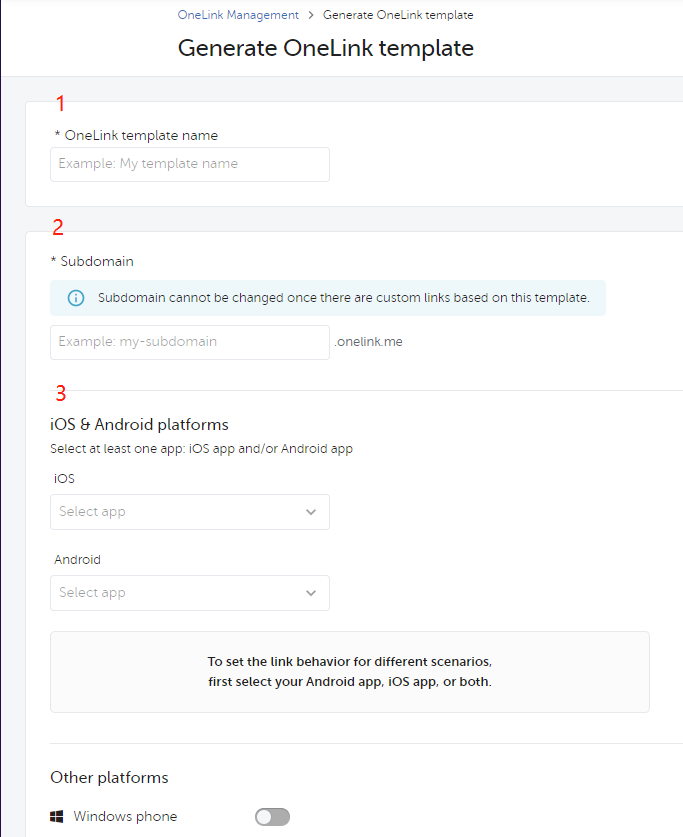
- Android: Add SHA-256 fingerprint in "Use App Links", and save the generated
intent-filtercode.
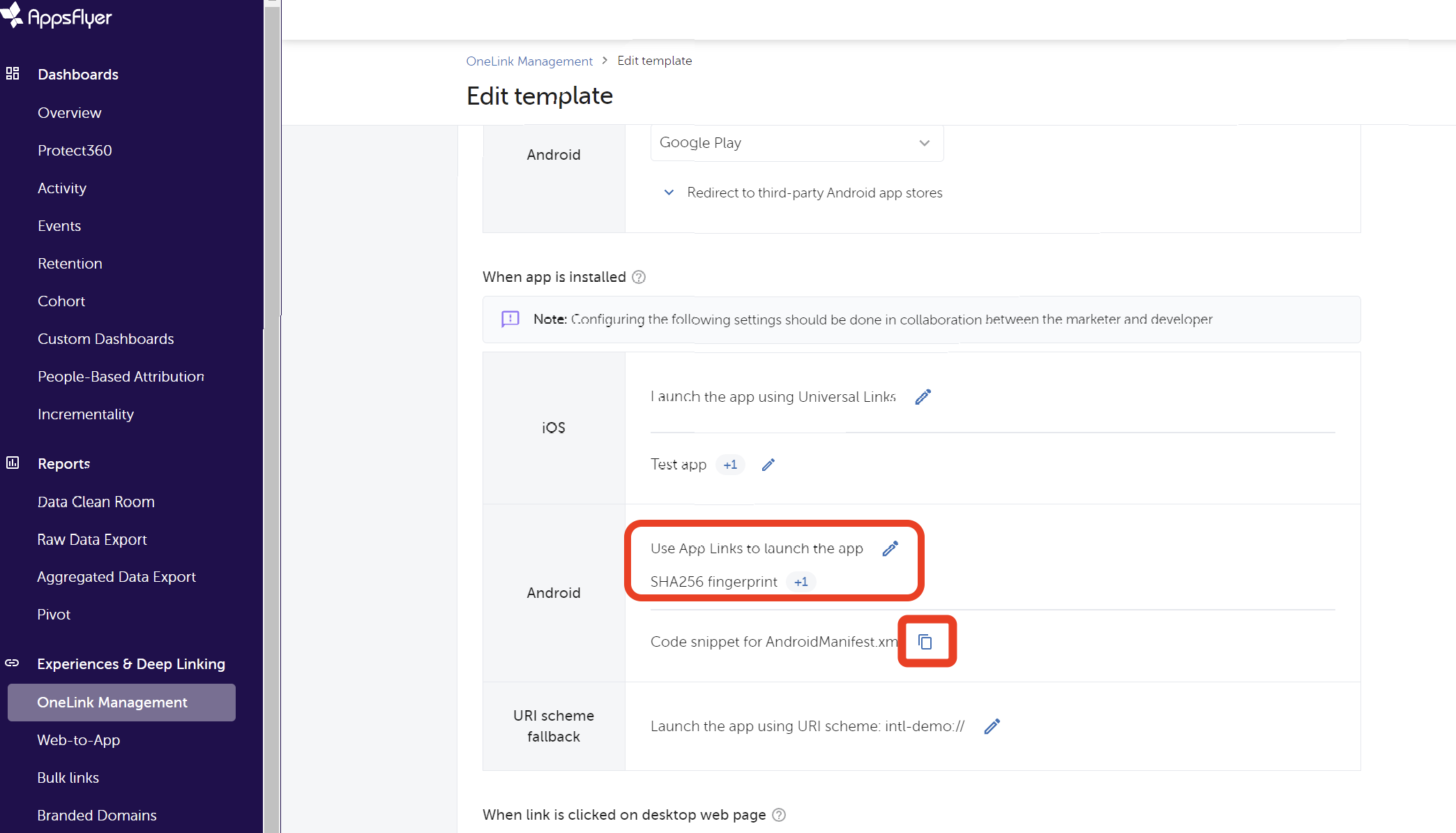
Step 3: Configure SDK
Android:
- Add in
INTLConfig.ini:
APPSFLYER_APP_INVITE_ONELINK_ID_ANDROID = {Template_ID}
- Add AppsFlyer to
[Android LifeCycle](if missing):
LIFECYCLE = WeChat,QQ,Twitter,Adjust,Facebook,Google,Line,VK,Garena,Discord,Dmm,Update,Firebase,WhatsApp,Permission,GooglePGS,AppsFlyer
- Add intent-filter in the game's MainActivity in
AndroidManifest.xmlto open the game, and replace{Subdomain}and{OneLink_Template_ID}.
    <activity
            android:name="com.intlgame.unity.MainActivity"
            android:configChanges="fontScale|keyboard|keyboardHidden|locale|mcc|mnc|navigation|orientation|screenLayout|screenSize|smallestScreenSize|touchscreen|uiMode"
            android:exported="true"
            android:label="@string/app_name"
            android:launchMode="singleTask">
            <intent-filter android:autoVerify="true">
                <action android:name="android.intent.action.VIEW" />
                <category android:name="android.intent.category.DEFAULT" />
                <category android:name="android.intent.category.BROWSABLE" />
                <data
                    android:host="{Subdomain}.onelink.me"
                    android:pathPrefix="/{OneLink_Template_ID}"
                    android:scheme="https" />
            </intent-filter>
    </activity>
iOS:
- Add in
INTLConfig.ini:
APPSFLYER_APP_INVITE_ONELINK_ID_IOS = {Template_ID}
- Add subdomain to Associated Domains:
- Unity: Modify
XCodePostProcess.cs, add
capManager.AddAssociatedDomains(new string[] { "appslinks:subdomain.onelink.me"});- UE: Add subdomain in
AssociatedDomainsofDefaultEngine.ini:
AssociatedDomains=appslinks:subdomain.onelink.me - Unity: Modify
Step 4: Call OneLink Interface
Set OneLink callback:
- Unity
- Unreal Engine
INTLAPI.AddExtendResultObserver(OnExtendEvent); // Set callback

public void OnExtendEvent(INTLExtendResult extendResult)
{
    if ("OnOneLinkResult".Equals(extendResult.ExtendMethodName)) // OneLink click callback
    {
        if (extendResult.RetCode == 0) // OneLink click callback succeeded
        {
            string jsonParameter = extendResult.ExtraJson; // Parameters returned by AF after clicking OneLink
            // TODO: Handle OneLink Parameter
        }
        else // OneLink click callback failed
        {
            // TODO: handle OneLink Failed result
        }
    }
}
- Callback class inherits
IINTLPluginObserverclass - Implement
IINTLPluginObserverclass methods in the callback class as needed.
FINTLExtendEvent extendEvent;
extendEvent.AddUObject(this, &UFriendWindow::OnExtendResult_Implementation);

void UFriendWindow::OnExtendResult_Implementation(FINTLExtendResult ret) {
    if (ret.ExtendMethodName.Equals(TEXT("OnOneLinkResult"))) // OneLink click callback
    {
        if (ret.RetCode == 0) // OneLink click callback succeeded
        {
            FString jsonParameter = ret.ExtraJson; // Parameters returned by AF after clicking OneLink
            // TODO: Handle OneLink Parameter
        }
        else // OneLink click callback failed
        {
            // TODO: handle OneLink Failed result
        }
    }
}
Set the callback for the user clicking the shared OneLink:
- Unity
- Unreal Engine
The generation and clicking of OneLink share a callback. They can be distinguished by parameters in INTLExtendResult.
    INTLAPI.AddExtendResultObserver(OnExtendEvent);//Setup callback
    public void OnExtendEvent(INTLExtendResult extendResult)
    {
        if ("OnOneLinkResult".Equals(extendResult.ExtendMethodName))//OneLink click callback
        {
            if (extendResult.RetCode == 0)//OneLink click callback successful
            {
                string jsonParameter = extendResult.ExtraJson;//Parameters returned by AF after clicking OneLink
                //TODO:Handle OneLink Parameter
            }
            else//OneLink click callback failed
            {
                //TODO: handle OneLink Failed result
            }
        }
    }
FINTLExtendEvent extendEvent;
extendEvent.AddUObject(this, &UFriendWindow::OnExtendResult_Implementation);

void UFriendWindow::OnExtendResult_Implementation(FINTLExtendResult ret) {
  if (ret.ExtendMethodName.Equals(TEXT("OnOneLinkResult")))//OneLink click callback
  {
    if (ret.RetCode == 0)// OneLink click callback successful
    {
      FString jsonParameter = ret.ExtraJson;// Parameters returned by AF after clicking OneLink
      //TODO:Handle OneLink Parameter
    }
    else// OneLink click callback failed
    {
      //TODO: handle OneLink Failed result
    }
  }

}
Refer to the sample code to generate OneLink, and modify parameters as needed.:
- Unity
- Unreal Engine
StringBuilder sb = new StringBuilder();
        sb.Append("{");
        sb.Append("\"deep_link_value\":\"abc\"").Append(","); //<TARGET_VIEW>

        sb.Append("\"deep_link_sub1\":\"1234\"").Append(",");//<PROMO_CODE>
        sb.Append("\"deep_link_sub2\":\"1234\"").Append(",");//<REFERRER_ID(openid)>
        sb.Append("\"channel\":\"mobile_share\"").Append(",");//Channel
        sb.Append("\"campaign\":\"summer_sale\"");//Campaign
        //Other parameters, optional
        sb.Append("\"deep_link_sub3\":\"1234\"").Append(",");
        sb.Append("\"deep_link_sub4\":\"1234\"").Append(",");
        sb.Append("\"deep_link_sub5\":\"1234\"").Append(",");
        sb.Append("\"deep_link_sub6\":\"1234\"").Append(",");
        sb.Append("\"deep_link_sub7\":\"1234\"").Append(",");
        sb.Append("\"deep_link_sub8\":\"1234\"").Append(",");

        sb.Append("\"af_sub4\":\"12324\"").Append(",");
        sb.Append("\"af_sub5\":\"dfasdf\"").Append(",");

        sb.Append("}");
        String paramsJsonString = sb.ToString();
        INTLExtend.Invoke("AppsFlyer", "generateInviteLinkUrl", paramsJsonString);
        FString ParamsJsonString = TEXT("");
        const TSharedRef<TJsonWriter<>> JsonWriter = TJsonWriterFactory<>::Create(&ParamsJsonString);
        JsonWriter->WriteObjectStart();
        JsonWriter->WriteValue(TEXT("deep_link_value"),TEXT("abc"));

        JsonWriter->WriteValue(TEXT("deep_link_sub1"),TEXT("1234"));
        JsonWriter->WriteValue(TEXT("deep_link_sub2"),TEXT("1234"));

        JsonWriter->WriteValue(TEXT(""),TEXT("1234"));
        JsonWriter->WriteValue(TEXT(""),TEXT("1234"));

        JsonWriter->WriteValue(TEXT("deep_link_sub3"),TEXT("1234"));
        JsonWriter->WriteValue(TEXT("deep_link_sub4"),TEXT("1234"));
        JsonWriter->WriteValue(TEXT("deep_link_sub5"),TEXT("1234"));
        JsonWriter->WriteValue(TEXT("deep_link_sub6"),TEXT("1234"));
        JsonWriter->WriteValue(TEXT("deep_link_sub7"),TEXT("1234"));
        JsonWriter->WriteValue(TEXT("deep_link_sub8"),TEXT("1234"));

        JsonWriter->WriteValue(TEXT("af_sub4"),TEXT("1234"));
        JsonWriter->WriteValue(TEXT("af_sub5"),TEXT("dfasdf"));

        JsonWriter->WriteObjectEnd();
        JsonWriter->Close();

        UINTLSDKAPI::ExtendInvoke(EINTLLoginChannel::kChannelAppsFlyer,TEXT("generateInviteLinkUrl"),
Step 5: Test Integration
- Enter the AppsFlyer console.
- In the left sidebar, click SDK Integration Tests.
- Select the application to test and click Run test.
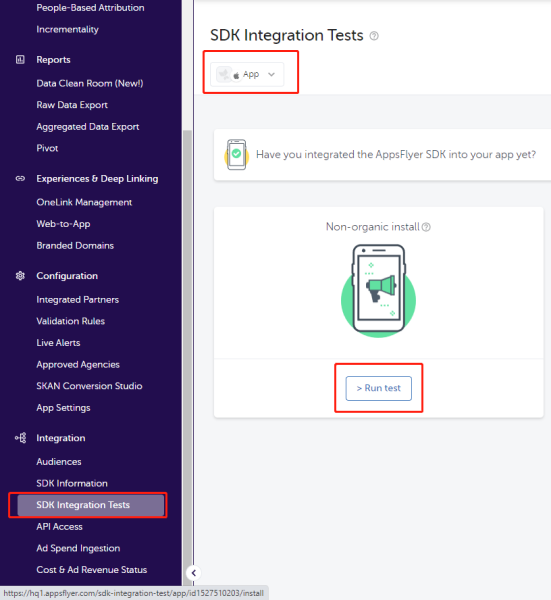
- On the Run non-organic install test page, select the test device and choose Other.
- Scan the QR code and install the app.
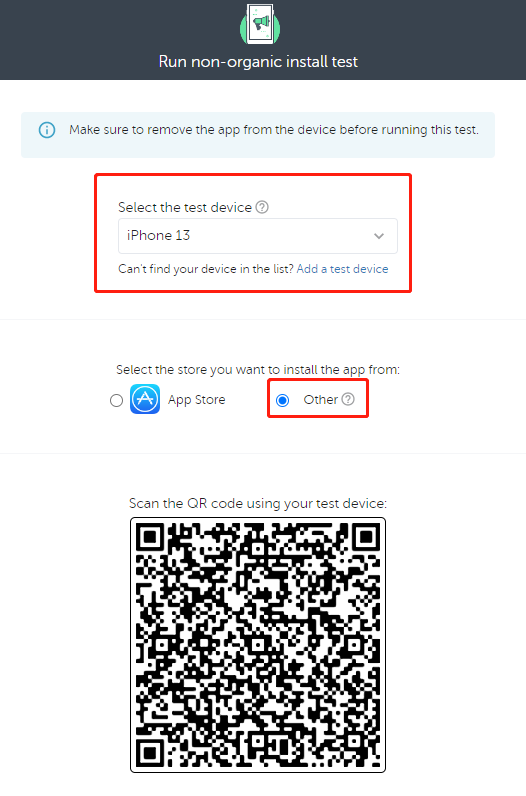
To test activation again, remove the application and restart the test.
Client Interface
Deep Link Observer
- Unity
- Unreal Engine
| API | Function Definition |
|---|---|
| SetDeepLinkObserver | Set a deep link callback to notify the game engine layer whether data has arrived. Upon receiving a callback, manually call the Fetch function to retrieve the data. |
| RemoveDeepLinkObserver | Remove the deep link callback. |
| API | Function Definition |
|---|---|
| SetDeepLinkObserver | Set the callback for the INTL deep link module BaseResult to notify the game engine layer whether data has arrived. After receiving the callback, you need to manually call the Fetch function to obtain the data. |
| GetDeepLinkObserver | Obtain the callback for BaseResult. |
| OnDeepLinkResult_Implementation | Implement the callback for INTL deep link BaseResult. |
Fetch
Fetch interface retrieves cached deep link data from the SDK.For more information, see:

