Web Login Integration
Quick Start
Step 1: Integrate SDK
During the project debugging stage, the SDK debug version package can be integrated, which is only for integration testing.For project launch, integrate the official version of the SDK package.
Currently supports the npm package method and CDN method
- npm
- CDN
// To use LI PASS function, ensure the version is greater than 1.16.0
$ npm install @intlsdk/account-api
// SDK debug version package
<script src="https://test-common-web.intlgame.com/sdk-cdn/account-api/latest/index.umd.js"></script>

// SDK official version package
<script src="https://common-web.intlgame.com/sdk-cdn/account-api/latest/index.umd.js"></script>
Step 2: Using SDK
During integration testing, set env to test environment; Set env to the corresponding official environment when the project goes live.
Parameters vary for different functions.
LI PASS Login Related
const accountApi = new IntlgameAccountApi({
  env: "test", // Environment where the SDK runs
  gameID: 11, // Game ID configured in Player Network
  appID: "", // APP ID configured in Player Network
  accountPlatType: 131, // LI PASS platform ID
  langType: "en", // Language
});
| Parameter | Type | Description | Remark |
|---|---|---|---|
| env | string | SDK environment For more information, see Obtain Deployment Cluster Information. | Required |
| gameID | number | Unique Game ID in Player Network | Required |
| appID | string | App ID ACCOUNT_APP_ID assigned by the Player Network Console | Required |
| accountPlatType | number | Account platform type, used to identify different account platforms ACCOUNT_PLAT_TYPE assigned by the Player Network Console, LI PASS is 131 | Required |
| hostCAcc | string | Required if using LI PASS, pass https://test-web-pass.intlgame.com for test environmentPass https://li-sg.intlgame.com for official environment | LI PASS login is required |
| langType | string | Language type For more information, see Language Type Definition | Required |
Third-party Channel Related
const accountApi = new IntlgameAccountApi({
  env: "test", // Environment where the SDK runs. See 'env explanation' below
  gameID: 11,
});
| Parameter | Type | Description | Remark |
|---|---|---|---|
| env | string | SDK environment For more information, see Obtain Deployment Cluster Information. | Required |
| gameID | number | Unique Game ID in Player Network | Required |
Supported Channels
The current Player Network SDK supports the following channels (not limited to):
Custom Account
const accountApi = new IntlgameAccountApi({
  env: "test", // Environment where the SDK runs
  gameID: 11, // Game ID configured in Player Network
  appID: "", // APP ID configured in Player Network
  accountPlatType: xxx, // Account platform type
  langType: "en", // Language
});
| Parameter | Type | Description | Remark |
|---|---|---|---|
| env | string | SDK environment For more information, see Obtain deployment cluster information. | Required |
| gameID | number | Unique Game ID in Player Network | Required |
| appID | string | App ID ACCOUNT_APP_ID assigned by the Player Network Console | Required |
| accountPlatType | number | Account platform type, used to identify different account platforms | Required |
| langType | string | Language type For more information, see Language Type Definition - Self-Built Account | Required |
Flow Chart
Account Password Registration
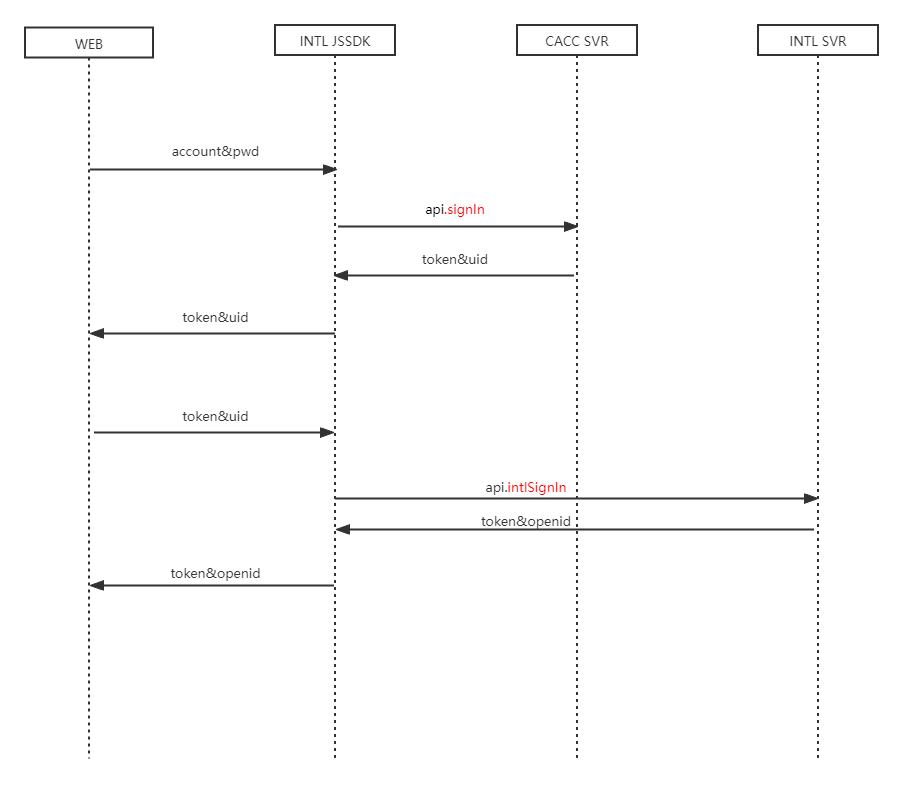
Account Registration
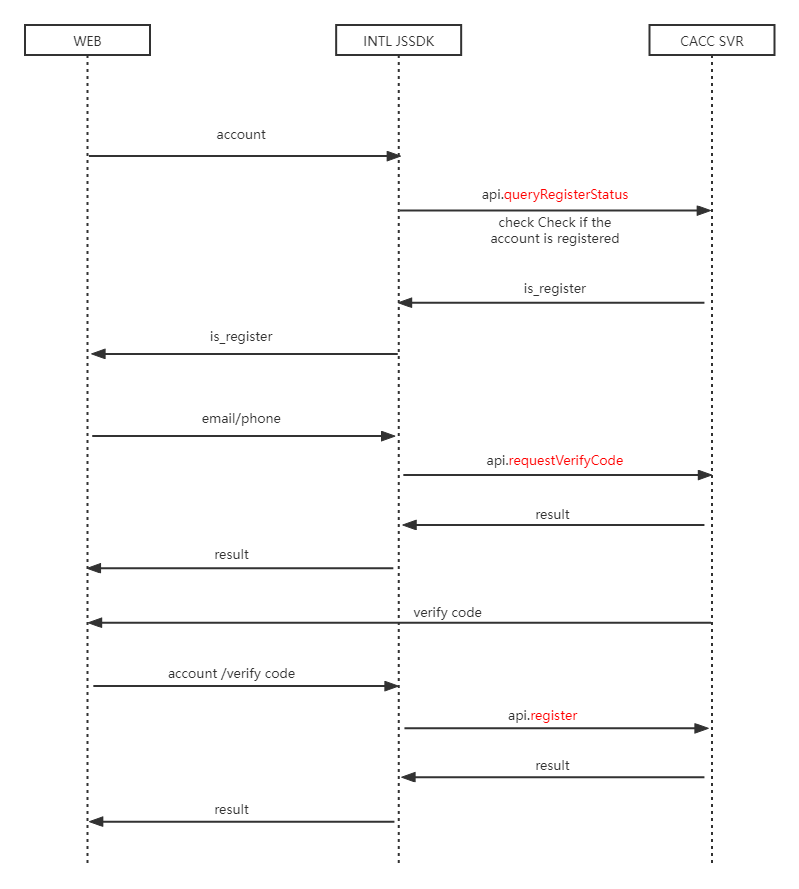
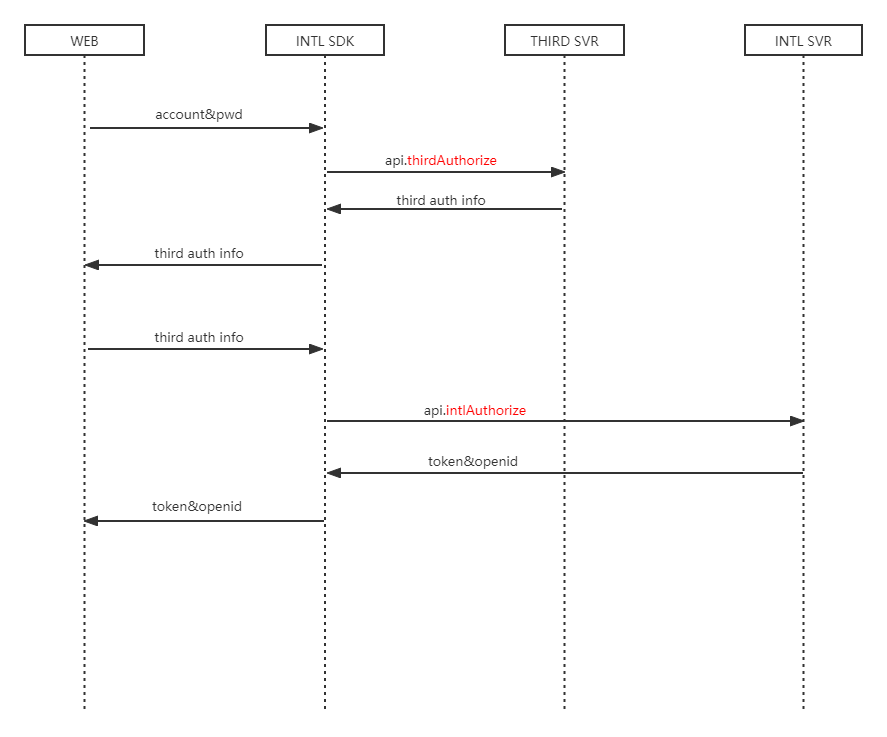
Third-Party Account Login Process
Client Integration
The Web section in the flow chart is what the Web client needs to complete, including
Step 1: Initialize JSSDK Step 2: Develop user interactions, obtain user's email and password, and call the login interface Step 3: Handle login results, and the site decides whether to persistently store the login interface (store in cookie or localStorage, etc.)
Backend Integration
Web client needs to pass login data to the game backend for authorization, the game backend does authorization with the PNTSDK backend, handle authorization results returned by the game backend
The authentication steps from game backend to PNTSDK backend; refer to the backend integration guide Backend Integration Overview
In addition, call the /v2/auth/verify_login authentication API
API
For more information about the Third-Party Login API, see:
docs/resources/api/Web/Account/Bind/GetBindChannelsByOpenID
| API | Function Definition |
|---|---|
| thirdAuthorize | Third-Party Channel Authorization |
| intlAuthorize | Player Network Account Authorization |
| intlLogout | Logout |
For more information about the Binding API, see:
| API | Function Definition |
|---|---|
| Bind | Bind |
| Unbind | Unbind |
| getBindChannelsByOpenID | Get a list of bindings according to Player Network SDK OpenID |
| getBindChannelsByUid | Get a list of bindings by channel login information |
For more information about the Mapping API, see:
| API | Function Definition |
|---|---|
| Map | Map |
| Unmap | Unmap |
| Get Mapping List (queryMapByCAccInfo) | Get a channel list mapped to the custom account based on custom account login information |
| Get Mapping List (queryMapByThirdInfo) | Get the custom account UID mapped by the channel based on channel login information |

