Getting Started Guide
Visitor accounts allow players to play the game without creating an account and providing any personal information.Players can quickly try the game without a regression process, reducing the barrier to entry and increasing player engagement.
Preparation for the start
Visitor accounts are only available when used in conjunction with LI PASS or third party accounts.Please integrate LEVEL INFINITE PASS or THIRD PARTY CHANNEL ACCOUNT before you start to use the Visitor account as the login method.
Set up a visitor account in the Player Network console.
Implementing Visitor Login
The login process of the visitor account is the same as the third-party channel, and you can refer to the login process of the third-party channel to realize the visitor login.
Transfer Guest Account
Players may choose to relay their Visitor Account from one device to another if they have two devices and have not lost their Visitor Account data.This will be useful in case a player wishes to upgrade their device but has not yet created an account for the game.
The relay code can be used to relay a visitor account.For example, a player who logs into a game on device A with OpenID A can generate a lead code by setting a password.On device B, the player logs into the game by entering the password set on device A and the corresponding lead-in code.The visitor account on device B now holds OpenID A and the account has been successfully transferred.
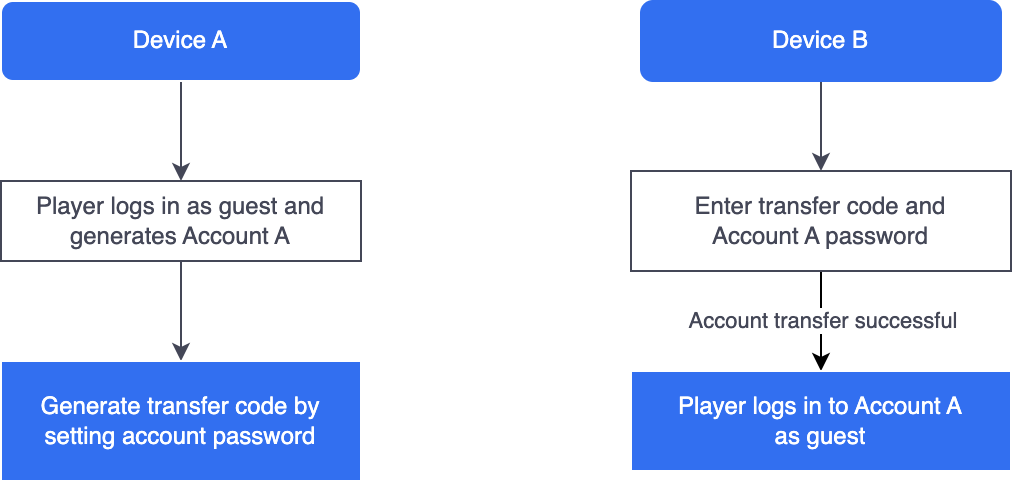
Visitor account passwords should be 1-20 bytes, or the game can disable length validation by setting TRANSFER_CODE_LENGTH_VALIDATION to 0 in INTLConfig.ini.
API
- Unity
- Unreal Engine
| Endpoint | Function definition |
|---|---|
| GenerateTransferCode | Generate relay codes for logged-in accounts |
| QueryTransferCode | Query the relay code of a logged-in account |
| TransferAccount | Relay accounts from other devices to this guest account |
| Endpoint | Function definition |
|---|---|
| GenerateTransferCode | Generate relay codes for logged-in accounts |
| QueryTransferCode | Query the relay code of a logged-in account |
| TransferAccount | Relay accounts from other devices to this guest account |

