iOS
This document introduces how to set up WeChat authentication, allowing your game to use Player Network's login authentication service to sign in via the WeChat channel.
Prerequisites
1. Set up your game on the WeChat Open Platform
1. Create a WeChat Application
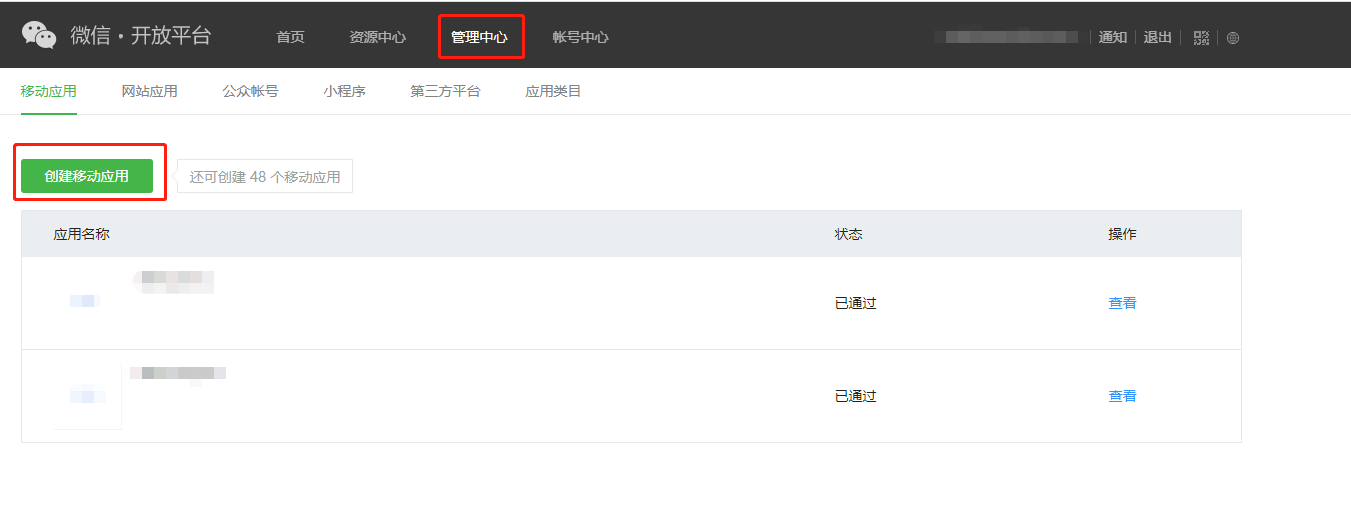
Register an account on the WeChat Open Platform and follow the instructions in the Management Center to create a mobile application.
2. Obtain Application Information
-
Log in to the WeChat Open Platform.
-
Click Management Center in the top navigation bar.
-
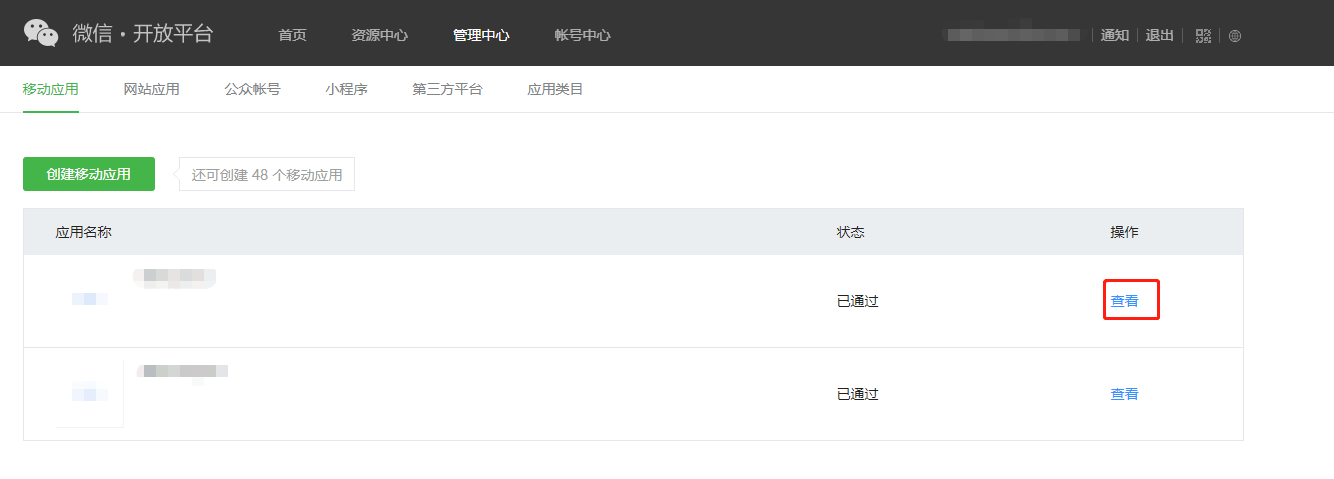
In the Mobile Applications tab, under the Actions column for the relevant application, click View.
-
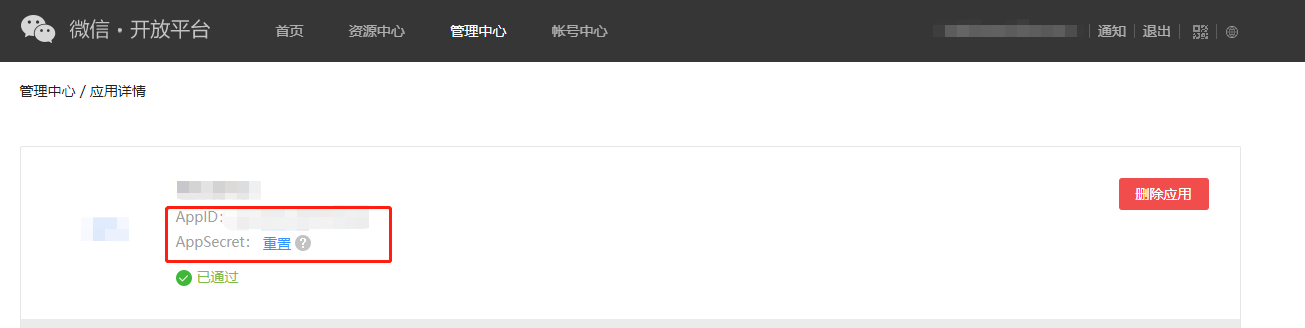
On the application details page, check the AppID and AppSecret.
3. Apply for business permission to obtain AppName
When configuring a single WeChat channel, AppName is optional.If planning to add multiple WeChat channels, AppName is required. Please complete the following application process to obtain AppName:
The application requires internal Tencent permissions. If no one on your team has Tencent internal access, please contact your Player Network liaison for assistance.
-
Log in to the WeChat Open Platform Internal Interface Management System.
-
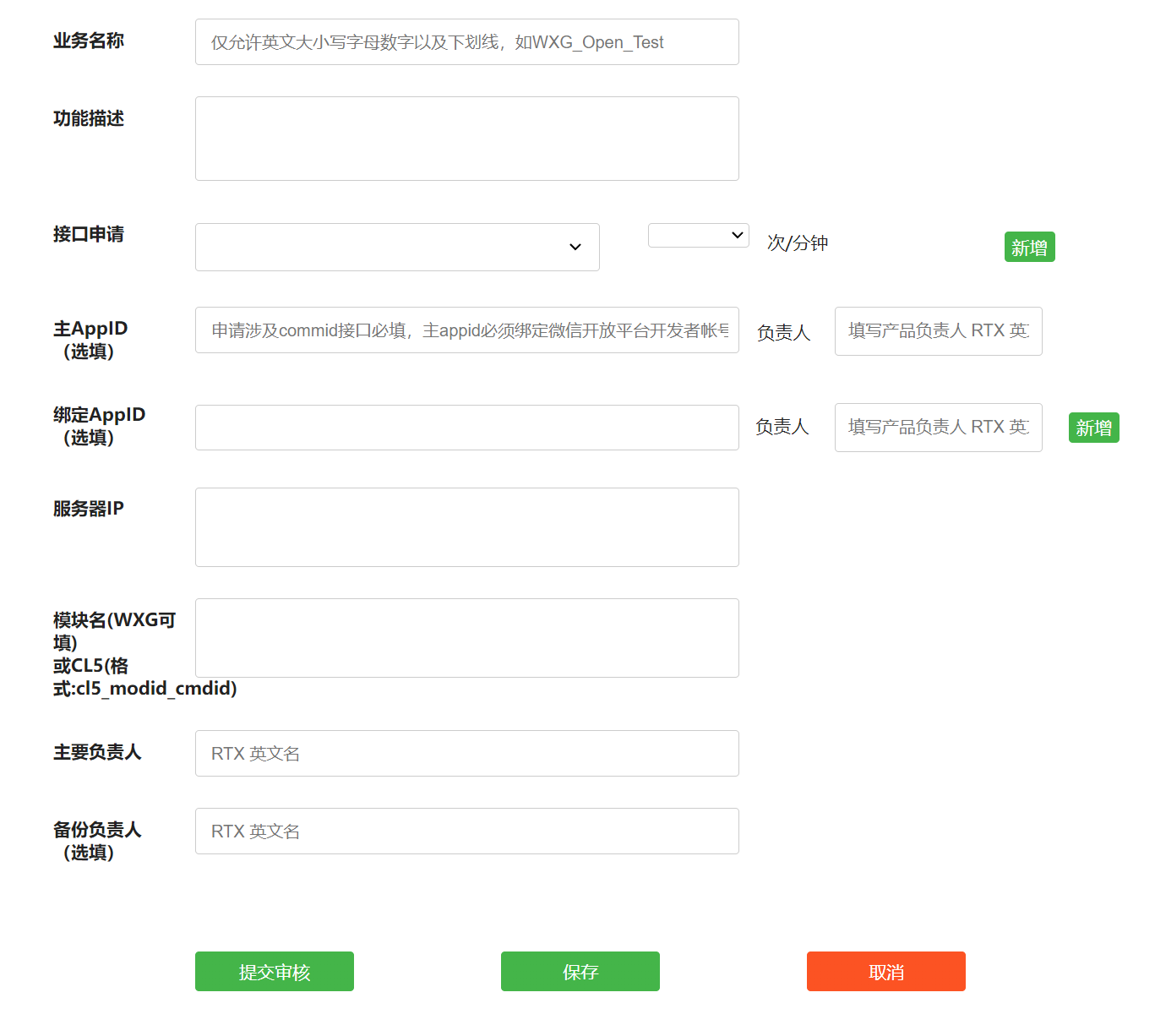
Refer to the Application Guidelines to fill in the application form, ensuring all information is accurate.
-
Submit the application and wait patiently for approval.
-
After approval, please accurately fill in the Business Name from the application form in the AppName field in the Player Network Console to complete the configuration.
- Obtain a Player Network Console login account.
- Create a new project for the game, or join an existing project.
- Download SDK.
- Integrate the SDK.
- Add WeChat as a login authentication method in Player Network Console.
Step 1: Configure SDK for WeChat Login
-
Open your project's INTLConfig.ini file:
INTLConfig.ini[INTL environment]
# WARNING: You should change this URL to the production environment when you release your game.
INTL_URL = https://test.intlgame. com
GAME_ID = {INTL_GAME_ID}
SDK_KEY = {INTL_SDK_KEY}
[INTL Log]
LOG_LEVEL = 1
LOG_CONSOLE_OUTPUT_ENABLE = 1
LOG_FILE_OUTPUT_ENABLE = 1
LOG_ENCRYPT_ENABLE = 0
LOG_COMPRESS_ENABLE = 0 [WeChat Channel] WECHAT_APAPPORT_ENABLE = 1 LOG_ENCRYPT_ENABLE = 0 LOG_COMPRESS_ENABLE = 0 0
[WeChat Channel]
WECHAT_APP_ID = {INTL_WECHAT_APP_ID}
WECHAT_UNIVERSAL_LINK_IOS = {WECHAT_UNIVERSAL_LINK_IOS}- Set the SDK backend environment to
INTL_URL = https://test.intlgame.com. - Replace
{INTL_GAME_ID}and{INTL_SDK_KEY}with the values forGAME_IDandSDK_KEYassigned by the Player Network Console. - Set
LOG_LEVEL = 1,LOG_CONSOLE_OUTPUT_ENABLE = 1,LOG_FILE_OUTPUT_ENABLE = 1,LOG_ENCRYPT_ENABLE = 0andLOG_COMPRESS_ENABLE = 0to output console logs and log files without encrypting or compressing the output without encrypting or compressing the output. - Replace
{INTL_WECHAT_APP_ID}with the AppID assigned by WeChat. - Replace
{WECHAT_UNIVERSAL_LINK_IOS}with theUNIVERSAL_LINKset on the WeChat Open Platform.
- Set the SDK backend environment to
-
Add WeChat configuration.
- Unity
- Unreal Engine
Open INTLCoreKit.projmods and replace {INTL_WECHAT_APP_ID} with the WeChat AppID before exporting the Xcode project from Unity.
{
    "group": "INTL",
    "libs": [

    ],
    "frameworks": [

    ],
    "files": [
    ],
    "folders": [],
    "excludes": [
        "^.*.meta$",
        "^.*.mdown$",
        "^.*.pdf$"
    ],
    "headerpaths":[],
    "build_settings":
    {
        "OTHER_LDFLAGS": ["-ObjC"],
        "ENABLE_BITCODE": "NO"
    },
    "system_capabilities": {
    },
    "Info.plist":{
        "LSApplicationQueriesSchemes":
        [
            "weixin",
            "weixinULAPI"
        ],
        "NSAppTransportSecurity":
        {
            "NSAllowsArbitraryLoads": true
        },
        "CFBundleURLTypes" :
        [
            {
                "CFBundleTypeRole":"Editor",
                "CFBundleURLName":"wechat",
                "CFBundleURLSchemes":["{INTL_WECHAT_APP_ID}"]
            }
        ]
    }
}
- SDK 1.24 and later
- SDK versions before 1.24
Open INTLSDK/Source/INTLWeChat/Libs/iOS/INTLWeChat_UPL.xml and replace {INTL_WECHAT_APP_ID} with the WeChat AppID.
<dict>
    <key>CFBundleURLName</key>
    <string>wechat</string>
    <key>CFBundleTypeRole</key>
    <string>Editor</string>
    <key>CFBundleURLSchemes</key>
    <array>
        <string>{INTL_WECHAT_APP_ID}</string>
    </array>
</dict>
Open INTLSDK/Source/INTLConfig/Configs/iOS/Plist/INTLWeChat.plist and replace {INTL_WECHAT_APP_ID} with the actual WeChat AppID.
<dict>
    <key>CFBundleURLName</key>
    <string>wechat</string>
    <key>CFBundleTypeRole</key>
    <string>Editor</string>
    <key>CFBundleURLSchemes</key>
    <array>
        <string>{INTL_WECHAT_APP_ID}</string>
    </array>
</dict>
Replace {INTL_WECHAT_APP_ID} with the WeChat App ID you applied for for your service.
Step 2: Add WeChat Login
Pass the permissions when calling INTLAPI.Login.The list of known WeChat iOS/Android permissions is as follows (the official documentation does not clearly specify permissions):
| Permissions | Description |
|---|---|
| snsapi_userinfo | Get user info (Default permission for Player Network SDK) |
| snsapi_friend | Get Friend List |
| snsapi_message | Send message |
- Register login-related callbacks.
- Unity
- Unreal Engine
// Add callbacks
public void AddAuthObserver()
{
    INTLAPI.AddAuthResultObserver(OnAuthResultEvent);
}

// Remove callbacks
public void RemoveAuthObserver()
{
    INTLAPI.RemoveAuthResultObserver(OnAuthResultEvent);
}

// Process the INTLAuthResult callback
public void OnAuthResultEvent(INTLAuthResult ret)
{
    Debug.Log($"MethodID: {ret.MethodId}");

    string methodTag = "";
    if (authRet.MethodId == (int)INTLMethodID.INTL_AUTH_LOGIN)
    {
        methodTag = "Login";
    }
    else if (authRet.MethodId == (int)INTLMethodID.INTL_AUTH_BIND)
    {
        methodTag = "Bind";
    }
    else if (authRet.MethodId == (int)INTLMethodID.INTL_AUTH_AUTOLOGIN)
    {
        methodTag = "AutoLogin";
    }
    else if (authRet.MethodId == (int)INTLMethodID.INTL_AUTH_QUERY_USER_INFO)
    {
        methodTag = "QueryUserInfo";
    }
    else if (authRet.MethodId == (int)INTLMethodID.INTL_AUTH_GET_AUTH_RESULT)
    {
        methodTag = "GetAuthResult";
    }
}
C++ Event Handling (above v1.15)
//configure callback
FINTLAuthEvent authEvent;
authEvent.AddUObject(this, &OnAuthResult_Implementation);
UINTLSDKAPI::SetAuthResultObserver(authEvent);
// Remove callbacks
UINTLSDKAPI::GetAuthResultObserver().Clear();
void OnAuthResult_Implementation(FINTLAuthResult ret)
{
    UE_LOG(LogTemp, Warning, TEXT("MethodID: %d"), ret.MethodId);
}
Unreal Event Handling
void OnAuthResult_Implementation(FINTLAuthResult ret)
{
    UE_LOG(LogTemp, Warning, TEXT("MethodID: %d"), ret.MethodId);
}
- Call the
AutoLogininterface to log in automatically.
- Unity
- Unreal Engine
INTLAPI.AutoLogin();
UINTLSDKAPI::AutoLogin();
- If automatic login fails, call the
Logininterface to let the player log in manually.
- Unity
- Unreal Engine
INTLAPI.Login(INTLChannel.WeChat, "", "");
UINTLSDKAPI::Login(EINTLLoginChannel::kChannelWeChat, "", "");
- Synchronize client authentication status with the game backend and wait for the final verification result.
Scan code login
Starting from Player Network SDK V1.26.00, WeChat QR code login is supported on Android and iOS platforms.
By default, if the phone has the WeChat app installed, it will directly launch the WeChat app for login. If the app is not installed, it will automatically switch to QR code login.To modify the default behavior, you can specify the qrcode_mode parameter in extraJson:
| qrcode_mode | Explanation |
|---|---|
| auto | Auto mode (default): Prefer using WeChat app for login. If the app is not installed, use QR code login. |
| force_app | Force WeChat app login: Login will return an error if the WeChat app is not installed. |
| force_qrcode | Force QR code login: QR code login will be used regardless of whether the WeChat app is installed. |
- Unity
- Unreal Engine
string permissions = "";
string extraJson = "{\"qrcode_mode\" : \"force_qrcode\"}";
INTLAPI.Login(INTLChannel.WeChat, permissions, extraJson);
FString Permissions = TEXT("");
FString Extra_JSON = TEXT("{\"qrcode_mode\" : \"force_qrcode\"}");
UINTLSDKAPI::Login(EINTLLoginChannel::kChannelWeChat);
Step 3: Acceptance testing for login functionality
Search for the keyword "AuthResult" in the Player Network SDK logs to confirm whether the channel name and OpenID are returned correctly.If correct, it means the integration configuration is successful, and login functionality has been successfully added.
If you encounter issues during integration, see FAQs.

