LI PASS Changelog
caution
- When upgrading to the latest version, please consult the upgrade guide for all versions.
- The versions of all plugins used in the game must match, including the version of the SDK used by the launcher.If your business requires integrating different versions of the Player Network SDK at the same time, or upgrading only one plugin, you need to contact Player Network Assistant.
2026
V1.31.00#
2026.1.21
Feature Optimizations
- Mobile, PC: Optimized font display issues for some minority languages.
- Mobile, PC: Optimized the gamepad operation experience on PC. Gamepad input within the game will be disabled when the Webview is opened to prevent unintended operations.
- Mobile, PC: Optimized Webview to support auto-rotation; its display orientation is no longer locked to the game's orientation.
Bug Fixes
- Mobile: Fixed the notch screen occlusion issue on the compliant credit card authentication interface.
- Fixed several known issues.
Upgrade Guide
- This version supports Mobile and PC platforms.
- Download the LI PASS plugin and V1.31.00 resources from the Player Network Console, and fully replace the corresponding folders in your game project.
2025
V1.30.01#
2025.12.10
Upgrade Guide
- This version adds console platform adaptation based on V1.30.00, supporting Mobile, PC, and Console platforms
- Download the LI PASS plugin and V1.30.01 resources from the Player Network Console, and fully replace the corresponding folders in your project
v1.30.00#
2025.10.31
New Features
- Mobile, PC: Added support for LI PASS platform-level minor chat authorization, allowing chat authorization to be set across games, optimizing the cumbersome process where minor players had to obtain authorization separately in each game
- Mobile, PC: Added support for LI PASS account security level functionality, designed to guide players to independently improve their security level.Players can view their account security level and security recommendations in the LI PASS account center.For detailed guidance, see Security Level
- Mobile, PC: Added support for automatically retrieving the channel email and displaying the LI PASS binding prompt when opening the account center after logging in via Discord
Feature Optimizations
- Mobile, PC: Optimized compliance flow logic to handle scenarios where the game’s compliance configuration and the LI PASS platform compliance configuration are inconsistent.
- Mobile, PC: Optimized UI layout and presentation for certain interfaces
Bug Fixes
- Mobile: iOS Fixed the issue where the compliance country list could not be displayed due to the Unreal Engine's SetIsFocusable method possibly being called by business logic, causing its return value to change
- Mobile, PC: Fixed an issue where account deletion requests in the account center would mistakenly fetch the test environment domain when INTL_WEBVIEW_COMMON_URL was not configured
Upgrade Guide
- This version supports Mobile and PC platforms.
- Download the LI PASS plugin and V1.30.00 resources from the Player Network Console, and fully replace the corresponding folders in your game project.
V1.29.01#
2025.8.25
Bug Fixes
- Mobile, PC, Console: Fixed an issue where new LI PASS account logins required repeatedly checking the service terms when the business was a non-Proxima Beta publisher and did not integrate the IEGG compliance solution
- Mobile, PC: Fixed UI display issues in certain interfaces
- Console: Fixed an occasional crash when returning to the console after completing credit card verification during LI PASS QR code login
- Console: Fixed an occasional focus loss issue on the compliance agreement selection interface, which prevented the terms from being selected
Upgrade Guide
- This version adds console platform adaptation based on V1.29.00, supporting Mobile, PC, and Console platforms
- Download the LI PASS plugin and V1.29.01 resources from the Player Network Console, and fully replace the corresponding folders in your game project
V1.29.00#
2025.8.5
New Features
- Mobile, PC: Added support for triggering the client login state switch together after a player binds LI PASS via the Web SDK in the in-game WebView
- Mobile: Added Passkey creation guidance flow for user login and account center, with a configurable option to show or hide the guidance popup
Feature Optimizations
- Mobile, PC: Optimized CAPTCHA capabilities, supporting different types of CAPTCHA providers, and allowing assignment of specific providers and parameter types based on strategy
- Mobile, PC: Optimized the wording for updating LI PASS email subscription selections
- Mobile, PC: Optimized additional data reporting points in the account center
Bug Fixes
- Mobile, PC: Fixed an issue where repeatedly clicking the button when navigating from the account center to the LI PASS official website would trigger multiple redirects
- Fixed several known issues
Upgrade Guide
- This version supports Mobile and PC platforms
- Download the LI PASS plugin and V1.29.00 resources from the Player Network Console, and fully replace the corresponding folders in your game project
V1.28.01#
2025.6.24
New Features
- Mobile, PC: Added account interception functionality. When an account environment is detected to have security risks, it supports intercepting player actions in LI PASS password login, third-party channel login, and binding scenarios, and displays a risk alert
- Console: Added support for Console platform
Feature Optimizations
- Console: Supports customizing compliance age verification methods by country/region. For details, see Custom Verification Methods
- Console: Supports configuring default compliance countries/regions. When the user’s IP location is not in the country/region list, the default configuration will be used. The configuration item is LI_DEFAULT_COMPLIANCE_REGION
- Console: Optimized interaction for compliance agreement checkboxes, combining the “Privacy Policy” and “User Agreement” checkboxes into one to simplify user operations
- Console: Optimized email templates for compliance credit card verification
Bug Fixes
- Console: Fixed an issue where the email input field on the South Korea real-name verification screen would lose focus after triggering a red error message
- Console: Fixed an issue where the compliance age dropdown and birthday selector would jump abnormally to the agreement checkbox when focus moved to the bottom
- Console: Fixed an issue where switching users without clearing the cache caused the compliance region to change incorrectly
Upgrade Guide
- This version supports Mobile, PC, and Console platforms
- Download the LI PASS plugin and V1.28.01 resources from the Player Network Console, and fully replace the corresponding folders in your game project
V1.28.00#
2025.5.30
New Features
- Mobile, PC: Added support for intelligent guided login, automatically determining the player’s account status and guiding them to the most suitable flow, simplifying operations and optimizing user experience. For details, see Intelligent Guided Login Flow
- Mobile, PC: Added support for customizing compliance age verification methods by country/region. For details, see Flexible Configuration of Regional Age Verification Methods
- Mobile, PC: Added support for configuring default compliance countries/regions. When the user’s IP location is not in the country/region list, the default configuration will be used. The configuration item is LI_DEFAULT_COMPLIANCE_REGION
Feature Optimizations
- Mobile, PC: Optimized interaction for compliance agreement checkboxes by combining the "Privacy Policy" and "User Agreement" checkboxes into one, simplifying user operations
- Mobile, PC: Optimized the display of “Account Does Not Exist” and “Account Already Registered” error messages, changing from Toasts to popup guidance
- Mobile, PC: Optimized input parameters for the LI PASS initialization interface
InitLIP, making theappVersionparameter optional and defaulting to the device’sappVersionto unify the input format, for detailed guidance see Initialization (InitLIP) - Mobile, PC: Optimized hot update files
INTLLuaCodeGenandObjectCacheby renaming LuaDelegation definitions toINTLLuaDelegationto avoid conflicts with other components - Mobile, PC: Expanded scenarios that trigger CAPTCHA verification
- Mobile, PC: Optimized copy and multilingual translations in certain interfaces
Bug Fixes
- Mobile, PC: Fixed an issue where selecting the same avatar in the account center caused a “username already exists” error
- Mobile, PC: Fixed an issue where switching users without clearing the cache caused the compliance region to change incorrectly
Upgrade Guide
- This version supports Mobile, PC, and Console platforms
- Download LI PASS plugin and V1.28.00 resources from the Player Network Console, and fully replace the corresponding folders in your game project
V1.27.00#
2025.3.21
New Features
- Mobile: Added support for Passkey login functionality
- Passkey allows players to use fingerprint, Face ID, or device PIN for authentication, completing LI PASS fast login without entering a password
- Passkey is shared across all LI PASS games, allowing players to use a Passkey created in any supported game in other games without resetting, enabling seamless cross-game login
- Mobile, PC: Added support for one-click copy of username in the account center
Feature Optimizations
- Mobile, PC, Console: Optimized Arabic UI interface adaptation
- Mobile, PC, Console: Optimized compliance age input interactions for the US, Colombia, UK, and India, changing all to dropdown selection
- Mobile, PC, Console: Optimized several compliance process code logics for multi-platform consistency
Upgrade Guide
- This version supports Mobile, PC, and Console (Unreal Engine only) platforms
- Download LI PASS plugin and V1.27.00 resources from the Player Network Console, and fully replace the corresponding folders in your game project
V1.26.00#
2025.1.9
New Features
- Mobile, PC: Completely redesigned account center
- Added Marketing Center module, providing LI PASS email subscription, LI PASS official website coin management and redemption, official website and social media access, and marketing campaign display and access.All modules support configuration, for detailed feature introduction and configuration guidance see Marketing Center
- Added support for players to change avatars in the account center.Businesses can also access avatar information through the GetLICombineAccountInfo interface to obtain the entire avatar list through GetLIAvatarInfo
Feature Optimizations
- Mobile, PC, Console: Optimized compliance interface call logic for LI PASS login, auto-login, and binding processes, merged compliance information return interface for LI PASS UID and game OpenID, reducing redundant interface calls and lowering response time.- Applicable to Proxima Beta publishers or non-Proxima Beta publishers not using the IEGG compliance solution, for detailed interface parameter adjustments see ComplianceInitWithParams and AuthResult
- Mobile, PC, Console: Made the LI PASS Terms of Service a mandatory selection in the compliance agreement interface.Based on legal requirements, Proxima Beta publishers must also select the LI PASS Terms of Service
- Mobile, PC, Console: Optimized the timing of fetching cloud control configuration during LI PASS startup, retrying multiple times if the first attempt fails to further ensure update capability
- Mobile, PC: Optimized the account center password change function, automatically displaying the bound email without requiring the player to re-enter it
Bug Fixes
- Mobile, PC, Console: Fixed the issue where agreement versions were not isolated between multiple channel packages, now supporting independent management of each channel package's agreement version
- Mobile, PC: Fixed an issue with URL parameter concatenation when navigating via WebView, now only appending game ID parameters when navigating to the LI PASS official website with client login state
- Fixed several known issues
Upgrade Guide
- This version supports Mobile, PC, and Console (Unreal Engine only) platforms
- Download LI PASS plugin and V1.26.00 resources from the Player Network Console, and fully replace the corresponding folders in your game project
2024
V1.25.00#
2024.11.5
New Features
- Mobile, PC, Console: For non-Proxima Beta publishers not using the IEG Global compliance solution, added an integrated compliance process configurable via COMPLIANCE_SWITCH_ALL_PLATFORM; this process only triggers IEG Global compliance verification during LI PASS login or binding, while game compliance processes (such as game agreement selection) must be developed by the game itself. Refer to ComplianceInitWithParams and AuthResult for interface calls
- Mobile, PC, Console: Added search functionality in the compliance country/region selection interface to allow players to quickly locate the country they want
- Mobile: Added support for navigating to the LI PASS official website with client login state:
Players with a bound LI PASS and valid login state can securely navigate to the LI PASS official website via an external browser without re-login, improving the user experience.This feature applies when navigating from the More Service section in the account center, or can be used in other navigation scenarios by integrating the API OpenLIPASSMoreService, feature switches can be configured via Player Network support - Mobile: Added support for automatically retrieving channel email and displaying the LI PASS binding prompt when opening the account center after third-party channel login. Supported channels include Facebook, Twitter, and Google, see Quick Binding
- PC: Added support for integrating the account center in Steam and Epic platform login solutions, integration guide see OpenAccountCenter
Feature Optimizations
- Mobile, PC, Console: Optimized UI layout, buttons, and clickable areas in certain LI PASS interfaces to achieve more consistent visuals across platforms and improve click experience
- Mobile, PC, Console: Optimized code logic for old and new credit card verification flows in the IEG Global compliance solution
- Mobile, PC, Console: Updated configurable country/region list according to the latest compliance requirements, detailed list see Country or Region Configuration
- Mobile, PC: Optimized default avatar and bind/unbind icons in the account center
- Mobile, PC: Optimized display of third-party channels on the login interface, added scroll bar
- Mobile: Optimized input error prompts in the login interface and compliance process interface, changing from toast to red text inside input fields
- Mobile: Optimized verification code input, supporting automatic removal of leading and trailing spaces and prioritizing numeric keyboard, improving player experience when entering verification codes
Bug Fixes
- Mobile, PC, Console: Fixed an issue where players with some compliance country/region parameters set to unknown (999) were blocked from completing the compliance verification process and could not log in
- Mobile, PC, Console: Fixed ReportTag issues caused by modifications to AccountFlowSwitch initialization logic, resolving data reporting point problems
Upgrade Guide
- Starting from this version, the LI PASS version number will be unified and merged with the Player Network SDK as V1.25.00
- This version supports Mobile, PC, and Console (Unreal Engine only) platforms
- Download LI PASS plugin and V1.25.00 resources from the Player Network Console, and fully replace the corresponding folders in your game project
V1.17.01#
2024.9.2
New Features
- Console: Added support for Nintendo Switch platform, including QR code login functionality
- Mobile, PC: Cross-game LI PASS linking functionality now supports console, as well as third-party channel login scenarios on mobile and PC
- Mobile, PC: Added support for tiled layout in the LI PASS login interface, under which LI PASS channel login will always appear on the first screen.Configuration guidance see ACCOUNT_FLOW_SWITCH
- PC: Added support for gamepad operation in Unity engine PC games, callable via SetGamepadStatus
Version upgrade
- Mobile, PC, Console: Added support for Unreal Engine 5.4 adaptation
Feature Optimizations
- PC: Optimized keyboard shortcut input for login and compliance interfaces, improving Tab and Enter key operations for better PC keyboard experience
Bug Fixes
- Mobile, PC, Console: Fixed hot update PAK file building issue when IOStore is enabled in Unreal Engine
- Mobile, PC, Console: Fixed some interface text prompts and data reporting issues
- PC: Fixed inconsistent platform source identifiers after Web JSSDK login, now unified as
source = 32
Upgrade Guide
- This version supports Mobile, PC, and Console (Unreal Engine only) platforms
- To integrate or upgrade to this LI PASS version, update the Player Network SDK to 1.24.01
- Download LI PASS plugin and V1.17.01 resources from the Player Network Console, and fully replace the corresponding folders in your game project
V1.17.00#
2024.7.12
New Features
- PC: Added support for cross-game synchronization of LI PASS with certain third-party channels, providing new integrations the ability to automatically link third-party channels across games
- PC: Added support for gamepad operation in Unreal Engine PC games, callable via SetGamepadStatus
Feature Optimizations
- Mobile, PC, Console: Optimized and unified the callback events for opening and closing panels
LIP_PANEL_OPENandLIP_PANEL_CLOSE, see LIBaseEvent - Mobile, PC, Console: Optimized language switching for game terms of service and privacy policy in the compliance country/region selection interface, supporting automatic switching based on client language
- Mobile, PC: Optimized UI display for users without reward pack integration, controlled by new configuration LIP_REWARD_ENABLE, deprecated old configuration
SHOW_LOGIN_REWARD_ICON - Mobile, PC: Optimized popup prompts for binding LI PASS in the account center
- Mobile: Optimized DMA advertisement privacy agreement consent flow, all users confirm terms via DMA notification popup
- Console: Improved error message display in console login and compliance process interfaces
Bug Fixes
- Mobile, PC: Fixed an issue where the account center username displayed as guest when players logged in via third-party channels
- Mobile, PC: Fixed an issue where PC device names in the account center device history interface exceeded bounds
- PC: Fixed an error occurring when opening the Korean game privacy policy without a logged-in player
- Console: Fixed an issue where the focus was lost after clicking the delete button on the account deletion popup and returning to the login page
Upgrade Guide
- This version supports Mobile, PC, and Console (Unreal Engine only) platforms
- To integrate or upgrade to this LI PASS version, update the Player Network SDK to 1.24.00
- Download LI PASS plugin and V1.17.00 resources from the Player Network Console, and fully replace the corresponding folders in your game project
V1.16.01#
2024.5.31
New Features
- Console: Added support for QR code login on console platforms, allowing players to conveniently log in to LI PASS by scanning a QR code with their phone, and to open the LI PASS in-game binding interface via
QueryBindInfofor fast in-game binding on console
Bug Fixes
- PC, Console: Fixed abnormal compliance popup issues caused by missing DMA protocol platform check logic
- Mobile, PC: Fixed device history close button click issue
Upgrade Guide
- This version supports Mobile, PC, and Console (Unreal Engine only) platforms
- To integrate or upgrade to this LI PASS version, update the Player Network SDK to 1.23.01
- Download LI PASS plugin and V1.16.01 resources from the Player Network Console, and fully replace the corresponding folders in your game project
V1.16.00#
2024.5.10
New Features
- Added support for UI customization on certain interfaces
- Added basic A/B testing capability, supporting A/B experiments in the client via hot update
Feature Optimizations
- Reduced the visibility of the LEVEL INFINITE PASS logo on non-primary game interfaces
- Optimized the display of new device login binding restriction countdown, adding highlighting to numbers and time units
- Optimized stacking display when multiple toast messages appear simultaneously
- Optimized login reminders for accounts with abnormal regional attribution, providing users with more accurate guidance
- Standardized multilingual abbreviations, supporting differentiation between Traditional Chinese for Taiwan and Hong Kong
- Optimized text formatting in certain popup interfaces
- Optimized font configuration for Unity and Unreal engines, unifying font size, color, and transparency across engines
Bug Fixes
- Fixed an issue where the username did not appear in compliance parent verification email subjects in some scenarios
Upgrade Guide
- This version supports Mobile and PC platforms
- To integrate or upgrade to this LI PASS version, the supported Player Network SDK versions are 1.22.01 to 1.23.00
- Download LI PASS plugin and V1.16.00 resources from the Player Network Console, and fully replace the corresponding folders in your game project
V1.15.00#
2024.3.14
New Features
- Added support for independent Korean game privacy policy navigation to comply with Korea's latest data privacy regulations;
Supports modifying Korean game privacy policy configuration in the Player Network Console
Feature Optimizations
- Optimized prompt text for minor restriction feature
- Optimized display of input field error messages on PC to improve user experience
- Optimized More Services link navigation in the account center, now directing to the corresponding game page on the LI PASS official website
Bug Fixes
- Fixed multilingual issues in security alert emails, supporting sending security alert emails in the specified language during login and auto-login
- Fixed an issue where the DMA advertisement privacy agreement configuration
EU_DMA_URLdid not support '-' or '?' escaping
Upgrade Guide
- This version supports Mobile and PC platforms
- To integrate or upgrade to this LI PASS version, update the Player Network SDK to 1.22.01
- Download LI PASS plugin and V1.15.00 resources from the Player Network Console, and fully replace the corresponding folders in your game project
V1.14.00#
2024.2.2
New Features
- Added registration guidance for unregistered users when login fails
Version upgrade
- Support for Unreal Engine 5.3
Feature Optimizations
- Optimized countdown display format, switching to hours when countdown is less than 1 day
- Optimized prompt text when auto-registration is enabled on the login interface
Bug Fixes
- Fixed an issue in the account center device history where the list could not be scrolled down
- Fixed several LQA issues, improving multilingual copy and display
Upgrade Guide
- This version supports Mobile and PC platforms
- To integrate or upgrade to this LI PASS version, update the Player Network SDK to 1.22.00
- Download LI PASS plugin and V1.14.00 resources from the Player Network Console, and fully replace the corresponding folders in your game project
V1.13.01#
2024.1.11
New Features
- Mobile: Added DMA advertisement consent flow for EEA/UK users, supporting agreement selection for both new and existing users. For detailed configuration see
ANALYTICS_CONSENT_ENABLEandEU_DMA_URL- For newly registered project users in the applicable region (EEA/UK), an individual ad notification selection is added above the "One-Click Select" on the Terms page
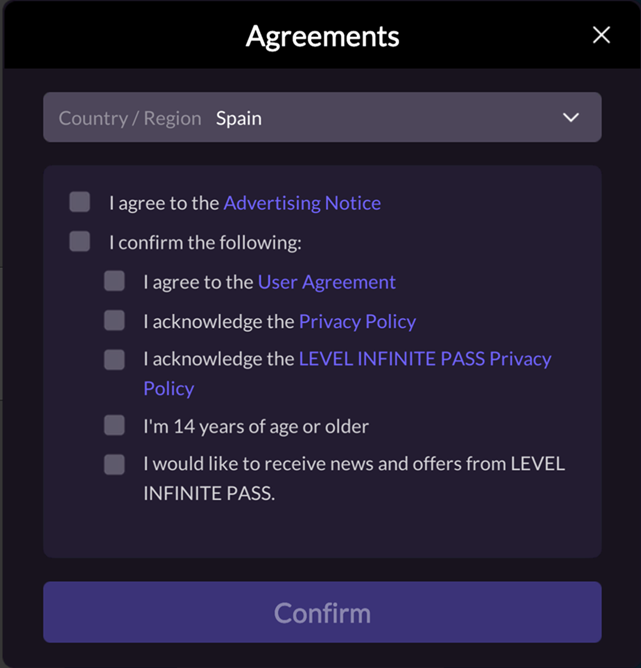
- For registered users of the game in the applicable region (EEA/UK), an advertisement notification pop-up window will appear the first time you enter the game after upgrading the version, and users are asked to confirm whether they agree to it.
 PC: When logging in on PC, DMA ad privacy agreement opt-in interaction process is skipped; ad notification option is not displayed and ad notification popup will not appear.Also the code does not set the Consent Mode, leaving it unset by the user
- For newly registered project users in the applicable region (EEA/UK), an individual ad notification selection is added above the "One-Click Select" on the Terms page
Upgrade Guide
- This version only supports Mobile platform, the PC version of the resource is for testing purposes only
- Accessing or upgrading this LI PASS version depends on updating the Player Network SDK version to 1.21.03
- Download the LI PASS plugin and V1.13.01 resources from the Player Network console and replace the corresponding folder in the game project with the complete one
2023
V1.13.00#
2023.12.28
New Features
- Added support for account deletion function and support for adding the entrance to the game deletion function in the account center.For detailed configuration options, please refer to
SHOW_DELETE_ACCOUNT_BUTTON
Feature Optimizations
- Optimize the sorting of countries/regions in the Compliance screen, keep the order of A-Z
- Optimize the rules for displaying device names in the device history in the security settings, and unify the display of mobile and PC
- Optimize the prompts and contents of some scenarios, and change the prompts of user triggered re-login, account has been bound and banned by the game to pop-up windows
- Optimize the keyboard input method of the login interface of Unity Engine games, and improve the experience of the keyboard blocking problem
Bug Fixes
- Fixed several LQA issues, improved multilingual copy and presentation
Upgrade Guide
-
This version only supports Mobile and PC platforms
-
Accessing or upgrading this LI PASS version depends on updating the Player Network SDK version to 1.21.02
-
Download the LI PASS plugin and V1.13.00 resources from the Player Network console and replace the corresponding folder in the game project with the full one
V1.12.00#
2023.12.04
New Features
- New PlayStation 5 and Xbox Series X|S platforms supporting the Unity engine have been added, providing standardized access to LI PASS and supporting hot update capabilitiesFor more information, see LI PASS Getting Started Guide
- Added support for independent checking of marketing email terms.In order to meet the compliance requirements of some countries/regions, support the configuration to remove the marketing agreement of some countries/regions from the one-click checkbox and replace it with a separate checkbox
- Added support for underage banning, which provides games with LI PASS access with the ability to block underage players from entering the game based on specific regions
Feature Optimizations
- Optimize the UI display details in vertical gamertag center when the introduction text of binding benefits exceeds one line in some languages
- Optimize the device verification mechanism to only perform device verification when users log in through third-party channels and bind LI PASS in the game
- Optimize the display of the close button on each page of the compliance user process to ensure that the compliance process is carried out in one direction
- Optimized unified email and password validation rules across platforms
- Optimized several UI display issues
Bug Fixes
- Fixed several LQA issues, improved multilingual copy and presentation
- Fix resource loading exception when system area is Turkey
Upgrade Guide
- Accessing or upgrading this LI PASS version depends on updating the Player Network SDK version to 1.21.01
- Download the LI PASS plugin and V1.12.00 resources from the Player Network console and replace the corresponding folder in the game project with the complete one
V1.11.00#
2023.10.19
New Features
- The interface UI is fully updated to cover cross-end (iOS, Android, PC, Console) and multi-scenario (Social Media, Platform) login scenarios.
- New Restriction feature to restrict players from logging in when the region the LI PASS account belongs to doesn't match the game's release compliance region, supports per-game control switches.See
REGION_RESTRICTION_CHECK_ENABLEfor configuration entries - Added verification of parents' e-mail addresses during parent authentication to avoid duplicating the registered e-mail address of LI PASS
- Add new language, support Chinese Taiwan Traditional zh-TW
Version upgrade
- Support for Unreal Engine 5.2
Feature Optimizations
- Optimize the birthday entry checking mechanism, the user must select a year that is less than or equal to the current year
- Optimize the user prompts when an account that has been bound to LI PASS is repeatedly bound, providing clearer prompts
Bug Fixes
- Fix invalid setting when business-initiated call to
UpdateCountryListinterface
Upgrade Guide
- Accessing or upgrading this LI PASS version depends on updating the Player Network SDK version to 1.20.01
- Download the LI PASS plugin and V1.11.00 resources from the Player Network console and replace the corresponding folder in the game project with the complete one
V1.10.00#
2023.9.4
New Features
- PC: Supports standardized LI PASS interaction and UI for PC games (Steam / Epic) under Unreal Engine
- PC: Unreal Engine will restrict player login when the LI PASS account region conflicts with the game's release compliance region, supporting backend control for each game
- Unreal Engine parental verification adds verification for parent email address to avoid duplication with the registered LI PASS email
- Unreal Engine parental verification adds post-verification email notification
- Supports hiding the close button on the login interface via configuration, see
SHOW_LOGIN_PANEL_CLOSEfor details
Feature Optimizations
- Unreal: optimized birthday input validation, requiring selected year to be less than or equal to the current year
- Replace the slua_unreal file name in the Plugins/Levelinfinite directory with lipass_slua_unreal to resolve the UBT execution conflict error caused by the duplicate slua_unreal_model file name
- Updated the Privacy Policy of LI PASS as required by the law
- Optimized the names of some countries and regions
Upgrade Guide
- V1.10.00 only supports Unreal Engine PC version.If you need to access other endpoints, we recommend downloading the most recent version of the history
- As of version V1.10.00, LI PASS has optimized the product directory and no longer names the related product directory after GameNativeFor more information, see Integration Guide
- To integrate or upgrade to this LI PASS version, the Player Network SDK must be updated to V1.20.01
- Download the LI PASS plugin and V1.10.00 resources from the Player Network console and replace the corresponding folder in the game project with the complete one
- When using LoginChannelWithLIPass for login after upgrading LI PASS version, you need to remove the following code: (LevelInfinite.AutoLogin + OpenLoginPanel)
V1.09.00#
2023.8.1
Feature Optimizations
- Optimized compliance age selection interaction for South Korea, supporting tiered age range selection
- Optimized multilingual adaptation, improved text translation and layout for Arabic
- Optimized security validation mechanism for user center LI PASS binding and third-party channel binding/unbinding.Supports configuration control, see SAFETY_DEVICE_CHECK_ENABLE
- Optimized adaptation for Android physical back key, added new API OnBackPressed for closing interfaces
- Optimized Unreal archive artifacts, uniformly compiled as Luac files
- Optimized several UI interfaces
Upgrade Guide
- To integrate or upgrade to this LI PASS version, the Player Network SDK must be updated to V1.19.03
- Download the LI PASS plugin and the V1.09.00 resources from the Player Network console and replace the corresponding folder in the game project with the complete one
V1.08.00#
2023.7.11
New Features
- Added support for PlayStation 5 and Xbox Series X|S platforms, providing standardized LI PASS login and binding flow on Unreal Engine, also supporting hot update capability..*/}
- Added support for 2FA security verification function, players can choose to turn it on by themselves in the account center.After this function is turned on, players need to pass the second verification of mailbox when they use non-authentication code to log in the game.
- Added support for device management functionality in the account center, including:
- Supports displaying player login history and device records, with red dot notification for new devices
- Supports players logging out of all devices under the currently logged in game
- Added support for LI PASS binding verification mechanism in the account center, when a new device login is detected, binding the LI PASS account is restricted for a specified period, reducing the risk of abnormal binding after account loss.The game can be configured with switches and time limits.
- Added support for CAPTCHA verification in client registration and login processes, with per-game switch control
- Added Unity engine asmdef support, for more information see Official Documentation.
Feature Optimizations
- Optimize the UI interaction of the third-party channel binding and unbinding button in the account center to provide players with more accurate status alertsFor more information, see Product Description
- Optimize the email text color on the unbundle page and the multi-language copy of the get verification code button to improve readability
- Optimize to add the space removal processing of mailbox input box
- Optimized to support Unreal Engine auto-calculation of UI resolution scaling, providing more convenient adaptive display adaptation
Upgrade Guide
- Accessing or upgrading this LI PASS version depends on updating the Player Network SDK version to V1.19.02
- Download the LI PASS plugin and V1.08.00 resources from the Player Network console and replace the corresponding folder in the game project with the complete one
V1.07.00#
2023.6.12
New Features
- Added support for automatically filling the most recently logged-in email account when logging in with LI PASS.This feature supports on/off control, see Configuration Items for configuration items
- Added support for displaying the third-party channels that the user has recently logged in to at the top of the channel list by default.This function supports on/off control, see Configuration Items for configuration items
- Newly check the registration status of the user's email address when obtaining the verification code to simplify the non-essential operation of the user
- Added interface for setting compliance countries and regions, detailed guidance see UpdateCountryList
Feature Optimization
- Optimize Unity & UE performance, improve image loading performance, fix memory leaks
- Optimize the error alerts and guidelines for users with unregistered LI PASS and empty passwords to improve user experience
- Optimize the binding guidance for non-LI PASS users in the user center to improve user experience
- Optimize the user center binding reminder text, make the reminder more concise and clearer
- Optimize the display rules of third-party channels in the user center, so that users can directly see the list of third-party channels when LI PASS is not bound, which is more user-friendly
- Optimize the country and region where authentication is not required, and the user's underage authentication status is set to adult
Bug Fixes
- Fix an issue where, in certain Korea-specific scenarios, users were incorrectly assigned an adult compliance status when real-name authentication was turned off
- Fixed several known issues
Upgrade Guide
- From version V1.07.00, LI PASS adjusted the Unity directory structure, dividing it into Runtime and Editor directories.To upgrade this version, it is recommended to delete the old LevelInfinite catalog before importing the new LevelInfinite catalog
- Upgrading this version depends on updating the Player Network SDK version to V1.19.01
- Download the LI PASS plugin and V1.07.00 resources from the Player Network console and replace the corresponding folder in the game project with the complete one
V1.06.00#
2023.5.19
New Features
- Added India Regional Compliance Certification Support
- Add Unity side set font interface, support dynamic switching fonts at runtime
- Added INI editor extension to support editing LI PASS related INI configurations in Unity/UE editor visualization tools
- Added Unity 2021, 2022 support
- Added UE 5.0, 5.1 support
- Added Lua layer exception callback handling LILuaErrorObserver
Feature Optimizations
- Optimized skinning integration process, see Skin Integration
- Optimized custom font process, see Unreal Engine Font Replacement
- Optimize some interface texts
- Optimize UI display for different login methods
- Optimize the closing process of the pop-up window for deleting numbers, and support closing the pop-up window to return to the login interface automatically
- Optimize the process of parent authentication, and support modifying the parent's email address without completing the authentication
Bug Fixes
- Fixed the issue of unrecorded status of Korean nightly marketing email agreements
- Fix the issue that the countdown of the silent period did not show the real-time number of days
Upgrade Instructions
- Download the LI PASS plugin and the 1.06 resources from the Player Network console and replace the corresponding folder in the game project with the complete one
- Replaced LevelInfinite init method calls with
InitLI - If you have customized UI skinning before, please contact [mingyiwang]/[flawang] for customization resources
- When a Lua layer error occurs, a callback will be triggered, it is recommended that the game add reporting to Crashsight/Bugly in the LILuaErrorObserver function

