Discord Game Status Information (DiscordRichPresence)
Data structure
FINTLRichPresence
| Parameters | Type | Explanation | Note |
|---|---|---|---|
| gameName | FString | Game name registered on Discord Developer Portal | Mandatory |
| state | FString | The party status of the activity, if specified, it must be a string between 2 to 128 characters | Optional |
| details | FString | Detailed description, defaults to empty value, if specified, it must be a string between 2 to 128 characters | Optional |
| largeText | FString | Text prompt for large image, if specified, it must be a string between 2 to 128 characters | Optional |
| largeImage | FString | Link for large image, if specified, it must be a string between 1 to 256 characters | Optional |
| smallText | FString | Text prompt for small image, if specified, it must be a string between 2 to 128 characters | Optional |
| smallImage | FString | Link for small image, if specified, it must be a string between 1 to 256 characters | Optional |
| startTime | int32 | Timestamp for starting this activity 'start_time_' and 'end_time_' should be both set or neither. If neither is set, the game defaults to start at 00:00:00. If both are set, 'start_time_' will be used. | Optional |
| endTime | int32 | Timestamp when this activity ends | Optional |
| partyMaxSize | int32 | The maximum number of people who can join the party, default is 0, the set value must be greater than or equal to 0 | Optional |
| supportedPlatforms | int32 | On which platforms activity invitations can be accepted. PC = 1, IOS = 8, Android = 16. Supports using values like 1 | 8 | 16 to support multiple platforms | Optional |
| extraJson | FString | Extended JSON field, default is an empty string | Optional |
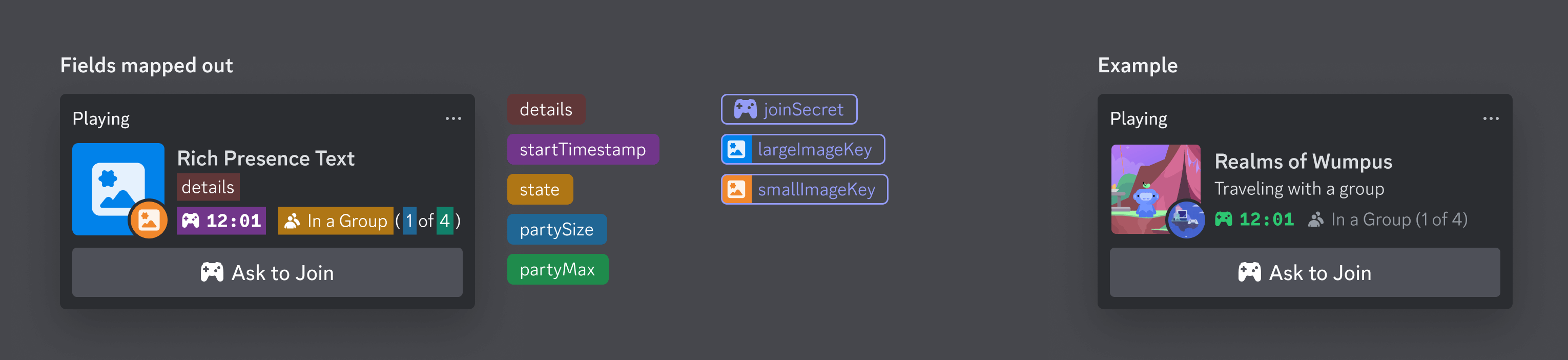
Example of displaying player game status on Discord client can refer to the image below: