Report login event steps (ReportLoginStep) (Deprecated, not recommended)
The data of the login event is reported for calculating funnel analysis conversion rates.
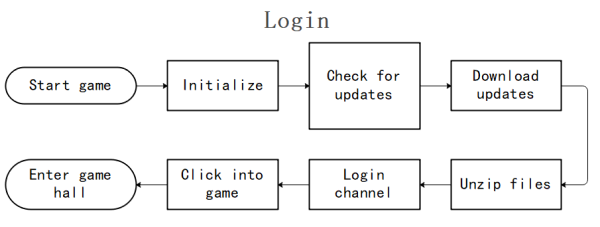
The login funnel model includes the steps:
0: Start Game > 1: Initialize > 2: Check for Updates > 3: Download Updates > 4: Unzip Files > 5: Login Channel > 6: Click Enter Game > 7: Enter Lobby
Function Definition
public static void ReportLoginStep(uint step, string stepName, bool result, int errorCode = 0, string extraJson = "{}");
Parameter Details
| Parameters | Type | Explanation |
|---|---|---|
| step | uint | Step ID starts counting from 0 |
| stepName | String | Step Name |
| result | bool | Step Result true: Success false: Failure |
| errorCode | int | Error Code When result=true, errorCode=0 When result=false, errorCode is a custom error code |
| extraJson | String | Additional Parameters JSON Format |
Sample Code
INTLAPI.ReportLoginStep(0, "start game", true, 0, "{}"); // 0: Start game
INTLAPI.ReportLoginStep(1, "initialize", true, 0, "{}"); // 1: Initialize
INTLAPI.ReportLoginStep(2, "check for updates", true, 0, "{}"); // 2: Check for updates
INTLAPI.ReportLoginStep(3, "download updates", true, 0, "{}"); // 3: Download updates
INTLAPI.ReportLoginStep(4, "unzip files", true, 0, "{}"); // 4: Unzip files
INTLAPI.ReportLoginStep(5, "login channel", true, 0, "{}"); // 5: Login channel
INTLAPI.ReportLoginStep(6, "click into game", true, 0, "{}"); // 6: Click enter game
INTLAPI.ReportLoginStep(7, "enter game hall", true, 0, "{}"); // 7: Enter lobby

