Access Guide
The SDK-only integration provides comprehensive identity verification capabilities, enabling you to design login flows of any type.
This article introduces how to implement Player Network SDK's authentication feature in the game client, listing relevant APIs and their usage guide. Please select the corresponding integration method based on the function you need.
-
Capabilities: Player Network SDK provides the core, underlying account capabilities interfaces without any pre-built front-end interfaces. This solution gives development teams maximum flexibility and control, suitable for scenarios requiring fully customized front-end interaction flows.
-
Your Implementation Focus:
- Responsible for the development, testing, and maintenance of all front-end interfaces (UI/UX)
- Handle the process of login status expiration (e.g., token expiration) and naturally redirect to the login interface.
Login flow
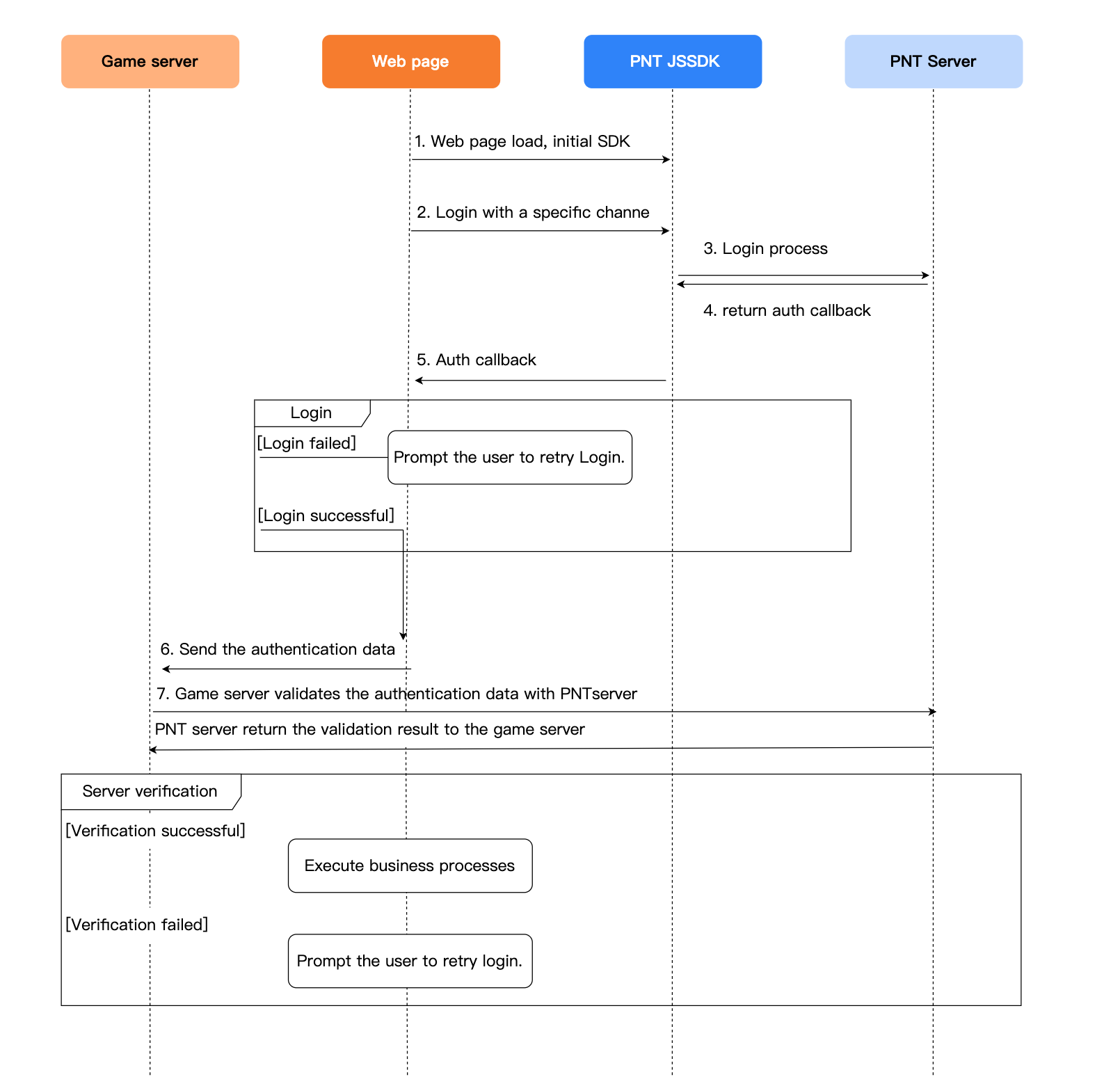
Import SDK
During project integration testing, import the debugging SDK package, which is intended only for integration testing.For project launch, the official SDK package must be imported.
Currently supports both npm package and CDN formats.
- npm
- CDN
// To use LI PASS features, ensure the version is greater than 1.16.0
$ npm install @intlsdk/account-api
// SDK Debugging Version Package
<script src="https://test-common-web.intlgame.com/sdk-cdn/account-api/latest/index.umd.js"></script>

// SDK Official Release Package
<script src="https://common-web.intlgame.com/sdk-cdn/account-api/latest/index.umd.js"></script>
Using SDK
During integration testing, set env to test environment; Set env to the corresponding official environment when the project goes live.
Parameters vary for different functions.
Email Account Login Related
const accountApi = new IntlgameAccountApi({
  env: "test", // SDK operating environment
  gameID: 11, // Game ID configured in Player Network
  appID: "", // APP_ID configured in Player Network
  accountPlatType: 131, // LI PASS platform id
  hostCAcc: "https://test-web-pass.intlgame.com", // For testing use `https://test-web-pass.intlgame.com`, for production use `https://li-sg.intlgame.com`
  langType: "en", // Language
});
| Parameters | typology | descriptive | Notes |
|---|---|---|---|
| env | string | SDK environment For more information, see Obtain deployment cluster information. | Required |
| gameID | number | Player Network Game Unique ID | Required |
| appID | string | App ID [ACCOUNT_APP_ID] allocated by Player Network Console (/docs/pntconsole/configuration/ConfigureLIPASS#parameters) | Required |
| accountPlatType | number | Account platform type used to identify different account platforms [ACCOUNT_PLAT_TYPE] provided by Player Network Console (/docs/pntconsole/configuration/ConfigureLIPASS#parameters), LI PASS is 131 | Mandatory |
| hostCAcc | string | If LI PASS, this item is required, test environment pass https://test-web-pass.intlgame.comofficial environment pass https://li-sg.intlgame.com | LI PASS login is required |
| langType | string | Language type For more information, see Language Type Definition | Required |
After initializing the SDK, please complete the email account registration and login according to the Flowchart and API List.
Third-party Channel Related
Channel login invokes the thirdAuthorize API to open the third-party channel page, requiring the player to provide third-party identity information to complete the login.After successful login, there is usually an authorization page requiring players to agree to the project obtaining their third-party channel account information (such as username, avatar, email, etc.).If the player consents to authorization, the third-party channel will return the user's UID and other information to Player Network SDK for authentication, allowing the player to log in to the project.
Player Network JSSDK encapsulates the access logic for mainstream third-party social platforms, supporting quick authentication and extraction of user information, shielding the integration differences between channels and greatly reducing integration costs.The game team can freely configure supported channels and their display order based on business needs.Project teams can freely configure supported channels and their display order according to business requirements.
const accountApi = new IntlgameAccountApi({
  env: "test", // Environment where the SDK runs. See 'env explanation' below
  gameID: 11,
});
| Parameter | Type | Description | Remarks |
|---|---|---|---|
| env | String | SDK environment For more information, see Obtain deployment cluster information. | Required |
| gameID | number | Unique Game ID in Player Network | Required |
After initializing the SDK, please complete the third-party channel login according to the Flowchart and API List.
Flow Logic Diagram
Account Password Registration
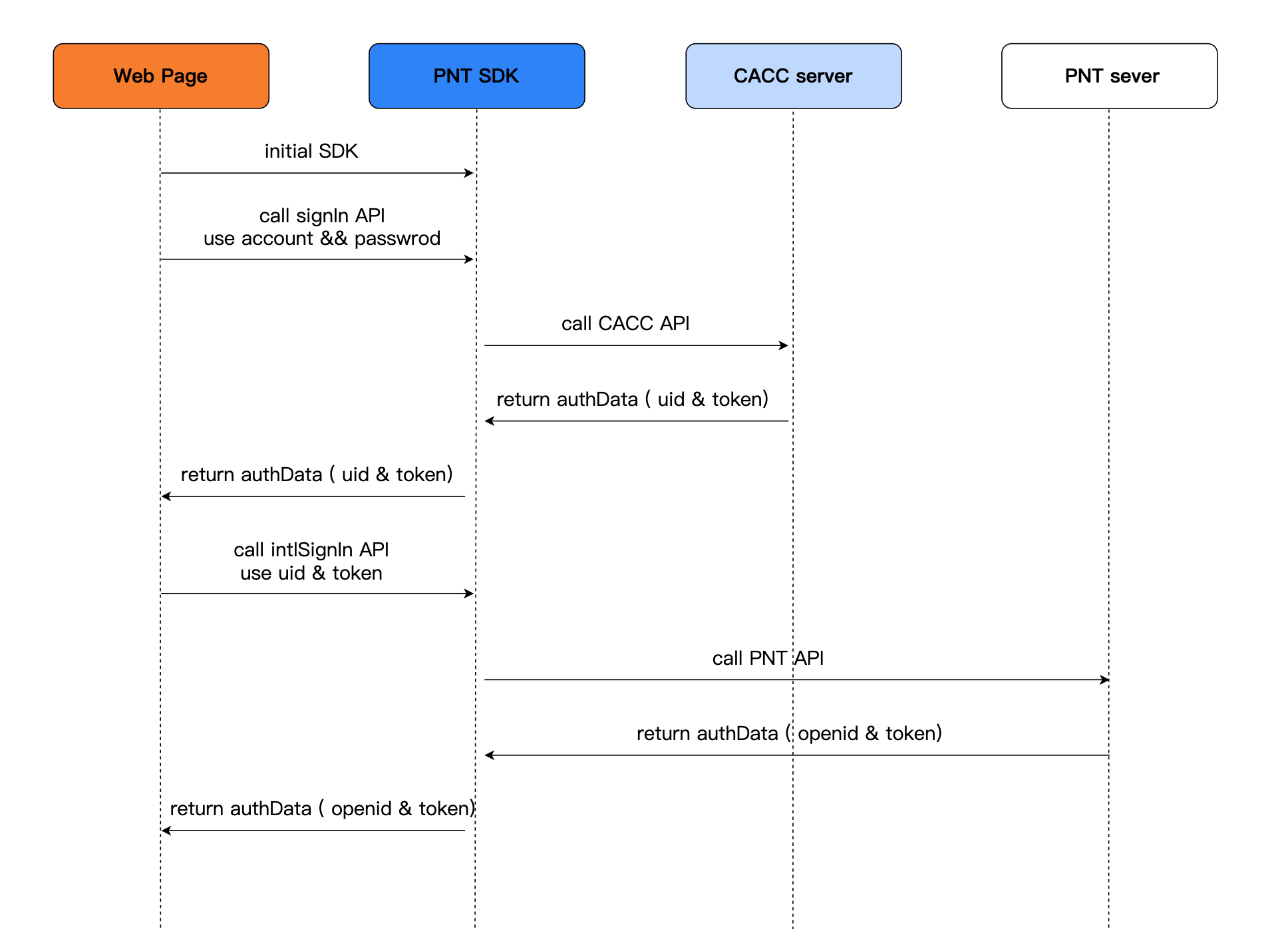
Account Registration
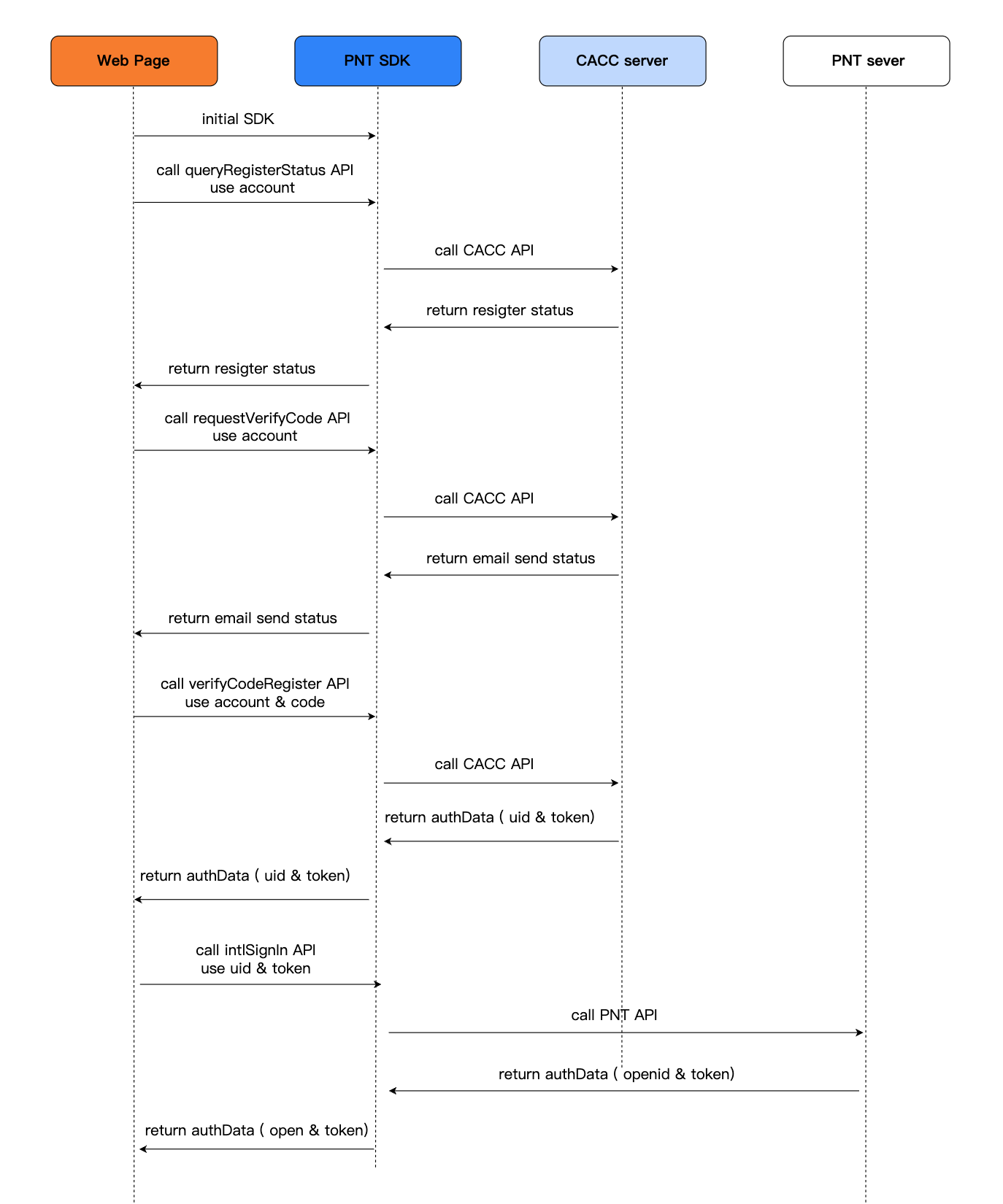
Third-Party Account Login Flow
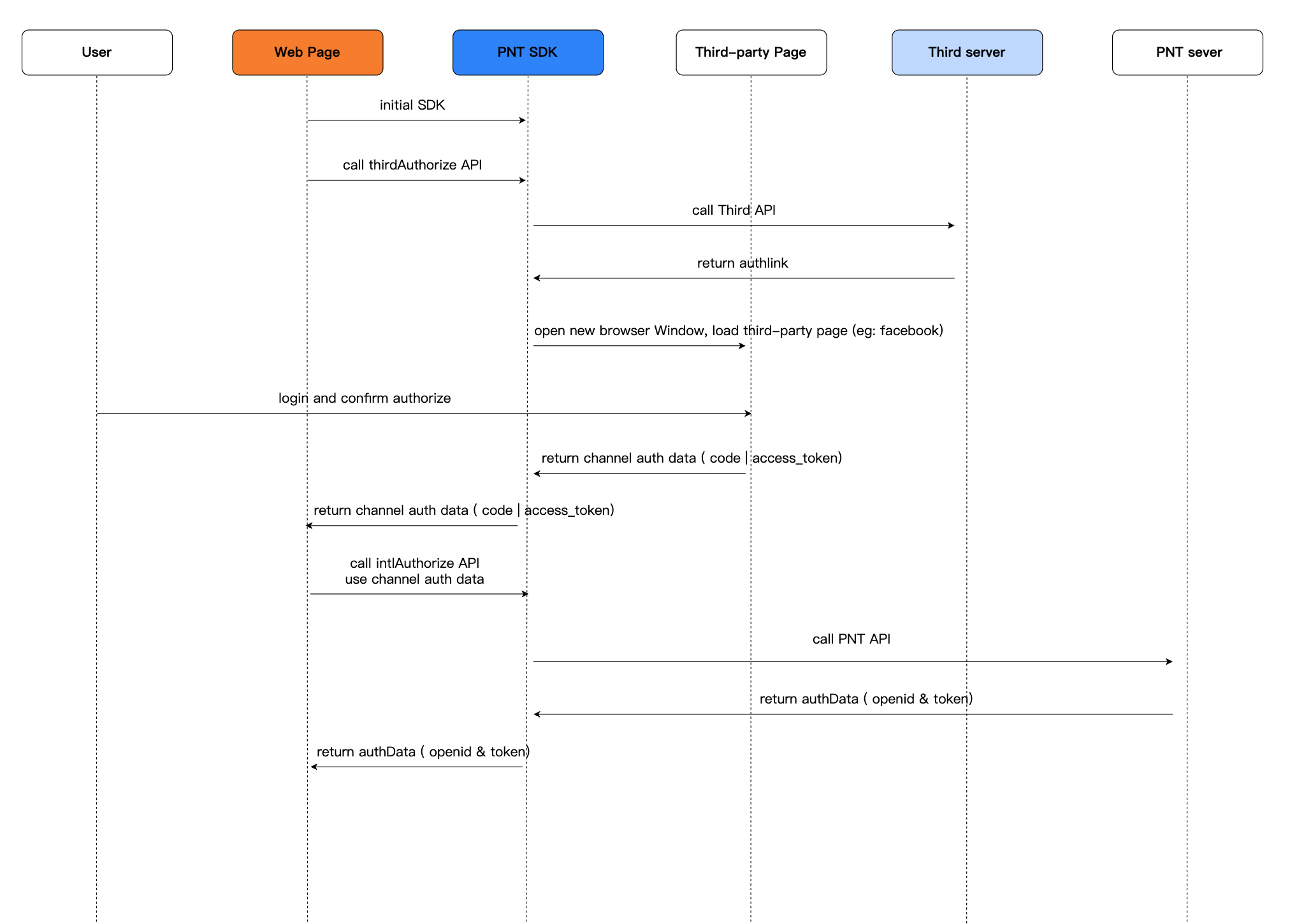
API
Email Account API
For more information about email account login APIs, see:
| API | Function definition |
|---|---|
| signIn | Password Login |
| verifyCodeSignIn | log in using email verification code |
| VerifyCodeRegister | Register email account |
| requestVerifyCode | Send verification code (can be used for registration, login, and password change) |
| queryRegisterStatus | Check email registration status |
| queryUserInfo | Query user information |
| modifyProfile | Modify user information |
| modifyUserAgreement | Modify User Agreement |
| queryUserNameStatus | Check if the username is in use |
| resetPassword | Change password |
| Logout (intlLogout) | Logout |
third-party API
For more information about third-party login APIs, see:
| API | Function definition |
|---|---|
| thirdAuthorize | Third-Party Channel Authorization |
| intlAuthorize | Player Network Account Authorization |
| intlLogout | Logout |
Bind API
For more information about binding APIs, see:
| API | Function definition |
|---|---|
| Bind | Bind |
| Unbind | Unlink |
| getBindChannelsByOpenID | Get bind list using Player Network SDK OpenID |
| getBindChannelsByUid | Get bind list using channel login information |

