Third-party Channel Login
Enable third-party channel login
LI PASS Web login for third-party channels only supports system browsers. Built-in WebView components of any game or application do not support third-party channel login:
- For security policy reasons, certain third-party channels, such as Google accounts and Facebook accounts, have completely prohibited login via embedded WebViews (for example, Facebook App, X App, built-in project browsers, etc.).
- The WebView component cannot load two pages simultaneously, which means it cannot load third-party login pages to complete the login process
Third-party channel login for the LI PASS Web component currently supports Apple, Discord, Epic, Facebook, Google, LINE, PS5, Steam, Twitch, X, VK, QQ, and WeChat.
LIPassUI supports third-party channel login. Please ensure you have configured third-party channel information and set the channel's client ID and secret in the Player Network Console. Please refer to the Third-party Channel Integration Guide
Method 1: Configuration via Player Network Console (recommended)
By configuring third-party channel login through the Player Network Console, you can update the third-party channels to display in real time.For detailed configuration steps, see Web Login Channels.
Method 2: Configure via code
<div id="infinite-pass-component"></div>
const pass = new PassFactory.Pass({
  env: "test", // Environment
  gameID: xxxxx, // GAME_ID configured in Player Network Console
  appID: "", // APP_ID configured in Player Network Console

  config: {
    socialList: ['facebook', 'twitter']
  }
});

// Call the `start` method to mount the login launcher to the specified DOM node
pass.start("#infinite-pass-component");

// You can listen to the event list to get user authentication information when users complete login or registration
pass.on("onLogin", (userInfo) => {
  // After the user fails to log in, the 'onLoginError event' will be triggered, and the game logic after the user successfully logs in, can be processed in the event callback
  // For example, redirect to a specific page
  console.log(userInfo);
});

pass.on("onLoginError", (userInfo) => {
  // The 'onLogin event' will be triggered after the user successfully logs in, and the game logic after the user fails to log in, can be processed in the event callback.
  console.log(userInfo);
});
Key configuration parameters
| Parameters | Type | Description | note |
|---|---|---|---|
| socialList | string[] | Channel list. For detailed configuration, please refer to config | Optional |
| socialParams | object | Configuration required for third-party channel login. For detailed configuration, please refer to socialParams | Optional |
Return parameters
| Parameters | Type | Description |
|---|---|---|
| ret | number | Return code 0: Request successful !=0: Request failed, see the msg for details |
| msg | string | Result explanation |
| token | string | User token generated by Player Network SDK Length: 40 bytes, see Token for details |
| openid | string | Player Network SDK user's unique identifier Default is a 64-bit unsigned integer string, can also support 32-bit |
| token_expire_time | int64 | Player Network SDK token expiration time Unix time |
| user_name | string | Username for login |
| channel_info | object | Channel information for login For more information, see ChannelInfo. |
| del_account_status | number | Account deletion status -1: Query failed 0: No account deletion record withdrawn or deleted number (email or phone account) 1: Silent period before account deletion 2: Account deletion successful 3: Account deletion in progress 4: Account deletion failed |
| seq | string | Message sequence number of the data flow |
Return Example
{
    channel_info: {
        access_token:"xxxxx",
        expire_ts: 1641527900,
    }
    first_login: 0,
    msg: "success",
    openid: "xxxx",
    picture_url: "https://www.google.com/Images/profileA.png",
    ret: 0,
    seq: "1638935899-1006943754-018668-0000656615",
    token: "xxx",
    token_expire_time: 1641527900,
    del_account_status: 0,
    user_name: "user",
}
Bind during login process
[Optional] Automatically prompt users to bind LI PASS during login
For users who login via third-party channels, if they have not used an email to bind LI PASS, you can prompt them to bind LI PASS during login.
To use this feature, activate Prompt player to bind LI PASS via email and Automatically trigger on login switches in the Account Binding Policy section of the Player Network Console, and pass in webID when initializing pass.
Once enabled, when a player logs in using a third-party channel account, they will be prompted with a LI PASS binding popup to complete the binding.
Auto pop-up: After the player logs in via Web component, if the player is not recognized as bound to a LI PASS account, the binding popup will automatically appear. As required by configuration, only after completing or skipping the binding can the user continue to the web page.
- Allow players to skip binding - Show a Skip button on the email binding page to let the player skip the email binding step.
- Force players to bind - Hide the Skip button on the email binding page, requiring the player to bind their email before completing the login step.
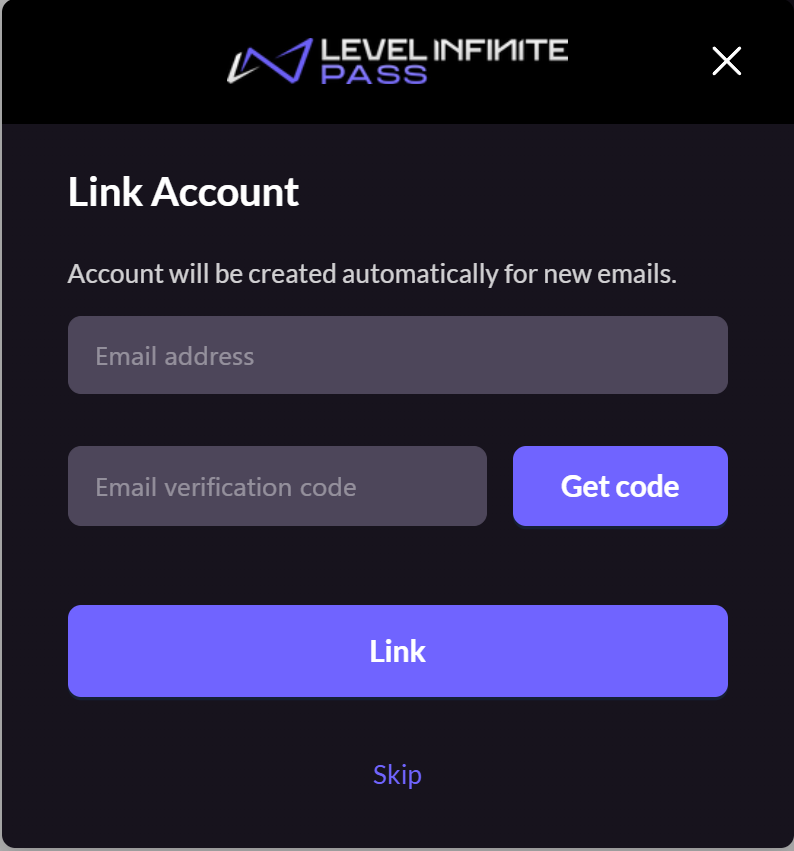
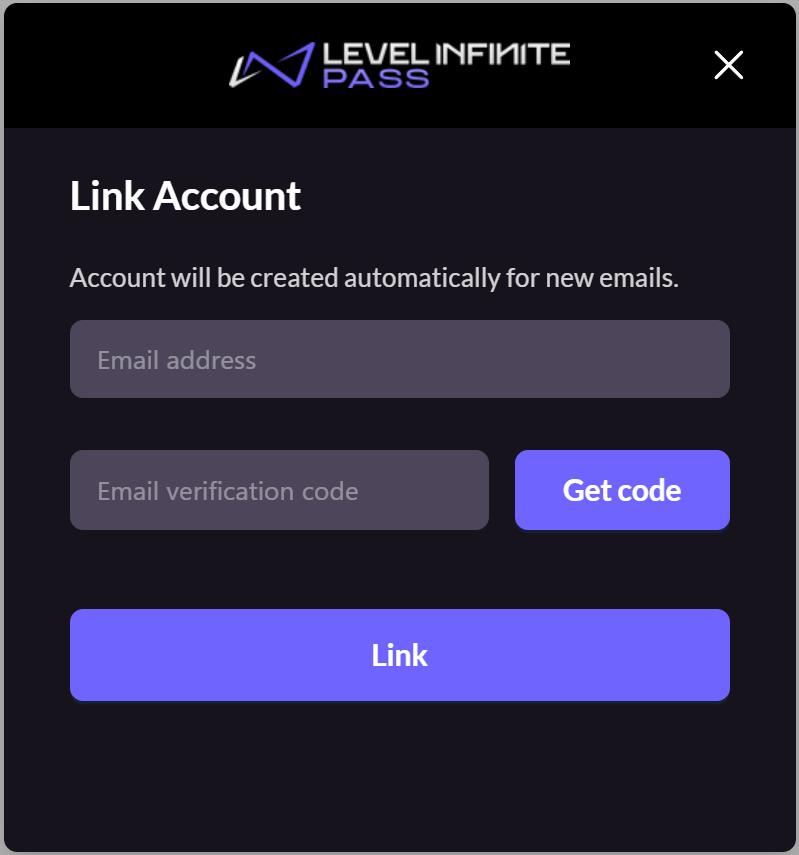
You can listen to the onBindError event to get information related to binding errors:
const pass = new PassFactory.Pass({
  env: "test", // Environment
  gameID: xxxxx, // GAME_ID configured in Player Network Console
  appID: "", // APP_ID configured in Player Network Console
  webID: "xxxxxxxxxxxx", // WEB_ID configured in Player Network Console
});

// Call `start` to mount the login launcher to the specified DOM node
// After successful login, the result is returned in `onLogin` and `onRegister` events
pass.start("#infinite-pass-component");

// When the user completes login and binding, the `onLogin` event is triggered, and the binding result `has_bind_lip` is returned
pass.on("onLogin", (userInfo) => {
  console.log(userInfo.has_bind_lip);
});

// You can listen to the `onBindError` event, which is triggered when a binding error occurs
pass.on("onBindError", (result) => {
  console.log(result);
});

// You can listen to the `onClose` event. When the user clicks the close button during the binding process and Player Network Console's binding policy is set to **Force player to bind**, this event will be triggered
pass.on("onClose", (accountApi) => {
  console.log(accountApi);
});
| Parameters | Type | Description |
|---|---|---|
| has_bind_lip | boolean | Whether LI PASS is bound true: The user has bound LI PASS, or binding is completed during this login false: The user skipped binding |
[Optional] Automatically prompt users to bind third-party channels during login
You can prompt users to bind third-party channels during login. If the user has not previously bound a LI PASS account, LI PASS binding will be prioritized; only one channel can be bound per login process.
The scope of third-party channel binding must be a subset of the login third-party channels.
To use this feature, activate Prompt player to bind third-party channels and Automatically trigger on login switches in the Account Binding Policy section of the Player Network Console, and pass in webID when initializing pass.
You can listen to the onBindError event to get information related to binding errors:
const pass = new PassFactory.Pass({
  env: "test", // Environment
  gameID: xxxxx, // GAME_ID configured in Player Network Console
  appID: "", // APP_ID configured in Player Network Console
  webID: "xxxxxxxxxxxx", // WEB_ID configured in Player Network Console
});

// Call `start` to mount the login launcher to the specified DOM node
// After successful login, the result is returned in `onLogin` and `onRegister` events
pass.start("#infinite-pass-component");

// When the user completes login and binding, the `onLogin` event is triggered, and the binding result `has_bind_lip` is returned
pass.on("onLogin", (userInfo) => {
  console.log(userInfo.has_bind_lip);
});

// You can listen to the `onBindError` event, which is triggered when a binding error occurs
pass.on("onBindError", (result) => {
  console.log(result);
});

// You can listen to the `onClose` event. When the user clicks the close button during the binding process and Player Network Console's binding policy is set to **Force player to bind**, this event will be triggered
pass.on("onClose", (accountApi) => {
  console.log(accountApi);
});
| Parameters | Type | Description |
|---|---|---|
| has_bind_lip | boolean | Whether LI PASS is bound true: The user has bound LI PASS, or binding is completed during this login false: The user skipped binding |
| socialBindList | object | User's third-party channel bind list |
socialBindList
| Parameters | Type | Description |
|---|---|---|
| channelId | number | Channel ID |
| channelName | string | Channel unique identifier |
| isNewlyBound | boolean | Binding done in this operation, used to distinguish between historical and current binding |
Obtain player email during login
[Optional] Retrieve player email during third-party channel login
This setting belongs to the Third-party Channel Configuration in the Player Network Console. Web-side operator roles do not have access; please contact business team to complete the configuration.
To use the quick binding feature of the Web binding module, you must first set permission to obtain player email during third-party channel login.
- For compliance, you can apply masking to the returned
emailfor certain sources. If needed, please contact Player Network assistant to enable this. - You can report
base64(sha256(email))in background logs. If needed, please contact Player Network assistant to enable this. - Can be used to verify player information or check whether the binding list contains
emailinfo. If needed, please contact Player Network assistant to enable this. - Can be used for iOS Firebase's Private Set Membership (PSM) feature. For details, see Firebase iOS Project Configuration.
Below are third-party channels that support returning player email:
Apple
Apple requires player authorization to obtain email. If the player refuses authorization, their email cannot be retrieved. See Login interface for passing email and fullName.
-
Use an editing tool to add the
emailpermission under [Dynamic] inAPPLE_LOGIN_PERMISSION. -
Enable the email return feature in the Player Network Console by setting return_email to YES. For details, see Third-party Channel Configuration.
Enable the email return feature in the Player Network Console by setting return_email to YES. For details, see Third-party Channel Configuration.
-
Use an editing tool to add the
emailpermission under [Dynamic] inFACEBOOK_LOGIN_PERMISSION.IfFACEBOOK_LOGIN_PERMISSIONis not configured inINTLConfig.ini,emailpermission will be automatically included. -
Configure email permission in Meta for Developers.The email permission requires Advanced Access Level for all applications to obtain the player's email.
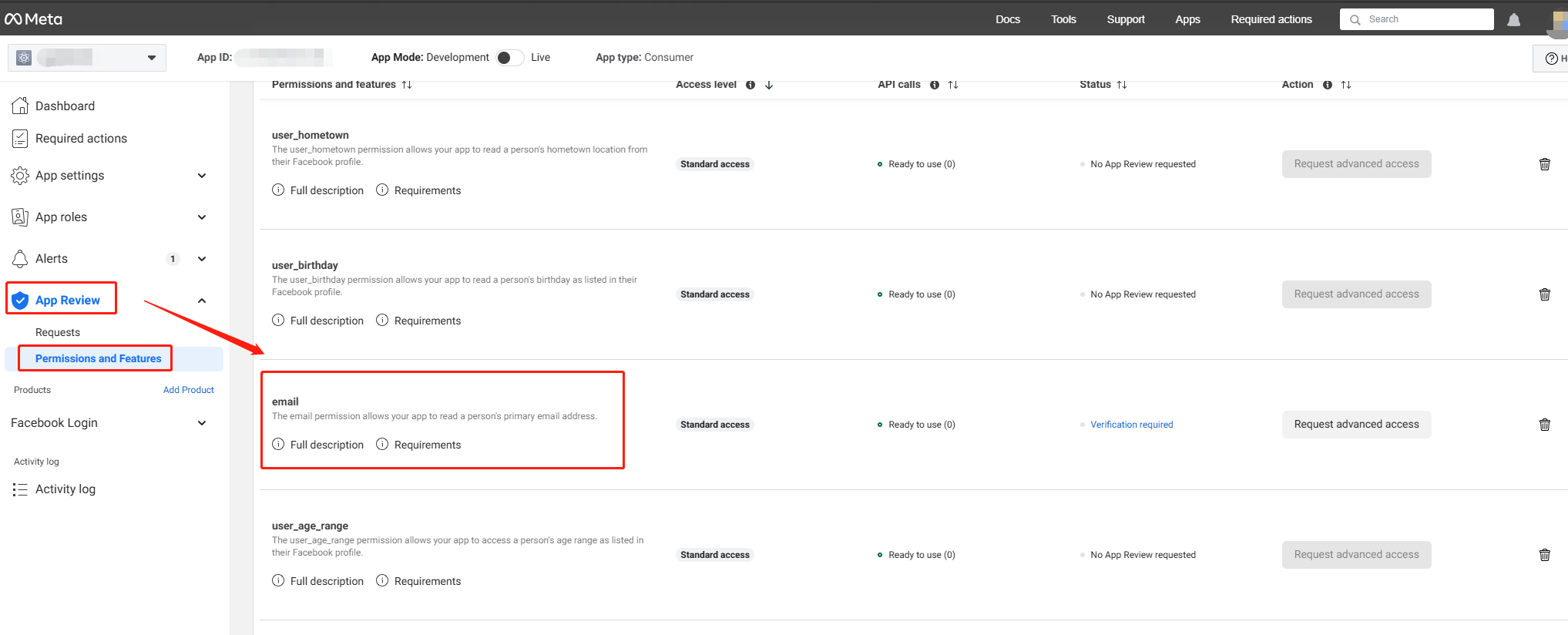
-
Enable the email return feature in Player Network Console by setting return_email to YES. For details, see Third-party Channel Configuration.
X
-
On X Developer Platform under User authentication settings, check Request email from users.
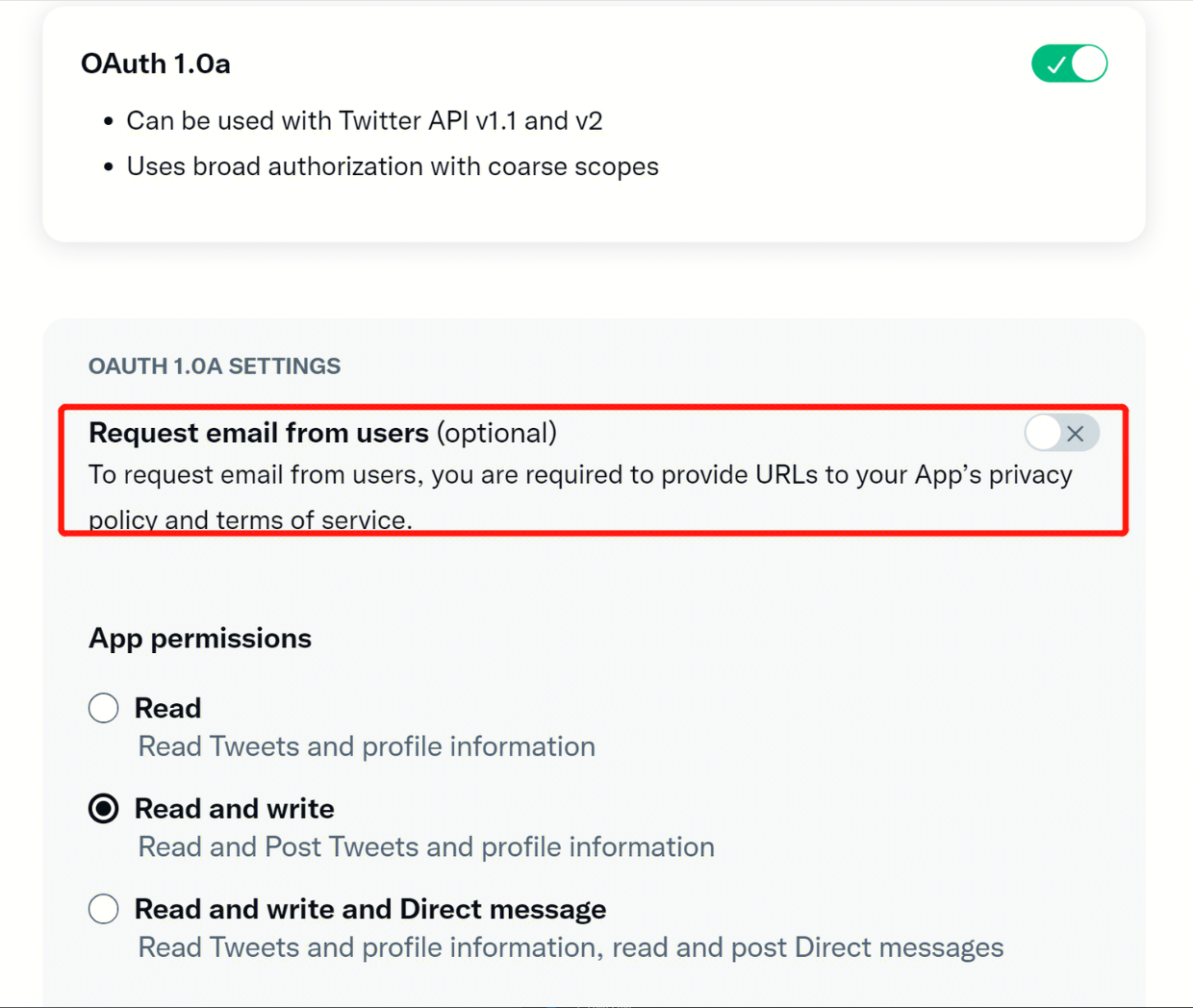
-
Enable the email return feature in the Player Network Console by setting return_email to YES. For details, see Third-party Channel Configuration.

