Compliance Integration
Overview of Compliance Features
LI PASS integrates the entire compliance process. To integrate LI PASS, the following compliance features must be completed:
- Configuration of Issuing Countries/Regions and Agreement Terms
- Minor Verification
- Minor Chat Authorization
- Account Deletion
For a detailed introduction to LI PASS compliance features, see the Compliance Module product document.
For human service assistance, you can consult the Player Network Assistant on Enterprise WeChat.
Configuration of Issuing Countries/Regions and Agreement Terms
Set List of Issuing Countries/Regions
LI PASS obtains the player's current country/region based on the player's IP address and defaults to displaying that country/region. Players can also choose to switch to other countries/regions themselves.
The game can set the required country list and blocked country list as needed in the following 2 ways:
1. Configure the required country list and blocked country list on the Player Network Console
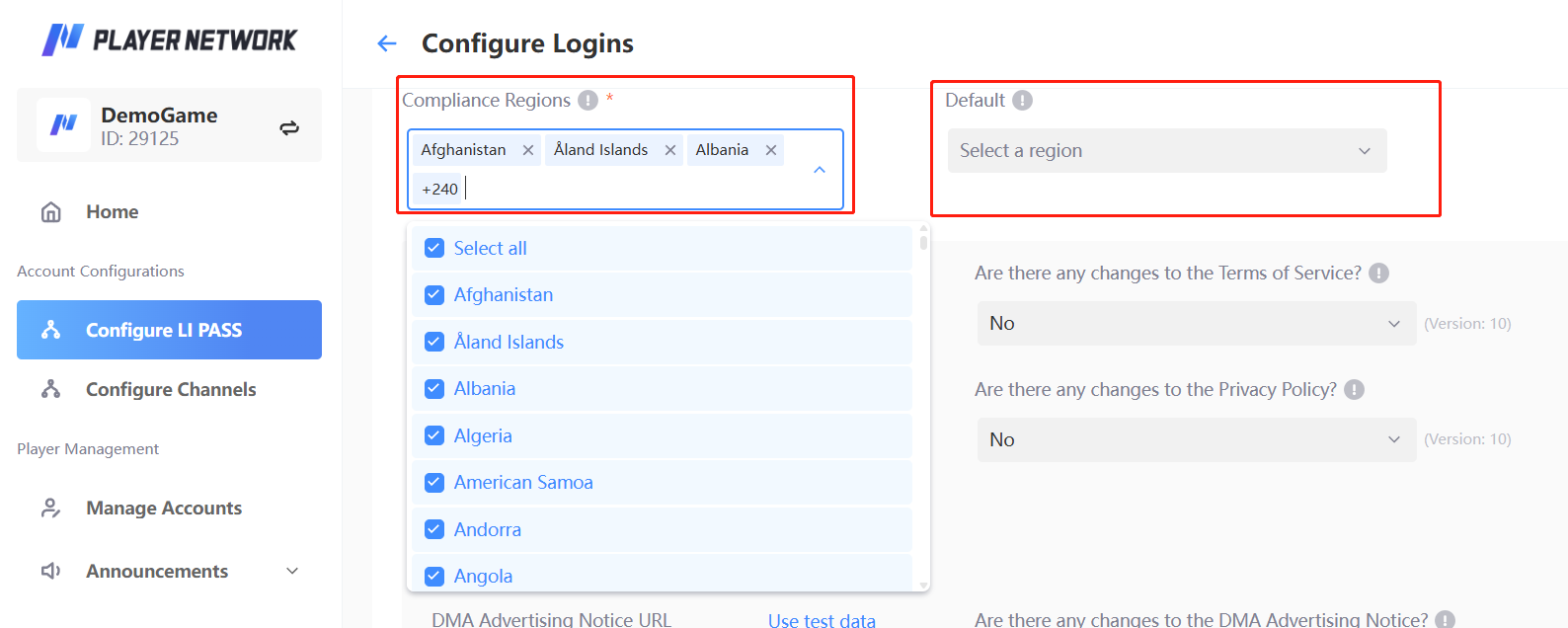
Configure the country list on the Player Network Console.Set the default displayed country/region on the right side to show this default country/region when obtaining the player's country/region by IP fails.
2. Call the UpdateCountryList API to set the list of countries to display and the list of countries to block.
- When calling the
UpdateCountryListinterface, it is necessary to pass theallowListandblockListarrays. TheallowListarray should contain ISO 3166-1 numerical codes for countries/regions that need to be displayed, while theblockListarray should contain ISO 3166-1 numerical codes for countries/regions to be blocked.
Code example:
- Unity
- Unreal Engine
string[] allowArray = new string[] {"496","400"};
string[] blockArray = new string[] {"400"};

LevelInfinite.UpdateCountryList(allowArray,blockArray);
TArray<FString> allowList;
allowList.Add(TEXT("496"));
allowList.Add(TEXT("400"));
TArray<FString> blockList;
blockList.Add(TEXT("400"))

ULevelInfiniteAPI::UpdateCountryList(allowList,blockList);
If the country list and blocked country list are simultaneously set in both the Player Network Console and game code, the configuration from the Player Network Console takes priority.
Agreement Terms Configuration
LI PASS displays the corresponding compliance agreement based on the player-selected country/region. The number of compliance agreements varies across different countries/regions.All agreement terms are as follows:
- [Required] Game Service Terms and Game Privacy Agreement
- [Required] LEVEL INFINITE PASS Service Terms and LEVEL INFINITE PASS Privacy Agreement
- [Optional] LEVEL INFINITE PASS and Game Marketing Email Subscription
- [Optional, only South Korea] Nighttime Marketing Email Subscription
- [Required, only Mobile in EEA Region] DMA Advertising Notification
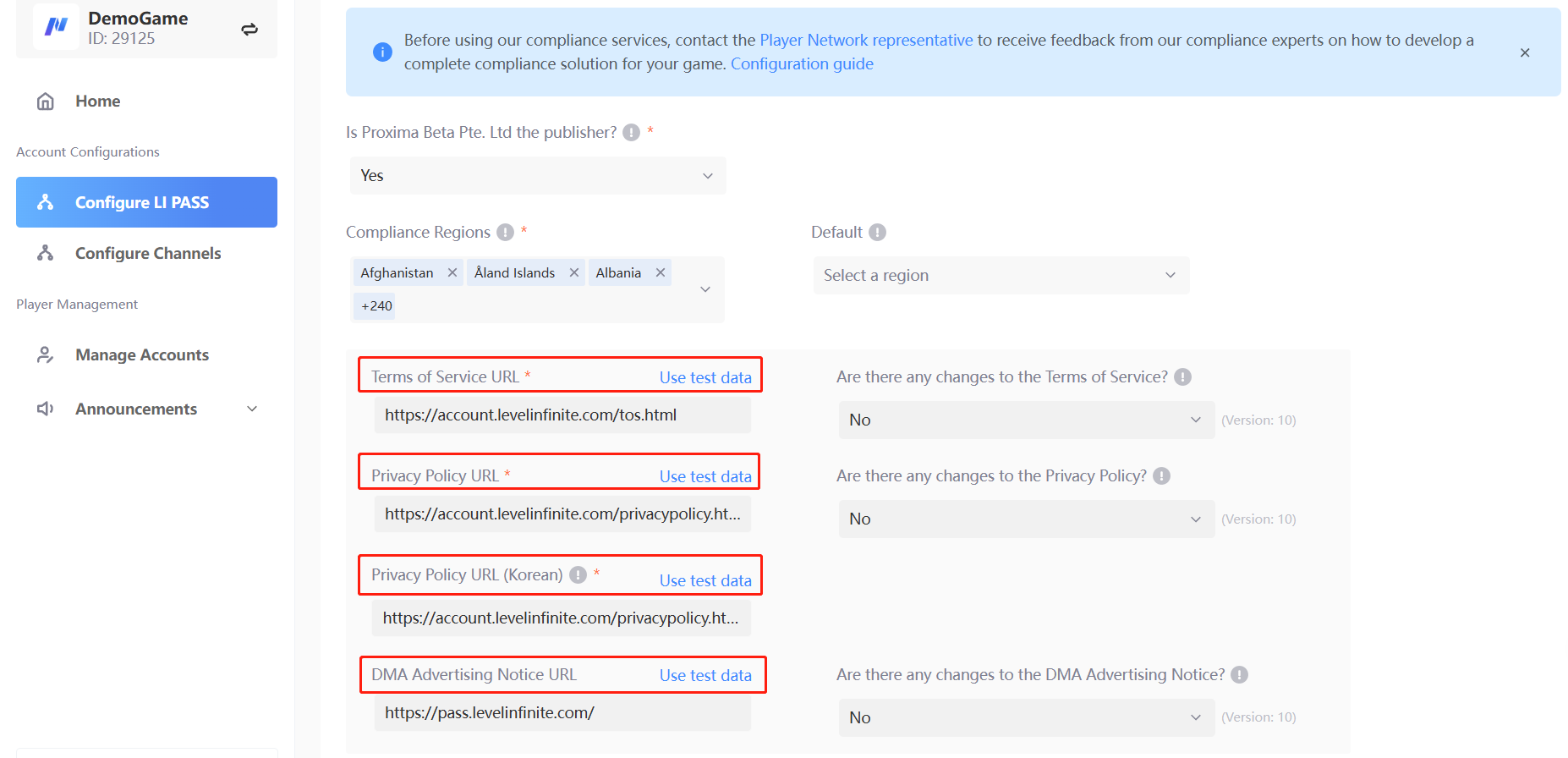
- Game-side needs to complete the agreement terms for Game Service Terms, Game Privacy Agreement, Korean Game Privacy Agreement, DMA Advertising Notification, and create them into a webpage.
- Provide multi-language switching functionality on the agreement terms webpage.
- Configure the agreement terms webpage URL in the Player Network Console or INTLConfig.ini.
- Player Network Console, as shown in the screenshot:
- Configuration in the game client's INTLConfig.ini file:
GAME_PP_URL = {Your webpage URL}
GAME_TOS_URL = {Your webpage URL}
- If both the Player Network Console and game code configure the agreement terms webpage URL, the configuration from the Player Network Console takes priority.
- LEVEL INFINITE PASS Service Terms and LEVEL INFINITE PASS Privacy Agreement have been implemented in the LI PASS login component.
Minor Verification
LI PASS login component has fully implemented the minor verification service. After contacting fanfanliang(梁晓彤) and configuring on the compliance console, it can be directly used.
LI PASS offers a standard overseas minor verification compliance process. For customization needs, you can contact the compliance personnel fanfanliang(梁晓彤) .
Configuration of minor verification process includes:
- Adult Age Configuration
- Configuration of Minor Compliance Verification Method
- Game's Minimum Suitable Play Age
- Minor Entry Ban Feature
- Minor Game Chat Authorization
Adult Age Configuration
The LI PASS compliance team sets the corresponding adult age according to the laws and regulations of different countries/regions. For more information or modification related configurations, you can contact the compliance personnel fanfanliang(梁晓彤) .
Minor Compliance Verification Method
According to the laws and regulations of different countries/regions, the main verification methods for minors are as follows:
- No Minor Verification Required
- Player Self Verification
- Parent Email Authorization for Minor Verification
- US Credit Card Verification for Minors
- Korean PC Real Name Verification
No Minor Verification Required
When registering an account/first login, if the selected country/region does not require minor verification, the player can enter the game by agreeing to the relevant agreements and terms without undergoing the minor verification process.
Player Self Verification
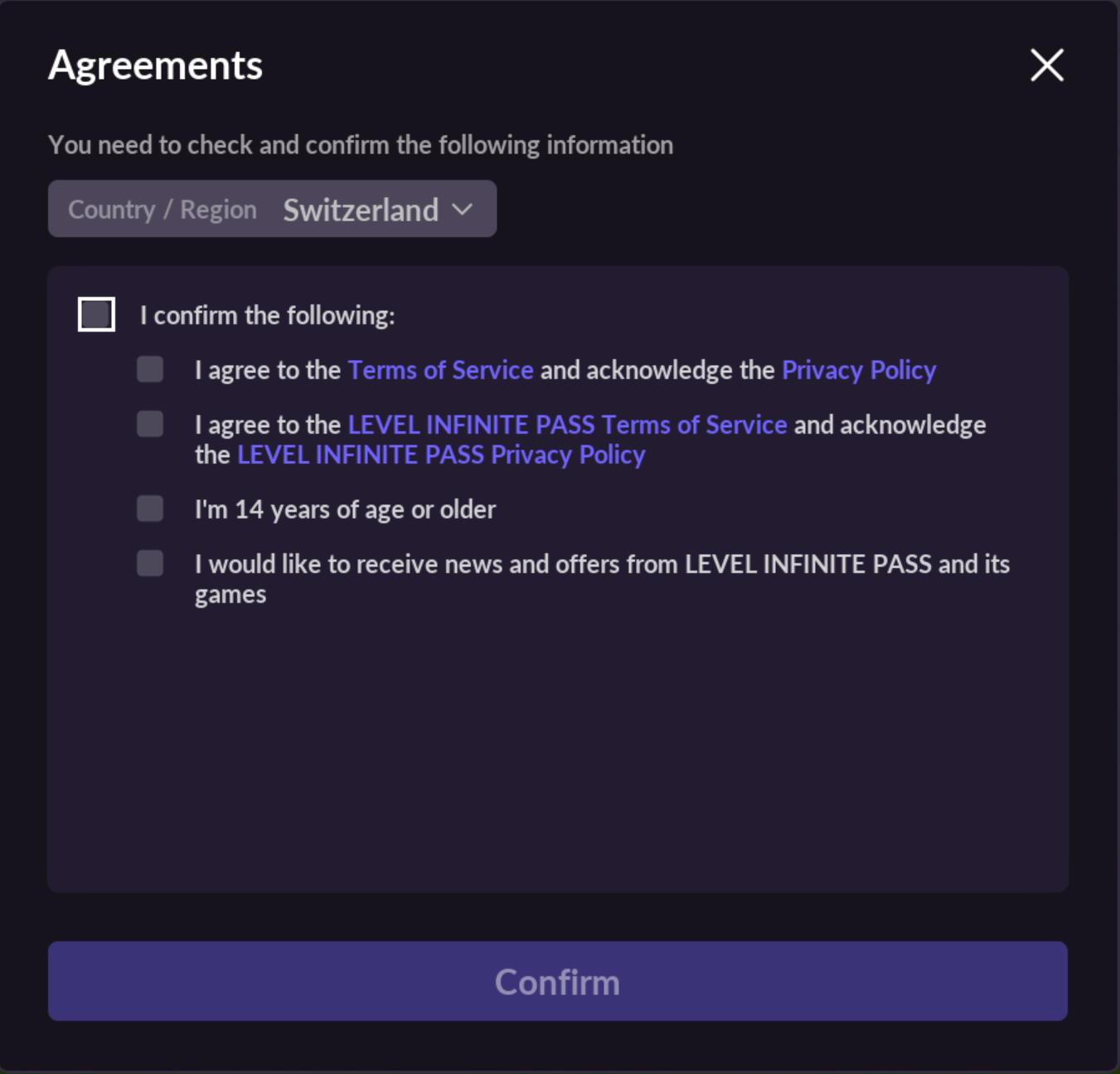
When registering an account/first login, if the selected country/region requires self-verification for minors, the agreement terms interface will prompt the player to tick the compliance agreement and confirm the adult option. If the adult option is not ticked, it indicates that the player is a minor, as shown in the third option of the example below.
Parent Email Authorization for Minor Verification
Distribution in Europe, South Korea (limited to non-PC games), etc., and allowing minor players to enter the game, requires sending an email to the parent's inbox for authorization before the player can enter the game.
The game side needs to provide account used for sending parental verification emails (send-only, no receiving), for specific configuration contact fanfanliang(梁晓彤) .
US Credit Card Verification for Minors
According to relevant American laws and regulations, players under the age of 13 need their parent's credit card payment (deducting one dollar in advance) for verification if they wish to enter the game.
Game-side needs to create offerid for credit card verification on the Midas website and authorize it to LI PASS platform. For specific configuration contact fanfanliang(梁晓彤) .
Korean PC Real Name Verification
According to South Korean laws and regulations, Korean PC games require real name verification.The logic of real-name verification service has been implemented in LI PASS login component, if PC games need to be distributed in South Korea, please contact fanfanliang(梁晓彤) for real-name configuration.
Minor Entry Ban Feature
LI PASS component has implemented the feature to prohibit minor players from entering the game, the game-side only needs simple configuration to enable this feature.If there is a need, please contact fanfanliang(梁晓彤) for configuration.
Minor Game Chat Authorization
According to legal requirements from some countries/regions, if minors are allowed into the game, their chat function (including text and voice chat) must be disabled by default; only upon obtaining parental authorization can the chat function be provided to minor players.
Countries/regions requiring parental authorization for chat functionalities include: United Kingdom, United States, Singapore, India, South Korea, Russia, all European Economic Area countries (30), etc.
LI PASS supports authorizing minor chat functionalities in different scenarios:
- Obtaining authorization during minor player registration/login stage (included in the Credit Card/Email Certification process);
- Obtaining authorization before minor players use chat functionalities.
Authorization during registration/login stage
LI PASS component has integrated the minor chat authorization functionality during the registration/login stage.When the game enables the parental authorization function for minor chat, LI PASS component will embed the chat authorization process during minor verification at the registration/login stage, according to the player's region to complete credit card or email authentication and proceed to parental authorization.
Game-side needs to focus on:
-
The game needs to listen for the
SOCIAL_FEATURE_APPROVE_STATUScallback event to obtain the player's minor chat authorization status and handle the callback logic. For details, see SOCIAL_FEATURE_APPROVE_STATUS; -
For more information, refer to LI PASS Event Callback Information (LIEventObserver).
Obtain authorization before using the chat function
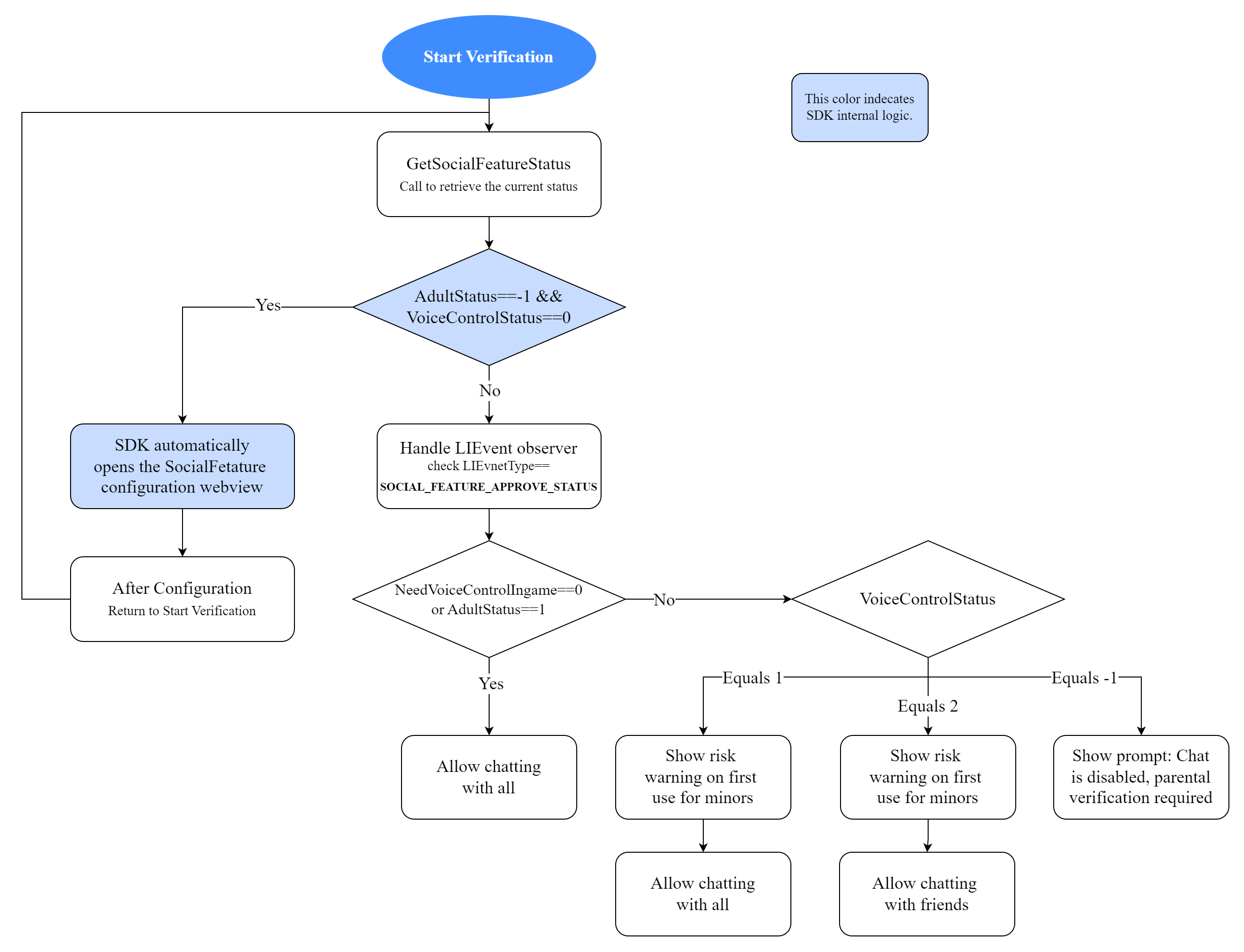
To authorize before using chat functionalities, the game needs to call the relevant interface manually.
Before minor players first use chat functionalities in-game, prompt the player for an authorization application. The specific implementation process is as follows:
-
The game calls GetSocialFeatureStatus to get the player's social feature control authorization status. LI PASS's internal logic will determine whether the player is a minor and whether minor chat authorization needs to be completed
-
If it is judged that the player is a minor and minor chat authorization needs to be completed, LI PASS will automatically launch a WebView and enter the minor chat authorization process;
-
The game needs to listen for the
SOCIAL_FEATURE_APPROVE_STATUScallback event to obtain the player's minor chat authorization status and handle the callback logic. For details, see SOCIAL_FEATURE_APPROVE_STATUS; -
For more information, refer to LI PASS Event Callback Information (LIEventObserver).
- Unity
- Unreal Engine
LevelInfinite.AddLIEventObserver(OnLIBaseEventResult);

private void OnLIBaseEventResult(LIBaseEventResult liRet)
{
    switch (liRet.lIEventType)
    {
        case LIEventType::SOCIAL_FEATURE_APPROVE_STATUS:
        {
            try
                {
                    LISocialFeatureApproveStatus param = JsonUtility.FromJson<LISocialFeatureApproveStatus>(liRet.extraJson);
                    ShowLogInNewLine("SOCIAL_FEATURE_APPROVE_STATUS, VoiceControlStatus:" + param.VoiceControlStatus + ", NeedVoiceControl:" + param.NeedVoiceControl + ", NeedVoiceControlIngame:" + param.NeedVoiceControlIngame + ", NeedVoiceControlParentCert:" + param.NeedVoiceControlParentCert);
                }
                catch (Exception e)
                {
                    Debug.LogError("On LIEventType.SOCIAL_FEATURE_APPROVE_STATUS" + liRet.lIEventType.ToString() + "Error. msg:" + e.ToString());
                }
                break;
        }
    }
}
LIEventObserver = ULevelInfiniteAPI::GetEventDelegate().AddUObject(this, &USample::OnLIEvent_Callback);
void USample::OnLIEvent_Callback(FLIBaseEvent Event)
{
FString logStr;
switch (Event.EventType) {
case ELIEventType::SOCIAL_FEATURE_APPROVE_STATUS:{
FLIPSocialFeatureApproveStatus param;
FJsonObjectConverter::JsonObjectStringToUStruct(Event.ExtraJson, ¶m, 0, 0);
logStr = FString::Printf(TEXT("SOCIAL_FEATURE_APPROVE_STATUS, VoiceControlStatus: %d, NeedVoiceControl: %d, NeedVoiceControlIngame: %d, NeedVoiceControlParentCert: %d"), param.VoiceControlStatus, param.NeedVoiceControl, param.NeedVoiceControlIngame, param.NeedVoiceControlParentCert);
break;
}
}
Account Deletion
Deleting an account removes multiple data types, including:
- In-game data
- Payment data
- Account data
- Peripheral component data
For more related content about account deletion, please contact fanfanliang(梁晓彤) .
Account Deletion through Account Center
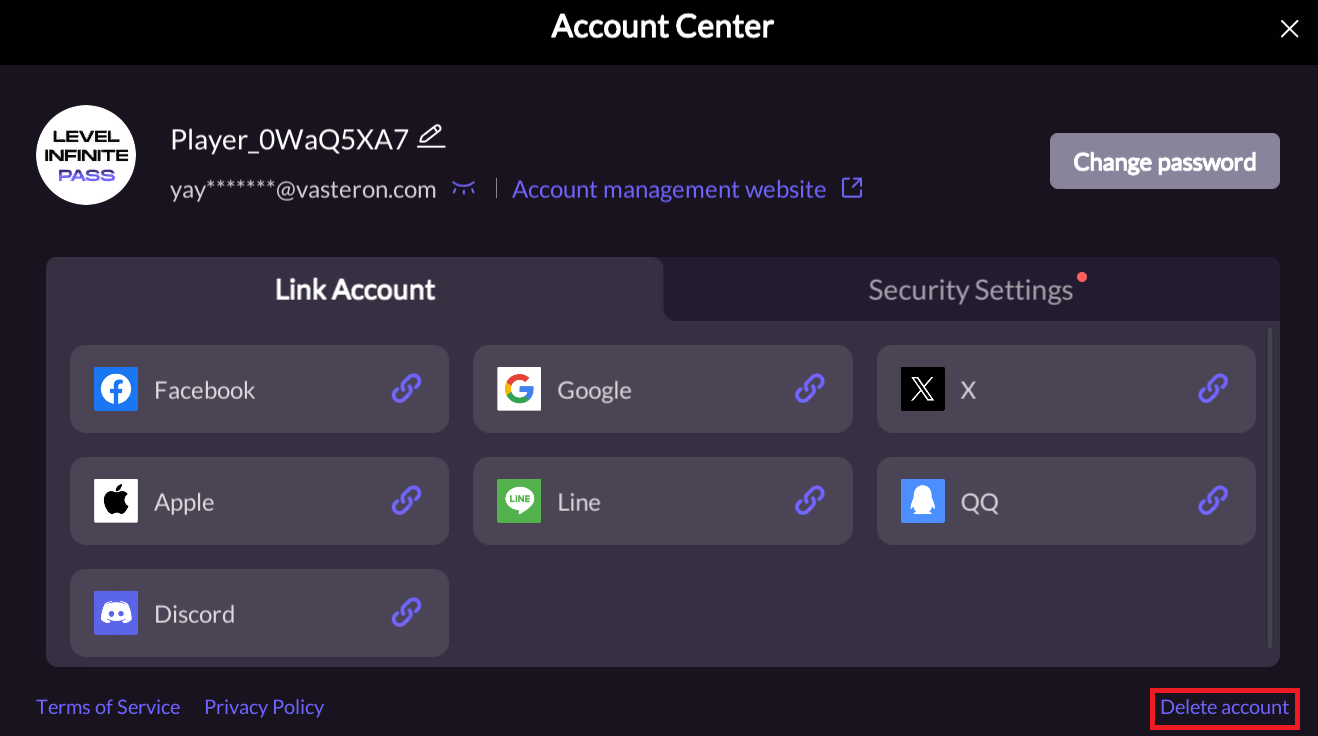
The logic of the account deletion service has been implemented in the LI PASS account center. Game developers only need to integrate the account center module containing the delete function and configure the delete button as the player entry.The specific integration process is as follows:
-
Configure SHOW_DELETE_ACCOUNT_BUTTON in the INTLConfig.ini file to display the account deletion button in the Account Center;
-
The game calls [OpenAccountCenterWithParams] (/docs/account/lipass/AccountCenter#account-center-deletion) to open the account center. After the player clicks the delete button, LI PASS will launch the H5 account deletion page.
-
When the game calls [OpenAccountCenterWithParams] (/docs/account/lipass/AccountCenter#account-center-deletion) to open the account center, it needs to listen to
ACCOUNT_CENTER_OPENandACCOUNT_CENTER_CLOSEevents. -
See LIEventType Events and LI PASS Event Callback Information (LIEventObserver) for details.
- When an account is deleted, the current game needs to be exited to prevent user misoperation.
- Unity
- Unreal Engine
- The game must listen for the
DELETE_ACCOUNT_SUCCESS,DELETE_ACCOUNT_FAIL, andDELETE_PARAMETERS_MISSINGevents to obtain the account deletion result; - See LIEventType Events and LI PASS Event Callback Information (LIEventObserver) for details.
Example Code:
LevelInfinite.AddLIEventObserver(OnLIBaseEventResult);

private void OnLIBaseEventResult(LIBaseEventResult liRet)
{
    switch (liRet.lIEventType)
    {
        case LIEventType::DELETE_ACCOUNT_SUCCESS:
        {
            logStr = TEXT("Account center open");
            break;
        }
        case LIEventType::DELETE_ACCOUNT_FAIL:
        {
            logStr = TEXT("Account center close");
            break;
        }
        case LIEventType::DELETE_PARAMETERS_MISSING:
        {
            logStr = TEXT("Account center close");
            break;
        }
    }
}
Example Code:
- The game must listen for the
DELETE_ACCOUNT_SUCCESS,DELETE_ACCOUNT_FAIL, andDELETE_PARAMETERS_MISSINGevents to obtain the account deletion result; - See LIEventType Events and LI PASS Event Callback Information (LIEventObserver) for details.
LIEventObserver = ULevelInfiniteAPI::GetEventDelegate().AddUObject(this, &USample::OnLIEvent_Callback);

void USample::OnLIEvent_Callback(FLIBaseEvent Event)
{
	FString logStr;
	switch (Event.EventType) {
    case ELIEventType::DELETE_ACCOUNT_SUCCESS:
    {
      logStr = TEXT("LI PASS account delete success");
      break;
    }
    case ELIEventType::DELETE_ACCOUNT_FAIL:
    {
      logStr = TEXT("LI PASS account delete fail");
      break;
    }
    case ELIEventType::DELETE_PARAMETERS_MISSING:
    {
      logStr = TEXT("Missing parameters to delete LI PASS account");
      break;
    }
  }
Silent Period for Account Deletion
-
After a player submits an account cancellation request, the account will enter a 30-day deletion silent period set by the platform.
-
During the account deletion silent period, players can log in to the game to reactivate their account and cancel the account cancellation request.
-
Once the account deletion silent period ends, the player's account will be permanently deleted and cannot be recovered.
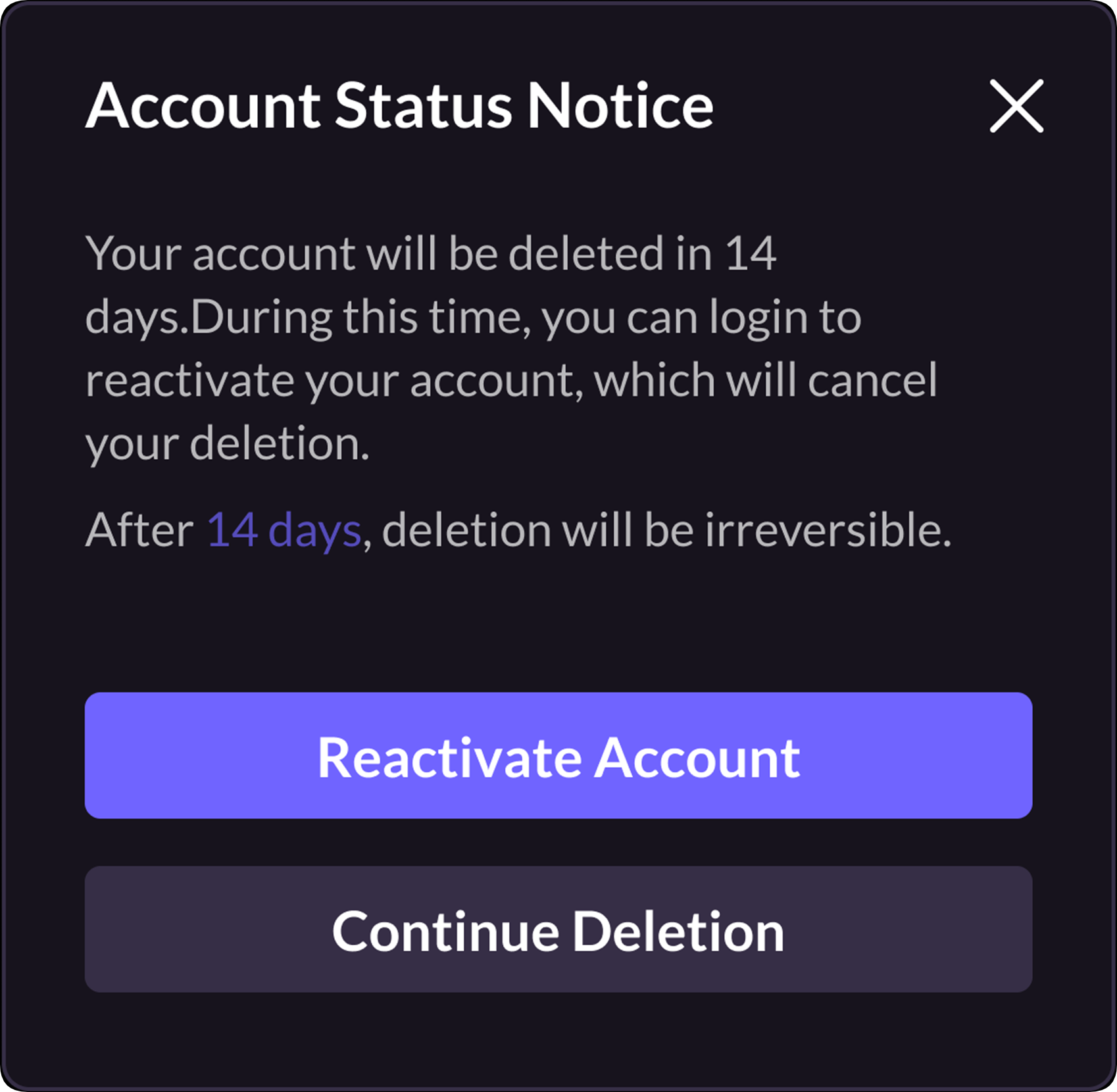
As shown in the above image:
-
Players can click Reactive Account to reactivate their account and enter the game;
-
If the player clicks Continue Deletion or the Close button in the upper right corner to maintain the Deletion Silence Period, it will clear the player's login state and return them to the login screen.

