Access Overview
This article provides an overview of the services and access provided by LI PASS.LI PASS services are integrated in PlayerNetwork SDK, to use LI PASS related services, you need to access PlayerNetwork SDK first.
If you need human service, you can consult Player Network Assistant at Enterprise WeChat.
PlayerNetwork SDK Integration Process
- Select the appropriate account plan for your game (Mobile account plan, PC Standalone account plan, PC Store account plan, Console account plan);
- Configure your project on the Player Network Console; for specific configuration steps, refer to the Player Network Console Documentation;
- Download the PlayerNetwork SDK according to the game's functional needs. Refer to PlayerNetwork SDK download;
- Integrate the PlayerNetwork SDK within the game project Integration;
- During the development phase, verify PNT related functions and conduct thorough testing in the testing environment;
- During the launch preparation phase, switch to the production environment.
PlayerNetwork SDK Login Service
Access login functionality according to different plans:
- Mobile Account Solution
- PC Standalone Account Solution
- PC Store Account Solution
- Console Account Solution
The complete login process (including client and backend) is illustrated below:
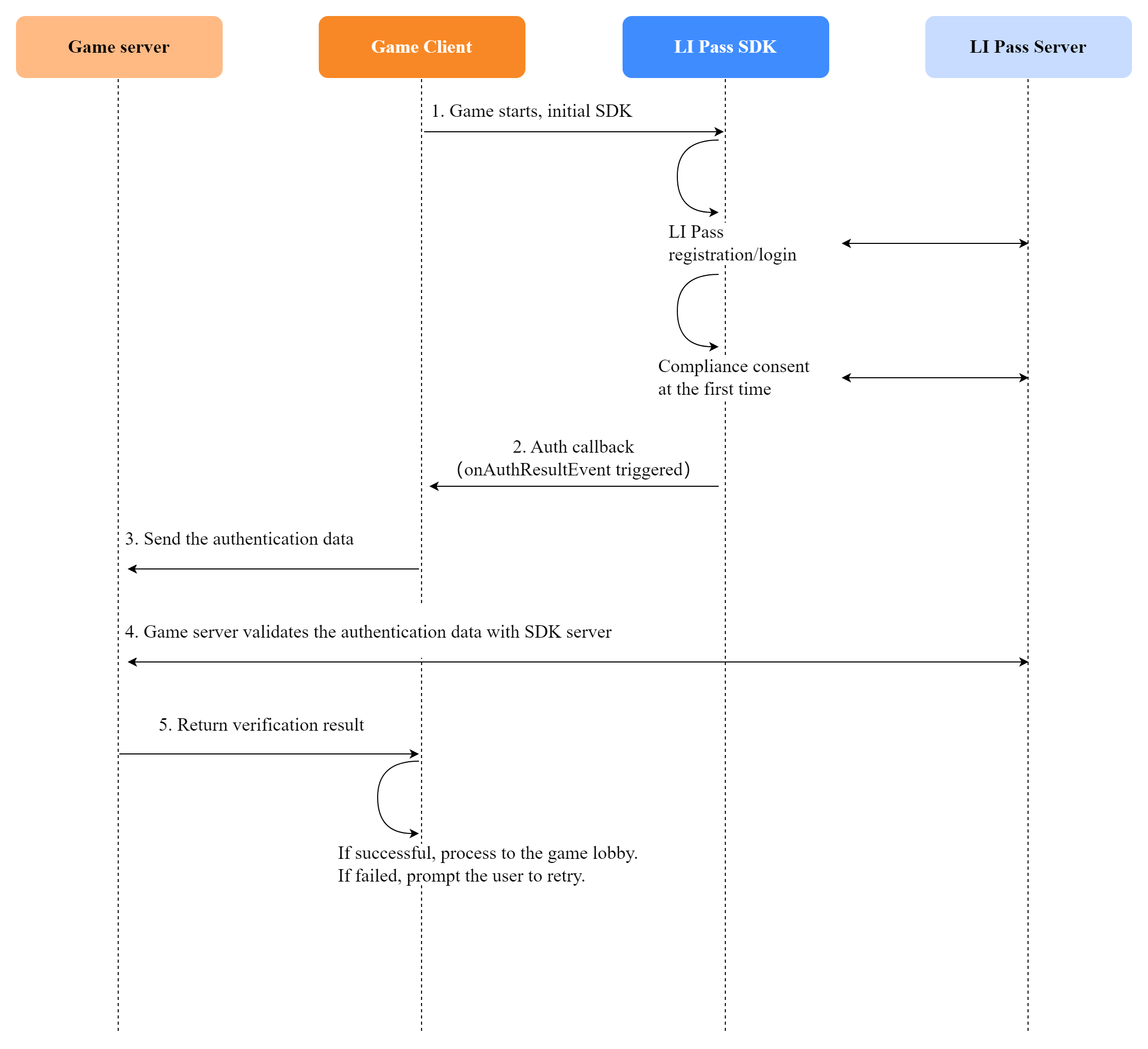
Complete Game Integration Process:
-
- Properly integrate the chosen game account plan from the PlayerNetwork SDK integration process, complete the PlayerNetwork SDK login process, and receive login state data returned by PlayerNetwork SDK;
-
- Transfer the login state data (openid and token) received in step 2 to the game backend;
-
- Have the game backend authenticate the login state data with the PlayerNetwork SDK backend;
-
- Upon successful authentication, the game backend returns the result to the game client. Players can enter the game lobby if login is successful; otherwise, notify the user of the reason for failure or advise retrying.
Game Client Integration Steps
Steps to be completed by the game client:
-
- Complete the initialization of PlayerNetwork SDK upon game startup;
-
- Integrate the selected game account plan, complete the PlayerNetwork SDK login process, and obtain the login state data from PlayerNetwork SDK;
-
- Transfer the login state data (openid and token) to the game backend and receive the authentication results from the backend;
-
- Process the results of the backend authentication;
Game Backend Integration Steps
Steps to be completed by the game backend:
-
- Formulate protocols and provide backend interfaces to receive the login data (openid and token) from the game client;
-
- After receiving the login state data from the game client, call the backend interface provided by PlayerNetwork SDK for authentication;
-
- Once authentication is completed, process the authentication data returned by the PlayerNetwork SDK backend and send the results back to the game client;
PlayerNetwork SDK Backend Authentication Service can refer to the following integration guide:
Compliance Features
PlayerNetwork SDK Compliance Services include:
- Release countries/regions and agreement terms;
- Minor Authentication;
- Minor messaging authorization;
- Account Deletion.
For specific access information, contact fanfanliang (Liang Xiaotong) to learn more.Visit /docs/account/lipass/Compliance Integration for detailed access information.
Agreement Terms Configuration
- The game compliance manager formulates the game's User Agreement and Privacy Terms and places them on a webpage;
- The game compliance manager provides the webpage address of the agreement terms to the game developers;
- The game developers configure the agreement on the Player Network Console and release it within the game.
Minor Authentication
- The game compliance manager should communicate with the LI PASS compliance team member fanfanliang (Liang Xiaotong) to fully understand the LI PASS minor authentication-related services;
- Based on the game's characteristics and the services provided by LI PASS compliance, the game compliance manager drafts corresponding minor authentication requirements;
- The game compliance manager configures the minor authentication-related parameters on the Player Network Console and releases them within the game;
Minor Messaging Authorization
There are two integration modes for minor messaging authorization. Businesses can choose one according to their needs:
- Authorization obtained during registration/login phase: PlayerNetwork SDK has implemented the entire authorization process, so game developers only need to open the corresponding settings;
- Authorization obtained before minor players use the messaging function: requires game developers to call the relevant SDK interface.
Account Deletion
There are two integration modes for the account deletion feature. Businesses can choose one according to their needs:
- Game integration with LI PASS Account Center module (LI PASS Account Center already includes account deletion functionality);
- Game developers independently call related SDK interfaces to implement.
Account Center
- LI PASS provides an Account Center module. If needed, the game may offer an entry point to open the account center at an appropriate location;
- Developers need to manually call the relevant interfaces to implement the functionality of opening the Account Center;
- For more details about the Account Center, visit Account Center to learn more.
Gift Feature
LI PASS gift features include first login gifts and binding gifts, which can be integrated through the following process:
- Game planners communicate with the LI PASS team for appropriate game gift plans;
- Once the gift plan is determined, configure the gift distribution interface on IDIP;
- Configure gift activities on login gift activity platforms (AMS or Game Events);
- For first login gifts after players enter the game lobby (after character creation completes), game developers must call relevant interfaces to complete the gift distribution;
- Binding gifts have been implemented in the LI PASS Account Center, integrate the LI PASS Account Center module to enable.
To learn more details about rewards, please refer to the Rewards Documentation.
Account Security
LI PASS accounts come with a series of measures to ensure account security:
- The game publisher and planner need to fully understand the account security options provided by LI PASS and configure these options in LI PASS Settings on Player Network Console;
- After the game launches, the Player Network monitoring team will closely monitor account security;
- If account anomalies are detected, the LI PASS team will promptly communicate corresponding strategies with the game publishing team to ensure account security.
To learn more about account security, please see the Security Documentation.
Hotfix Feature
PlayerNetwork SDK provides a hotfix feature, allowing quick online issue resolution without releasing new versions, reducing update cost and time, and enhancing user experience.
The hotfix feature requires support from the game engine. The LI PASS Team will work with game developers to complete hotfix integration.
To learn more about hotfix functionality, review the /docs/account/lipass/Hotfix Integration documentation.
Custom UI/UX Feature
To better align the UI/UX style and experience with the game, LI PASS offers a custom UI/UX feature.
If the game requires custom UI/UX, follow the process below for customization:
- The game team provides the LI PASS team with the UI/UX design plan;
- LI PASS Team develops the customized UI/UX and provides a customized version;
- Game development team integrates the customized UI/UX PlayerNetwork SDK.
Go to Custom UI/UX for more information.

