Secure Access
Go to Security Product Documentation to learn more
Abnormal Login Alert
When a player logs into their game account using a new device in an unusual region, the system will automatically send an abnormal login alert email to the player’s bound LI PASS account email, informing the player of potential security risks and providing appropriate solutions.
This feature needs to be enabled via the Player Network console, and it supports configuring trigger conditions for abnormal login alerts.Configurable in the Configure LI PASS section under Account Security.
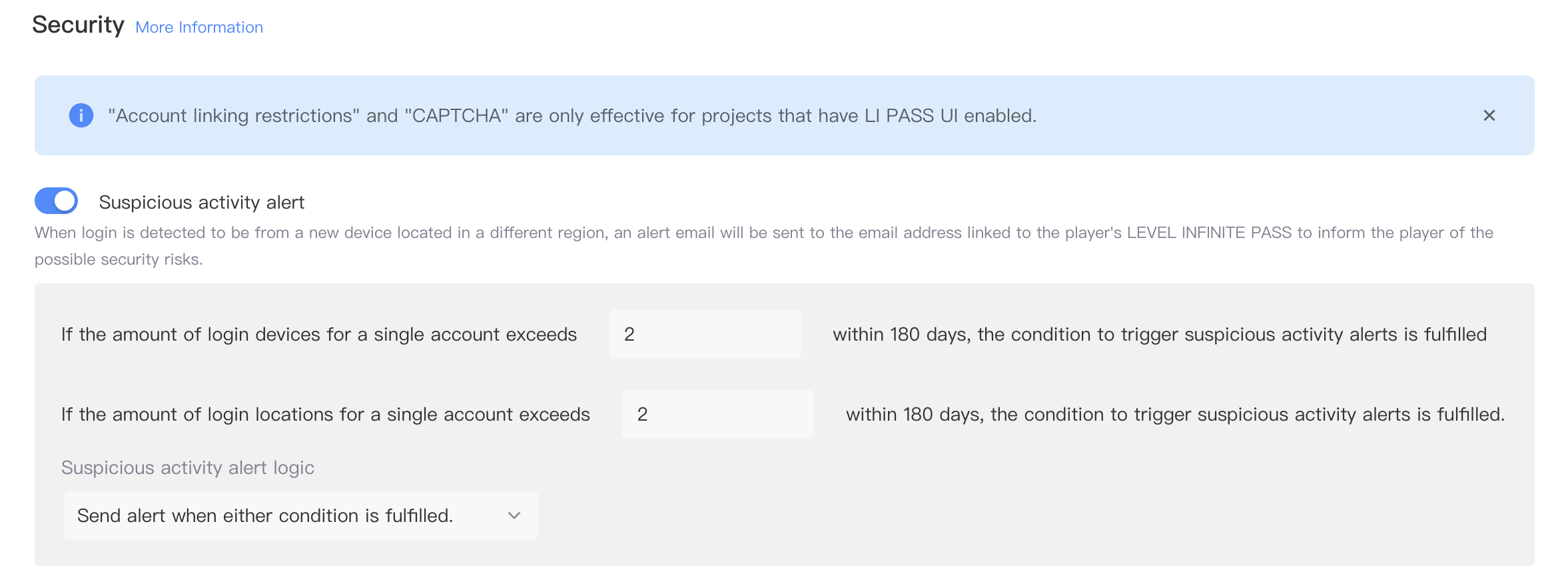
As shown in the figure below, after turning on the “Abnormal Login Alert” switch in the Player Network console, you can configure the number of login devices and regions.
- When common login devices exceed X, abnormal login alert conditions are met: X is the number of device IDs a player logged in within 180 days, as an integer, specific number depends on your security strategy.
- When common login regions exceed X, abnormal login alert conditions are met: X is the number of country/region IPs a player logged in within 180 days, as an integer, specific number depends on your security strategy.
- Device abnormal alert determination strategy: whether emails are sent when both conditions are met or when any one condition is satisfied.
Account Binding Restriction
The “Account Binding Restriction” feature only takes effect for businesses using the LI PASS UI solution.
The account binding restriction switch needs to be enabled in the Player Network console, and once enabled, the account cannot bind a third-party channel account or LI PASS account within X hours after logging in on a new device: X is an integer between 1~99, specific number depends on your security strategy.


