Integration Overview
PC Store solution, suitable for games listed on Steam and Epic.
Before integrating this solution, you can learn about the LI PASS PC Store product documentation
Client Login Process
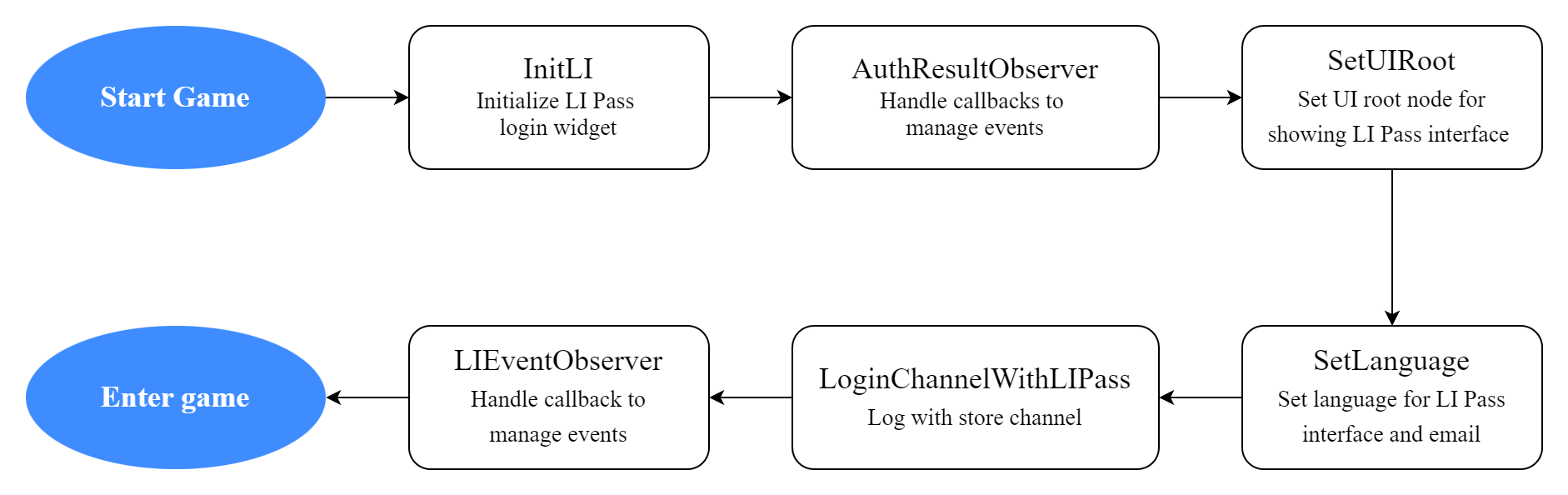
- After the game completes initialization on startup, call the
LoginChannelWithLIPassinterface and pass in the store channel name you intend to use for login, such as Steam or Epic, to obtain the channel authorization, - After obtaining the channel authorization information, LI PASS sends the authorization data to the LI PASS backend for channel authentication,
- Once authentication by LI PASS backend is completed, LI PASS will proceed to complete the account compliance process,
- After receiving the event to enter the game, you need to pass the received login state data (openid and token) to the game backend for LI PASS authentication,
- Once the above steps are complete, the player may enter the game lobby
To learn about interfaces and callbacks relevant to login integration, browse the PC Store Solution /docs/account/lipass/login/pc2/Login Integration module
Player account operations
During development, player account binding/unbinding, account reset, and deletion may be performed multiple times. These operations can be completed via the Player Network Console
For detailed information, please visit:
Steam Store
For integration of the Steam channel and the process for launching your game, refer to the Steam documentation.
-
For games planned to launch on the Steam Store, before the official release, multiple games are created in the Steam backend for development and testing—for instance, the official release version might be GameA, and the public test version might be GameA Playtest,
-
Game projects must register multiple games with different gameids in Player Network Console, corresponding to different games on the Steam Store, and then configure the appropriate login parameters,
For games with different gameids, the same player will get a different openid when logging in through the same channel.
-
When packaging the game, for different Steam games, just modify the
GAME_IDandINTL_URLsettings inINTLConfig.ini, -
Steam games that have integrated the LI PASS PC Store login solution allow players to link/bind LI PASS accounts during login. Players who have linked a LI PASS account only need to go through the compliance process once,
-
When releasing the official version, if you need to send rewards to external test players, you can do so using the email associated with the LI PASS account or the player's Steam ID,
Epic Store
For integration and game publishing workflows for the Epic channel, please refer to the Epic documentation.
-
For games planned to launch on the Epic Store, before the official release, multiple games are created in the Epic backend for development and testing,
-
Game projects must register multiple games with different gameids in Player Network Console, corresponding to different games on the Epic Store, and then configure the appropriate login parameters,
For games with different gameids, the same player will get a different openid when logging in through the same channel.
-
When packaging the game, for different Epic games, just modify the
GAME_IDandINTL_URLsettings inINTLConfig.ini, -
Epic games that have integrated the LI PASS PC Store login solution allow players to link/bind LI PASS accounts during login. Players who have linked a LI PASS account only need to go through the compliance process once,
-
When releasing the official version, if you need to send rewards to external test players, you can do so using the email associated with the LI PASS account,

