Binding Component Integration
Games often hold account linking-related marketing activities. Hence, the Web component supports the account linking function, making your operations efficient and cost-effective.
Bind LI Pass Component
After a user logs in using a third-party channel and accesses the web page, you can manually trigger the LI PASS binding process by calling the bind API during page initialization or via a button embedded in the page to proactively open the binding pop-up.
- If the currently logged-in third-party channel is able to return the user's email, and that email has not registered a LI PASS account, the user enters the quick binding process.
- If the currently logged-in third-party channel cannot retrieve the email, or the retrieved email has already registered a LI PASS account and is bound to another account, the user will be prompted to enter a new email to bind to LI PASS.
- If the current user has already bound LI PASS, it will return the bound information.
User binding process
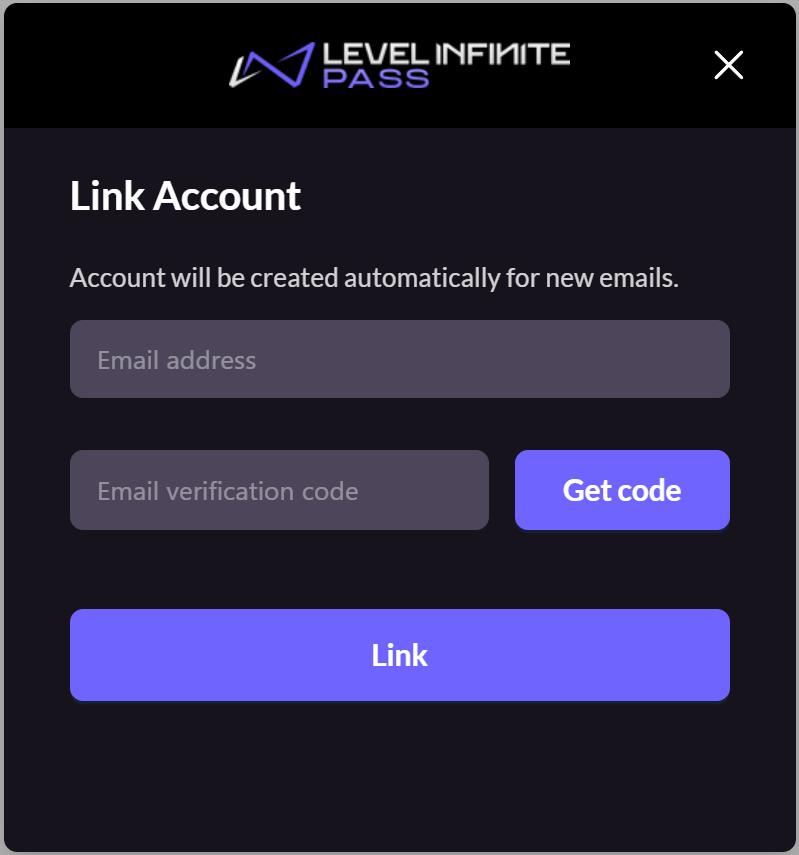
Player enters email to login/register LI PASS email binding
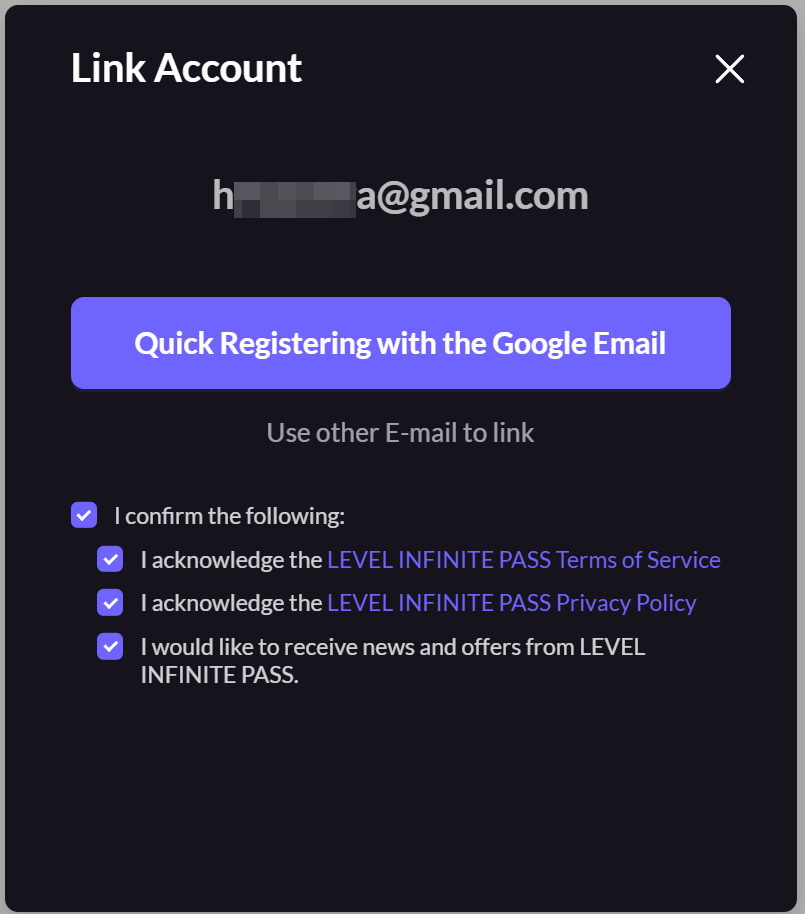
Quick bind
Quick Binding: Some third-party accounts support passing user email. In this scenario, the user's third-party account email will be shown to guide them to quickly bind/newly register LI PASS.
This feature is available only after completing the steps in obtaining the player email during third-party channel login.
- If this email is already registered with LI PASS, the display here will reflect the agreement terms' checkbox status for that LI PASS.
- Players can also choose to bind another LI PASS by entering a different email and verification code.
Integration Method
Create LI PASS Web configuration in Player Network Console and enable Guide players to bind LI PASS with email and Allow players to manually trigger in Account Binding Strategy.After publishing, pass the generated WEB_ID when initializing pass.
You can listen for the onBindError event to obtain information related to binding errors:
Example
const pass = new PassFactory.Pass({
  env: "test", // Environment
  gameID: xxxxx, // GAME_ID configured in Player Network console
  appID: "", // APP_ID configured in Player Network console
  webID: "xxxxxxxxxxxx", // WEB_ID configured in Player Network console
});


// Call the `bind` method to render the binding component
pass.bind({
  bindToken: '', // Current user's openid
  bindToken: '', // Current user's token
  bindChannelID: 6, // Current user's channelid
})

// Listen for the `onBind` event; you can view the user's binding status from `has_bind_lip` in the result
pass.on("onBind", (result) => {
  console.log(result);
});

// The `onClose` event is triggered when the user clicks close, indicating binding was not completed
pass.on("onClose", (accountApi) => {});

// You can listen for the `onBindError` event; when binding errors occur, this process is triggered
pass.on("onBindError", (result) => {
  console.log(result);
});
Return Parameters
| Parameter | Type | Description |
|---|---|---|
| has_bind_lip | boolean | Whether LI PASS is bound |
| openid | string | Player Network SDK Unique User Identification Defaults to 64-bit unsigned integer string, supports 32-bit as well |
| token | string | Player Network SDK generates a user token Length: 40 bytes, see Token for details. |
| channel_info | object | Channel Information |
channel_info
| Parameter | Type | Description |
|---|---|---|
| channelId | number | Channel ID |
Bind Third-Party Channel Component
In cases where the user has completed login authorization, you can call the bindSocial API to manually trigger the binding process for the third-party channel.
Integration Method
Create a LI PASS Web configuration in the Player Network console, and enable Guide players to bind third-party channels and Allow players to manually trigger in Account Binding Strategy.After publishing, pass the generated WEB_ID when initializing pass.
You can listen for the onBindError event to obtain information related to binding errors:
Example
const pass = new PassFactory.Pass({
  env: "test", // Environment
  gameID: xxxxx, // GAME_ID configured in Player Network Console
  appID: "", // APP_ID configured in Player Network Console
  webID: "xxxxxxxxxxxx", // WEB_ID configured in Player Network Console
});


// Call the `bindSocial` method to display the binding component
pass.bindSocial({
  bindToken: '', // Current user's openid
  bindOpenid: '', // Current user's token
  bindChannelID: 6, // Current user's channelid
})

// Listen for the `onBind` event to check user's binding status from the result
pass.on("onBind", (result) => {
  console.log(result);
});

// The `onClose` event is triggered when the user clicks the close button, indicating the user did not complete the binding
pass.on("onClose", (accountApi) => {});

// You can listen for the `onBindError` event, which is triggered when there is a binding error
pass.on("onBindError", (result) => {
  console.log(result);
});
Return Parameters
| Parameter | Type | Description |
|---|---|---|
| has_bind_lip | boolean | Whether LI PASS is bound |
| openid | string | Player Network SDK Unique User Identification Defaults to 64-bit unsigned integer string, supports 32-bit as well |
| token | string | Player Network SDK generates a user token Length: 40 bytes, see Token for details. |
| socialBindList | object | User's third-party channel bind list |
socialBindList
| Parameter | Type | Description |
|---|---|---|
| channelId | number | Channel ID |
| channelName | string | Channel unique identifier |
| isNewlyBound | boolean | Whether this operation is a new bind, used to distinguish between historical binds and current binds |

