PC Store Account Solution
Overview
LI Pass PC Store Account Solution is designed for PC games released on Steam and Epic Store, launched via Steam and Epic clients.
Visit PC Store Integration Guide for quick integration steps.
Login Flowchart
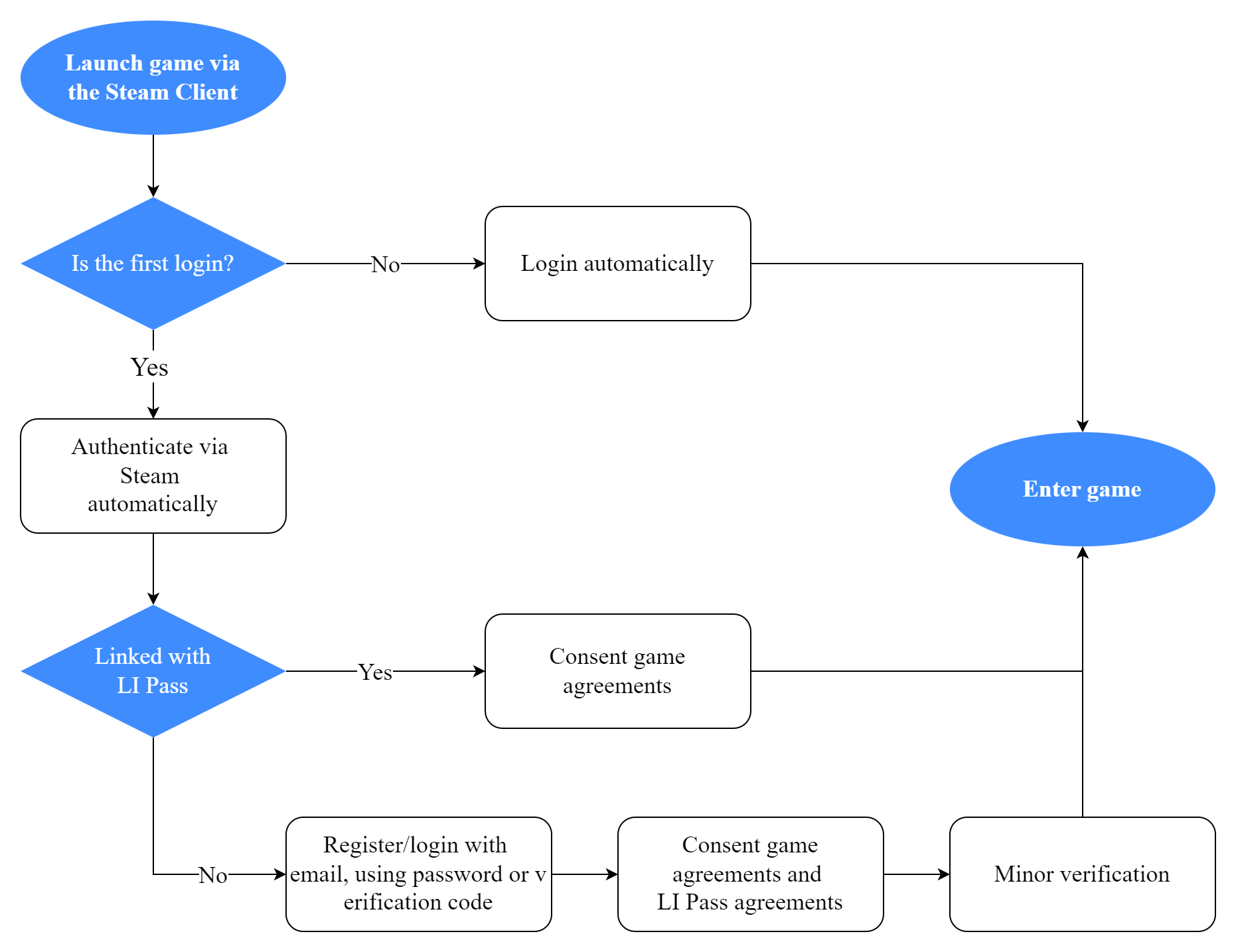
The following login flow, using Steam channel as an example:
- During the game launch process, LI Pass automatically calls Steam authorization;
- For returning players, they can directly enter the game;
- New players, if the system identifies Steam ID already linked with LI Pass account, must agree to game service terms and user agreement to enter the game;
- New players, if Steam ID is not linked with LI Pass account, must complete LI Pass registration or login, comply with minor verification, user agreement, and privacy policy to enter the game.
Detailed Product Features
Registration
New players entering the game, if not linked with LI Pass and not registered, can perform LI Pass registration.
LI PASS offers manual registration and automatic registration, allowing configuration on Player Network Console. See Registration Mode Configuration for details.
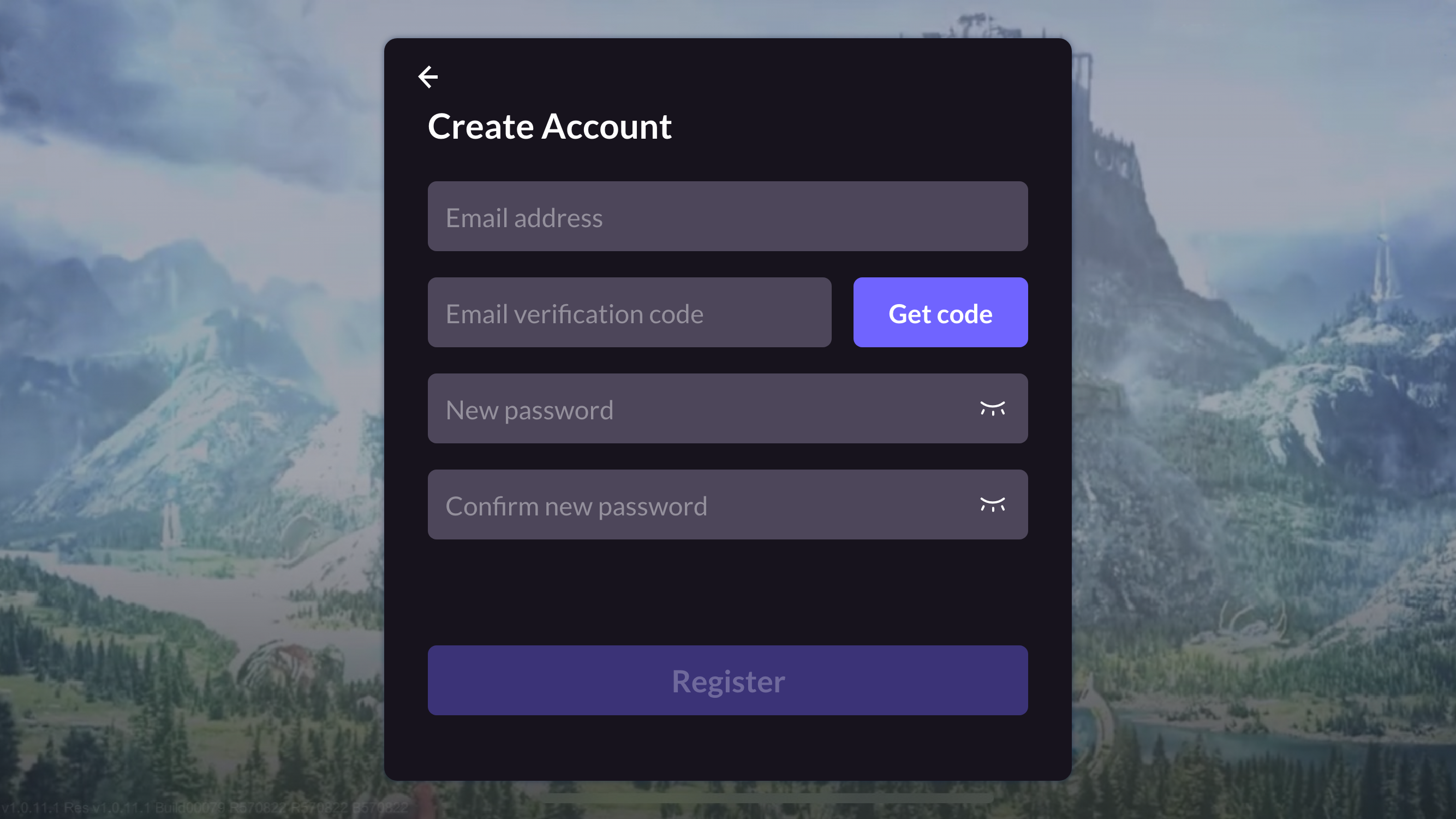
- Manual registration requires email input, verification retrieval, and entering password twice.After registration, re-enter the password for login.
- Automatic registration requires only email and verification input. If previously registered, auto-login occurs; if not, auto-registration and login proceed without further login needed.Players can set passwords in Account Center after entering the game.
- Manual Registration
- Auto Registration
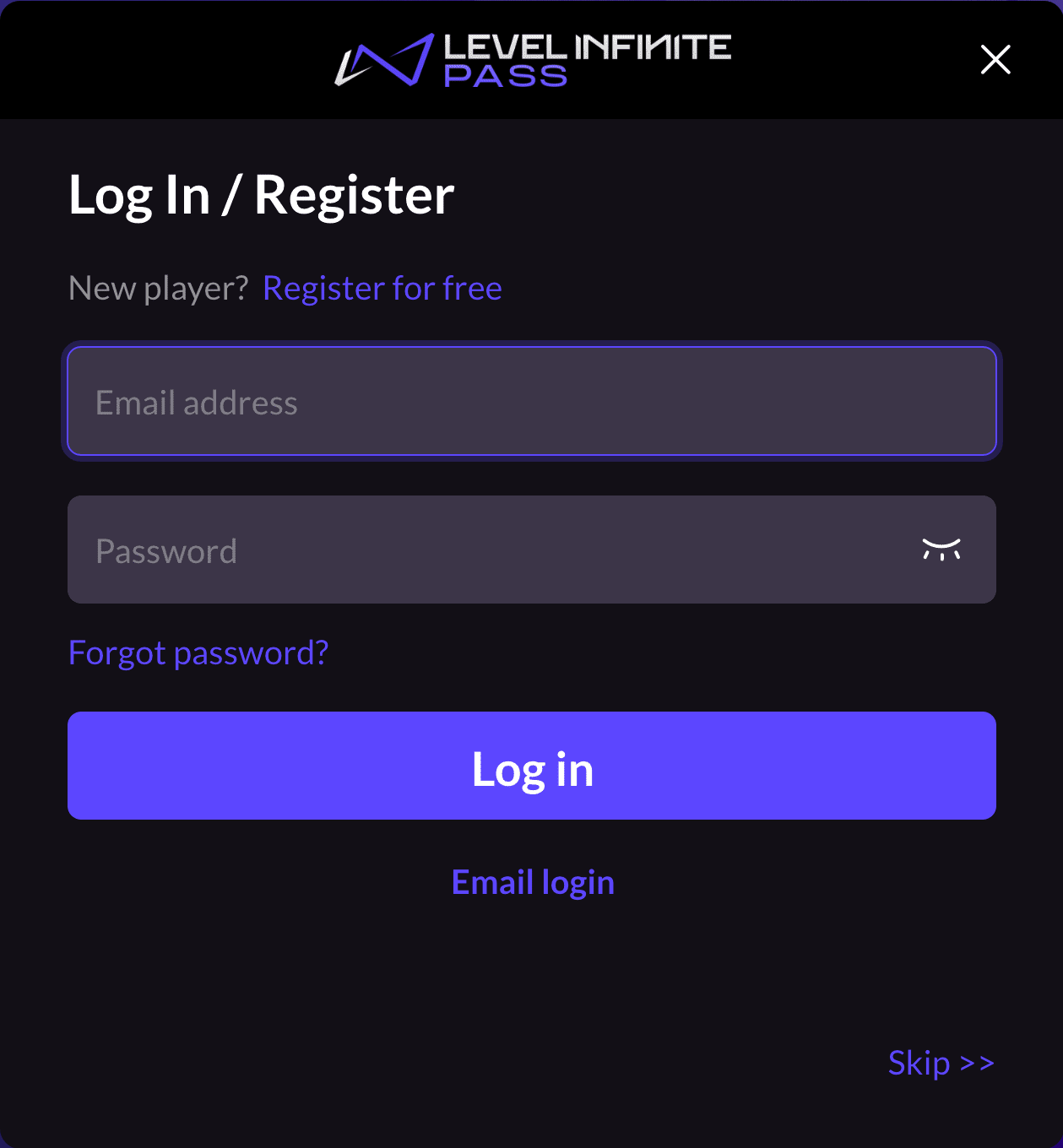
- On Log In/Register page, players click Register for free, to open Create Account page.
-
On Create Account page, players input email, get verification code, enter password, click Register to open Agreements page.
-
On the Agreements page, the player selects Country/Region, age, and must agree to the user terms and conditions and the game's privacy agreement, among other things.
LI PASS first displays the player's default region based on their IP, and the compliance protocol required for that region.Players can choose to switch to another country, the compliance requirements of each country are different, LI Pass will switch the corresponding compliance program according to the compliance configuration.See Compliance Examples for detailed compliance processes by region.
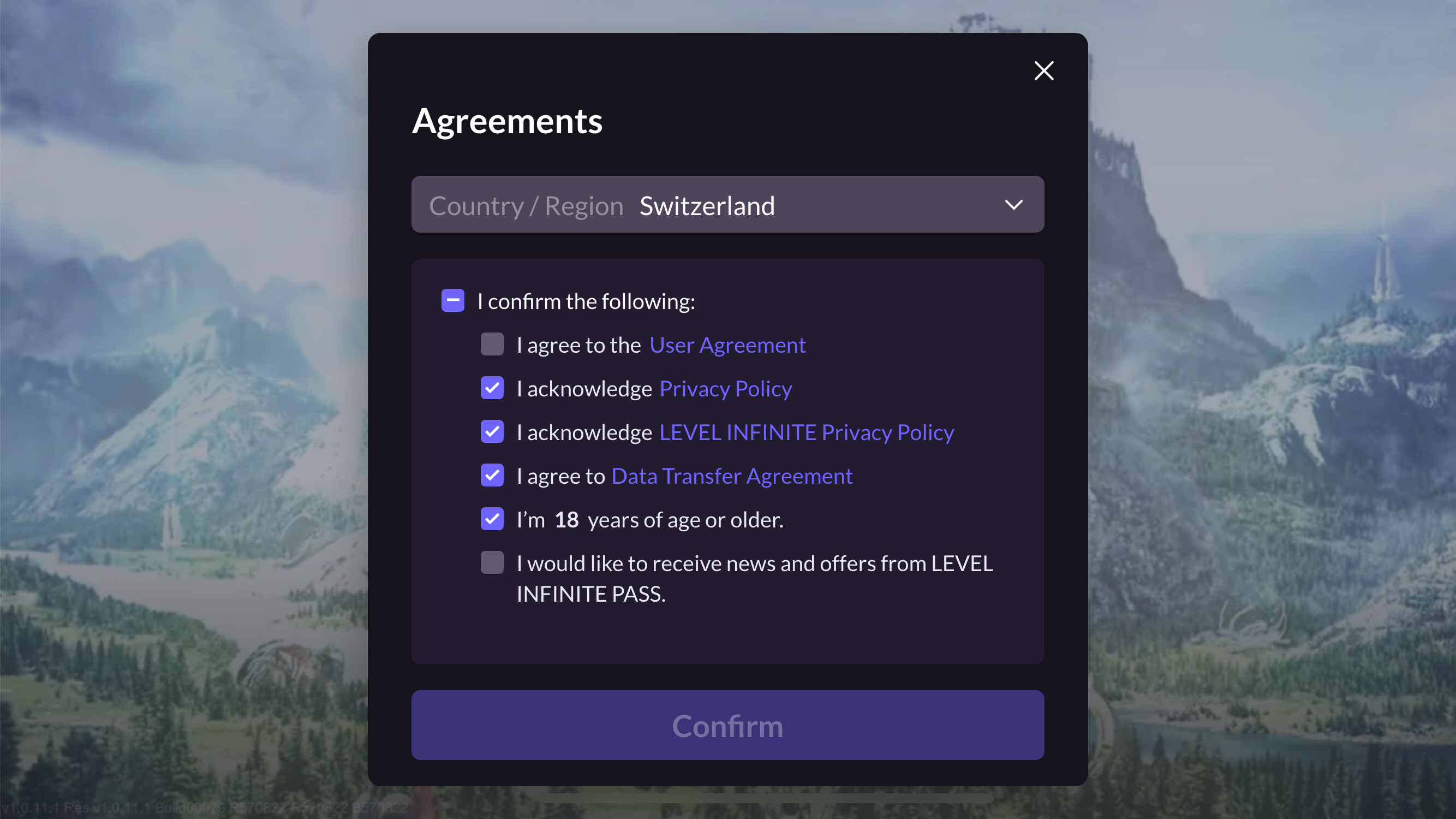
- After clicking Confirm, players return to the login interface, with notification indicating successful registration.After registration, players continue to the login process below.
- When Player Network Console configures auto-registration option, Log In/Register page opens as shown, players input email, Get code, then click Log in/Register as system checks account existence.
- If registered: direct login;
- If not registered: auto-register and login. After successful login, Agreements page opens.
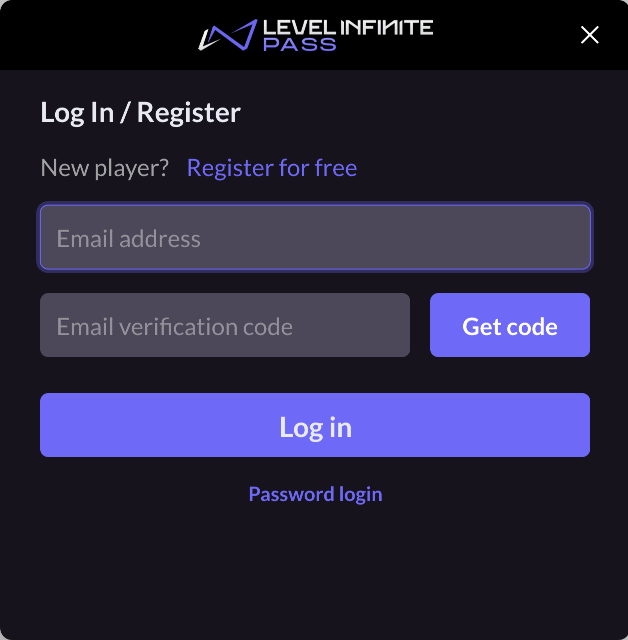
- On Agreements page, players perform necessary compliance tasks including selecting Country/Region, age, agreeing to user terms and privacy policies.
LI PASS displays default region based on player IP and necessary compliance agreements.Players can switch countries. Each has different compliance requirements, with LI Pass modifying project accordingly.Refer to Compliance Examples for detailed regional compliance processes.
- After clicking Confirm, players automatically succeed in logging in, entering game lobby.
Login
LI PASS supports Email Password Login and Email Verification Login.
For both login methods, players navigate through Log In/Register page and switch via Email login and Password login buttons.
Email Password Login
Enter email and password on the page, then click Log in to enter the game.
Email Verification Login
Players input email address, click Get code, enter email verification code, click Log in to enter the game.
Skip Associated Description
Support skipping LI Pass email account association, configurable via Skip Association.After setting skip association, Skip button appears at lower right corner of registration/login interface, clicking it leads directly to compliance certification page.
Login Channel Instructions
LI Pass Email Account
LI Pass Email Account is a brand under Level Infinite, used across all games to access LI Pass, comprising player email password, compliance info, subscription status, shared across games.For example, players using LI Pass in Game A will reuse their email login in Game B, foregoing further compliance, requiring only agreement acceptance to enter.
Store Channels
LI Pass currently supports store channels Steam, Epic.
Cross-Game Account Association
- Pre-integration Evaluation Required: Please communicate with your contact person to confirm the account architecture plan. Once the account structure is determined, it cannot be changed. Please ensure proper planning before integration.
- Synchronization Scope: Cross-game account association relationships only synchronize across games that have enabled this feature. Games that have not enabled it will not be affected.
- Channel Limitations: Some mobile channels (such as Facebook, etc.) cannot use cross-game association features due to platform restrictions, as user identifiers obtained across different AppIDs are different.
Taking Steam channel as an example, Steam ID and LI Pass account association applies across games.For example, players associated LI Pass in Game A, will skip LI Pass email registration/login in Game B.
Association is internally completed by LI Pass, requiring no additional business integration.
Cross-Game Account Association Diagram
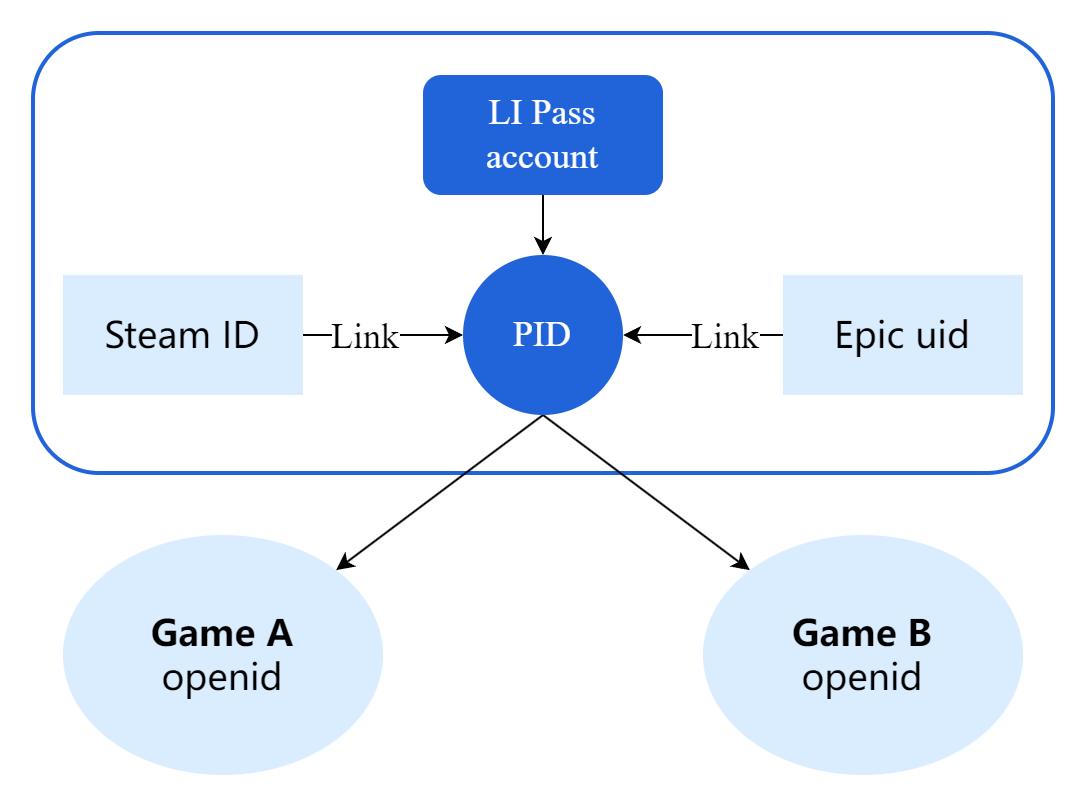
Diagram showing association outside the game, taking Steam as example, Steam ID and LI Pass association happens outside, linking with PID and mapping to in-game openid.
If skipping association, LI Pass and PID remain unlinked, though openid is generated via PID.
Benefits of Cross-game association:
- LI Pass supports cross-platform use, accounts used in various scenes like official sites and game promo events.
- LI Pass offers security ensuring account preservation
- LI Pass Email enhances marketing reach
- LI Pass Link speeds new game login, boosting user experience and retention
- LI Pass data provides multi-dimensional monitoring and insight, enhancing game operations
- LI Pass provides enhanced account security guarantees, ensuring player accounts are not lost
- Through the LI Pass email, players can access more marketing and promotional activities
- Using the LI Pass Link for cross-game association features, players can achieve quick login to new games, improving user experience and retention
- The data capability of LI Pass allows for multidimensional monitoring and insights, providing more precise and comprehensive operational support for games
Difference between Cross-Game Account Association(Link) and Account Binding(Bind)
Bindings exist within single games, not passed to other games.For example, using guest in Game A binds LI Pass, Game B requires rebinding.
Account Association(Cross game link) occurs outside games, after LI Pass link completion in Game A, system inherits steam-linked LI Pass into Game B, bypassing linking.

