Minor Chat
LI PASS provides a standardized compliance solution package, allowing businesses to directly configure compliance services without needing to integrate the interfaces mentioned in this document once integrated with LI PASS.For businesses integrating LI PASS, you can contact the Player Network assistant for more details.
For businesses not using the standard LI PASS compliance solution, this document aims to introduce the interfaces provided by Player Network for minor chat authorization functionality and how to use these interfaces.
Player Network SDK interfaces currently only support triggering minor chat authorization after account registration and before using the chat function.
During the account registration stage, launching the minor chat authorization can only be achieved through the LI PASS interface. Please refer to Minor Chat Authorization.
Prerequisites
To use the minor chat authorization function, integrate Player Network SDK V1.24.00 and above versions, and enable social feature control through backend configuration. For more details, contact the Player Network assistant.
Before calling the required compliance interfaces, business operations need to set the necessary key parameters in the corresponding URL through compliance-related interfaces, such as region and lang_type:
- Set User Properties (ComplianceInitWithParams)
- Set User Region and Age for Compliance (ComplianceMultiSetStatusWithAge)
- Get Local Authentication Data (GetAuthResult)
Implement Minor Chat Features
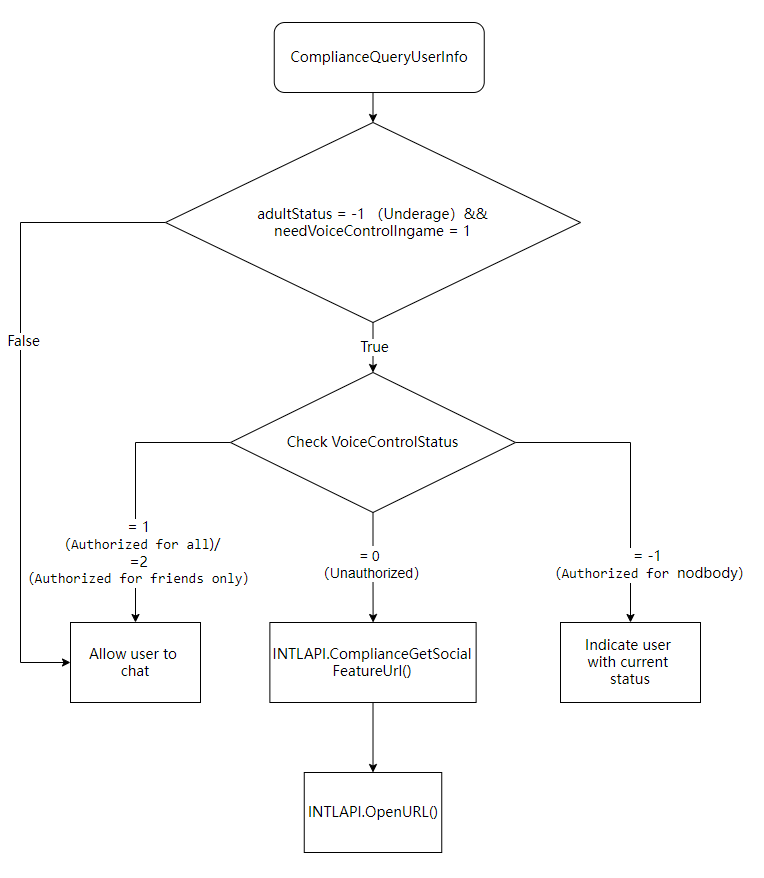
- Call ComplianceQueryUserInfo to check the player's compliance status and determine whether the player is a minor.
- Unity
- Unreal Engine
INTLAPI.ComplianceQueryUserInfo();
UINTLSDKAPI::ComplianceQueryUserInfo();
- Determine whether to initiate minor chat authorization.
- Unity
- Unreal Engine
// Process the INTLComplianceResult callback
public void OnComplianceResultEvent(INTLComplianceResult complianceRet)
{
    if (complianceRet.MethodId == (int)INTLMethodID.INTL_COMPLIANCE_QUERY_USER_INFO)
    {
        // Minor, and the game requires chat authentication, and the player has not completed chat authentication
        if (complianceRet.AdultStatus == -1 &&
            complianceRet.NeedVoiceControlIngame == 1 &&
            complianceRet.VoiceControlStatus == 0)
        {
            // Get minor chat authorization URL
            //  Open the above URL using the OpenURL interface
        }
    }
}
// Process the INTLComplianceResult callback
void OnComplianceResultEvent(INTLComplianceResult complianceRet)
{
    if (complianceRet.MethodId == (int32)kMethodIDComplianceQueryUserInfo)
    {
        // Minor, and the game requires chat authentication, and the player has not completed chat authentication
        if (complianceRet.AdultStatus == -1 &&
            complianceRet.NeedVoiceControlIngame == 1 &&
            complianceRet.VoiceControlStatus == 0)
        {
            // Get minor chat authorization URL
            // Open the above URL using the OpenURL interface
        }
    }
}
| Field | Explanation | Remarks |
|---|---|---|
| AdultStatus | Determine if the user is an adult -2: Below game grade age, cannot enter the game -1: Underage 0: Not set 1: Adult | Key Point |
| VoiceControlStatus | Social feature control authorization status -1: Parent disabled player chat (chat range set to Nobody) 0: Not authorized 1: Authorized for everyone 2: Authorized for friends only | Key Point |
| NeedVoiceControlIngame | Is in-game social feature control needed 0: Not required 1: Required | Key Point |
- If it is determined that chat certification must be completed, call ComplianceGetSocialFeatureVerifyUrl to obtain the minor chat certification URL.
- Unity
- Unreal Engine
string url = INTLAPI.ComplianceGetSocialFeatureVerifyUrl();
FString url = UINTLSDKAPI::ComplianceGetSocialFeatureVerifyUrl();
- Use the OpenURL interface to open the above URL and bring up the minor chat authorization page.
- Unity
- Unreal Engine
INTLAPI.OpenUrl()
UINTLSDKAPI::OpenUrl()

