Account Deletion
LI PASS provides a standardized compliance solution package, allowing businesses to directly configure compliance services without needing to integrate the interfaces mentioned in this document once integrated with LI PASS.For businesses integrating LI PASS, you can contact the Player Network assistant for more details.
For businesses not using the standard LI PASS compliance solution, please refer to the contents of this document to implement the account deletion feature.
Console does not support calling the account deletion API; accounts must be manually deleted by customer service. For specific access information, contact fanfanliang (梁晓彤) to learn more.
Prerequisites
- The preconditions for account deletion should be customized by game developers based on needs. Once the conditions are met, follow the steps to implement the account deletion logic within the Project.
- The business needs to set up a cooling-off period after an account deletion request is submitted for different countries or regions, in accordance with compliance requirements. During this period, the player can cancel their account deletion request.After the silent period, the account will be deleted.
- Business must provide the official game names needed in each region for the account deletion email template, as well as a contact email for account deletion emails.It's suggested to use the official game name in account deletion emails to help players identify your identity and prevent emails from being compared or marked as spam.Emails will be used to send and receive mail related to account deletion.
Implement account deletion logic on the game client
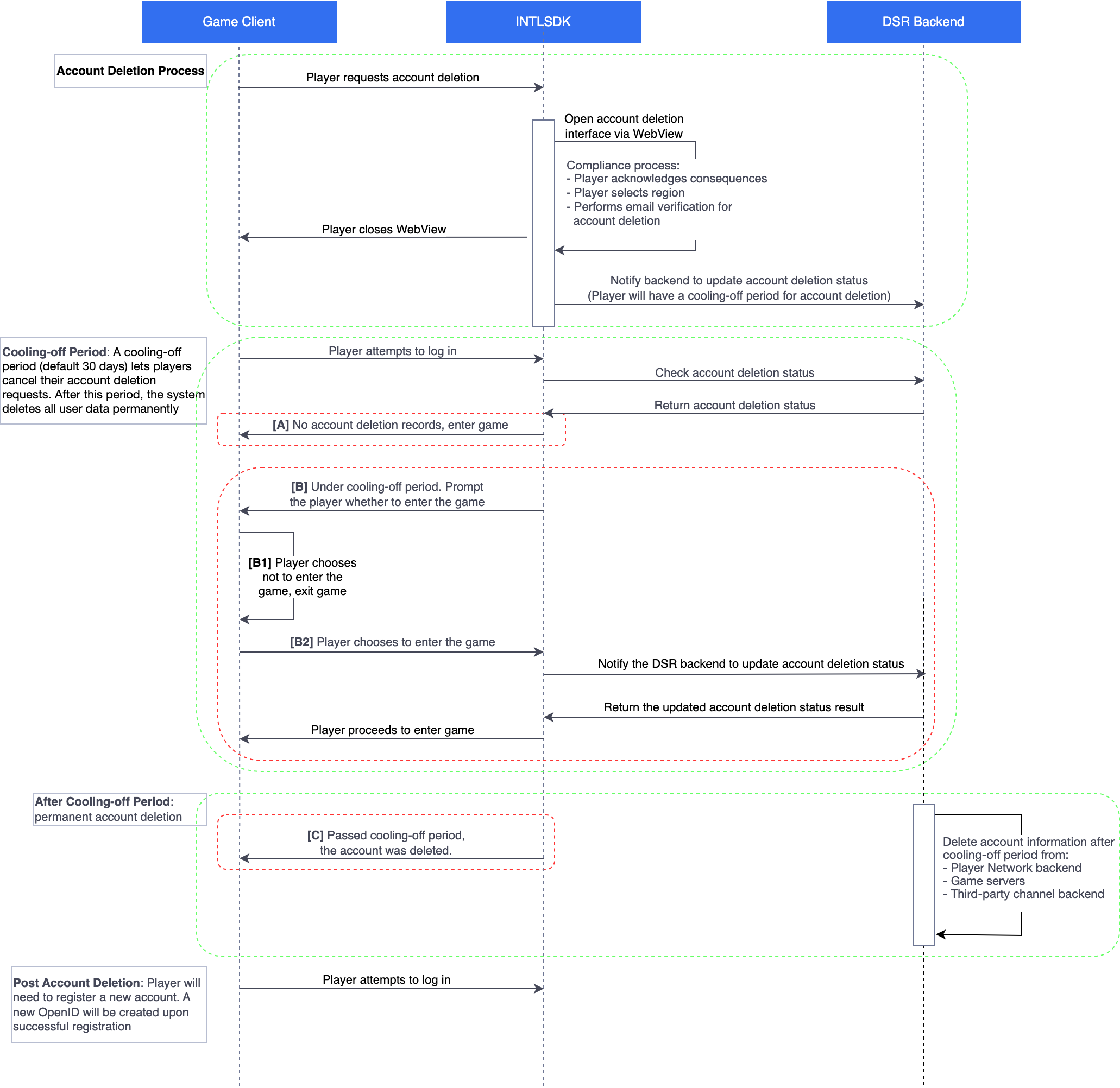
Integrate Account Deletion H5 Page
Players must log in for the encryptEnable parameter in OpenUrl to be auto-passed.
In SDK versions prior to 1.30, ensure that when deploying to production environments, the INTL_WEBVIEW_COMMON_URL value in the INTLConfig.ini file is set to the production environment address:
INTL_WEBVIEW_COMMON_URL = https://common-web.intlgame.com
From version 1.30 onwards, the SDK automatically handles the environment address, so this configuration is no longer necessary.
Use OpenUrl to open WebView and launch the account deletion H5 page.
URL Request GET Parameters
| Parameters | Type | Explanation | Note |
|---|---|---|---|
| pageIndex | int | Enter different account deletion pages 0: Account Deletion 2: Revoke Privacy Agreement Consent 3: Revoke User Agreement Consent | Required |
| intl_cluster | string | Base64URL encoding of INTL_URL in INTLConfig.ini within the Player Network SDK | Required |
| user_name | string | Username (it is recommended to use the in-game character name, a blank string will cause the character name to appear blank in the account deletion email) | Required |
| area_id | uint | Game Region ID (if non-existent, pass a blank string) | Required |
| zone_id | uint | Game Zone ID (if non-existent, pass a blank string) | Required |
| lang_type | string | Language type (RFC 4646), e.g., "en".For details, see Language Type Definition | Required |
Login State Data
When encryptEnable is passed as true in OpenUrl, the following login state data will be automatically added to the link.For more information, see OpenUrl.
| Parameters | Type | Explanation | Note |
|---|---|---|---|
| gameid | string | Game ID allocated by Player Network | Required |
| channelid | int | Login Channel | Required |
| OS | string | Terminal OS Indicator 1: Android 2: iOS 3: Web 4: Linux 5: Windows 6: Switch | Required |
| encodeparam | string | Encrypted fields: Player Network SDK OpenID, Player Network SDK token, third-party channel OpenID, etc. | Required |
| seq | string | Serial Number | Optional |
Request Example
Test Environment URL: test-common-web.intlgame.com
Production Environment URL: common-web.intlgame.com
- Unity
- Unreal Engine
string delete_account_url = "test-common-web.intlgame.com";
int pageIndex = 0;
string intl_cluster = "aHR0cHM6Ly90ZXN0LmludGxnYW1lLmNvbQ";
string user_name = "xiaooang%20Tx";
string lang_type = "en";
uint area_id = 1;
uint zone_id = 1;
bool encryptEnable = true;
bool isFullScreen = false;
string url = $"https://{delete_account_url}/account-deletion/index.html?pageIndex={pageIndex}&intl_cluster={intl_cluster}&user_name={user_name}&lang_type={lang_type}&area_id={area_id}&zone_id={zone_id}";
INTLAPI.OpenUrl(url, INTLWebViewOrientation.Auto, isFullScreen, encryptEnable);
FString delete_account_url = TEXT("test-common-web.intlgame.com");
int pageIndex = 0;
FString intl_cluster = TEXT("aHR0cHM6Ly90ZXN0LmludGxnYW1lLmNvbQ");
FString user_name = TEXT("xiaooang%20Tx");
FString lang_type = TEXT("en");
uint area_id = 1;
uint zone_id = 1;
bool encryptEnable = true;
bool isFullScreen = false;
TArray<FStringFormatArg> args;
args.Add(FStringFormatArg(delete_account_url));
args.Add(FStringFormatArg(pageIndex));
args.Add(FStringFormatArg(intl_cluster));
args.Add(FStringFormatArg(user_name));
args.Add(FStringFormatArg(lang_type));
args.Add(FStringFormatArg(area_id));
args.Add(FStringFormatArg(zone_id));
FString url = FString::Format(TEXT("https://{0}/account-deletion/index.html?pageIndex={1}&intl_cluster={2}&user_name={3}&lang_type={4}&area_id={5}&zone_id={6}"), args);
UINTLSDKAPI::OpenUrl(url, INTLWebViewOrientation.Auto, isFullScreen, encryptEnable);
Access Example
Production Environment:
https://common-web.intlgame.com/account-deletion/index.html?pageIndex=0&area_id=1&zone_id=1&lang_type=en&intl_cluster=aHR0cHM6Ly90ZXN0LmludGxnYW1lLmNvbQ&gameid=11&channelid=6&user_name=xiaooang%20Tx&os=1&ts=1617245219&sdk_version=1.7.00.28&seq=11-805b892eed1065983850b0d87f7fe706c862473b579703b711cae6a0d6ffefd4-1617245219-201&encodeparam=97C45AE512DDEDE0F1ED0E2E4FB3C31F8B96E406110A8D6E2F464859350DC359A8E94B25DA42454829B5336D8CD6ADDBCD13C66081391E96EC2F938A1F9F6DE429EBEF3B65D0560D10C428C21E204686D09CE0B64B2BA1E51E732FD05300249C5F118E8316B0A65D700C9AC28310A458
Test Environment:
https://test-common-web.intlgame.com/account-deletion/index.html?pageIndex=0&area_id=1&zone_id=1&lang_type=en&intl_cluster=aHR0cHM6Ly90ZXN0LmludGxnYW1lLmNvbQ&gameid=11&channelid=6&user_name=xiaooang%20Tx&os=1&ts=1617245219&sdk_version=1.7.00.28&seq=11-805b892eed1065983850b0d87f7fe706c862473b579703b711cae6a0d6ffefd4-1617245219-201&encodeparam=97C45AE512DDEDE0F1ED0E2E4FB3C31F8B96E406110A8D6E2F464859350DC359A8E94B25DA42454829B5336D8CD6ADDBCD13C66081391E96EC2F938A1F9F6DE429EBEF3B65D0560D10C428C21E204686D09CE0B64B2BA1E51E732FD05300249C5F118E8316B0A65D700C9AC28310A458
H5 Callback
After the deletion operation is executed, the page will call the Player Network SDK's JS API, executing the jsCallNative method.
-
If deletion is successful, the callback transmits a JSON string:
{"type":"request_delete_account_success","value":"Request for game account cancellation submitted successfully"}If
typeequalsrequest_delete_account_success, it can be determined that the account deletion request was successful;valueis a fixed string at this time. -
If deletion fails, the callback transmits a JSON string:
{"type":"request_delete_account_fail","value":"$code|$seq_id|$message"}If
typeequalsrequest_delete_account_fail, it can be determined that the account deletion request failed.valuecontains three pieces of information (separated by |) respectively:$codeerror code (a number),$seq_idthe request serial number (used to locate errors in the backend), and$messageerror message.
Player Information Deletion Protocol
Player Network account deletion service informs the game to delete player information through IDIP.The game needs to implement the IDIP player game information deletion interface.Business recommendation: refer to Account Deletion Protocol.
IDIP Account Deletion Protocol
{gameserver_dns}:{port}/{path}?idip_sign=xxx
Request Body
| Field | Type | Explanation | Note |
|---|---|---|---|
| head | Object | Header Information | Required |
| body | Object | Body Information | Required |
Request Body "head" Parameter
| Field | Type | Explanation | Note |
|---|---|---|---|
| iCmdid | int | Command word, value is 101 | Required |
| iSeqid | int | Data Stream Message Serial Number | Required |
| ServiceName | string | Service name ("GDOS" extended alternate field) | Required |
| dtSendTime | string | Format: YYYY-MM-DD HH:mm:ss | Required |
| iVersion | int | Version number, fixed value set by caller | Required |
| Authenticate | String(32) | Empty field | Required |
| Type | Uint32 | Request source value | Required |
Request Body "body" Parameter
| Field | Type | Explanation | Note |
|---|---|---|---|
| OpenId | String(64) | Player Network SDK user identification | Required |
| Serial | String | Request serial number, generated by caller | Required |
| Area ID | uint | Game District | Required |
| Platform ID | uint | Platform | Required |
| Zone ID | uint | Subzone | Required |
Response Body
| Field | Type | Explanation | Note |
|---|---|---|---|
| head | Object | Header Information | Required |
| body | Object | Body Information | Required |
Response Body "head" Parameter
| Field | Type | Explanation | Note |
|---|---|---|---|
| iCmdid | int | Command word, value is 100 | Required |
| iSeqid | int | Data Stream Message Serial Number | Required |
| ServiceName | string | Service name ("GDOS" extended alternate field) | Required |
| dtSendTime | string | Format: YYYY-MM-DD HH:mm:ss | Required |
| iVersion | int | Version number, fixed value set by caller | Required |
| Authenticate | String(32) | Empty field | Required |
| Type | Uint32 | Request source value | Required |
Response Body "body" Parameter
| Field | Type | Explanation | Note |
|---|---|---|---|
| Return value | int | Game Return Code | Required |
| Error information | string | Information returned from the game side | Required |
Player recent login time protocol
Player Network account deletion service queries player information history via IDIP; (must be implemented by the game).
Recommended business reference Last Login Time Protocol.
Existing game (IDIP) query player recent login time protocol
{gameserver_dns}:{port}/{path}?idip_sign=xxx
Request Body
| Field | Type | Explanation | Note |
|---|---|---|---|
| head | Object | Header Information | Required |
| body | Object | Body Information | Required |
Request Body "head" Array Content
| Field | Type | Explanation | Note |
|---|---|---|---|
| iCmdid | int | Command word, value is 101 | Required |
| iSeqid | int | Data Stream Message Serial Number | Required |
| ServiceName | string | Service name ("GDOS" extended alternate field) | Required |
| dtSendTime | string | Format: YYYY-MM-DD HH:mm:ss | Required |
| iVersion | int | Version number, fixed value set by caller | Required |
| Authenticate | String(32) | Empty field | Required |
| Type | Uint32 | Request source value | Required |
Request Body "body" Array Content
| Field | Type | Explanation | Note |
|---|---|---|---|
| OpenId | String(64) | Player Network SDK user identification | Required |
| Area ID | uint | Game District | Required |
| Platform ID | uint | Platform | Required |
| Zone ID | uint | Subzone | Required |
Response Body
| Field | Type | Explanation | Note |
|---|---|---|---|
| head | Object | Header Information | Required |
| body | Object | Body Information | Required |
Response Body "head" Array Content
| Field | Type | Explanation | Note |
|---|---|---|---|
| iCmdid | int | Command word, value is 101 | Required |
| iSeqid | int | Data Stream Message Serial Number | Required |
| ServiceName | string | Service name ("GDOS" extended alternate field) | Required |
| dtSendTime | string | Format: YYYY-MM-DD HH:mm:ss | Required |
| iVersion | int | Version number, fixed value set by caller | Required |
| Authenticate | String(32) | Empty field | Required |
| Type | Uint32 | Request source value | Required |
Response Body "body" Array Content
| Field | Type | Explanation | Note |
|---|---|---|---|
| Return value | int | Game Return Code | Required |
| Error information | string | Information returned from the game side | Required |
| LoginTime | uint64 | User's last login time in the game, Unix timestamp | Required |

