How to obtain the SDK version
Obtain the SDK version from the SDK
- Unity
- Unreal Engine
- If the iOS plugin is included, open
INTLCore.hlocated in the pathPlugins\iOS\INTLSDK\INTLCore\INTLCore.framework\Headers\INTLCore.h. - Locate the string
#define INTLCore_Version_Stringthat indicates the SDK version.
- Open
INTLCore.hlocated in the downloaded SDK path/Plugins/INTLSDK/Source/INTLCore/Libs/include. - Locate the string
#define INTLCore_Version_Stringthat indicates the SDK version.

Obtain the SDK version from SDK logs
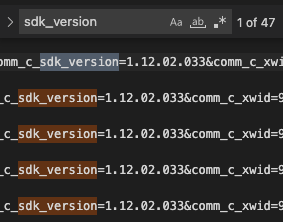
To obtain Player Network SDK logs, see How to Obtain SDK Logs.
In the SDK logs, search for the sdk_version string containing the SDK version.
Obtain the SDK version using the Android plugin
- Unity
- Unreal Engine
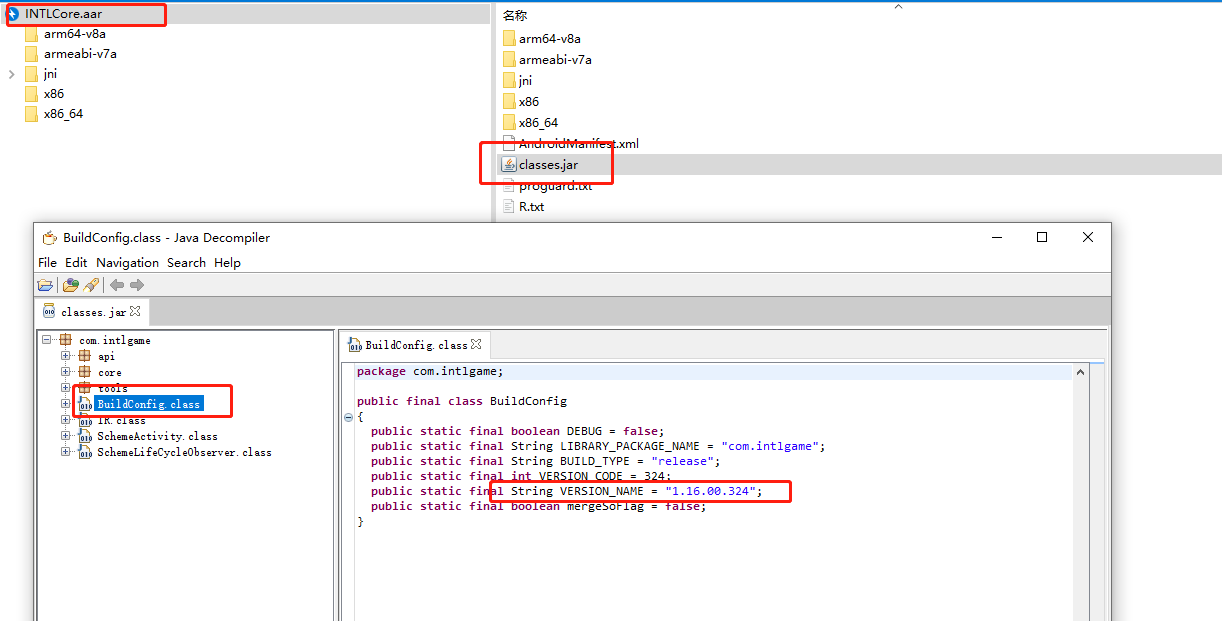
- Extract the Player Network SDK core package
INTLCore.aarfrom the pathPlugins\Android\INTLCore.aar. - Extract
Classes.jarfrom the Player Network SDK core package. - Open
BuildConfig.classand locate the stringVERSION_NAMEthat indicates the SDK version.
- Extract the Player Network SDK core package
INTLCore.aarfrom the pathINTLSDK\Source\INTLCore\Libs\Android\libs. - Extract
Classes.jarfrom the Player Network SDK core package. - Open
BuildConfig.classand locate the stringVERSION_NAMEthat indicates the SDK version.