iOS 17 Privacy Manifest
The Privacy Manifest is a type of property list that records and describes the data types collected by an app or SDK.To comply with the Privacy Policy announced by Apple at WWDC23, the Player Network SDK has provided a privacy manifest since V1.22, meeting the requirements for a designated SDK to offer a privacy manifest and SDK signature.
Starting in Spring 2024, for apps that need to be updated or uploaded to Apple App Store Connect, developers must clearly specify the reason for use to demonstrate how the app uses the required reason API (API for which a reason must be provided).
The following table lists Player Network SDK plugins affected by the privacy policy. Configure the required plugins for your game project according to the listed integration methods:
| Plugin | Privacy Manifest | SDK Signature | Integration Method |
|---|---|---|---|
| INTLCore | Supported | Not Required | Manual Merge |
| INTLFoundation | Supported | Not Required | Manual Merge |
| INTLAdjust | Supported | Not Required | Auto Integration |
| INTLAppsFlyer | Supported | Not Required | Auto Integration |
| INTLDiscord | SDK End-of-Life | * | Manual Merge |
| INTLDmm | Supported | Supported | Auto Integration |
| INTLFacebook | Supported | Supported | Auto Integration |
| INTLFirebase | Supported | Supported | Auto Integration |
| INTLGarena | Supported | Not Required | Auto Integration |
| INTLGoogle | Supported | Not Required | Auto Integration |
| INTLHighLevel | Need for Speed Only | - | * |
| INTLLine | Supported | Supported | Auto Integration |
| INTLQQ | Supported | Supported | Auto Integration |
| INTLTikTok | Supported | Not Required | Auto Integration |
| INTLTwitter | SDK End-of-Life | - | Manual Merge |
| INTLUbiSoft | TDM Only | * | - |
| INTLVK | Not Supported | Not Required | * |
| INTLVNG | Not Supported | Not Required | - |
| INTLWeChat | Supported | Not Required | Auto Integration |
| INTLBugly | Deprecated | * | - |
| INTLCrashSight | Deprecated | * | - |
| INTLCustomer | Deprecated | * | - |
| INTLKaKao | Deprecated | * | - |
| INTLTAB | Deprecated | * | - |
- Manual Merge: The third-party SDK provides a separate privacy manifest file and does not need to be upgraded.Manual merging is required; add to the game's privacy manifest according to the steps.
- Auto Integration: The third-party SDK has been updated; the framework now comes with a privacy manifest file. After upgrading the SDK, the manifest will be merged automatically; no additional configuration is needed.
- Not Announced Yet: The third-party SDK is not yet supported and has not announced their method of support.
Steps
- Find the privacy manifest
PrivacyInfo.xcprivacyfor the required plugin in the Player Network SDK output directory.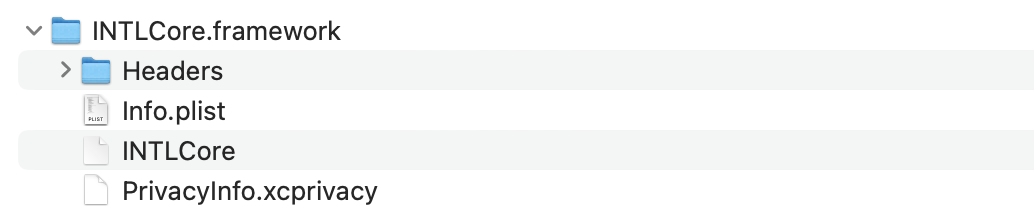
- Unity
- Unreal Engine
| Plugin | Path |
|---|---|
| INTLFoundation | /Plugins/iOS/INTLSDK/INTLFoundation/INTLFoundation.framework/PrivacyInfo.xcprivacy |
| INTLCore | /Plugins/iOS/INTLSDK/INTLCore/INTLCore.framework/PrivacyInfo.xcprivacy |
| INTLGarena | /Plugins/iOS/INTLSDK/INTLGarena/INTLGarena.framework/PrivacyInfo.xcprivacy |
| Plugin | Path |
|---|---|
| INTLFoundation | /INTLSDK/Source/INTLFoundation/Libs/iOS/INTLFoundation/INTLFoundation.embeddedframework/INTLFoundation.framework/PrivacyInfo.xcprivacy |
| INTLCore | /INTLSDK/Source/INTLCore/Libs/iOS/INTLCore/INTLCore.embeddedframework/INTLCore.framework/PrivacyInfo.xcprivacy |
| INTLGarena | /INTLSDK/Source/INTLGarena/Libs/iOS/INTLGarena/INTLGarena.embeddedframework/INTLGarena.framework/PrivacyInfo.xcprivacy |
-
Compare the four nodes in the
PrivacyInfo.xcprivacyfrom Player Network SDK with the corresponding contents in the project'sPrivacyInfo.xcprivacy, and merge based on the following conditions.

-
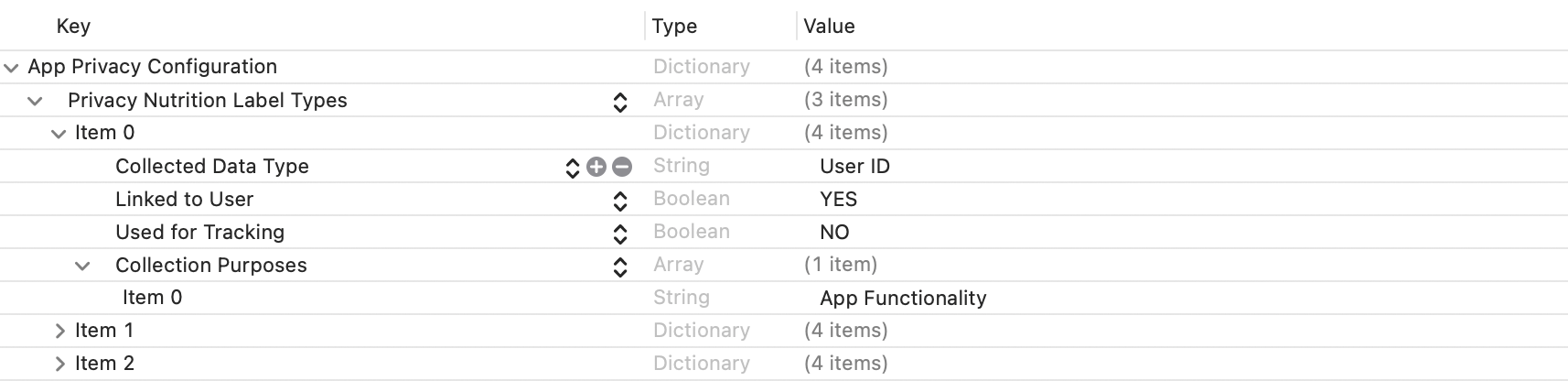
Privacy Nutrition Label Types (NSPrivacyCollectedDataTypes)is the node describing types of data usage:
Compare theitemvalues forCollected Data Type (NSPrivacyCollectedDataType)in each; if there are differences, add them to the project file.
If any values are the same, compareCollection Purposes (NSPrivacyCollectedDataTypePurposes); if there are differences, add them to the project file.
-
Privacy Tracking Domains (NSPrivacyTrackingDomains)is the node for the domain tracking list:
Compare the corresponding nodes; if there are differences, add them to the project file. -
Privacy Tracking Enabled (NSPrivacyTracking)describes whether the App Tracking Transparency feature is enabled:
Compare the corresponding nodes. If the value in the Player Network SDK privacy manifest isYES, modify the project file. -
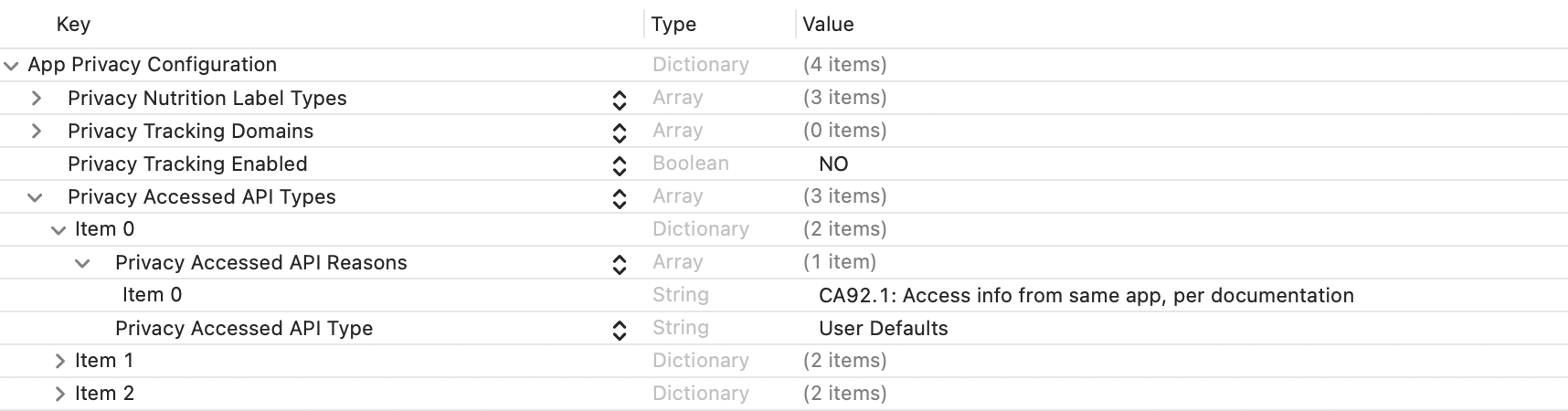
Privacy Accessed API Types (NSPrivacyAccessedAPITypes)is the node describing the types of APIs used:
Compare theitemvalues forPrivacy Accessed API Type (NSPrivacyAccessedAPIType)in each. If there are differences, add them to the project file.
If any values are the same, comparePrivacy Accessed API Reasons (NSPrivacyAccessedAPITypeReasons); if there are differences, add them to the project file.
-
Verify Privacy Manifest
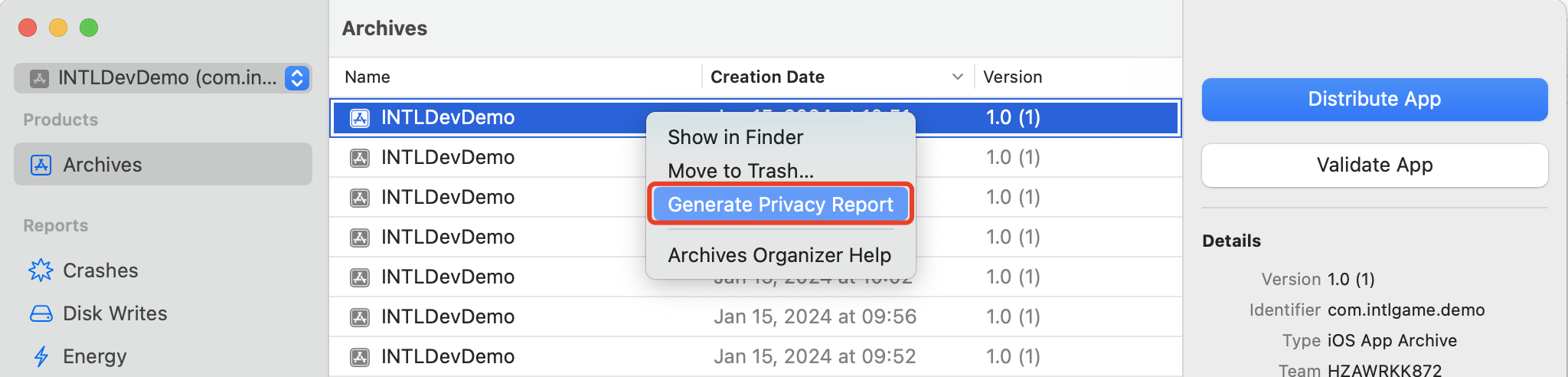
You can generate a privacy report with Xcode 15 to verify if it meets your expectations.