Integration Overview
First, review the LI Pass Mobile Product Documentation
Login Process
Client Login Process
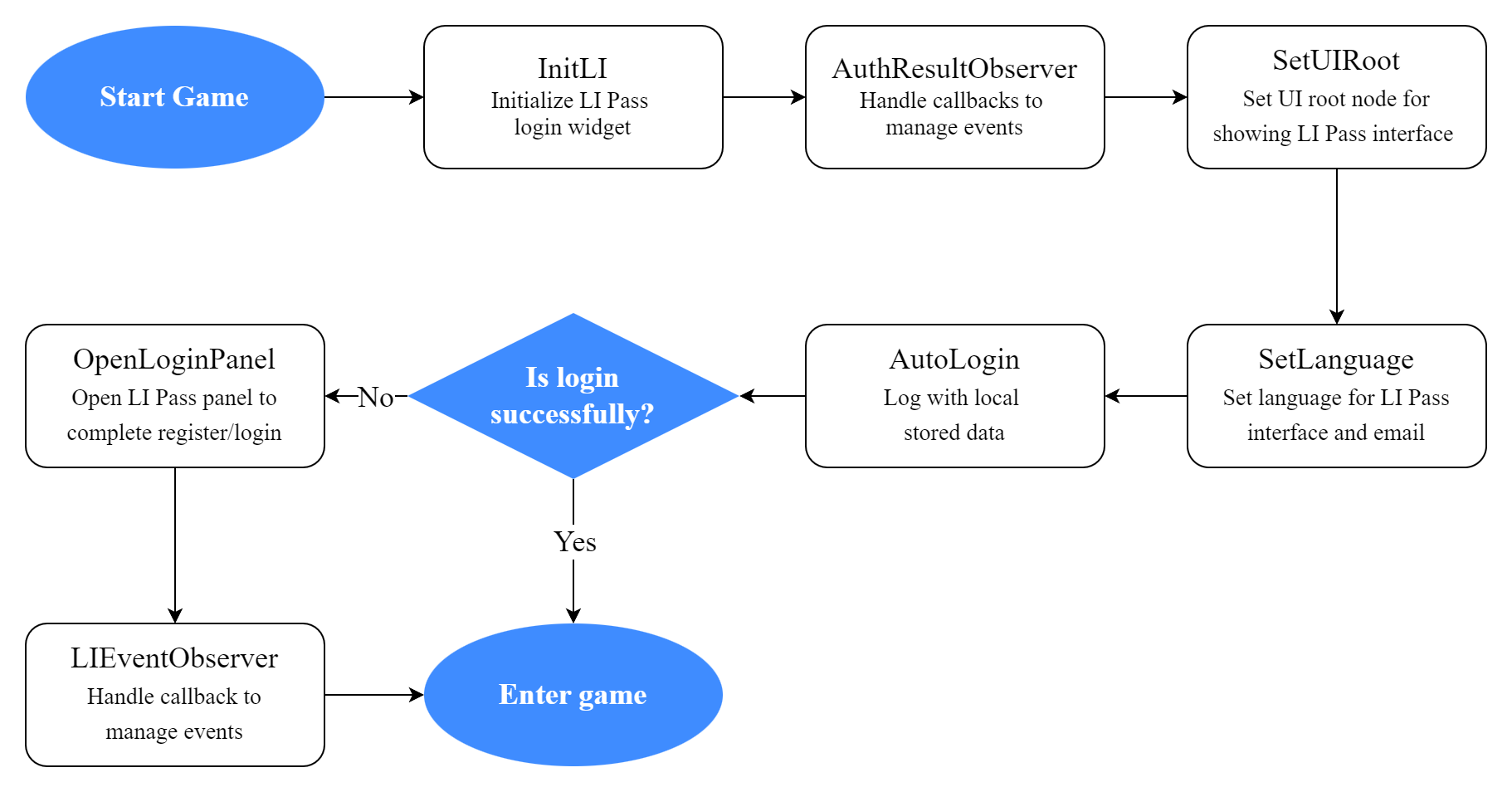
After invoking AutoLogin, LI Pass will use the local login state to verify the account with the LI Pass backend. If the login state is valid, it will successfully log in.If invalid, you need to open the LI Pass interface and log in again.
Callback handling occurs in AuthResultObserver.
After opening the LI Pass login panel with OpenLoginPanel, registration, login, and compliance processes are completed within LI Pass internally; game businesses need not be concerned.Focus only on the callback result, as once the login is successful, it will return login state information and handle callback events in LIEventObserver, directing to the game's main interface.
Multi-Store Channel Package Solution
If the game is released in multiple app stores, it will have multiple different package names. Most third-party login channels only support one package name per application.Thus, Player Network has introduced the multi-store channel package solution to ensure account synchronization for game packages with different package names.
Go to learn more about the Multi-Store Channel Package Solution.
Account Testing Method
During development, you may frequently perform player account linking, unlinking, resetting, and deletion. You can complete these operations through the Player Network Console
See details:

