Friends List Functionality
Registration callback
For callback information, see Unity Callback / Unreal Callback.
Discord
You can obtain the Discord friend list without using Discord as a login channel, but you need to call DiscordAuthorize to authorize the Discord account first.
Prerequisites:
- Players must grant the
openid,sdk.social_layer, andemailpermissions.For details, see OAuth2 Scopes.
Discord's returned friend list is unordered. The Player Network SDK will provide the user's recent online time for game-side sorting.
Parameters:
page(int): page number, >0count(int): items per page, >0
- Unity
- Unreal Engine
INTLAPI.DiscordQueryFriends(1, 10);
Callback: DiscordFriendsResultObserver
UINTLSDKAPI::DiscordQueryFriends(1, 10);
Callback: DiscordFriendsResultObserver
Friend information structure: DiscordUserInfo
For more details about Discord's social features, refer to Discord Social SDK.
Epic
Only supports getting platform friends (not in-game friends).
Parameters:
- page: Page number
- page_size: Number of friends per page
- is_in_game:
falseto get platform friends
- Unity
- Unreal Engine
// Get platform friends, 10 per page, return page 1
INTLAPI.QueryFriends(1, 10, false, INTLChannel.Epic);
// Get platform friends, 10 per page, return page 1
UINTLSDKAPI::QueryFriends(EINTLLoginChannel::kChannelEpic, 1, 10, false, "{}");
Facebook
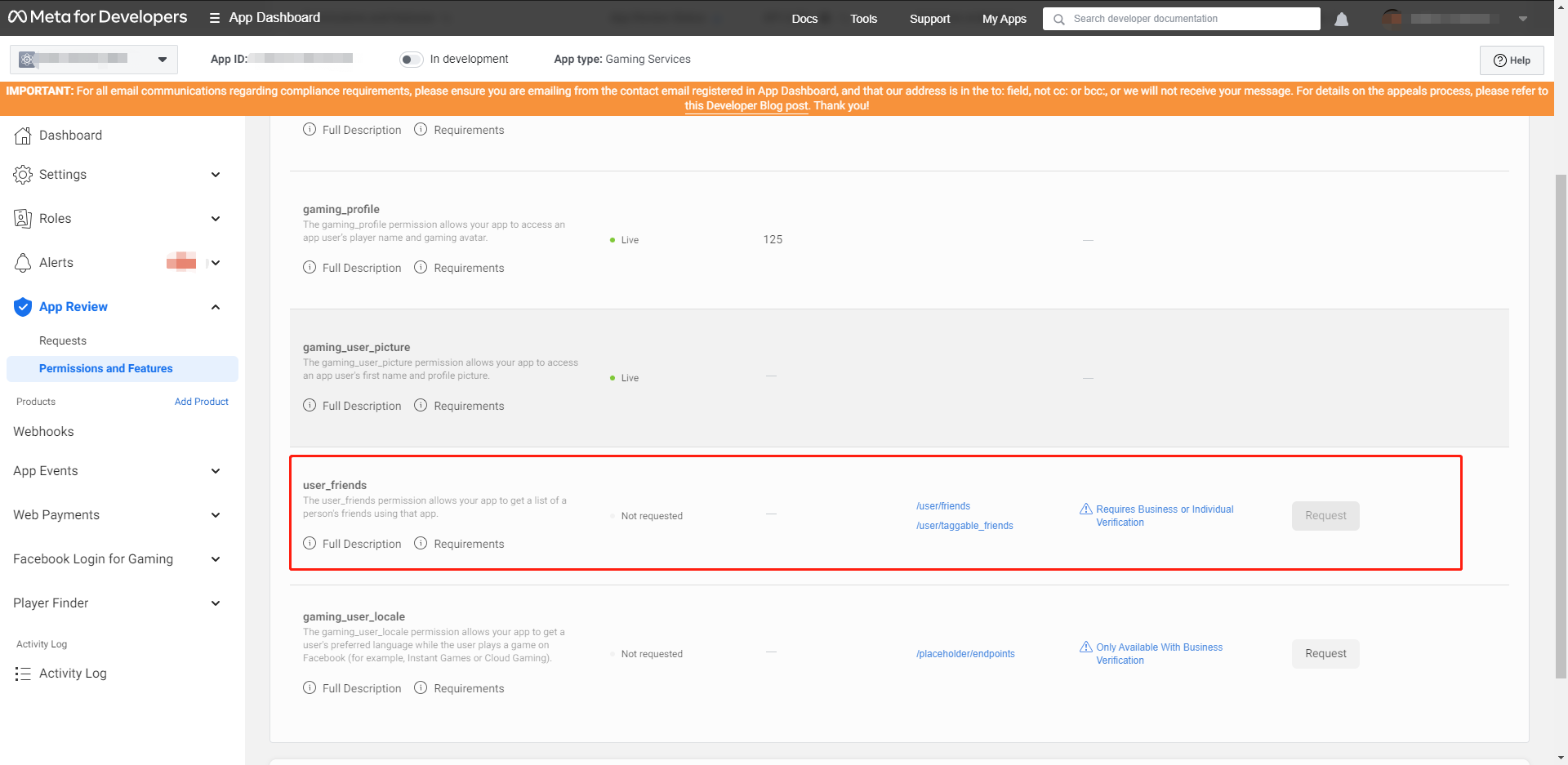
You need to apply for user_friends permission in the Facebook Developer Console. You can use it once approval is granted.For further details, please contact the Player Network Assistant.
After approval, use the backend interface /v2/friend/friend_list to obtain the friends list.
Steam
Supports querying platform friends and in-game friends.In-game friends are friends who recently played together, and may not necessarily be added as friends on the Steam platform.
Prerequisites:
- Install and run Steam
- Steam login status is valid
Parameters:
- page: Page number
- page_size: Number of friends per page
- is_in_game:
true- get in-game friendsfalse- get platform friends
- Unity
- Unreal Engine
// Get in-game friends, 10 per page, return page 1
INTLAPI.QueryFriends(1, 10, true, INTLChannel.Steam);

// Get platform friends, 10 per page, return page 1
INTLAPI.QueryFriends(1, 10, false, INTLChannel.Steam);
// Get in-game friends, 10 per page, return page 1
UINTLSDKAPI::QueryFriends(EINTLLoginChannel::kChannelSteam, 1, 10, true, "{}");

// Get platform friends, 10 per page, return page 1
UINTLSDKAPI::QueryFriends(EINTLLoginChannel::kChannelSteam, 1, 10, false, "{}");
Friend status
Friend status information is returned in the extra_json field of FriendResult.
"extra_json": {
    "persona_state": 0
}
persona_state description:
| Value | Description |
|---|---|
| 0 | Not logged in |
| one | Logged in |
| 2 | Logged in, but busy |
| 3 | Away automatically |
| 4 | Away automatically for a long time |
| 5 | Online, trading |
| 6 | Online, want to play games |
| 7 | Online, but shown as offline to friends |
Error code
| Error code | Description |
|---|---|
| 1031 | Steam DLL loading failed |
| 1032 | Needs to be started from the Steam platform |
| 1033 | Steam initialization failed (check steam_appid.txt location or if Steam is running) |
Switch
Supports querying platform friends and in-game friends.
Parameters:
- page: Page number (starting from 0)
- page_size: Number of friends per page (≤300)
- is_in_game:
true- get in-game friendsfalse- get platform friends
- Unity
- Unreal Engine
INTLAPI.QueryFriends(1, 10, true, INTLChannel.Switch);
UINTLSDKAPI::QueryFriends(EINTLLoginChannel::kChannelSwitch, 1, 10, true);
Returned data structure:
{
  "ret": 0,
  "msg": "",
  "method_id": 203,
  "ret_code": 0,
  "ret_msg": "Success",
  "lists": [{
    "openid": "eb4621e26d73bdab",
    "user_name": "xuzhang",
    "gender": 0,
    "extra_json": "{\"status\":\"0\",\"isFavorite\":\"true\",\"lastPlayedAppId\":\"0\",\"isSameApplication\":\"false\"}"
  }]
}
VK
Supports querying platform friends and in-game friends.
Parameters:
- page: Page number
- page_size: Number of friends per page
- is_in_game:
true- get in-game friendsfalse- get platform friends
- Unity
- Unreal Engine
// Get in-game friends
INTLAPI.QueryFriends(1, 10, true, INTLChannel.VK);

// Get platform friends
INTLAPI.QueryFriends(1, 10, false, INTLChannel.VK);
// Get in-game friends
UINTLSDKAPI::QueryFriends(EINTLLoginChannel::kChannelVK, 1, 10, true, "{}");

// Get platform friends
UINTLSDKAPI::QueryFriends(EINTLLoginChannel::kChannelVK, 1, 10, false, "{}");
Xbox Series X|S
Only supports getting in-game friends.
- Unity
- Unreal Engine
INTLAPI.QueryFriends(1, 10, true, INTLChannel.Xbox);
UINTLSDKAPI::QueryFriends(EINTLLoginChannel::kChannelXbox);
Returned data structure:
{
  "ret": 0,
  "msg": "",
  "method_id": 203,
  "ret_code": 0,
  "ret_msg": "Success",
  "lists": [{
    "openid": "10027382",
    "user_name": "xuzhang",
    "extra_json": "{\"status\":\"Online\"}"
  }]
}

