Friends List Functionality
Registration callback
For callback information, see Unity Callback / Unreal Callback.
Discord
You can obtain the Discord friend list without using Discord as a login channel, but you need to call DiscordAuthorize to authorize the Discord account first.
Prerequisites:
- Players must grant the
openid,sdk.social_layer, andemailpermissions.For details, see OAuth2 Scopes.
Discord's returned friend list is unordered. The Player Network SDK will provide the user's recent online time for game-side sorting.
Parameters:
page(int): page number, >0count(int): items per page, >0
- Unity
- Unreal Engine
INTLAPI.DiscordQueryFriends(1, 10);
Callback: DiscordFriendsResultObserver
UINTLSDKAPI::DiscordQueryFriends(1, 10);
Callback: DiscordFriendsResultObserver
Friend information structure: DiscordUserInfo
For more details about Discord's social features, refer to Discord Social SDK.
Epic
Only supports getting platform friends (not in-game friends).
Parameters:
- page: Page number
- page_size: Number of friends per page
- is_in_game:
falseto get platform friends
- Unity
- Unreal Engine
// Get platform friends, 10 per page, return page 1
INTLAPI.QueryFriends(1, 10, false, INTLChannel.Epic);
// Get platform friends, 10 per page, return page 1
UINTLSDKAPI::QueryFriends(EINTLLoginChannel::kChannelEpic, 1, 10, false, "{}");
Facebook
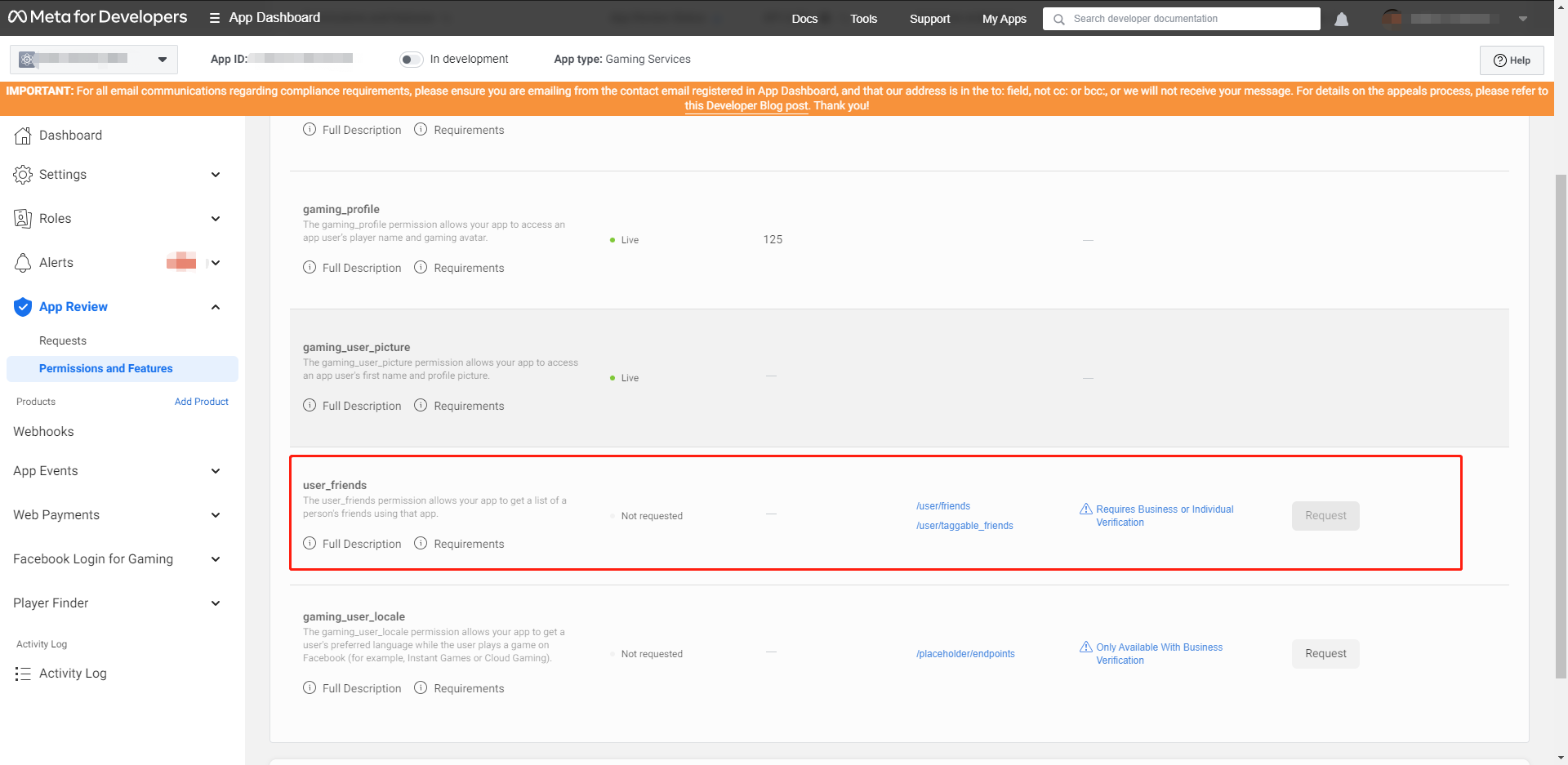
You need to apply for user_friends permission in the Facebook Developer Console. You can use it once approval is granted.For further details, please contact the Player Network Assistant.
During the unpublished phase of the application, developers can first add white-listed test accounts through the Facebook developer console to simulate Friend list requests and generate data for retrieval. Once verification is successful, formally submit the user_friends permission review.
After approval, use the backend interface /v2/friend/friend_list to obtain the friends list.
When calling Login, you need to add the permissions parameter and include the user_friends permission.
If using LI PASS integration, please refer to [CHANNEL]_LOGIN_PERMISSION configuration. Example: FACEBOOK_LOGIN_PERMISSION: "public_profile,user_friends"
Steam
Supports querying platform friends and in-game friends.In-game friends are friends who recently played together, and may not necessarily be added as friends on the Steam platform.
Prerequisites:
- Install and run Steam
- Steam login status is valid
Parameters:
- page: Page number
- page_size: Number of friends per page
- **is_in_game **:
true- get in-game friendsfalse- get platform friends
- Unity
- Unreal Engine
// Get in-game friends, 10 per page, return page 1
INTLAPI.QueryFriends(1, 10, true, INTLChannel.Steam);

// Get platform friends, 10 per page, return page 1
INTLAPI.QueryFriends(1, 10, false, INTLChannel.Steam);
// Get in-game friends, 10 per page, return page 1
UINTLSDKAPI::QueryFriends(EINTLLoginChannel::kChannelSteam, 1, 10, true, "{}");

// Get platform friends, 10 per page, return page 1
UINTLSDKAPI::QueryFriends(EINTLLoginChannel::kChannelSteam, 1, 10, false, "{}");
Friend status
好友状态信息在 FriendResult 的 extra_json 字段中返回。
"extra_json": {
    "persona_state": 0
}
Friend status information is returned in the extra_json field of FriendResult.
| Value | Explanation |
|---|---|
| string | Not logged in |
| one | Logged in |
| 2 | Logged in, but busy |
| 3 | Away automatically |
| 4 | Away automatically for a long time |
| 5 | Online, trading |
| 6 | Online, want to play games |
| 7 | Online, but shown as offline to friends |
Error Codes
| Error Codes | Explanation |
|---|---|
| 1031 | Steam DLL loading failed |
| 1032 | Needs to be started from the Steam platform |
| 1033 | Steam initialization failed (check steam_appid.txt location or if Steam is running) |
Switch
Supports querying platform friends and in-game friends.
Parameters:
- page: Page number (starting from 0)
- page_size: Number of friends per page (≤300)
- **is_in_game **:
true- get in-game friendsfalse- get platform friends
- Unity
- Unreal Engine
INTLAPI.QueryFriends(1, 10, true, INTLChannel.Switch);
UINTLSDKAPI::QueryFriends(EINTLLoginChannel::kChannelSwitch, 1, 10, true);
返回数据结构:
{
  "ret": 0,
  "msg": "",
  "method_id": 203,
  "ret_code": 0,
  "ret_msg": "Success",
  "lists": [{
    "openid": "eb4621e26d73bdab",
    "user_name": "xuzhang",
    "gender": 0,
    "extra_json": "{\"status\":\"0\",\"isFavorite\":\"true\",\"lastPlayedAppId\":\"0\",\"isSameApplication\":\"false\"}"
  }]
}
VK
Supports querying platform friends and in-game friends.
Parameters:
- page: Page number
- page_size: Number of friends per page
- **is_in_game **:
true- get in-game friendsfalse- get platform friends
- Unity
- Unreal Engine
// Get in-game friends
INTLAPI.QueryFriends(1, 10, true, INTLChannel.VK);

// Get platform friends
INTLAPI.QueryFriends(1, 10, false, INTLChannel.VK);
// Get in-game friends
UINTLSDKAPI::QueryFriends(EINTLLoginChannel::kChannelVK, 1, 10, true, "{}");

// Get platform friends
UINTLSDKAPI::QueryFriends(EINTLLoginChannel::kChannelVK, 1, 10, false, "{}");
Xbox Series X
Only supports getting in-game friends.
- Unity
- Unreal Engine
INTLAPI.QueryFriends(1, 10, true, INTLChannel.Xbox);
UINTLSDKAPI::QueryFriends(EINTLLoginChannel::kChannelXbox);
返回数据结构:
{
  "ret": 0,
  "msg": "",
  "method_id": 203,
  "ret_code": 0,
  "ret_msg": "Success",
  "lists": [{
    "openid": "10027382",
    "user_name": "xuzhang",
    "extra_json": "{\"status\":\"Online\"}"
  }]
}

