Discord Social SDK Features
If the system version falls between the two, the plugin can be integrated but its functions will be disabled.
Step 1: Configure Discord Application
If you have completed Discord login configuration, you may skip the application creation step.
1.1. Create an Application
- Register and authenticate your account on the Discord official website.
- Go to the Developer Platform and click New Application.
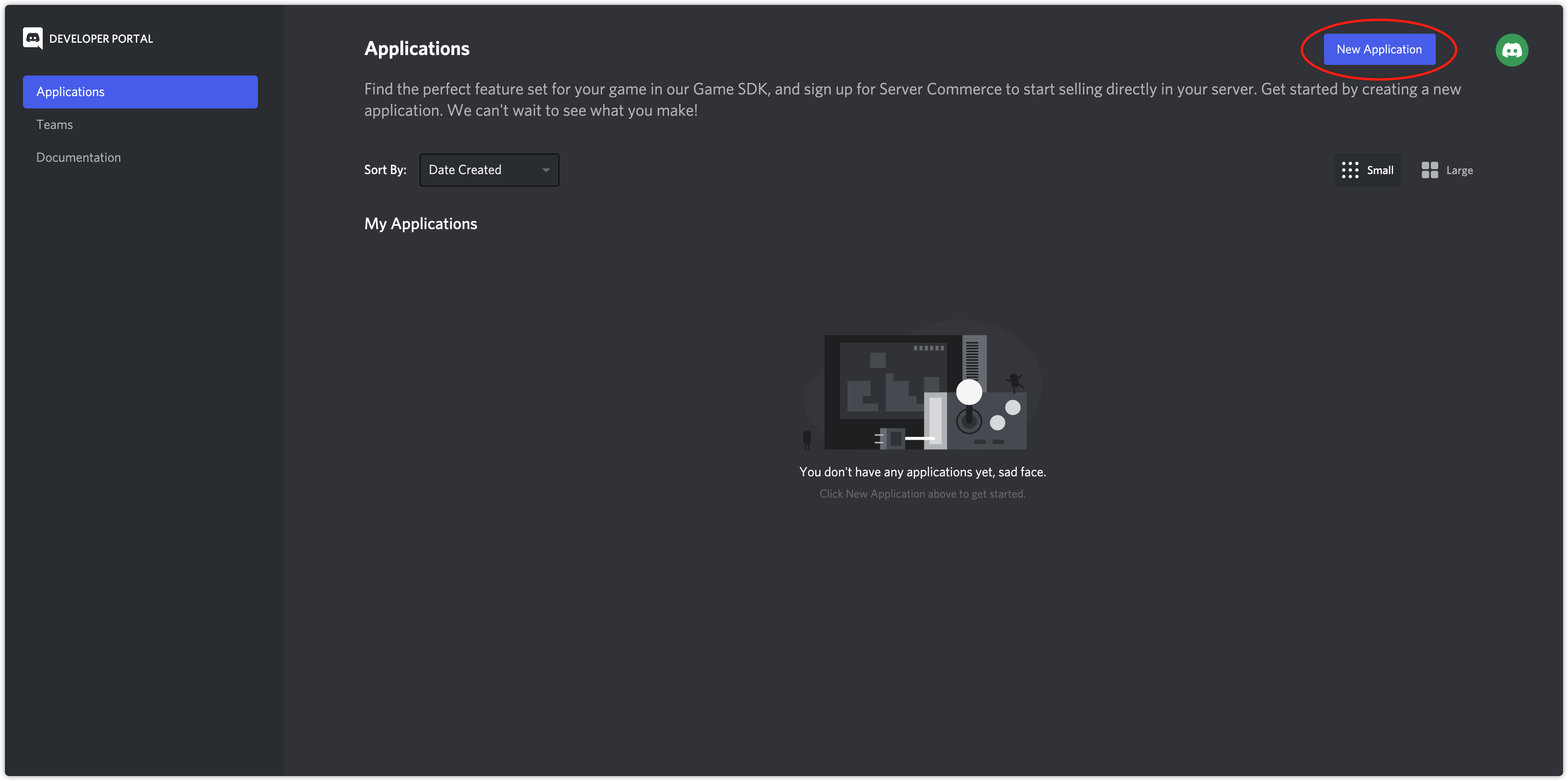
- Enter your application name and click Create.
- On the General Information page, obtain the APPLICATION ID.
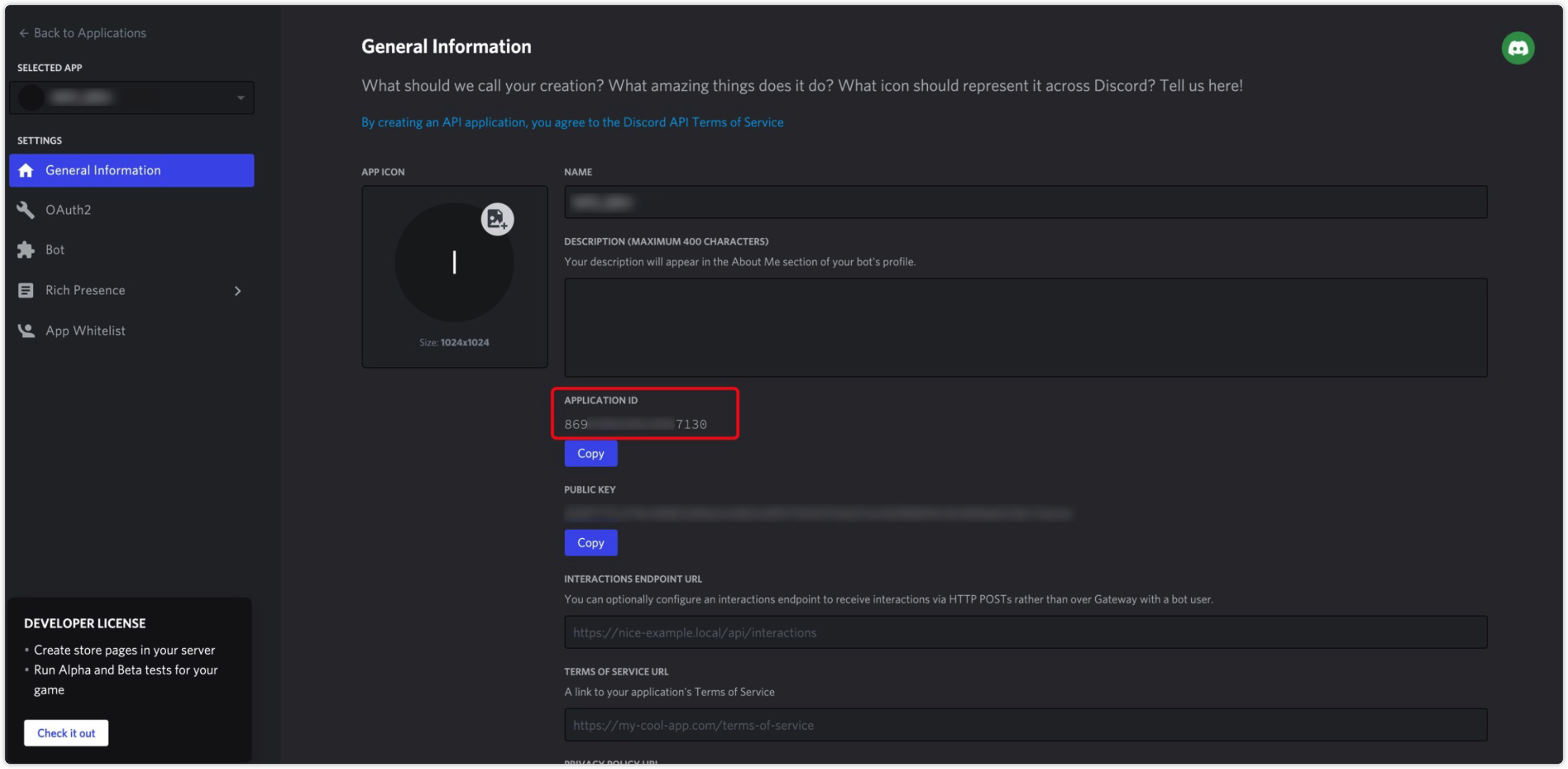
- Configure the Discord App ID in INTLConfig.ini.
1.2. Apply for SDK Access
- Go to the Developer Platform.
- Click Getting Started, fill out the form, and submit.
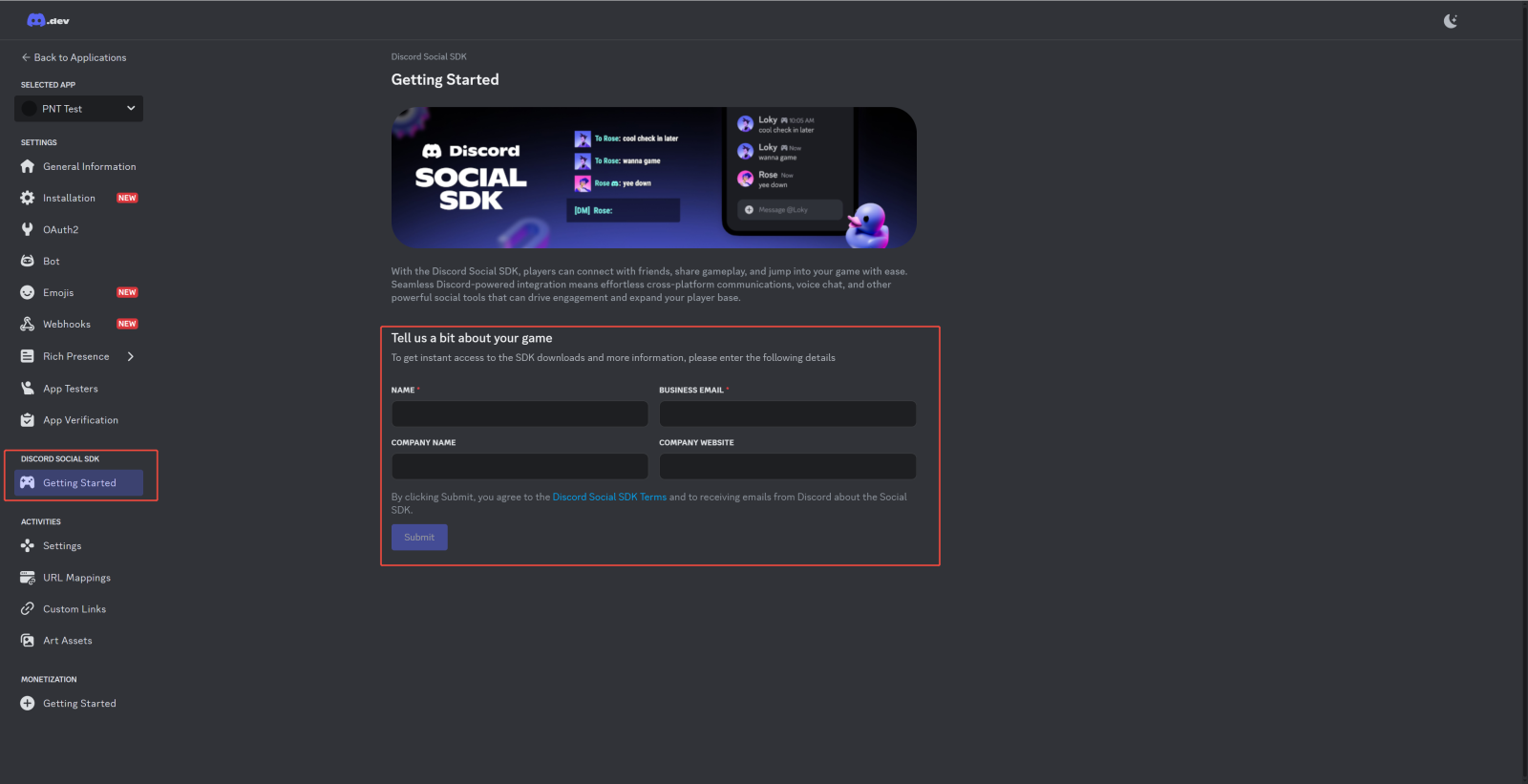
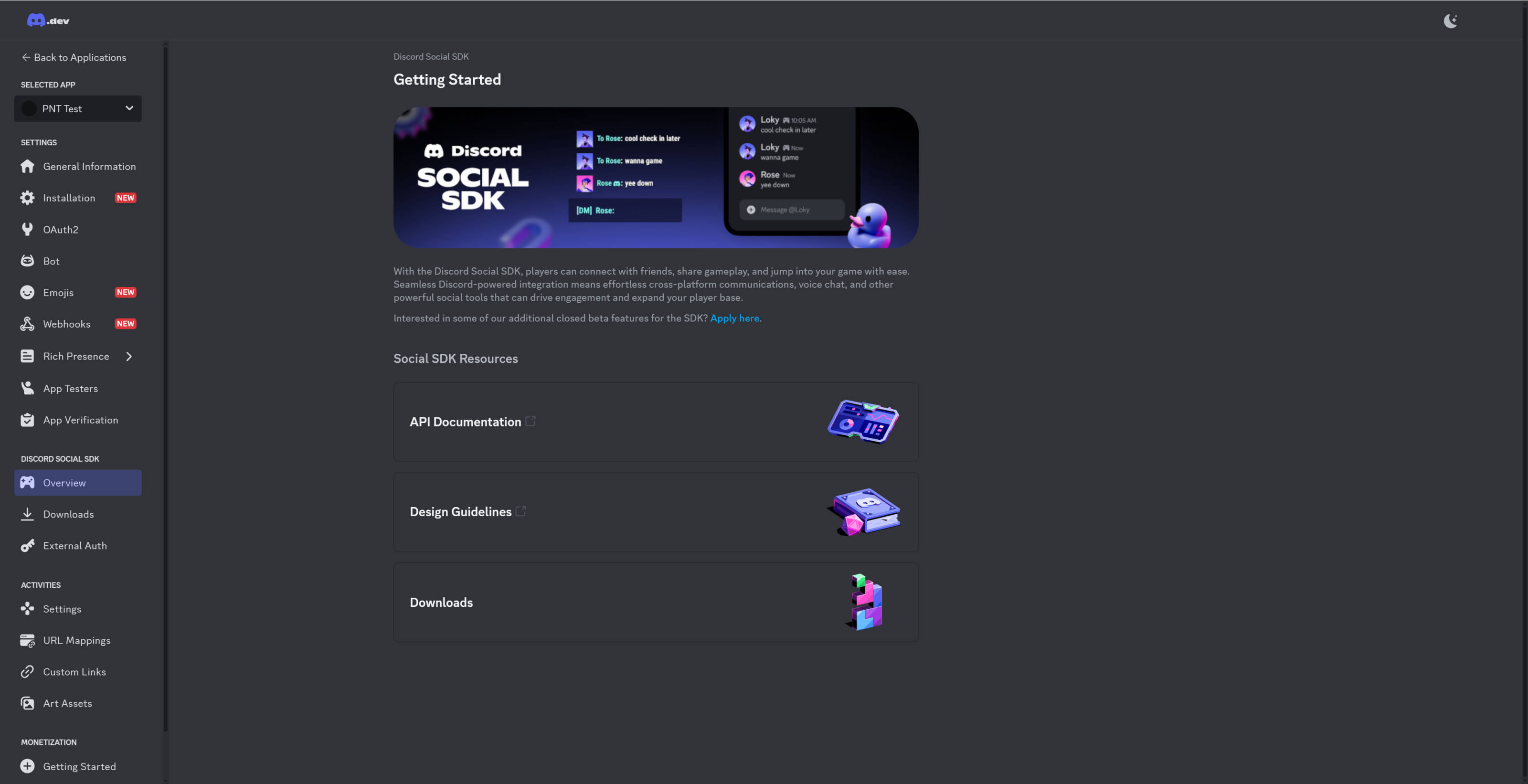
Before the official launch of your game, notify the Discord team in advance to enable production permissions.
1.3. Configure OAuth2
- Click OAuth2 and turn on the PUBLIC CLIENT option.

- Configure Redirects:
- Android/iOS:
discord-{YOUR_APP_ID}:/authorize/callback - PC:
http://127.0.0.1/callback
- Android/iOS:

For mobile, configure DeepLink: add the jump URL in General Information → Deep Link URL.

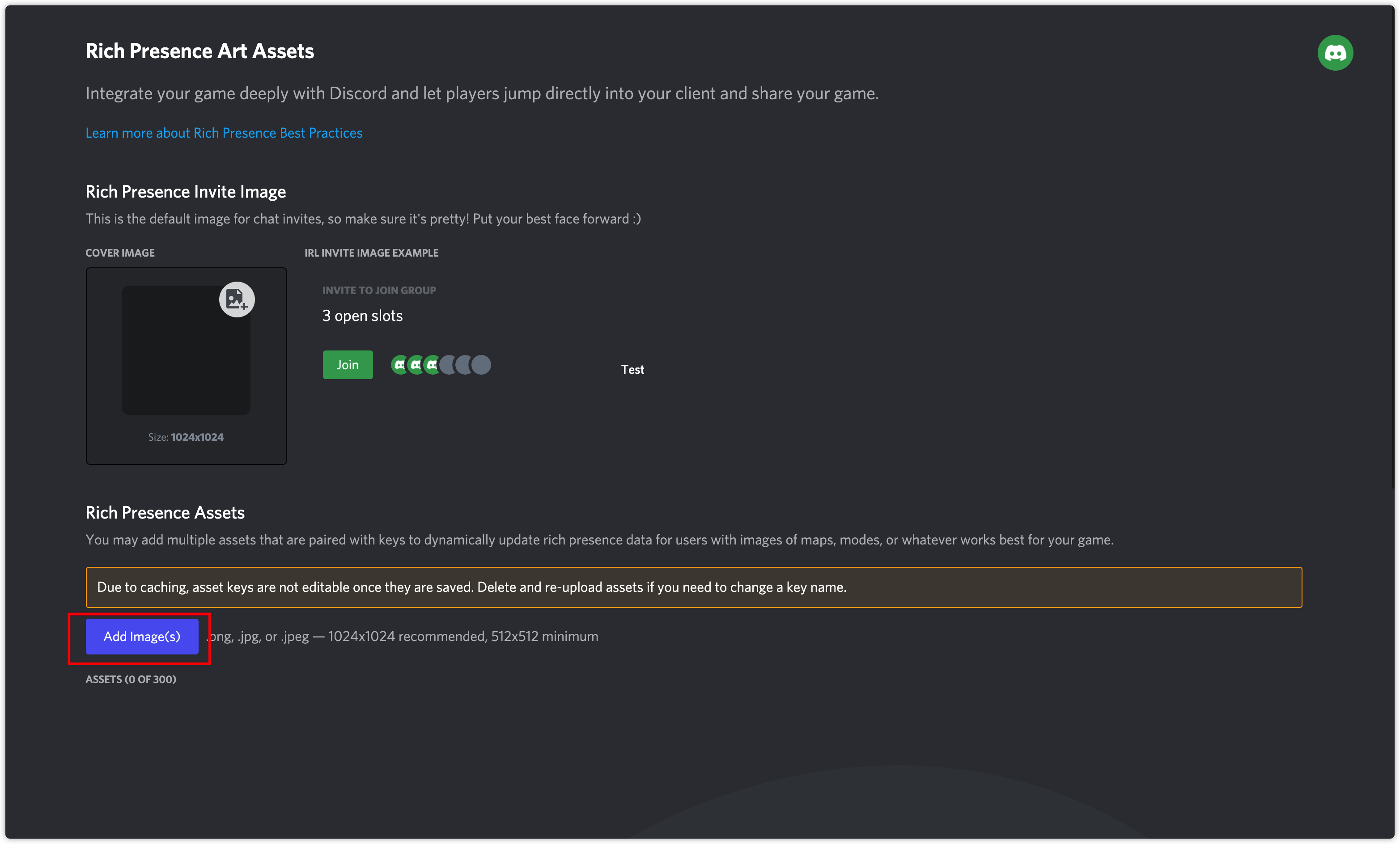
1.4. Configure Rich Presence Assets
- Click Rich Presence.
- Click Add Image(s) to upload image assets.
Step 2: Register Callback
It is recommended to register all callbacks when the game starts.
General Function Callback
- Unity
- Unreal Engine
// Add/remove callbacks
INTLAPI.AddDiscordBaseResultObserver(OnDiscordBaseResult);
INTLAPI.RemoveDiscordBaseResultObserver(OnDiscordBaseResult);

// Handle callback
private void OnDiscordBaseResult(INTLBaseResult baseRet)
{
    switch (baseRet.MethodId)
    {
        case (int)INTLMethodID.INTL_FRIEND_DISCORD_AUTHORIZE:
            // Authorization callback
            break;
        case (int)INTLMethodID.INTL_FRIEND_DISCORD_CREATE_LOBBY:
            // Create/join lobby callback
            break;
        case (int)INTLMethodID.INTL_FRIEND_DISCORD_LEAVE_LOBBY:
            // Leave lobby callback
            break;
        case (int)INTLMethodID.INTL_FRIEND_DISCORD_SET_RICH_PRESENCE:
            // Set game status callback
            break;
        case (int)INTLMethodID.INTL_FRIEND_DISCORD_SEND_MESSAGE:
            // Send message callback
            break;
        case (int)INTLMethodID.INTL_FRIEND_DISCORD_REMOVE_FRIEND:
            // Remove friend callback
            break;
        case (int)INTLMethodID.INTL_FRIEND_DISCORD_ADD_FRIEND_BY_ID:
            // Add friend by ID callback
            break;
        case (int)INTLMethodID.INTL_FRIEND_DISCORD_ADD_FRIEND_BY_NAME:
            // Add friend by username callback
            break;
        case (int)INTLMethodID.INTL_FRIEND_DISCORD_ACCEPT_FRIEND_REQUEST:
            // Accept friend request callback
            break;
        case (int)INTLMethodID.INTL_FRIEND_DISCORD_SEND_INVITE_TO_FREIND:
            // Send invite callback
            break;
        case (int)INTLMethodID.INTL_FRIEND_DISCORD_ACCEPT_INVITE_FROM_FRIEND:
            // Accept invite callback
            break;
        case (int)INTLMethodID.INTL_FRIEND_DISCORD_ON_RELATIONSHIP_CHANGED:
            // Notification for friend list changes, refresh list recommended
            break;
        case (int)INTLMethodID.INTL_FRIEND_DISCORD_ON_LOBBY_MEMBER_CHANGED:
            // Notification for lobby member changes, refresh status recommended
            break;
    }
}
// Configure callback
UINTLSDKAPI::SetDiscordBaseRetObserver(callback);
UINTLSDKAPI::GetDiscordBaseRetObserver();
UINTLSDKAPI::GetDiscordBaseRetObserver().Clear();

// Handle callback
void INTLObserverEventsHandler::OnDiscordBaseRet_Implementation(FINTLBaseResult ret)
{
    switch (ret.method_id_)
    {
        case kMethodIDFriendDiscordAuthorize:
            // Authorization callback
            if(ret.ret_code_ == ErrorCode::SUCCESS)
                // Call other functions
            break;
        case kMethodIDFriendDiscordCreateLobby:
            // Create/join lobby callback
            break;
        case kMethodIDFriendDiscordLeaveLobby:
            // Leave lobby callback
            break;
        case kMethodIDFriendDiscordSetRichPresence:
            // Set game status callback
            break;
        case kMethodIDFriendDiscordSendMessage:
            // Send message callback
            break;
        case kMethodIDFriendDiscordRemoveFriend:
            // Remove friend callback
            break;
        case kMethodIDFriendDiscordAddFriendByID:
            // Add friend by ID callback
            break;
        case kMethodIDFriendDiscordAddFriendByName:
            // Add friend by username callback
            break;
        case kMethodIDFriendDiscordAcceptFriendRequest:
            // Accept friend request callback
            break;
        case kMethodIDFriendDiscordSendInviteToFriend:
            // Send invite callback
            break;
        case kMethodIDFriendDiscordAcceptInviteFromFriend:
            // Accept invite callback
            break;
        case kMethodIDFriendDiscordOnRelationshipChanged:
            // Notification for friend list changes, refresh list recommended
            break;
        case kMethodIDFriendDiscordOnLobbyMemberChanged:
            // Notification for lobby member changes, refresh status recommended
            break;
    }
}
Personal Information Callback
- Unity
- Unreal Engine
INTLAPI.AddDiscordUserResultObserver(OnDiscordUserResult);
INTLAPI.RemoveDiscordUserResultObserver(OnDiscordUserResult);

private void OnDiscordUserResult(INTLDiscordUserResult userRet)
{
    if (userRet.MethodId == (int)INTLMethodID.INTL_FRIEND_DISCORD_GET_CONNECTED_USER)
    {
        // Handle user info
    }
}
UINTLSDKAPI::SetDiscordGetConnectedUserRetObserver(callback);
UINTLSDKAPI::GetDiscordGetConnectedUserRetObserver();
UINTLSDKAPI::GetDiscordGetConnectedUserRetObserver().Clear();

void INTLObserverEventsHandler::OnDiscordGetConnectedUserRet_Implementation(FINTLDiscordUserResult ret)
{
    // Handle user info
}
Friend List Callback
- Unity
- Unreal Engine
INTLAPI.AddDiscordFriendsResultObserver(OnDiscordFriendResult);
INTLAPI.RemoveDiscordFriendsResultObserver(OnDiscordFriendResult);

private void OnDiscordFriendResult(INTLDiscordFriendResult friendRet)
{
    // Handle friends list
}
UINTLSDKAPI::SetDiscordQueryFriendRetObserver(callback);
UINTLSDKAPI::GetDiscordQueryFriendRetObserver();
UINTLSDKAPI::GetDiscordQueryFriendRetObserver().Clear();

void INTLObserverEventsHandler::OnDiscordQueryFriendRet_Implementation(FINTLDiscordFriendResult ret)
{
    // Handle friends list
}
Text Message Callback
- Unity
- Unreal Engine
INTLAPI.AddDiscordMessageResultObserver(OnDiscordMessageResult);
INTLAPI.RemoveDiscordMessageResultObserve(OnDiscordMessageResult);

private void OnDiscordMessageResult(INTLDiscordMessageResult messageRet)
{
    // Handle message changes
}
UINTLSDKAPI::SetDiscordMessageUpdatedRetObserver(callback);
UINTLSDKAPI::GetDiscordMessageUpdatedRetObserver();
UINTLSDKAPI::GetDiscordMessageUpdatedRetObserver().Clear();

void INTLObserverEventsHandler::OnDiscordMessageUpdatedRet_Implementation(FINTLDiscordMessageResult ret)
{
    // Handle message changes
}
Lobby Invitation Callback
- Unity
- Unreal Engine
INTLAPI.AddDiscordInviteResultObserver(OnDiscordInviteResult);
INTLAPI.RemoveDiscordInviteResultObserver(OnDiscordInviteResult);

private void OnDiscordInviteResult(INTLDiscordInviteResult inviteRet)
{
    // Handle invitations
}
UINTLSDKAPI::SetDiscordAcceptInviteRetObserver(callback);
UINTLSDKAPI::GetDiscordAcceptInviteRetObserver();
UINTLSDKAPI::GetDiscordAcceptInviteRetObserver().Clear();

void INTLObserverEventsHandler::OnDiscordAcceptInviteRet_Implementation(FINTLDiscordInviteResult ret)
{
    // Handle invitations
}
Step 3: Call the API
DiscordAuthorize
Function: Link Discord account and grant friend permissions
Linking process:
- First time: Bring up authorization page → enter account and password → complete linking
- Next time: Direct linking using cache (if devices are changed or app is reinstalled, reauthorization is required)
- Unlink: Must be operated in-game (revoking authorization in Discord alone is not sufficient)
Must be called after every login and before invoking other Discord interfaces. Wait for callback to return SUCCESS before calling other functions.
The Discord authorization flow is shown below:

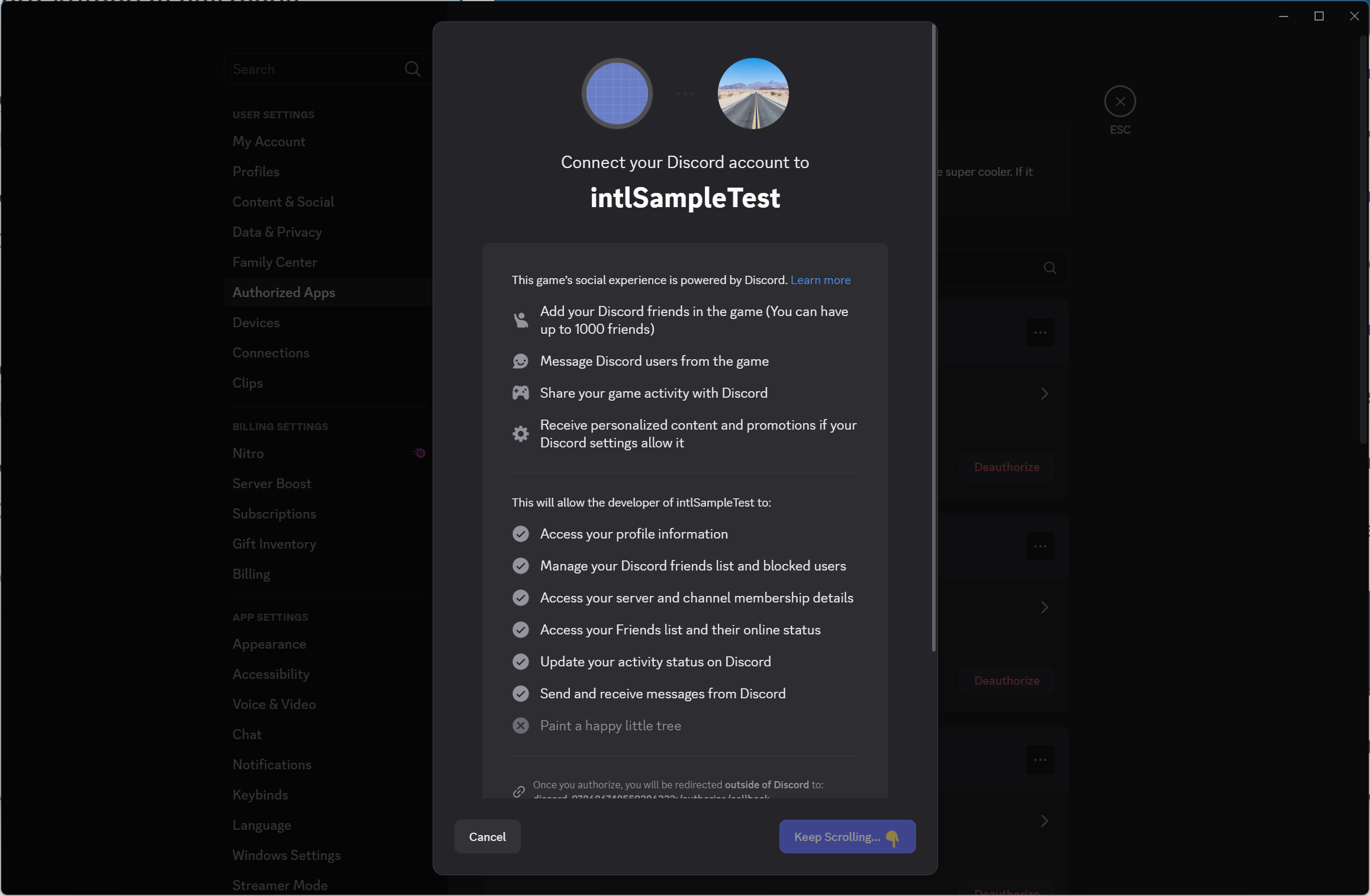
Reference style for Discord PC-side authorization page:
- Unity
- Unreal Engine
Callback handling interface: DiscordBaseResultObserver
INTLAPI.DiscordAuthorize();
Callback handling interface: DiscordBaseResultObserver
UINTLSDKAPI::DiscordAuthorize();
IsAuthorized
Function: Check if a cached token exists locally
Use case: Prevent automatic launch of the authorization page
- If returns
true: directly callDiscordAuthorize() - If returns
false: display a button for the user to manually authorize
- Unity
- Unreal Engine
bool isAuthorized = INTLAPI.IsAuthorized();
bool isAuthorized = UINTLSDKAPI::IsAuthorized();
DiscordGetConnectedUser
- Unity
- Unreal Engine
Callback: DiscordUserResultObserver
Data: DiscordUserInfo
INTLAPI.DiscordGetConnectedUser();
Callback: DiscordUserResultObserver
Data: DiscordUserInfo
UINTLSDKAPI::DiscordGetConnectedUser();
DiscordQueryFriends
Parameters:
page(int): page number, >0count(int): items per page, >0
- Unity
- Unreal Engine
Callback handling interface: DiscordFriendsResultObserver
INTLAPI.DiscordQueryFriends(1, 10);
Callback handling interface: DiscordFriendsResultObserver
UINTLSDKAPI::DiscordQueryFriends(1, 10);
DiscordAddFriendByName
Parameter: username (string)
Effect: The recipient can view the request; upon approval both parties receive friend list change callback
- Unity
- Unreal Engine
Callback handling interface: DiscordBaseResultObserver
INTLAPI.DiscordAddFriendByName("xiaoming");
Callback handling interface: DiscordBaseResultObserver
UINTLSDKAPI::DiscordAddFriendByName("xiaoming");
DiscordAddFriendByID
Parameter: userId (string)
Effect: The recipient can view the request; upon approval both parties receive friend list change callback
- Unity
- Unreal Engine
Callback handling interface: DiscordBaseResultObserver
INTLAPI.DiscordAddFriendById("123456789");
Callback handling interface: DiscordBaseResultObserver
UINTLSDKAPI::DiscordAddFriendById("123456789");
DiscordAcceptFriendRequest
Parameter: userId (string) - applicant's ID
Effect: Both parties receive friend list change callback
- Unity
- Unreal Engine
Callback handling interface: DiscordBaseResultObserver
INTLAPI.DiscordAcceptFriendRequest("123456789");
Callback handling interface: DiscordBaseResultObserver
UINTLSDKAPI::DiscordAcceptFriendRequest("123456789");
DiscordRemoveFriend
Parameter: userId (string)
Effect: No approval needed; both parties receive friend list change callback
- Unity
- Unreal Engine
Callback handling interface: DiscordBaseResultObserver
INTLAPI.DiscordRemoveFriend("123456789");
Callback handling interface: DiscordBaseResultObserver
UINTLSDKAPI::DiscordRemoveFriend("123456789");
After friend management functions succeed, both parties will receive the kMethodIDFriendDiscordOnRelationshipChanged callback.The callback does not contain userId; please call DiscordQueryFriends for details.
DiscordSendMessage
Parameters:
recipientId(string): Recipient IDcontent(string): Message content
Sending rules:
- Friend relationship: success
- Never friends: failure
- Previously friends, now deleted:
- Recipient online: callback successful but not displayed
- Recipient offline: error 50007
Sending messages involves privacy; the game must disclose this.
- Unity
- Unreal Engine
Callback handling interface: DiscordBaseResultObserver
INTLAPI.DiscordSendMessage("123456789", "hello world!");
Callback handling interface: DiscordBaseResultObserver
UINTLSDKAPI::DiscordSendMessage("123456789", "hi");
Registering Message Callback allows you to monitor friend message changes (create/edit/delete). Messages may contain emoji or non-text content.
DiscordSetRichPresence
- Unity
- Unreal Engine
Callback: DiscordBaseResultObserver
Parameter: DiscordRichPresence
INTLDiscordRichPresence richPresence = new INTLDiscordRichPresence();
richPresence.GameName = "Sample";
richPresence.State = "HappyTime";
richPresence.Details = "This is INTL Sample Game";
richPresence.PartyMaxSize = 5;
richPresence.SupportedPlatforms = 1 | 8 | 16;

INTLAPI.DiscordSetRichPresence(richPresence);
Callback: DiscordBaseResultObserver
Parameter: DiscordRichPresence
FINTLRichPresence presence;
presence.gameName = "gamename";
presence.state = "state";
presence.details = "details";
presence.partyMaxSize = 3;
presence.supportedPlatforms = 8 | 16;

UINTLSDKAPI::DiscordSetRichPresence(presence);
DiscordCreateLobby
Parameter: secret (string) - unique lobby identifier (valid for about 30 days)
Limitations:
- A user can only be in one lobby at a time.
- You must leave the current lobby before joining a new one.
- Exiting the game does not automatically leave the lobby; an active call is required.
- Lobby expires automatically several minutes after all members leave.
Recommendation: Encrypt the secret to prevent uninformed users from joining.
- Unity
- Unreal Engine
Callback handling interface: DiscordBaseResultObserver
INTLAPI.DiscordCreateLobby("testsecret");
Callback handling interface: DiscordBaseResultObserver
UINTLSDKAPI::DiscordCreateLobby("testsecret");
DiscordLeaveLobby
- Unity
- Unreal Engine
Callback handling interface: DiscordBaseResultObserver
INTLAPI.DiscordLeaveLobby();
Callback handling interface: DiscordBaseResultObserver
UINTLSDKAPI::DiscordLeaveLobby();
Whenever any member joins or leaves the lobby, all members will receive a callback.
DiscordSendInviteToFriend
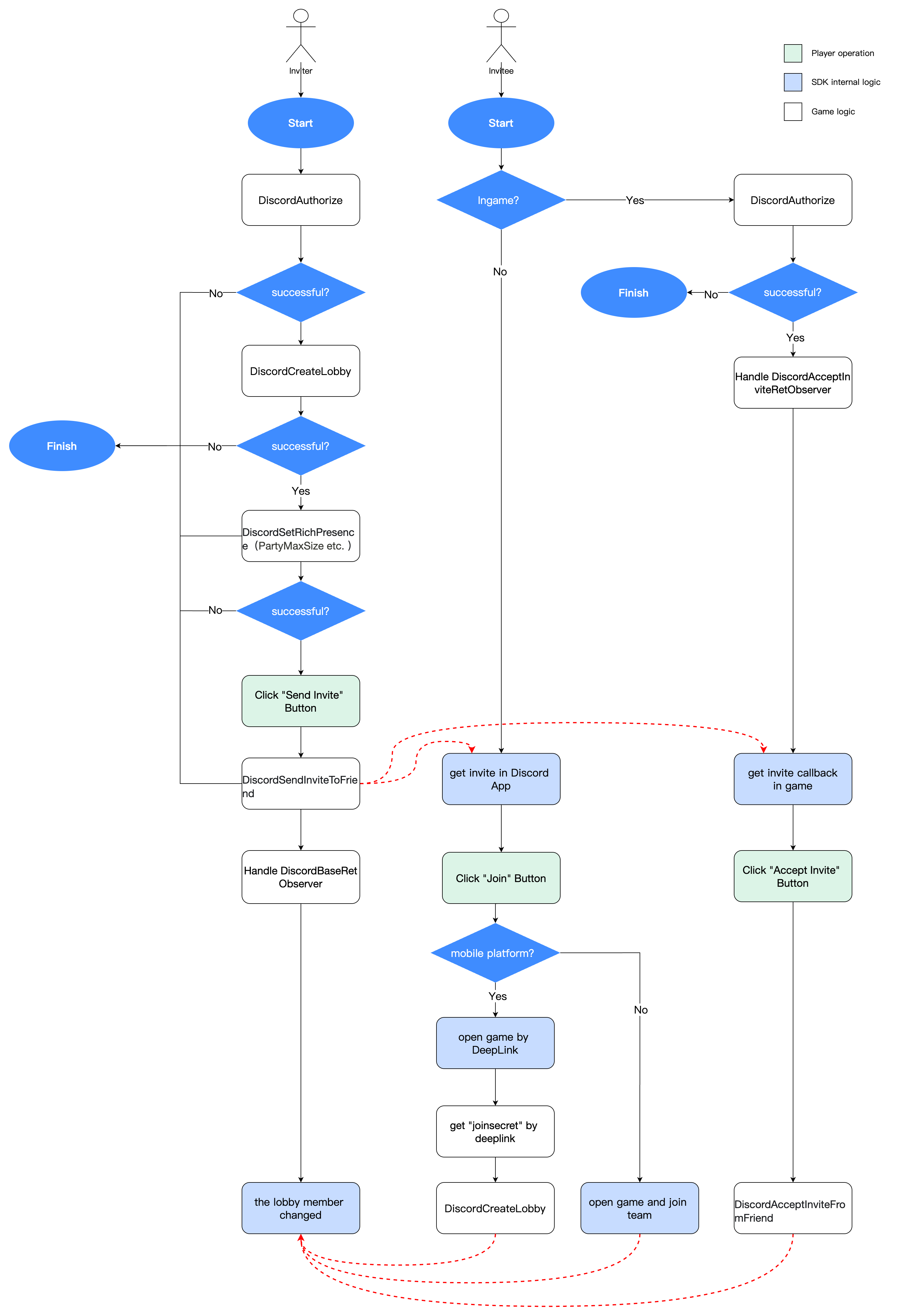
Must be performed in order:
- Create Lobby
- Set game status
- Send Invite
The sending invite flow is shown below:
Parameters:
userId(string): Friend IDcontent(string): Invitation message
- Unity
- Unreal Engine
Callback handling interface: DiscordBaseResultObserver
INTLAPI.DiscordSendInviteToFriend("123456789", "hi, come to play with me");
Callback handling interface: DiscordBaseResultObserver
UINTLSDKAPI::DiscordSendInviteToFriend("123456789", "hi, come to play with me");
DiscordAcceptInviteFromFriend
There are two ways to accept Discord game invitations:
Method 1: Function call
Register invitation callback, then invoke this function within the callback.
Method 2: Discord client
- PC: Click Join to join automatically
- Mobile: Click Join → DeepLink triggers the game → parse
joinSecret→ callDiscordCreateLobby
Parameter: userId (string) - sender ID
- Unity
- Unreal Engine
Callback handling interface: DiscordBaseResultObserver
INTLAPI.DiscordAcceptInviteFromFriend("123456789");
Callback handling interface: DiscordBaseResultObserver
UINTLSDKAPI::DiscordAcceptInviteFromFriend("123456");
Error Codes
| ID | Identifier | Description |
|---|---|---|
| 260001 | NEED_AUTHORIZE | Authorization required |
| 260002 | NO_USER_CONNECTED | User not connected |
| 260003 | NO_FOUND_LOBBY | Lobby not found |
| 260004 | TOKEN_NULL | Token is empty |
| 260005 | ERROR_CONNECT | Connection error |
| 260006 | CLIENT_NOT_READY | Client not ready |
| 260007 | LOBBY_ALREADY_EXISTS | Lobby already exists |
| 260008 | LOBBY_FULL | Lobby is full |
| 260009 | NO_FOUND_ACTIVITY | Project status not found |
| 260010 | NO_FOUND_PARTY | Party not found |
| 260011 | NO_FOUND_FRIEND | Friend not found |

