Set UI Root Node (SetUIRoot)
If you are using Unreal Engine, please refer to SetUIRoot in the Unreal Engine SDK.
Set the root node for all UI interfaces of LI PASS.
LI PASS UI design resolutions are:
Android, iOS (landscape): 1334x750
Android, iOS (portrait): 750x1334
PC, PS5, XSX: 1920x1080
After setting the UI root node, do not destroy the node, or the LI PASS UI interface cannot be mounted and unexpected behaviors may occur.
Function definition
public static void SetUIRoot(GameObject root);
Parameter Explanation
| Parameters | Type | Explanation |
|---|---|---|
| root | GameObject | UI Root Node |
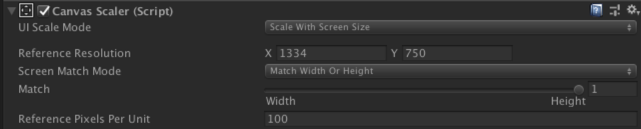
For mobile platforms (Android, iOS) using landscape games, it is recommended to set the canvas resolution to 1334x750, fixing the height and adapting the width, as shown below:
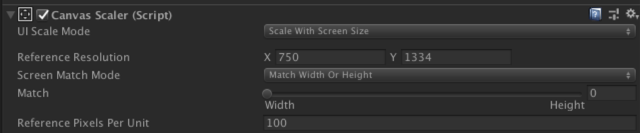
For mobile platforms (Android, iOS) using portrait games, it is recommended to set the canvas resolution to 750x1334, fixing the width and adapting the height, as shown below:
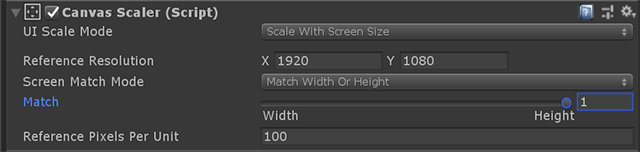
For PC or console platforms (PS5, XSX), it is recommended to set the canvas resolution to 1920x1080, fixing the height and adapting the width, as shown below:
In the editor, the default value of these numbers matches the current PC resolution. To avoid displaying out-of-frame issues, it is advisable that the resolution be set to a recommended value.
Code Example
LevelInfinite.SetUIRoot(uiRoot);

