AI Translation Development Integration Guide
1. Preparation before integration
1.1 Prerequisites
- Registered Player Network console and finished business project creation.
- If using SDK integration, the client Player Network SDK version must be 1.32 or above.
1.2 Choosing integration method
| Integration Method | Application scenarios | Integration features | Security Notes |
|---|---|---|---|
| SDK Integration (Recommended) | The business has integrated the Player Network SDK, and the client can directly call SDK capabilities. | Short development cycle, suitable for real-time in-game features. | The client only uses parameters required by the SDK and should not store the secret. |
| API Integration | Only integrate the AI Translation Service, or invoke centrally via the game backend. | Facilitates unified authentication, rate limiting, log auditing, and business encapsulation. | secret is only stored in trusted backend or key management systems. |
2. Management Console Operation
2.1 Function Entry
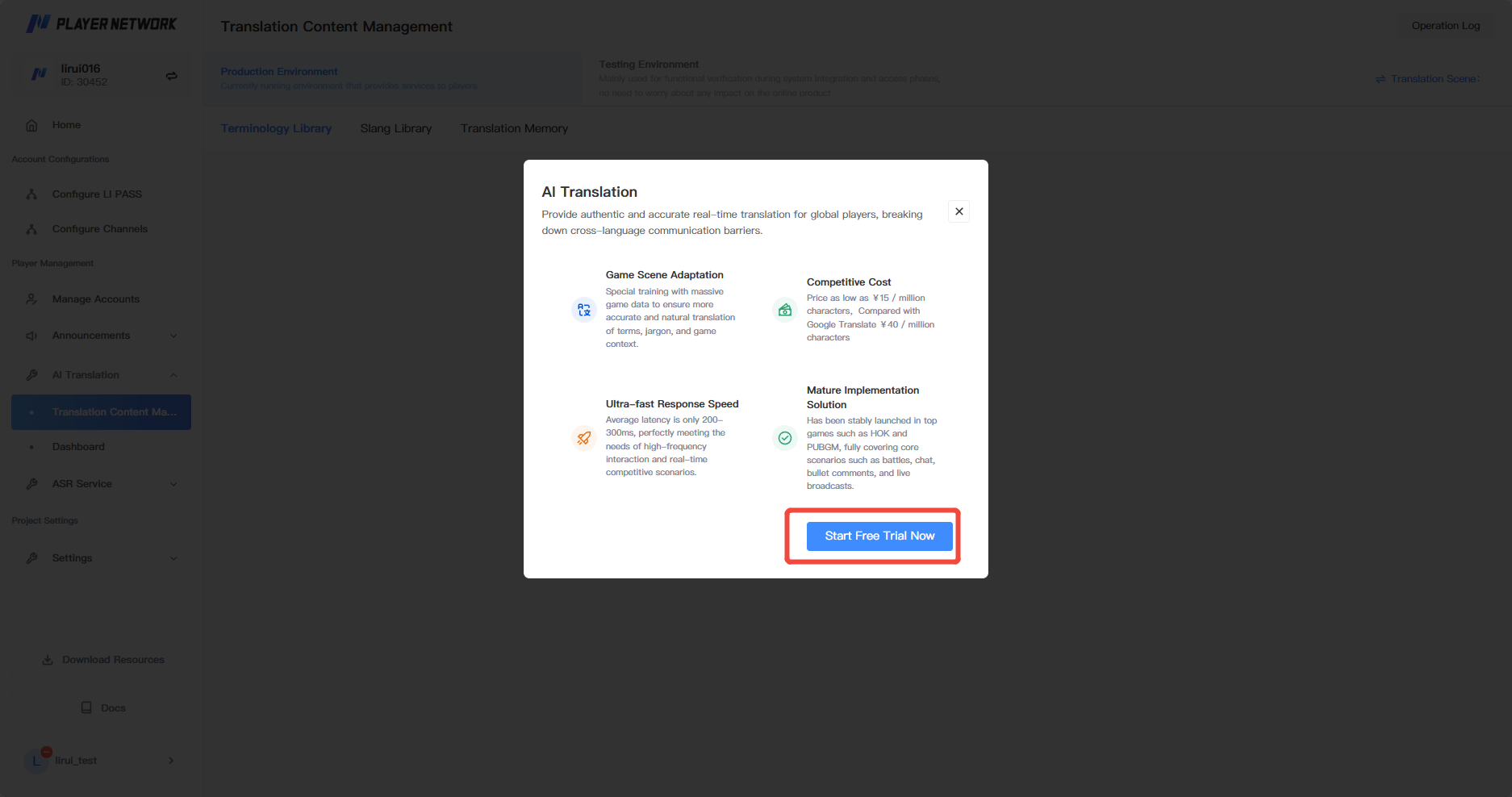
When you first enter the Translation Content Management, click "Try it for free now" to complete AI translation feature initialization.
2.2 Obtaining Parameters
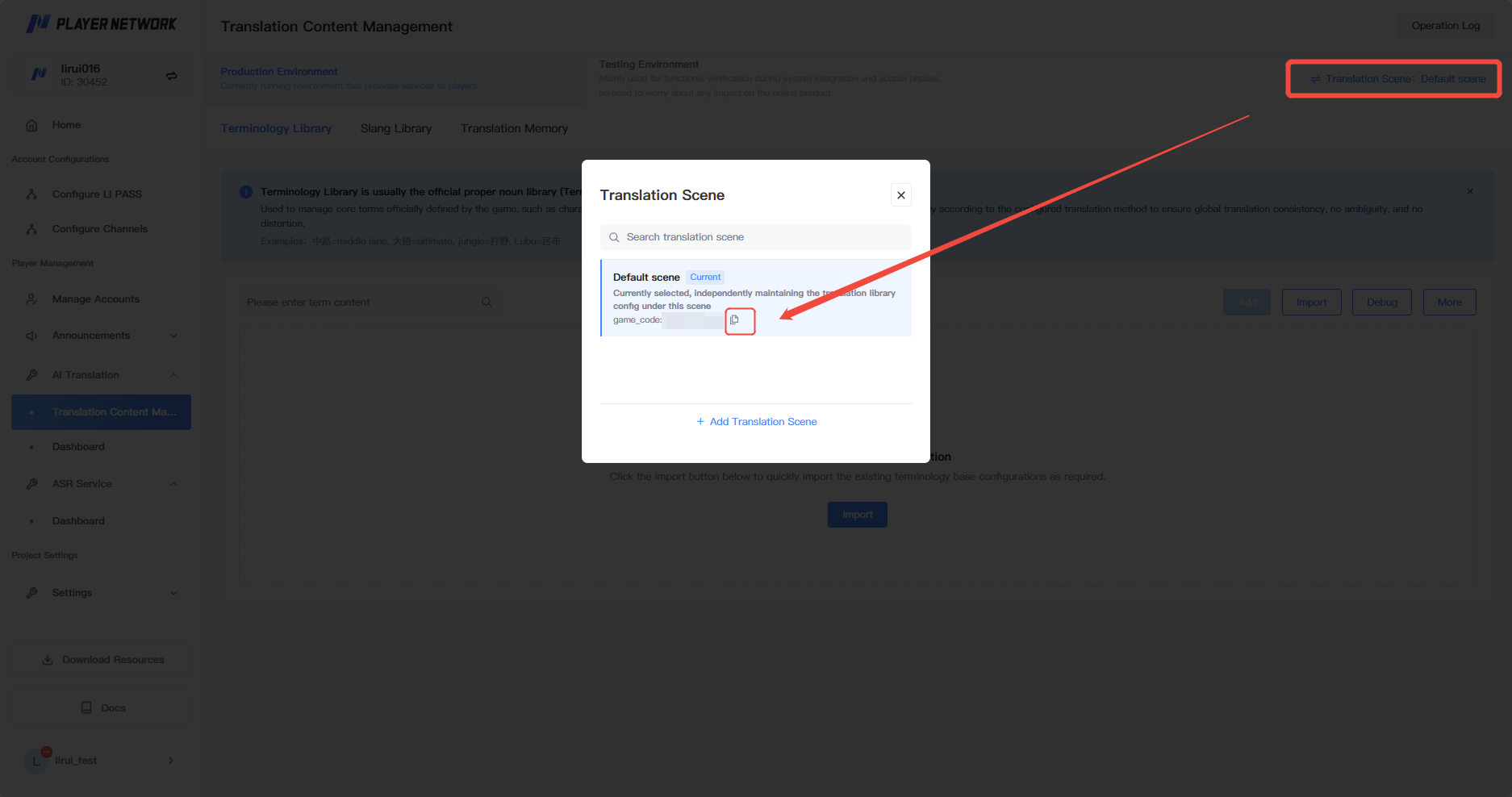
- Click the upper right corner "Scene Switch" to obtain the
gameCodecorresponding to this business scenario.It is recommended to always include thegameCodewhen making SDK/API calls.
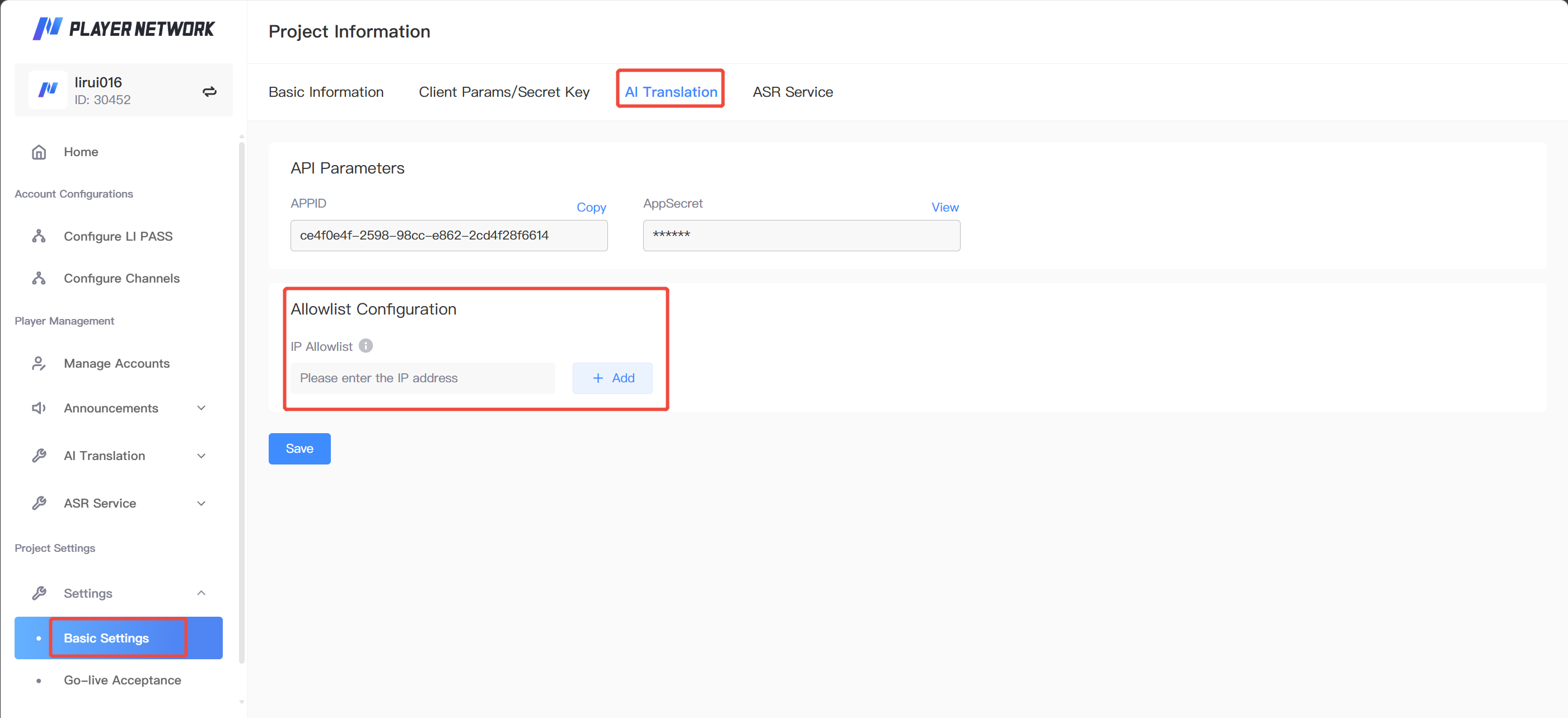
- For API integration, go to 「Project Information」 and select 「AI Translation」. In the 「API Parameters」 section, obtain
APPID (appId)andAppSecret (secret), which are used to issue the JWT Token required for request authentication.See 「3.4 JWT Token Generation Requirements」 for specific requirements.
2.3 Whitelist Configuration
When integrating via API, in 「Project Information → AI Translation」, fill in the backend outbound IP of the Project in the 「IP Whitelist」 area, verify it and then save.
3. Backend API Integration
3.1 Integration Flow
- The client or business service submits the text to be translated, along with the source language, target language, business scenario, and other relevant information to the game backend.
- The game backend uses
appId + secretto generate a JWT Token and calls the AI Translation API. - The AI Translation Service returns
retCode,message, andresult; the backend sends these to the client or writes them to the business system as required. - Backend logs key fields like
traceId,openId,gameCode,srcLang,targetLang,retCodefor troubleshooting.
3.2 API Information
When calling AI Translation API from backend, select the appropriate service domain name based on the deployment environment and concatenate with /api/v1/translator as the interface path.
Before calling the interface, you need to configure the game backend outbound IP whitelist in the Player Network management console; otherwise, the interface cannot be called successfully.For configuration, please refer to 「2.3 Whitelist Configuration」.
| Environment | Backend Domain Name | Full Call Address |
|---|---|---|
| test environment | http://translator.ai-test.levelinfinite.com | POST http://translator.ai-test.levelinfinite.com/api/v1/translator |
| Production environment | http://translator.ai.levelinfinite.com | POST http://translator.ai.levelinfinite.com/api/v1/translator |
| Project | Description |
|---|---|
| Interface Path | POST \<API domain>/api/v1/translator |
| Content-Type | application/json |
| Authorization | Bearer \<token> |
| Authentication Method | JWT, signature algorithm HS256; payload.data.account must equal the request body appId; payload.exp is the Unix expiration time in seconds. |
| Feature Description | Supports batch text translation, automatic source language detection, terminology/phrase locking, translation caching, and multi-strategy translation fallback. |
3.3 Request Parameters
| Parameter | Type | Required | Description |
|---|---|---|---|
| openId | string | Yes | User ID, identifies the specific user. |
| appId | string | Yes | The appId assigned by the admin must be consistent with payload.data.account in the JWT.For acquisition method, see 「2.2 Parameter Acquisition」. |
| srcLang | string | Yes | Source language code; use auto if uncertain. |
| targetLang | string | Yes | Target language code such as zh, en, ja, ko, ru. |
| gameCode | string | No, recommended | Business scenario code; if empty, the default gameCode of appId will be used; it is recommended to apply separately for different scenarios.See 「2.2 Parameter Acquisition」 for how to obtain. |
| text | []string | Yes | List of texts to translate, up to 5 items, total tokens must not exceed 4096. |
| context | json object | No | Translation context, includes topic, pastConversation, remark. |
| traceId | string | No, it is recommended to pass | Unique request ID, used for request tracing. |
| noCache | bool | No | Cache bypass: false uses cache, true does not use cache; default is false. |
| extInfo | string | No | Extension field, JSON string, for future expansion. |
context parameter
| Parameter | Type | Required | Description |
|---|---|---|---|
| topic | string | No | Topic/scene, e.g. "game chat", "event announcement", "esports commentary". |
| pastConversation | string | No | Historical conversation context, improves consistency of conversation translation. |
| remark | string | No | Additional description, e.g. proper nouns, role names, tone requirements. |
3.4 JWT Token Generation Requirements
- Obtain
appIdandsecretfrom the admin console. For details, see 「View parameter acquisition method」. Thesecretshould only be stored in a trusted backend or a key management system. - Use
secretassigned by admin as HS256 signature key. payloadmust includedata.account, value isappId.payloadmust includeexp, value is Unix seconds expiration.- Request header uses
Authorization: Bearer \<token>. - Request body
appIdmust matchdata.accountin token.
{
  "exp": 1710000000,
  "data": {
    "account": "<appId>"
  }
}
3.5 Request Example
POST /api/v1/translator HTTP/1.1
Content-Type: application/json
Authorization: Bearer <token>

{
  "openId": "test-user-001",
  "appId": "<app-id>",
  "srcLang": "auto",
  "targetLang": "en",
  "gameCode": "<game-code>",
  "text": ["Cosmodrone's heavy armored soldier"],
  "context": {
    "topic": "game chat",
    "pastConversation": "",
    "remark": ""
  },
  "traceId": "translator-20260701-0001",
  "noCache": false,
  "extInfo": ""
}
For a complete Python call example, see 「Appendix: Backend Integration Pseudocode」 under "Python Backend Call Example".
3.6 Response Handling
| Response Field | Type | Description | Handling Suggestion |
|---|---|---|---|
| retCode | string | Return code, "0" indicates success. | When not 0, return a business fallback prompt based on error type and record the traceId. |
| message | string | Return message. | For log positioning, frontend display needs to be converted to business-friendly text. |
| result | []Content | The list of translations results is consistent with the request text order. | Map back to original text by index. |
| debugInfo | json object | Not returned by default, usually null. | Generally not passed through to the client. |
Content Fields
| Field | Type | Description |
|---|---|---|
| text | string | Original text. |
| output | string | Translation result. |
| id | string | Content ID, calculated as MD5 of appId + srcLang + targetLang + text. |
{
  "retCode": "0",
  "message": "Success",
  "result": [
    {
      "text": "Cosmodrone's heavy armored soldier",
      "output": "Cosmodrone's heavy armored soldier",
      "id": "f009a3089f293939c0f01f36c0f047e2"
    }
  ],
  "debugInfo": null
}
3.7 Error Code and Backend Handling Suggestions
| retCode | Type | Common causes | Handling Suggestion |
|---|---|---|---|
| 0 | Success | Call succeeded. | Return result.output. |
| 1 | service codec Unmarshal | Parameter type error, e.g. string passed as int. | Check request JSON serialization and field types. |
| 1001 | ParamsError | appId does not exist, unsupported language, text is empty or exceeds batch limit, traceId too long. | Validate parameters; log errors and traceId. |
| 1002 | ServiceInternalError | Internal Service Error. | Retry briefly; if multiple failures occur, contact PNT support and provide the traceId. |
| 1003 | PermissionError | Token missing, expired, signature error, or token appId is inconsistent with the request body. | Regenerate token; check appId/secret. |
| 1007 | rate limit reached | QPM or daily PV reached the hard rate limit. | Frontend prompts retry later; backend circuit breaks or degrades; contact Admin to adjust quota. |
Original text can be marked as not to be translated using the <span class='notranslate'>{word}</span> tag.The caller needs to handle any <span class='notranslate'></span> tags that may be returned in the translation to avoid displaying the tags directly to players.
4. Client SDK Integration
SDK integration for AI translation requires Player Network SDK version 1.32 or above.Relative capabilities are not supported in version below 1.32 and require SDK upgrades.
4.1 Integration Flow
- Ensure the client has completed Player Network SDK initialization and user login, and can obtain login state information such as
openId / token. - Obtain
gameCodefrom console or backend configuration; if distributed by backend, synchronize configuration at client startup.For management-side acquisition methods, see 「2.2 Parameter Acquisition」. - Construct
INTLTranslatorReqrequest struct, fill source language, target language, texts to translate, context, andtraceId. - Call translation interface encapsulated by SDK to submit request.Actual method name is subject to the SDK version documentation.
- Read
translatorRespfromINTLTranslatorResultcallback and parsetranslator_rsp.result[].output. - Fallback display and report
traceIdfor non-zeroretCodeor SDK base error codes.
4.2 INTLTranslatorReq Field Description
| Field | Type | Required | Description | Filling Suggestion |
|---|---|---|---|---|
| SrcLang | string | Yes | Original language, default auto. | If player input language is unclear, pass auto. |
| TargetLang | string | Yes | Target language. | Recommended: use player current UI language or recipient language. |
| TranslateTexts | string | Yes | Translation content, format is JSON array string, up to 5 groups. | Example: ["hello", "world"]; note not an array object. |
| Topic | string | No | Translation text background information. | Can fill game_chat, notice, support_ticket, etc. |
| PastConversation | string | No | Historical conversation content. | Used for continuous translation of the context of the conversation. |
| Remark | string | No | Other supplementary information. | Can fill in the role name, equipment name, terminology description. |
| NoCache | bool | No | Whether to disable cache, default false. | For real-time chat generally use false; for special dynamic text can set true. |
| GameCode | string | No, it is recommended to pass | gameCode assigned by AI Translation Service. | Use the value obtained from management side scenario switching. For specific steps, see 「2.2 Parameter Acquisition」. |
| ExtInfo | string | No | Extension JSON field, note: it is a JSON string. | For example {"scene":"chat"}. |
| TraceId | string | No, it is recommended to pass | Unique request ID, used for request-response association. | Recommended to generate UUID by client or backend. |
INTLTranslatorReq req;
req.SrcLang = "auto";
req.TargetLang = "en";
req.TranslateTexts = "[\"Cosmodrone's heavy armored soldier\"]";
req.Topic = "game_chat";
req.PastConversation = "";
req.Remark = "";
req.NoCache = false;
req.GameCode = "<game-code>";
req.ExtInfo = "";
req.TraceId = "client-trace-001";

// SDK.Translate(req, OnTranslatorResult);
4.3 INTLTranslatorResult Callback Handling
- Translation results are returned in
translatorResp; the game side needs to parse them itself. - First determine SDK base result
ret / ret_code, then parsetranslator_rsp.retCode. - When
translator_rsp.retCodeis"0", get translation fromtranslator_rsp.result[].output. translator_rsp.resultand text order in requestTranslateTextscorrespond one-to-one.
{
  "ret": 0,
  "msg": "success",
  "translator_rsp": {
    "retCode": "0",
    "message": "Success",
    "traceId": "trace",
    "result": [
      {
        "text": "Original Text",
        "output": "Translated Text",
        "id": "c5b2802a287f58c9ce250f8c77fc6029"
      }
    ]
  },
  "asr_rsp": ""
}
5. Joint debugging & acceptance
5.1 Acceptance Checklist
| Checklist Items | Acceptance Criteria | Troubleshooting Fields |
|---|---|---|
| Feature Initialization | Admin console has completed AI translation initialization. | Project ID, appId |
| gameCode | gameCode passed through SDK/API is consistent with admin console scenario. | gameCode, traceId |
| Whitelist | Backend outbound IP added to AI translation API whitelist. | Outbound IP, request time |
| JWT Authentication | Authorization: Bearer \<token> passes authentication. | appId, exp, traceId |
| Parameter Validation | Fields such as openId, srcLang, targetLang, text meet requirements. | Request body, retCode, message |
| Batch Limit | Up to 5 texts per request, total tokens not exceeding 4096. | text length, retCode |
| Response Mapping | result order matches request text order; client displays output. | id, text, output |
| Error Fallback | Errors like 1001/1003/1007 are correctly prompted and reported. | retCode, message, traceId |
5.2 Go-live Confirmation
- Production domain, whitelist, and rate limit configuration confirmed.
- Backend token expiration is reasonable and supports auto-refresh.
- Do not log
secret, full token, or user sensitive text. - Client provides fallback content for translation failures.
- Critical error codes and
traceIdare integrated with monitoring and reporting.
6. Common Issues & Troubleshooting Suggestions
| Question | Possible Cause | Solution |
|---|---|---|
AI Translation returns PermissionError / 1003 | Token missing, expired, signature error, or request body appId does not match token account. | Regenerate token; check secret; ensure Authorization: Bearer \<token> format. |
AI Translation returns ParamsError / 1001 | appId does not exist, unsupported language, text is empty or exceeds limit. | Check appId, srcLang, targetLang, text quantity and length; keep traceId for troubleshooting. |
SDK callback prompts Invalid param, openid or token empty | The client is not logged in or did not obtain openId/token from authResult. | Log in again; ensure SDK login state is valid before invoking. |
SDK callback invalid config / ret 91002 | Backend configuration missing. | Contact Player Network Assistant to supplement configuration. |
Rate limit error 1007 | QPM or daily PV reached hard rate limit. | Business side degrades or prompts retry; contact Admin to adjust rate limit configuration. |
Callback returns Invalid param, openid or token empty is usually because openId or token was not passed.Please log in again and obtain the correct openId/token from authResult login state before invoking the interface.
Callback returns "msg":"invalid config", "ret":91002 is usually due to missing backend configuration; contact Player Network Assistant for configuration.
Appendix: Backend Integration Pseudocode
app_id and secret are used to issue the JWT token; the token is used for API authentication via the Authorization request header.In production environments, please obtain credentials from security configurations or a secret management system; do not hard-code them into the code repository.
Python backend call example
import json
import time
import uuid

import jwt
import requests

# app_id and secret are obtained from the admin side, used to issue JWT tokens.
app_id = "<app_id>"  # APPID
secret = "<secret>"  # AppSecret
api_url = "<full API URL>"  # Select the corresponding environment based on interface info in 3.2

token = jwt.encode(
    {
        "data": {"account": app_id},
        "exp": int(time.time()) + 300,
    },
    secret,
    algorithm="HS256",
)

body = {
    "openId": "test-user-001",
    "appId": app_id,
    "srcLang": "auto",
    "targetLang": "en",
    "gameCode": "<game-code>",
    "text": ["Heavy Armored Soldier of the Space Base"],
    "traceId": str(uuid.uuid4()),
    "noCache": False,
    "extInfo": "",
}

resp = requests.post(
    api_url,
    json=body,
    headers={
        "Authorization": f"Bearer {token}",
        "Content-Type": "application/json",
    },
    timeout=30,
)
resp.raise_for_status()
print(json.dumps(resp.json(), indent=4, ensure_ascii=False))

