ASR Service Development Integration Guide
1. Preparation Before Integration
1.1 Prerequisites
- Registration with Player Network Console is completed, and business project creation is done.
- If SDK integration is used, the client Player Network SDK version must be 1.32 or above.
1.2 Choose Integration Method
| Integration Method | Applicable Scenarios | Integration Features | Security Notes |
|---|---|---|---|
| SDK Integration (Recommended) | Business has already integrated with Player Network SDK, and the client can directly call SDK capabilities. | Short integration path, suitable for real-time in-game features. | The client uses only the parameters required by the SDK and must not store secret. |
| API Integration | Only integrate the ASR Service, or invoke centrally via the game backend. | Facilitates unified authentication, rate limiting, log audit, and business encapsulation. | secret is only stored in a trusted backend or key management system. |
1.3 Audio and Language Preparation
| Preparation Item | Description | Recommendation |
|---|---|---|
| Language code | ASR recognition language types, such as zh, en. | Set according to the player's current language or business scenario; if uncertain, it should be clearly configured by the backend/management console. |
| PCM parameters | The application/json protocol transmits raw PCM data; the current example uses 16 kHz, 16-bit, mono channel. | The acquisition end must ensure that the actual PCM parameters match the service requirements before performing base64 encoding. |
| Audio format | Supports WAV and GVoice Opus.audioFormat: 1-WAV, 2-GVoice Opus. | The client recording format must be consistent with audioFormat. |
| Audio path/file | SDK side uses local VoicePath; API file upload uses the data Part. | Verify file exists, is readable, and that size and duration are reasonable before upload. |
| Timestamp | The application/json protocol requires a JSON string formatted timeStamp, which contains start/end. | start is a Unix timestamp in seconds. end can be calculated as start + audio duration. |
2. Management Console Operations
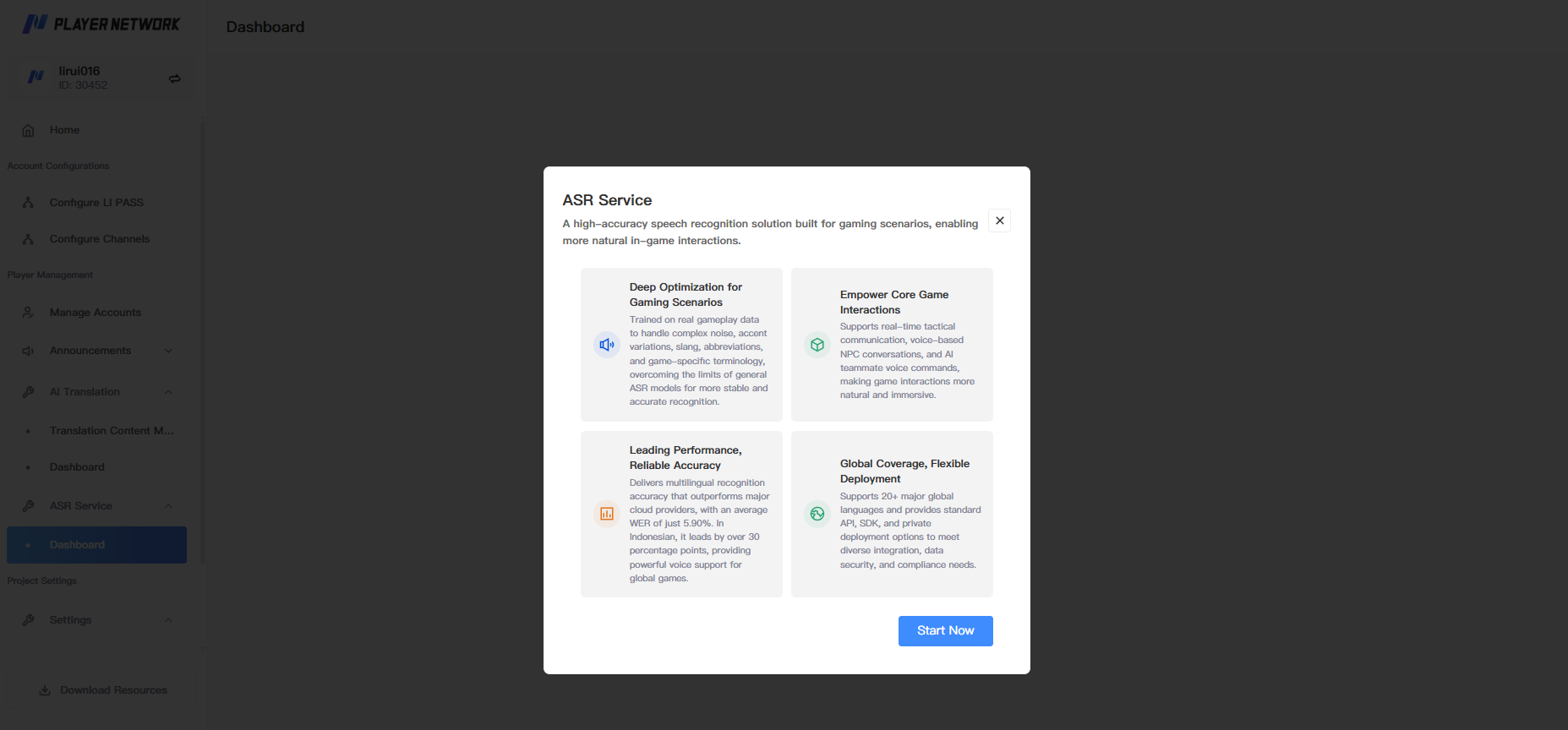
- When you first enter the ASR Service, click "Try it for free now" to complete ASR Service feature initialization.
- When integrating via API, complete the management configuration as follows:
| Configuration | Operation Instructions |
|---|---|
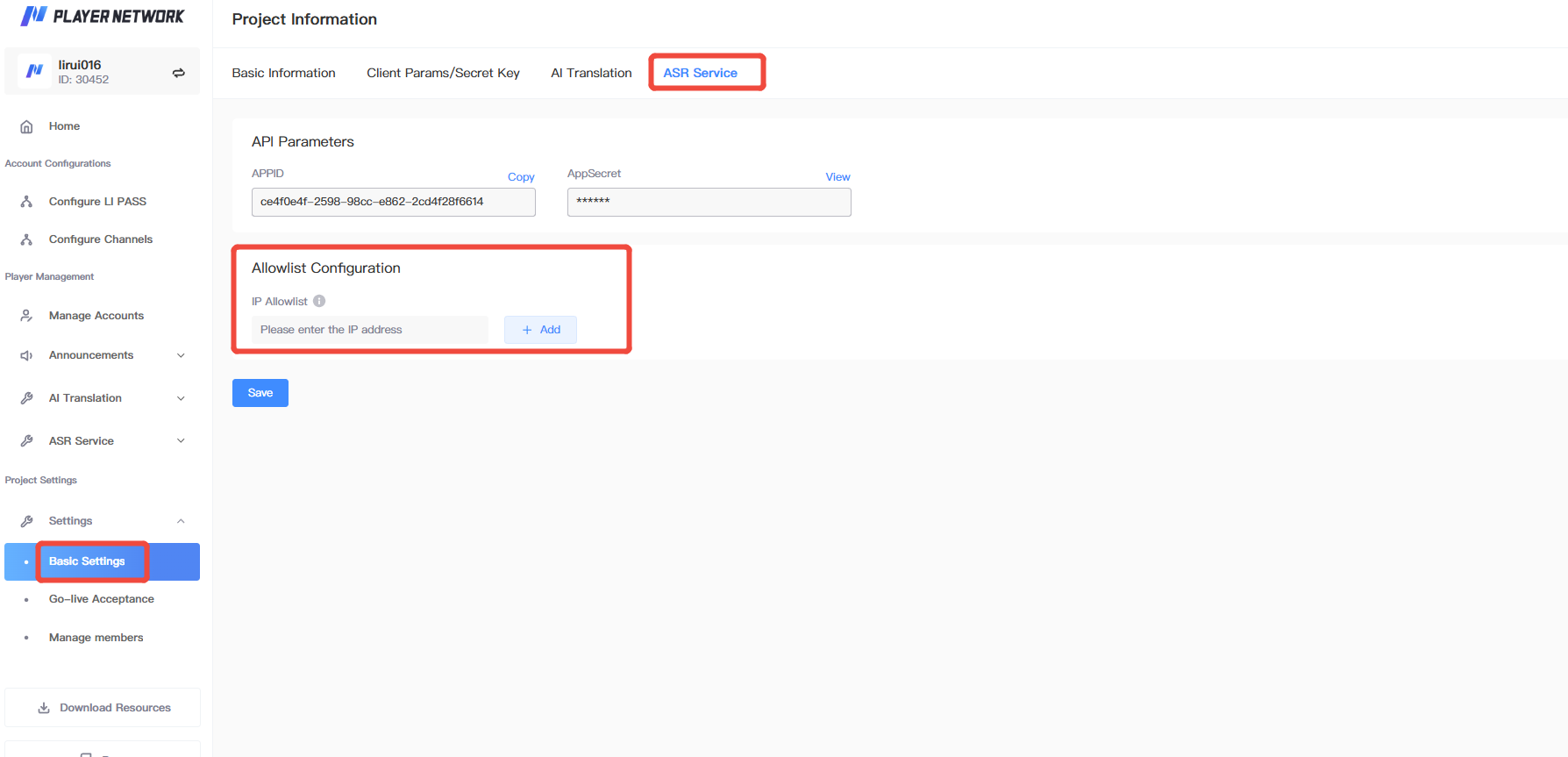
| Feature Entry | Go to 「Project Information」, and select 「AI Speech Recognition」. |
| Get parameters | In the 「API Parameters」 section, obtain APPID (appId) and AppSecret (secret) for issuing the JWT Token required for request authentication.For specific requirements, see 「3.2.1 JWT Token Generation Requirements」. |
| Whitelist Configuration | Fill in the game backend outbound IP in the 「Whitelist Configuration」 area, confirm it is correct, then save. |
3. Backend API Integration
3.1 Protocol Selection
| Protocol | Content-Type | Audio Input Method | Applicable Scenario | Notes |
|---|---|---|---|---|
| Protocol 1 | application/json | The audioFile field should contain raw PCM audio data encoded in base64. | Esports live streaming scenario. | Example PCM parameters: 16 kHz, 16-bit, mono; you need to provide appId, audioFile, gameCode, srcLang, timeStamp, and traceId. |
| Protocol 2 (recommended) | multipart/form-data | meta Part passes JSON configuration; data Part passes audio binary file. | In-game voice recognition from Player, client uploading WAV/GVoice Opus file. | Content-Type of both meta and data Parts will be checked and must be filled in as required. |
Protocol 1 only supports integration via backend API; Protocol 2 supports integration via backend API and also client SDK integration.For SDK integration, please refer to 「4. Client SDK Integration」.
3.2 API Information
When calling the ASR Service API from the backend, select the corresponding full address according to the current deployment environment. The API path is /api/v2/speechai/asr.
Before calling the interface, you must configure the outbound IP whitelist for the game backend in the Player Network management console, otherwise the interface call will not succeed.For configuration methods, please refer to 「2. Management Operations」.
| Environment | Full API Address | Description |
|---|---|---|
| Tencent Cloud Test environment | https://asr-test.intlgame.com/api/v2/speechai/asr | For use in Tencent Cloud test environment. |
| Project | Description |
|---|---|
| API Path | POST \<API domain>/api/v2/speechai/asr |
| Content-Type | multipart/form-data or application/json |
| Authorization | Bearer \<token> |
| Authentication Method | JWT, signature algorithm HS256; payload.data.account must be consistent with appId. |
| Feature Description | Speech recognition interface supports both base64 encoded PCM audio data and file upload audio. |
3.2.1 JWT Token Generation Requirements
- Obtain
appIdandsecretfrom the management portal. For detailed operations, see 「View parameter retrieval method」;secretis only stored in a trusted backend or key management system. - Use
secretas the HS256 signing key. - JWT
payload.data.accountmust equal theappIdin the request. - JWT
payload.expuses a Unix timestamp in seconds for expiration; the backend example sets it to expire 300 seconds after issuance. - The request header uses
Authorization: Bearer \<token>.
3.3 application/json Request Parameters
| Parameter | Type | Mandatory | Description |
|---|---|---|---|
| appId | string | Yes | appId assigned by the Admin. |
| audioFile | string | Yes | String of raw PCM audio bytes encoded by base64; the sample parameter is 16 kHz, 16-bit, mono. |
| gameCode | string | Yes | Business code identifying the business scenario; an incorrect value will result in an error. |
| srcLang | string | Yes | Target speech recognition language code, such as zh, en. |
| timeStamp | json string | Yes | JSON string containing Unix start and end seconds; note: it is not a nested JSON object. |
| traceId | string | Yes | Unique request ID, used to track requests. |
| gameLang | string | No | Player game language, can be omitted if there is no Player. |
| systemLang | string | No | Player's system language, can be omitted if there is no Player. |
| openId | string | No | User ID, currently not in use. |
| sessionId | string | No | Session ID, currently not in use. |
timeStamp Field
| Field | Type | Mandatory | Description |
|---|---|---|---|
| start | float64 | Yes | Audio segment start time, Unix timestamp in seconds. |
| end | float64 | Yes | Audio clip end time, Unix time stamp in seconds; can be calculated as start + audio bytes / (sample rate × bytes per sample × channel count). |
For example, the audio duration calculation method for 16 kHz, 16-bit, mono PCM is:
duration = len(pcm_bytes) / (16000 * (16 // 8) * 1)
POST /api/v2/speechai/asr HTTP/1.1
Content-Type: application/json
Authorization: Bearer <token>

{
  "appId": "<app-id>",
  "audioFile": "<base64 encoded PCM audio data>",
  "traceId": "asr-json-001",
  "srcLang": "zh",
  "gameCode": "<game-code>",
  "timeStamp": "{\"start\": 1672531200, \"end\": 1672531260.0}"
}
For a complete Python call example, see 「Appendix: Backend Integration Pseudocode」 under "Protocol 1".
3.4 multipart/form-data Request Parameters
| Part Name | Content-Type | Required | Description |
|---|---|---|---|
| meta | application/json | Yes | JSON configuration, describing basic information such as appId, audioFormat, gameCode, language, and traceId. |
| data | application/octet-stream | Yes | Audio binary file, currently supports WAV and GVoice Opus. |
meta Parameters
| Parameter | Type | Required | Description |
|---|---|---|---|
| appId | string | Yes | appId assigned by the admin. |
| audioFormat | int | Yes | Audio format: 1-WAV, 2-GVoice Opus. |
| gameCode | string | Yes | Business code identifying the business scenario. |
| traceId | string | Yes | Unique request ID, used to track requests. |
| srcLang | string | No | Target speech recognition language, such as zh, en; usually optional for in-game scenarios, more for e-sports live streaming. |
| gameLang | string | No | Player game language. |
| systemLang | string | No | Player system language. |
| openId | string | No | User ID, currently not in use. |
| sessionId | string | No | Session ID, currently not in use. |
| timeStamp | json string | No | Timestamp information, including start, end. |
POST /api/v2/speechai/asr HTTP/1.1
Content-Type: multipart/form-data; boundary=----boundary
Authorization: Bearer <token>

------boundary
Content-Disposition: form-data; name="meta"
Content-Type: application/json

{
  "appId": "<app-id>",
  "audioFormat": 1,
  "traceId": "asr-file-001",
  "srcLang": "en",
  "gameLang": "en",
  "systemLang": "en",
  "gameCode": "<game-code>"
}
------boundary
Content-Disposition: form-data; name="data"; filename="voice.wav"
Content-Type: application/octet-stream

(binary)
------boundary--
When actually integrating, it is recommended that the HTTP client automatically generate the multipart boundary, rather than manually fixing the boundary in the request headers.For a complete Python call example, see 「Appendix: Backend Integration Pseudocode」 under "Protocol 2".
3.5 Response Handling
| Response Field | Type | Description | Handling Recommendation |
|---|---|---|---|
| retCode | int | Return code, 0 means success. | If not 0, enter error handling and log reporting. |
| message | string | Return message. | For log records, not recommended for direct display to players. |
| traceId | string | Request tracking ID. | Provide to PNT support for troubleshooting. |
| result | object | ASR recognition result, returned only when successful. | Read result.text as the full recognized transcript. |
| result.start | float64 | Audio segment start time. | Used for streaming or segment recognition scenarios. |
| result.end | float64 | Audio segment end time. | Used for streaming or segment recognition scenarios. |
| result.text | string | Full recognized text content. | Display or enter follow-up translation/review process. |
| result.words | []Word | Detailed word-level information list. | Used for subtitle timeline, confidence, or speaker display; ignore if empty. |
| Word parameter field | Type | Description |
|---|---|---|
| text | string | Text content of the individual word. |
| start | float64 | The start time of the word in the audio (seconds). |
| end | float64 | The end time of the word in the audio (seconds). |
| score | float64 | Confidence score of word recognition. |
| speaker | string | Speaker identifier, used to distinguish different speakers. |
{
  "retCode": 0,
  "message": "success",
  "traceId": "29d7b34e-3521-4f16-9c5a-12b36c466382",
  "result": {
    "start": 1770780974,
    "end": 1770780980.017,
    "text": "Hello World!",
    "words": null
  }
}
3.6 Error Handling Recommendations
| Error Type | Possible Cause | Handling Suggestion |
|---|---|---|
| Authentication failed | Token expired, signature error, or appId does not match token account. | Regenerate token; check appId/secret; verify Authorization header format. |
| Parameter error | Missing appId, gameCode, traceId, audioFile; unsupported audioFormat; incorrect Part Content-Type for meta/data. | Verify required fields per protocol; explicitly set Part Content-Type for multipart requests. |
| Audio format error | Audio is not WAV/GVoice Opus or failed base64 decoding. | Verify format before client upload; server should log file type and size. |
| Abnormal audio duration | Audio is empty, too short, too long, or duration does not meet service requirements. | Client limits recording duration; backend adds pre-validation. |
| Recognition is empty or noisy | Audio has excessive noise, no human voice, or triggers noise filtering. | Prompt player to re-record on frontend; denoise or limit environmental noise as needed. |
| Internal Service Error | ASR service or dependency exception. | Retry briefly; if still fails, contact PNT support and provide traceId. |
4. Client SDK Integration
SDK integration for ASR Service requires Player Network SDK version 1.32 or above.Versions below 1.32 do not support the related capability; please upgrade the SDK first.
4.1 Invocation Process
- Ensure the client has integrated Player Network SDK and completed login state initialization.
- Record or obtain a local audio file, ensuring the format is WAV or GVoice Opus.
- Construct the
INTLTranslatorVoiceV2Reqrequest struct, filling fields such asVoicePath,AudioFormat,GameCode, andTraceId. - Call the SDK's encapsulated audio translation/ASR interface to submit the request.Use the actual method name according to your SDK version documentation.
- Read
asrRspfrom theINTLTranslatorResultcallback, and give priority to parsingresult.textaccording to the ASR V2 structure. - Display the recognized text or proceed with text translation, sensitive word review, chat sending, and other business processes.
4.2 Description of INTLTranslatorVoiceV2Req Fields
| Field | Type | Required | Description | Filling Suggestion |
|---|---|---|---|---|
| VoicePath | String | Yes | Audio file path. | Ensure the file exists and the client has read permissions. |
| AudioFormat | Integer | Yes | Currently supports WAV and GVoice Opus: 1-WAV, 2-GVoice Opus. | Fill in according to actual file format; do not mix them. |
| GameCode | String | Yes | gameCode assigned to the game by AI Translation Service. | Use the value obtained in the admin scenario switch. |
| SessionId | String | No | Session ID for streaming ASR. | Not required for non-streaming/regular file recognition. |
| GameLanguage | String | No | Game language setting. | Can be set to the player's current game language. |
| ExtInfo | String | No | Additional information. | You can enter a JSON string. |
| TraceId | String | Yes | Unique request ID for tracking purposes. | It is recommended to generate a unique UUID for each request. |
INTLTranslatorVoiceV2Req req;
req.VoicePath = "<local-voice-file.wav>";
req.AudioFormat = 1; // 1-WAV, 2-GVoice Opus
req.GameCode = "<game-code>";
req.SessionId = "";
req.GameLanguage = "zh";
req.ExtInfo = "";
req.TraceId = "client-asr-trace-001";

// SDK.AudioTranslateV2(req, OnTranslatorResult);
4.3 asrRsp Callback Handling
- ASR results are returned in
asrRsp; the game side needs to parse them itself. - It is recommended to read
asr_rsp.result.textas the recognition result in ASR V2. start,end, andwordsare mainly used for streaming or subtitle scenarios; can be ignored for normal in-game speech-to-text.- Only display the recognized text when callback
retCodeis 0; if not 0, prompt to re-record or try again later.
{
  "ret": 0,
  "msg": "success",
  "translator_rsp": "",
  "asr_rsp": {
    "retCode": 0,
    "message": "success",
    "traceId": "traceId",
    "result": {
      "text": "Hello World!",
      "start": 0,
      "end": 0,
      "words": null
    }
  }
}
5. Integration and Acceptance Testing
5.1 Acceptance Checklist
| Checklist Item | Pass Criteria | Problem Location Field |
|---|---|---|
| Feature Initialization | Admin console has completed ASR Service initialization. | Project ID, appId |
| gameCode | The provided gameCode is consistent with the admin scenario. | gameCode, traceId |
| Protocol Selection | Use application/json for base64. Use multipart/form-data for file upload. | Content-Type, request body |
| PCM parameters | The PCM sampling rate, bit depth, and number of channels for Protocol 1 match the service requirements, and before base64 encoding, these are the raw audio bytes. | PCM parameters, decoded byte count |
| timeStamp | Protocol 1 receives a JSON string containing start/end; the time span matches the audio length. | timeStamp, audio duration |
| Audio Format | WAV/GVoice Opus consistent with audioFormat. | audioFormat, file extension, audio header |
| multipart part | meta is application/json; data is application/octet-stream. | Part Content-Type |
| Recognition result | If successful, result.text or asr_rsp.result.text contains content. | retCode, message, traceId |
| Empty audio/noise | If there is no human voice or the scenario is noisy, prompt to re-record. | retCode, audio duration, traceId |
| Exception fallback | Authentication, parameters, formats, and service exceptions all have business prompts. | retCode, message, traceId |
5.2 Pre-launch confirmation
- Production domain, whitelist, and rate limit configuration confirmed.
- Backend token expiration time is reasonable and supports automatic refresh.
- Do not print
secret, full token, or complete audio contents in logs. - Client supports fallback processes such as recording failure, recognition failure, and re-record.
- Key error codes and
traceIdare integrated into monitoring alerts or issue reporting.
Prompt the player to stay in a quiet environment before recording; display the duration during recording; show loading during upload and recognition; provide a "Record Again" option upon failure.
It is recommended to display the ASR recognized text to the player for confirmation before sending, to avoid sending misrecognized content directly.
6. Common Issues & Troubleshooting Recommendations
| Question | Possible Causes | Solution |
|---|---|---|
| ASR reports parameter error after uploading file | Incorrect multipart meta/data part name or Content-Type. | Confirm meta=application/json, data=application/octet-stream. |
| JSON Protocol Parameter Error | timeStamp is passed as a nested object instead of a JSON string, or the PCM parameters do not match the service requirements. | Use json.dumps({"start": ..., "end": ...}); check sampling rate, bit depth, and number of channels. |
| ASR recognition result is empty | No valid voice detected in the audio, excessive noise, or abnormal recording permissions. | The client should first locally verify the size/duration of the recording file; prompt the player to re-record. |
| ASR audio format error | Uploaded format does not match audioFormat, or is not WAV/GVoice Opus. | Use unified recording coding; send audioFormat=1 for WAV, audioFormat=2 for GVoice Opus. |
| Authentication failed | Token missing, expired, signature error, or request body appId does not match token account. | Regenerate token; check secret; confirm Authorization: Bearer \<token> format. |
SDK callback invalid config / ret 91002 | Backend configuration missing. | Please contact the Player Network Assistant to supplement the configuration. |
Appendix: Backend integration pseudocode
app_id and secret are used to issue JWT tokens. The token is used for interface authentication through the Authorization request header.In production environments, credentials should be retrieved from secure configuration or a key management system—do not hard-code them in the code repository.
Protocol 1: application/json
This protocol encodes raw PCM audio bytes as base64 strings.The following example uses 16 kHz, 16-bit, mono PCM, and calculates the duration based on the number of audio bytes.
import base64
import json
import time
import uuid

import jwt
import requests

# app_id and secret are obtained from the admin console and are used to issue a JWT token.
app_id = "<app_id>"  # AppID
secret = "<secret>"  # AppSecret
api_url = "https://<api-domain>/api/v2/speechai/asr"

token = jwt.encode(
    {
        "data": {"account": app_id},
        "exp": int(time.time()) + 300,
    },
    secret,
    algorithm="HS256",
)

sample_rate = 16000
bit_depth = 16
num_channels = 1

pcm_bytes: bytes = ...  # Raw PCM audio bytes obtained from sources such as the voice SDK

base64_pcm_audio = base64.b64encode(pcm_bytes).decode("utf-8")
duration = len(pcm_bytes) / (
    sample_rate * (bit_depth // 8) * num_channels
)

ts = int(time.time())
body = {
    "appId": app_id,
    "audioFile": base64_pcm_audio,
    "gameCode": "<game-code>",
    "srcLang": "<src-lang>",
    "timeStamp": json.dumps({"start": ts, "end": ts + duration}),
    "traceId": str(uuid.uuid4()),
}

resp = requests.post(
    api_url,
    json=body,
    headers={"Authorization": f"Bearer {token}"},
    timeout=30,
)
resp.raise_for_status()
print(json.dumps(resp.json(), indent=4, ensure_ascii=False))
Protocol 2: multipart/form-data
This protocol transmits JSON configuration via the meta Part, and uploads WAV or GVoice Opus audio files via the data Part.The audioFormat must match the actual encoding of the file.
import json
import time
import uuid
from pathlib import Path

import jwt
import requests

# app_id and secret are obtained from the management console and used to issue the JWT token.
app_id = "<app_id>"  # AppID
secret = "<secret>"  # AppSecret
api_url = "https://<api-domain>/api/v2/speechai/asr"

token = jwt.encode(
    {
        "data": {"account": app_id},
        "exp": int(time.time()) + 300,
    },
    secret,
    algorithm="HS256",
)

meta = {
    "appId": app_id,
    "audioFormat": 1,  # 1-WAV, 2-GVoice Opus
    "traceId": str(uuid.uuid4()),
    "gameLang": "<player-game-lang>",
    "systemLang": "<player-system-lang>",
    "gameCode": "<game-code>",
}

audio_path = Path("<audio-file-path>")

with audio_path.open("rb") as f:
    files = {
        "meta": (None, json.dumps(meta), "application/json"),
        "data": (audio_path.name, f, "application/octet-stream"),
    }
    resp = requests.post(
        api_url,
        files=files,
        headers={"Authorization": f"Bearer {token}"},
        timeout=30,
    )

resp.raise_for_status()
print(json.dumps(resp.json(), indent=4, ensure_ascii=False))

